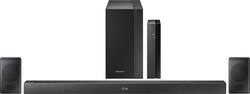
Samsung - 4.1-Channel Soundbar System with Rear Wireless Speakers and Digital Amplifier - Black
- Key Specs
- Wireless Connectivity: Bluetooth (The manner in which a device sends data to another device over a short distance without the use of wires or cables.)
- Wireless Subwoofer Connectivity: true
- General
- Product Name: 4.1-Channel Soundbar System with Rear Wireless Speakers and Digital Amplifier
- Brand: Samsung
- Model Number: HW-M370/ZA
- Audio
- Surround Sound Supported: Dolby Digital (Surround sound systems use multiple audio channels and speakers to create an immersive sound experience for the listener. There are also various proprietary technologies that imitate this kind of sound via a device's built-in speakers or soundbar.)
- Minimum Frequency Response: 38 hertz (Describes the maximum range of frequencies or musical tones a product can reproduce, from very low tones to very high treble tones. The minimum frequency or musical tone the speaker can reproduce. High treble tones have higher frequencies while low tones and deep bass have lower frequencies.)
- RMS Power: 200 watts (The maximum amount of continuous power the device is able to handle.)
- Connectivity
- Wireless Connectivity: Bluetooth (The manner in which a device sends data to another device over a short distance without the use of wires or cables.)
- Wireless Subwoofer Connectivity: true
- Satellite Speakers: Included (Using satellite speakers in conjunction with a soundbar allows for a surround sound experience; the soundbar can serve as a center channel speaker while satellites provide rear channel audio or additional front channel audio.)
- Speaker
- Subwoofer: Included
- Dimensions
- Product Height: 3 inches (The out of box height of the item. Height is measured as the vertical distance from the bottom of the item to the top as it would be primarily used or placed.)
- Product Width: 35.73 inches (The out of box width of the item. Width is measured as the horizontal distance from one side of the item to the other as it would be primarily used or placed.)
- Product Depth: 3 inches (The out of box depth of the item. Depth is measured as the distance from the front of the item to the back as it would be primarily used or placed.)
- Product Weight: 3.31 pounds (The out of box weight of the item.)
- Subwoofer Height: 13.9 inches
- Subwoofer Width: 7.05 inches
- Subwoofer Depth: 11.79 inches
- Subwoofer Weight: 10.14 pounds
- Included
- Remote Control Included: true
- Cable(s) Included: None
- Mounting Hardware Included: true
- Certifications Listings & Approvals
- ENERGY STAR Certified: true (Devices carrying the ENERGY STAR service mark, such as computer products and peripherals, kitchen appliances, and other products, generally use 20% to 30% less energy than required by federal standards.)
- Warranty
- Manufacturer's Warranty - Parts: 1 year
- Manufacturer's Warranty - Labor: 1 year
- Other
- UPC: 887276231105
Heighten your TV audio experience with this 4.1-channel Samsung Bluetooth sound bar. Its Dolby Digital technology provides enhanced cinematic sound, and its wireless active subwoofer suits any location to let you optimize bass output. This 200W Samsung Bluetooth sound bar comes with a wireless speaker kit for surround sound expansion support.
- 200W total system power: Provides quality sound for your favorite movies, shows, games and music.
- Slim 2-channel rear amplifier: As well as 2-speaker kit easily blends with any home decor.
- Dolby Digital decoder: Reproduces multichannel audio to deliver a cinematic audio experience.
- Bluetooth music streaming: Makes it easy to enjoy tracks stored on a compatible Bluetooth-enabled device (not included).
- Sleek appearance: Fits seamlessly along most HDTVs for a streamlined look.
Whats Included
- Samsung 4.1-Channel Soundbar System with Rear Wireless Speakers and Digital Amplifier
A: The rear speakers are wired to a wireless receiver, making them wireless from the sound bar.
Q: How does this system connect to multiple components such as cable/directv, Xbox and DVD player?
A: You will need to connect to a receiver to be able to connect to multiple components.
Q: Are the surround speakers wireless as well or is it just the subwoofer?
A: The surround speakers are connected by wires to a box which is wireless, so that you can put wireless receiver box anywhere and the speakers are connected to it with up to twelve or so feet of wire,
Q: How long is this sound bar?
A: The length is 35.7''.
A: No. The USB connection will only play music files located on a USB device. Additionally, the USB input is a micro-USB input so don't expect to connect your thumb drive without an adapter. Also, there is a very widely known issue with optical audio inputs. A large number of owners (including myself) are finding that the Automatic Power-Down "feature", which will power down the soundbar if no audio is detected after 5 minutes, is enabled by default and cannot be disabled with Direct Input, which is the input that you use when using Optical audio. In other words, until Samsung issues a firmware update fixing this, the soundbar will power off every few minutes, regardless if there is audio or not. I speak from experience.
A: It’s how many speakers and subs you can hook up. This has two rear speakers and one sub
A: I had the same issue and it turns out that if you put the wires all the way into the connection on the back of the speakers, the plastic coating keeps it from making connection. Pull out the wires and insert them just far enough so you still see actual wire. You can do this with the sound on and that will tell you it's now working. Good luck.
Q: I have the same questions ... 2.1 but shows 5.1..?
A: This is 2.1.




















