
StarTech.com - MST Hub Mini DisplayPort to 3-Port HDMI Multi-Monitor Splitter - Black
More Buying Options
About This Item
- Key Specs
- HDMI Cable Type: High Speed HDMI Cable
- Connector Type (End 1): Mini DisplayPort
- Connector Type (End 2): Mini DisplayPort
- General
- Brand: StarTech.com
- Model Number: MSTMDP123HD
- Product Name: MST Hub Mini DisplayPort to 3-Port HDMI Multi-Monitor Splitter
- Color: Black
- Compatibility: Compatible with Windows 7/8/8.1/10 (32/64 bit)
- Connectivity
- Cable Type: HDMI
- Product Type: Splitter
- HDMI Cable Type: High Speed HDMI Cable
- Connector Type (End 1): Mini DisplayPort
- Connector Type (End 2): Mini DisplayPort
- Warranty
- Warranty - Parts: 2 years
- Warranty - Labor: 2 years
- Other
- UPC: 065030861519
Expand your computer's screen with this StarTech.com DisplayPort to HDMI splitter. It connects up to three independent displays to a single mini DisplayPort port on your laptop or desktop so you can work on multiple projects at once. This StarTech.com DisplayPort to HDMI splitter supports Ultra HD 4K resolutions for high-quality images across devices.
- Compatible with select tablets and graphics cards: Such as AMD Radeon with Eyefinity Technology and Microsoft Surface Pro 3.
- Mini DisplayPort-to-HDMI adapter: Connects your compatible device to your HDTV, allowing you to easily stream audio and video content.
- Plug-and-play design: For simple setup.
- Compatible with select tablets and graphics cards: Such as AMD Radeon with Eyefinity Technology and Microsoft Surface Pro 3.
- Mini DisplayPort-to-HDMI adapter: Connects your compatible device to your HDTV, allowing you to easily stream audio and video content.
- Plug-and-play design: For simple setup.
Whats Included
- StarTech.com MST Hub Mini DisplayPort to 3-Port HDMI Multi-Monitor Splitter
- Universal power adapter (NA/EU/UK/AU)
- Owner's manual
- StarTech.com MST Hub Mini DisplayPort to 3-Port HDMI Multi-Monitor Splitter
- Universal power adapter (NA/EU/UK/AU)
- Owner's manual
Q: I would like to set up three screens and am wondering if this will work with a MacBook Air?
A: No, the MSTMDP123HD is not supported for Mac OS. Supported operating systems include: Windows 10, 8.1, 8 and 7. We would like to help recommend a possible solution. Please feel free to contact us at 1 800 265 1844. Our Technical Advisors are available 24 hours a day, 5 days a week to provide support. Atha, StarTech.com Support
Q: I have a samsung tv with 2 hdmi ports, but I need at least 4 hdmi ports, would this work?
A: No, the MSTMDP123HD connects to a computer with a Mini DisplayPort connection and outputs to three HDMI displays. Atha, StarTech.com Support
A: No, the MSTMDP123HD connects to a computer with a Mini DisplayPort connection and outputs to three HDMI displays. Atha, StarTech.com Support
A: This MSTMDP123HD requires the computer being used to have a "Mini DisplayPort" video connection that also supports MST. So this would not work with a computer with VGA and HDMI. Adam, StarTech.com Support
Q: Can this be used to mirror my Windows10 computer's display on 3 other devices?
A: The MSTMDP123HD is designed to extend or span across 3 displays on supported graphics cards. Windows will allow you to mirror to one display, but not all three. Brandon, StarTech.com Support
A: MacBook models with Thunderbolt 2 do not support dual displays over Thunderbolt (mini DisplayPort). A combination of two separate adapters would be needed. StarTech part number MDP2HDMI can be used for one display via the Thunderbolt port. The second would require the use of an open USB port, via USB32HDPRO. This combination will give the Mac two HDMI ports. Brandon, StarTech.com Support
A: No, the MSTMDP123HD connects to a computer with a Mini DisplayPort connection and outputs to three HDMI displays. Atha, StarTech.com Support
A: I’m sure it will. I have a Surface 3 laptop and Microsoft hub with 2 monitors connected. This is the only cable I found that worked.
Reviews
Customer Images
The vast majority of our reviews come from verified purchases. Reviews from customers may include My Best Buy members, employees, and Tech Insider Network members (as tagged). Select reviewers may receive discounted products, promotional considerations or entries into drawings for honest, helpful reviews.
Compare similar products
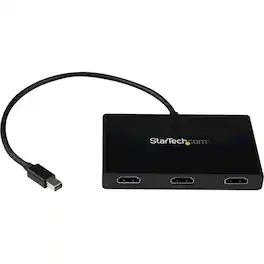
Expand your computer's screen with this StarTech.com DisplayPort to HDMI splitter. It connects up to three independent displays to a single mini DisplayPort port on your laptop or desktop so you can work on multiple projects at once. This StarTech.com DisplayPort to HDMI splitter supports Ultra HD 4K resolutions for high-quality images across devices.
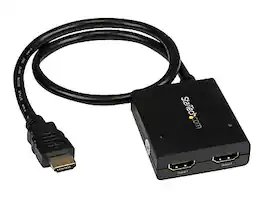
The ST122HD4KU 2-port video splitter supports Ultra HD (4K) ensuring astonishing picture quality, four times the resolution of high-definition 1080p, while sharing a 4K HDMI video source between two HDMI displays. The 4K splitter is backward compatible with previous HDMI revisions, supporting 1080p / 720p HDMI video resolution devices such as computers, Blu-ray players and cable TV set-top boxes. Even if you don't require 4K video today, the video splitter ensures you'll be ready to take advantage of tomorrow's display technology while still working with the devices you already have. Plus, this splitter supports 3D, enabling you to use the splitter with your stereoscopic 3D video source on active or passive 3D displays. For a hassle-free setup you can power the HDMI splitter with the included USB cable, or power adapter depending on which is most convenient for you. Plus, the splitter features a built-in HDMI source cable, which lets you connect it directly to your HDMI source without the expense of additional cabling. The ST122HD4KU is backed by a StarTech 2-year warranty, and free lifetime technical support.

Connect your laptop to a 4K monitor, projector, and other devices with our USB-C 4-in-1 Multiport Adapter. This compact USB-C adapter is the perfect solution for home, the office, or in-between workstations. It features two USB-A ports to charge and connect your smartphone, tablet, keyboard, thumb drive, mouse, or other high consumption device while its HDMI port connects your MacBook Pro, Chromebook, or other USB-C laptop to a display with up to 4K resolutions. This Belkin USB-C Hub supports pass-through charging up to 100W so you don’t have to choose between port expansion and power. Gain up to 5 Gbps of bandwidth between connected devices, for quick data transfer between computer and peripheral devices. This computer docking station also supports high-definition display resolutions up to 4K through the HDMI Port. Encased in a sleek aluminum finishing that matches popular devices, this compact USB port hub is a stylish addition for your work, study, or play setup.

Connect up to three DisplayPort displays to single DisplayPort 1.4 output with Multi-Stream Transport (MST) technology to boost your productivity Provides multiple display modes such as Mirror mode same content on each display, Extended mode with individual content on each display, and Panoramic Video Wall mode which combines multiple monitors to use as one large display
| Pros for StarTech.com - MST Hub Mini DisplayPort to 3-Port HDMI Multi-Monitor Splitter - Black | |||
|---|---|---|---|
| There were no pros for this product— | There were no pros for this product— | Overall Performance, Ease of use, HDMI, Connectivity, Size | There were no pros for this product— |
| Cons for StarTech.com - MST Hub Mini DisplayPort to 3-Port HDMI Multi-Monitor Splitter - Black | |||
| There were no cons for this product— | There were no cons for this product— | Price, Cable Length, Heat | There were no cons for this product— |