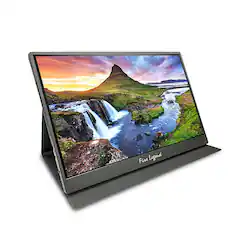
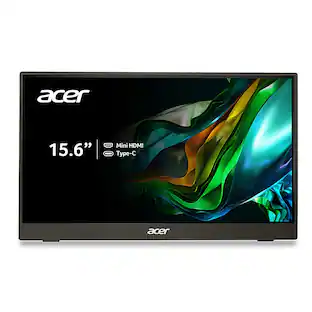
Acer - AOPEN 15.6" IPS LED Portable Monitor (Mini HDMI) - Black
- Key Specs
- Refresh Rate: 60Hz (The number of frames per second the device can produce natively without enhancement. Higher rates help produce smooth, seamless pictures.)
- Maximum Resolution: 1920 x 1080 (Maximum resolution refers to the highest number of pixels that a screen can process and display. Higher resolution signals produce more detailed images.)
- Response Time: 4 milliseconds (The speed at which pixels can change colors is called response time. It is measured in milliseconds (ms).)
- Panel Type: IPS (Technology that affects response time and image quality.)
- Synchronization Technology: Not Applicable (Generally, these technologies allow syncing between a computer/console game's frame rate and the device's refresh rate for a smoother display without tearing.)
- Screen Size: 15.6 inches (Size of the screen, measured diagonally from corner to corner.)
- Display Connector(s): 1 x HDMI, 2 x DisplayPort (The number and type of connectors used to connect to an external display.)
- General
- Brand: Acer
- Model Number: 16PM1Q BBMIUUX
- Product Name: AOPEN 15.6" IPS LED Portable Monitor (Mini HDMI)
- Color: Black
- Operating System Compatibility: Not Applicable
- Display
- Refresh Rate: 60Hz (The number of frames per second the device can produce natively without enhancement. Higher rates help produce smooth, seamless pictures.)
- Maximum Resolution: 1920 x 1080 (Maximum resolution refers to the highest number of pixels that a screen can process and display. Higher resolution signals produce more detailed images.)
- Native Resolution: 1920 x 1080 (Native resolution of a screen refers to its single, fixed resolution. Sometimes screens must scale an image up or down in order to fit the native resolution. This can cause a loss of resolution or detail.)
- Contrast Ratio: 1000:1 (Measured difference between a displayed image's brightest whites and darkest blacks. The larger the first number, the more detail and color that can be displayed.)
- Response Time: 4 milliseconds (The speed at which pixels can change colors is called response time. It is measured in milliseconds (ms).)
- Display Type: LED
- Panel Type: IPS (Technology that affects response time and image quality.)
- Synchronization Technology: Not Applicable (Generally, these technologies allow syncing between a computer/console game's frame rate and the device's refresh rate for a smoother display without tearing.)
- Aspect Ratio: 16:9 (The measurement of the width of a screen compared to the height of a screen, expressed as a ratio.)
- Curved Screen: false
- Brightness: 250 candela per square meter (A measure of the total light output.)
- Screen Size: 15.6 inches (Size of the screen, measured diagonally from corner to corner.)
- High Dynamic Range (HDR): false (An HDR-compatible 4K TV or other HDR-compatible product displays HDR video content when it's available from sources like 4K Ultra HD Blu-ray Discs and 4K streaming services.)
- Horizontal Viewing Angle: 170 degrees (The maximum angle at which the display can be viewed with acceptable visual performance from either side.)
- Vertical Viewing Angle: 170 degrees (The maximum angle at which the display can be viewed with acceptable visual performance from above or below.)
- Touch Screen: false (Touch-screen devices make navigating more intuitive. Using a touch-screen display, you can do things such as tap to select, hold and drag to move items, swipe to scroll, and pinch to zoom.)
- Connectivity
- Number of DisplayPort Inputs (Total): 2
- Number of HDMI Inputs (Total): 1
- Display Connector(s): 1 x HDMI, 2 x DisplayPort (The number and type of connectors used to connect to an external display.)
- USB Ports: 2 x USB-C 3.1 (The number and type of USB ports the product has.)
- Compatibility
- Wall Mountable: false (The product is able to be secured to a wall. Some products are designed ready to mount, while others may require additional hardware/accessories for installation.)
- Features
- Built-In Webcam: false
- Integrated Speaker(s): true
- Dimensions
- Product Height Without Stand: 8.7 inches
- Product Width: 13.96 inches (The out of box width of the item. Width is measured as the horizontal distance from one side of the item to the other as it would be primarily used or placed.)
- Product Weight: 2.4 pounds (The out of box weight of the item.)
- Stand Included: false
- Certifications Listings & Approvals
- ENERGY STAR Certified: false (Devices carrying the ENERGY STAR service mark, such as computer products and peripherals, kitchen appliances, and other products, generally use 20% to 30% less energy than required by federal standards.)
- EPEAT Qualified: false (The Electronic Product Environmental Assessment Tool (EPEAT) was designed to provide an environmental assessment tool for purchasers. In order to qualify for EPEAT, a product must meet all 23 required criteria.)
- Warranty
- Warranty - Parts: 3 years
- Warranty - Labor: 3 years
- Other
- UPC: 195133217910
In meetings, in the classroom and anywhere in between, AOPEN’s PM Series portable monitor is the go-to choice for people on the move! Just fire it up and enjoy High-Definition entertainment—anywhere! Its accurate, vivid colors come to life from any viewing angle on the 15.6” IPS display that features Full HD (1920x1080) resolution. Its slim design (0.4") and ultra-light weight (2.45 lbs.) allows it to easily fit in your laptop bag! Perfect for use as a secondary monitor for dual-monitor presentations, it’s powered by a single USB Type C cable, giving you the freedom to connect it to your laptop, smartphone or tablet—quickly and easily!
- Ultra-Slim Portable Design: Get outstanding portability with an ultra-light, ultraslim PM1 Series monitor. At just 3.85lbs and only 0.4" thin, the 15.6” display slides easily into bags and can accompany you everywhere. It’s ideal for use on the go, takes up minimal desk space, perfect for use as a secondary monitor during presentations.
- Vibrant Images: Crisp, true-to-life colors come alive in Full HD 1080p resolution. Movies and games appear more real and dramatic, and small details and text are clear with 1920 x 1080 resolution in a 16:9 aspect ratio.
- Clutter-Free Usage: Declutter your life and keep things simple with this single-cable solution. One USB-C cable hooks up your PM1 Series display to a laptop, sharing your display and transferring data while also supplying power. With this super-handy cable, you can also connect to your smartphone or tablet
- Mini HDMI: The side-mounted Mini HDMI port allows for easy access and device setup—while connecting to your digital camera or other devices with its much more convenient, smaller form factor.
- Wide Viewing Angle: Easily share what’s on your screen with clients, family and friends as colors stay true at wide viewing angles of up to 170° thanks to IPS panel technology
- Better for Your Eyes: Colors are adjusted in real-time to ensure the best visual experience. And with AOPEN Eye Protection, eye strain is reduced and provides a more comfortable viewing experience. Protect eyes and work and play longer, in comfort, with Bluelight Shield and Flickerless technology!
Whats Included
- Display
- Power Cord
- USB Type-C Cable
- Mini HDMI Cable
Q: How is the Acer AOPEN monitor powered?
A: The monitor is powered by a single USB Type C cable that also transfers data and display signal.
Q: What is the maximum viewing angle for this monitor?
A: The monitor has wide viewing angles of up to 170 degrees horizontally and vertically.
Q: Does this monitor have speakers?
A: Yes, the monitor has integrated speakers.
Q: What is the contrast ratio of this monitor?
A: This monitor has a contrast ratio of 1000:1.
Q: Why is this monitor good for my eyes?
A: This monitor uses Bluelight Shield and Flickerless technology to reduce eye strain and provide a more comfortable viewing experience.
Q: What is the response time for the Acer monitor?
A: The response time for this monitor is 4 milliseconds.
Q: What type of panel does this monitor use?
A: This monitor uses an IPS panel.
Q: Does it come with the case or stand?
A: Yes, it comes with the shell seen in the image. The shell protects the monitor when not in use (it closes completely to cover the screen) and allows it to sit open at different angles.
People also viewed
 $299.99The price was $399.99
 $659.99The price was $799.99
 $99.99The price was $119.99
Today's top picks
 $129.99The price was $169.99
 $89.00The price was $134.82