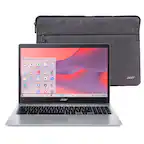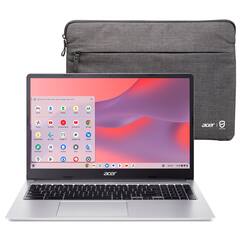
Acer - Chromebook 315 - 15.6" HD Laptop - Intel Pentium N6000 - 4GB LPDDR4X - 128GB eMMC (Protective Sleeve) - Silver
- Key Specs
- Screen Size: 15.6 inches (Size of the screen, measured diagonally from corner to corner.)
- Screen Resolution: 1366 x 768 (HD) (Screens come in a range of resolutions (measured in pixels, horizontal x vertical). The higher the resolution, the greater the picture quality.)
- Touch Screen: false (Touch-screen devices make navigating more intuitive. Using a touch-screen display, you can do things such as tap to select, hold and drag to move items, swipe to scroll, and pinch to zoom.)
- Processor Model: Intel Pentium (Your computer's processor is like its brain. Working in combination with system memory, the power of the processor determines the complexity of software you can run, how many programs you can have open at the same time, and how fast those programs will run. Most computers feature an AMD, Intel or Snapdragon processor.)
- CPU Base Clock Frequency: 1.16 gigahertz (Actual central processing unit (CPU) speed may vary by device configuration and design. The average rate at which the processor is able to execute tasks under normal operating conditions as asserted by the manufacturer.)
- Storage Type: eMMC
- Total Storage Capacity: 128 gigabytes
- System Memory (RAM): 4 gigabytes (Random-access memory (RAM) is a computing device's short-term data storage, which allows active information to be accessed quickly. The size and type of RAM determines how efficiently the device can handle large amounts of information at one time. For example, gaming or video editing requires more RAM for optimal performance.)
- Graphics: Intel UHD Graphics (Often referred to as a "graphics processing unit" (GPU), this device is responsible for displaying image content and decoding/encoding video content in programs and games.)
- Display Connector(s): 2 x DisplayPort (The number and type of connectors used to connect to an external display.)
- Battery Life (up to): 10 hours (Battery life will vary depending on the product configuration, product model, applications loaded on the product, power management setting of the product and the product features used by the customer. As with all batteries, the maximum capacity of this battery will decrease with time and usage.)
- Battery Chemistry: Lithium-ion
- 2-in-1 Design: false (A laptop and a tablet combined in one lightweight, portable device. Sometimes referred to as "convertible" or "hybrid" laptops, these devices deliver the processing power and keyboard of a laptop. When you're ready to play, either detach the screen or fold your 2-in-1 into tablet mode to comfortably watch movies, play games, read an e-book and more.)
- Backlit Keyboard: false (Integrated lights allow for visibility of the keys in low-light conditions.)
- General
- Brand: Acer
- Model Number: CB315-4H-P8FZ
- Product Name: Chromebook 315 - 15.6" HD Laptop - Intel Pentium N6000 - 4GB LPDDR4X - 128GB eMMC (Protective Sleeve)
- Color: Silver
- Year of Release: 2023
- Display
- Display Type: LCD
- Screen Size: 15.6 inches (Size of the screen, measured diagonally from corner to corner.)
- Screen Resolution: 1366 x 768 (HD) (Screens come in a range of resolutions (measured in pixels, horizontal x vertical). The higher the resolution, the greater the picture quality.)
- Touch Screen: false (Touch-screen devices make navigating more intuitive. Using a touch-screen display, you can do things such as tap to select, hold and drag to move items, swipe to scroll, and pinch to zoom.)
- Processor
- Processor Brand: Intel
- Processor Model: Intel Pentium (Your computer's processor is like its brain. Working in combination with system memory, the power of the processor determines the complexity of software you can run, how many programs you can have open at the same time, and how fast those programs will run. Most computers feature an AMD, Intel or Snapdragon processor.)
- Processor Model Number: N6000
- CPU Base Clock Frequency: 1.16 gigahertz (Actual central processing unit (CPU) speed may vary by device configuration and design. The average rate at which the processor is able to execute tasks under normal operating conditions as asserted by the manufacturer.)
- CPU Boost Clock Frequency: 3.3 gigahertz (Actual central processing unit (CPU) speed may vary by device configuration and design. The maximum rate at which the processor is able to execute tasks, typically only used for a short period of time as needed. This rate may temporarily boost the processor's performance, but may result in overheating, shutdown, or damage to equipment if sustained.)
- Number of CPU Cores: 4-core (quad-core) (A core, or "brain" of a CPU, allows it to receive and execute instructions. Each core can work independently or together to perform parallel operations.)
- Storage
- Storage Type: eMMC
- Total Storage Capacity: 128 gigabytes
- eMMC Capacity: 128 gigabytes (The amount of data that can be stored on the device's embedded Multimedia Card (eMMC). eMMC is a flash-based storage used in smartphones and personal computers; it typically has a smaller capacity than HDD or SSD storage.)
- Memory
- System Memory (RAM): 4 gigabytes (Random-access memory (RAM) is a computing device's short-term data storage, which allows active information to be accessed quickly. The size and type of RAM determines how efficiently the device can handle large amounts of information at one time. For example, gaming or video editing requires more RAM for optimal performance.)
- Type of Memory (RAM): LPDDR4X (Each type of RAM delivers a different level of speed, bandwidth, energy efficiency and performance.)
- Graphics
- Graphics Type: Integrated (Dedicated graphics uses a separate graphics card for processing video images. Because it does not use memory from the system's RAM, there is no extra burden on the CPU and graphics are processed more efficiently. Integrated graphics shares system RAM to process video images.)
- GPU Brand: Intel
- Graphics: Intel UHD Graphics (Often referred to as a "graphics processing unit" (GPU), this device is responsible for displaying image content and decoding/encoding video content in programs and games.)
- Compatibility
- Operating System: Chrome OS (The operating system manages all software and hardware, including files, memory and connected devices. Most importantly, it lets you interact with your device and your programs in a visual way; otherwise, you'd be typing computer code to get anything done.)
- Connectivity
- Display Connector(s): 2 x DisplayPort (The number and type of connectors used to connect to an external display.)
- Number of DisplayPort Outputs (Total): 2
- USB Ports: 2 x USB-C, 2 x USB-B (The number and type of USB ports the product has.)
- Number of USB Ports (Total): 4
- Headphone Jack: true (The device features an interface that allows for the connection of headphones.)
- Microphone Input: true (The device features an input for connecting an external microphone.)
- Wireless Connectivity: Wi-Fi, Bluetooth (The manner in which a device sends data to another device over a short distance without the use of wires or cables.)
- Wireless Standard: AX (The wireless networking protocol used by the device. Each iteration of the protocol is based on the 802.11 standard developed by the Institute of Electrical and Electronics Engineers (IEEE) Standards Association. Denoted by letters following 802.11 (802.11a, 802.11ac, etc.), each version, published in alphabetical order, encompasses all previous versions.)
- Wireless Networking Standard: Wi-Fi 6 (The wireless networking standard used by the device. Each iteration of the standard developed by the Wi-Fi Alliance corresponds to an existing IEEE 802.11 protocol; for example, standard 802.11ac (or AC) is termed Wi-Fi 5. Refers specifically to the standard the device is designed to use, but ultimately determines product interoperability and backward compatibility including previous versions.)
- Power
- Battery Life (up to): 10 hours (Battery life will vary depending on the product configuration, product model, applications loaded on the product, power management setting of the product and the product features used by the customer. As with all batteries, the maximum capacity of this battery will decrease with time and usage.)
- Battery Chemistry: Lithium-ion
- Camera
- Front-Facing Camera: true
- Front Facing Camera Video Resolution: 720p (Refers to the number of pixels, both horizontally and vertically, used by the camera facing the user to capture video. The higher the resolution the finer the video detail that can be seen.)
- Built-In Microphone: true
- Features
- 2-in-1 Design: false (A laptop and a tablet combined in one lightweight, portable device. Sometimes referred to as "convertible" or "hybrid" laptops, these devices deliver the processing power and keyboard of a laptop. When you're ready to play, either detach the screen or fold your 2-in-1 into tablet mode to comfortably watch movies, play games, read an e-book and more.)
- Backlit Keyboard: false (Integrated lights allow for visibility of the keys in low-light conditions.)
- Media Card Reader: true (A hardware device that allows for access to data on a memory card and enables the transfer of its files to a computer. These devices may have one or multiple slots for various types of memory cards, and may be integrated into the computer or available as an external device.)
- Media Card Slot: microSD
- Audio Technology: DTS Audio
- Security Features: Cable lock slot
- Cable Lock Slot: Kensington Security Slot (K-Slot)
- Dimensions
- Product Height: 0.79 inches (The out of box height of the item. Height is measured as the vertical distance from the bottom of the item to the top as it would be primarily used or placed.)
- Product Width: 14.42 inches (The out of box width of the item. Width is measured as the horizontal distance from one side of the item to the other as it would be primarily used or placed.)
- Product Depth: 9.61 inches (The out of box depth of the item. Depth is measured as the distance from the front of the item to the back as it would be primarily used or placed.)
- Product Weight: 3.53 pounds (The out of box weight of the item.)
- Certifications Listings & Approvals
- ENERGY STAR Certified: false (Devices carrying the ENERGY STAR service mark, such as computer products and peripherals, kitchen appliances, and other products, generally use 20% to 30% less energy than required by federal standards.)
- EPEAT Qualified: false (The Electronic Product Environmental Assessment Tool (EPEAT) was designed to provide an environmental assessment tool for purchasers. In order to qualify for EPEAT, a product must meet all 23 required criteria.)
- Included
- Optical Drive Type: None (An optical disk drive (ODD) uses a laser light to read data from or write data to an optical disc. These discs include CDs, DVDs, and Blu-ray Discs. This allows you to play music or watch movies using prerecorded discs.)
- Numeric Keypad: true
- Stylus Included: false
- Warranty
- Warranty - Parts: 1 year
- Warranty - Labor: 1 year
- Other
- UPC: 195133228794
The Acer Chromebook 315 features a 15.6" anti-glare screen designed to let you get more done, no matter where you are. You'll stay focused in either the classroom or the office with a dedicated number pad, a fast processor, and an eco-friendly OceanGlass touchpad. Recognized as the perfect multi-media companion, this special machine is super thin, extra light and delivers unmatched value in today’s fast-paced, technology-driven world. It features an impressive HDR camera, fast wireless connectivity and long-lasting battery life, so you can run your favorite Google apps or access your photos, videos, music and documents—all day long.
- The Best of Google, in a Laptop: Chromebooks run ChromeOS, the fast, secure operating system from Google, with built-in Google apps like Gmail, Gemini, Docs, Photos, YouTube, and more.
- Get Google AI Pro, 2TB of Storage, and More for 3 Months at No Cost: Boost your productivity and creativity with 3 months of Google AI Pro -- now including NotebookLM -- on us when you purchase a Chromebook.*
- Starts Fast, Won't Slow You Down: Chromebooks start up in under 10 seconds, and run automatic updates behind the scenes to deliver performance that’s full speed ahead.
- Chat with Gemini: Supercharge your ideas, right from your home screen. Get help planning, writing, learning, and more.**
- Never Had a Virus - No Need to Worry.***: Breathe easy knowing your security and privacy are covered with built-in protection and the Titan C2 security chip.
- The Apps You Know and Love: Popular apps for streaming, gaming, creating, and staying organized are all available on Google Play. Easily access Microsoft 365****, Minecraft, Adobe Express, and more.
- 15.6" HD Widescreen: The narrow bezel allows for a 15.6” non-glare screen in a smaller footprint. Thanks to the 10.5 mm narrow bezel and wide viewing angle of the HD screen, you can better enjoy movies, videos, and TV shows.
- Intel Pentium: Powered by an Intel Pentium Silver N6000 Processor, the Chromebook loads content-rich webpages fast, provide crisp video playback, and enables you to multitask effortlessly by allowing multiple pages to run at the same time.
- 4GB of Onboard LPDDR4X Memory: Smoothly run numerous programs and browser tabs at the same time.
- 128GB eMMC Storage: Load faster and play sooner! You can start fast, stay fast and quickly load apps with ease.
- The Power of Wireless: A strong, consistent wireless signal is provided by the Intel Wi-Fi 6 and strategically placed 802.11ax wireless antenna with 2x2 MU-MIMO technology. MU-MIMO (Multi-User Multiple-Input and Multiple-Output) is a standard that offers faster wireless speeds.
- Flexible Connectivity: Two USB Type-C ports for ultra-quick data transfer, video streaming, and battery charging. The reversible USB 3.2 Type-C connector is the same at both ends and, so it’s easy to attach. Also, two USB 3.2 Gen 1 ports for your convenience.
- Superior Conference Call Experience: Get a rich sound without needing to break the bank. With DTS Audio enjoy higher-quality video, distortion-free sounds, and deeper bass. Great sound, two built-in microphones and a flare-reducing webcam, this laptop is the ideal choice for hybrid workers.
- All-Day Battery Life: 10 hours of battery life goes a long way. With just a single charge, the powerful, long-lasting battery gets you through a full day’s worth of classes without needing your power adapter.
- Eco-friendly Touchpad: This Chromebook uses an environmentally-friendly OceanGlass touchpad made entirely out of abandoned plastic waste and reused within its surface to provide you with a sleek, glass-like tactile texture as your fingers scroll across the touchpad.
- Disclaimers*: *$59.97 value, for a limited time only. The Google AI Pro trial offer is available to eligible users with the purchase and activation of an eligible Chromebook on or after May 28, 2024. This offer is limited to users in Australia, Belgium, Canada, Denmark, Finland, France, Germany, India, Ireland, Italy, Japan, Luxembourg, Mexico, Netherlands, New Zealand, Norway, Poland, Portugal, South Africa, Spain, Sweden, Taiwan, United Kingdom and United States.
- Disclaimer* (Cont.): Redeem the offer by January 31, 2026, at 11:59pm PT. Valid form of payment required at sign-up, but you will not be charged until the trial period expires. $19.99/month at offer end. Cancel anytime. Gemini in Google AI Pro & Gemini for Gmail, Docs, & more are only available for ages 18+. Gemini for Gmail, Docs & more is available in select languages. See g.co/chromebook/google-ai-pro-3-month-offer for full terms. Results for illustrative purposes. Internet connection required
- Disclaimer* (Cont.): Check responses for accuracy. Feature availability varies based on language.
- Additional Disclaimers: **Check responses for accuracy. Internet connection required. Availability may vary by device, country, and language. ***As of February 2025 there has been no evidence of any documented, successful virus attack on ChromeOS. Data based on ChromeOS monitoring of various national and internal databases. ****Additional functionality available with a Microsoft 365 subscription (sold separately). Microsoft, Excel, & PowerPoint are registered trademarks of Microsoft Corporation.
- The Best of Google, in a Laptop: Chromebooks run ChromeOS, the fast, secure operating system from Google, with built-in Google apps like Gmail, Gemini, Docs, Photos, YouTube, and more.
- Get Google AI Pro, 2TB of Storage, and More for 3 Months at No Cost: Boost your productivity and creativity with 3 months of Google AI Pro -- now including NotebookLM -- on us when you purchase a Chromebook.*
- Starts Fast, Won't Slow You Down: Chromebooks start up in under 10 seconds, and run automatic updates behind the scenes to deliver performance that’s full speed ahead.
- Chat with Gemini: Supercharge your ideas, right from your home screen. Get help planning, writing, learning, and more.**
- Never Had a Virus - No Need to Worry.***: Breathe easy knowing your security and privacy are covered with built-in protection and the Titan C2 security chip.
- The Apps You Know and Love: Popular apps for streaming, gaming, creating, and staying organized are all available on Google Play. Easily access Microsoft 365****, Minecraft, Adobe Express, and more.
- 15.6" HD Widescreen: The narrow bezel allows for a 15.6” non-glare screen in a smaller footprint. Thanks to the 10.5 mm narrow bezel and wide viewing angle of the HD screen, you can better enjoy movies, videos, and TV shows.
- Intel Pentium: Powered by an Intel Pentium Silver N6000 Processor, the Chromebook loads content-rich webpages fast, provide crisp video playback, and enables you to multitask effortlessly by allowing multiple pages to run at the same time.
- 4GB of Onboard LPDDR4X Memory: Smoothly run numerous programs and browser tabs at the same time.
- 128GB eMMC Storage: Load faster and play sooner! You can start fast, stay fast and quickly load apps with ease.
- The Power of Wireless: A strong, consistent wireless signal is provided by the Intel Wi-Fi 6 and strategically placed 802.11ax wireless antenna with 2x2 MU-MIMO technology. MU-MIMO (Multi-User Multiple-Input and Multiple-Output) is a standard that offers faster wireless speeds.
- Flexible Connectivity: Two USB Type-C ports for ultra-quick data transfer, video streaming, and battery charging. The reversible USB 3.2 Type-C connector is the same at both ends and, so it’s easy to attach. Also, two USB 3.2 Gen 1 ports for your convenience.
- Superior Conference Call Experience: Get a rich sound without needing to break the bank. With DTS Audio enjoy higher-quality video, distortion-free sounds, and deeper bass. Great sound, two built-in microphones and a flare-reducing webcam, this laptop is the ideal choice for hybrid workers.
- All-Day Battery Life: 10 hours of battery life goes a long way. With just a single charge, the powerful, long-lasting battery gets you through a full day’s worth of classes without needing your power adapter.
- Eco-friendly Touchpad: This Chromebook uses an environmentally-friendly OceanGlass touchpad made entirely out of abandoned plastic waste and reused within its surface to provide you with a sleek, glass-like tactile texture as your fingers scroll across the touchpad.
- Disclaimers*: *$59.97 value, for a limited time only. The Google AI Pro trial offer is available to eligible users with the purchase and activation of an eligible Chromebook on or after May 28, 2024. This offer is limited to users in Australia, Belgium, Canada, Denmark, Finland, France, Germany, India, Ireland, Italy, Japan, Luxembourg, Mexico, Netherlands, New Zealand, Norway, Poland, Portugal, South Africa, Spain, Sweden, Taiwan, United Kingdom and United States.
- Disclaimer* (Cont.): Redeem the offer by January 31, 2026, at 11:59pm PT. Valid form of payment required at sign-up, but you will not be charged until the trial period expires. $19.99/month at offer end. Cancel anytime. Gemini in Google AI Pro & Gemini for Gmail, Docs, & more are only available for ages 18+. Gemini for Gmail, Docs & more is available in select languages. See g.co/chromebook/google-ai-pro-3-month-offer for full terms. Results for illustrative purposes. Internet connection required
- Disclaimer* (Cont.): Check responses for accuracy. Feature availability varies based on language.
- Additional Disclaimers: **Check responses for accuracy. Internet connection required. Availability may vary by device, country, and language. ***As of February 2025 there has been no evidence of any documented, successful virus attack on ChromeOS. Data based on ChromeOS monitoring of various national and internal databases. ****Additional functionality available with a Microsoft 365 subscription (sold separately). Microsoft, Excel, & PowerPoint are registered trademarks of Microsoft Corporation.
Whats Included
- Laptop
- USB Type-C AC Adapter
- Power Cord
- Protective Sleeve
- Laptop
- USB Type-C AC Adapter
- Power Cord
- Protective Sleeve
Q: How much memory does this Acer Chromebook have?
A: This Acer Chromebook comes with 4GB of onboard LPDDR4X memory.
Q: What size is the screen on this laptop?
A: The screen on this Acer Chromebook is 15.6 inches.
Q: What type of storage does this Acer Chromebook have?
A: This Acer Chromebook has 128GB eMMC storage.
Q: Why is this Chromebook good for conference calls?
A: This Chromebook is ideal for conference calls because it has DTS Audio for rich sound, two built-in microphones, and a flare-reducing webcam.
Q: Does this Chromebook have a numeric keypad?
A: Yes, this Chromebook does have a dedicated number pad.
Q: What comes included with the Google One AI Premium Plan?
A: The Google One AI Premium Plan includes Gemini Advanced, 2TB of cloud storage, and Gemini in Gmail, Docs, and more.
Q: How long does the battery last on this Chromebook?
A: This Chromebook offers up to 10 hours of battery life on a single charge.
Q: Will this Chromebook support Microsoft Word?
A: Greetings from the Intel team. Thank you for your question. You can access your Microsoft 365 apps from the web — including Word, Excel, PowerPoint, OneNote, OneDrive, and Outlook. The web apps allow you to: Create, edit, and collaborate on documents and files. Send and receive emails. Maintain an online calendar. You can’t install the Windows or Mac desktop versions of Microsoft 365 or Office 2016 on a Chromebook. The Android versions of Office, Outlook, OneNote, and OneDrive are not currently supported on a Chromebook. How to run Office apps on a Chromebook: https://support.microsoft.com/en-au/office/how-to-access-microsoft-office-on-a-chromebook-32f14a23-2c1a-4579-b973-d4b1d78561ad Open & edit Office files on your Chromebook: https://support.google.com/chromebook/answer/2481498?hl=en For detailed information about the Intel® Pentium® Silver N6000 Processor, visit: https://ark.intel.com/content/www/us/en/ark/products/212330/intel-pentium-silver-n6000-processor-4m-cache-up-to-3-30-ghz.html Thank you for choosing Intel! Emilio_Intel