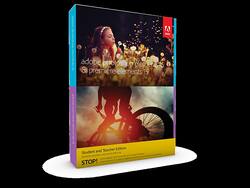
Adobe - Photoshop Elements 15 & Premiere Elements 15 Student and Teacher Edition - Windows, Mac OS
- Key Specs
- Operating System Compatibility: Windows, Mac OS
- Software Format: Physical (Physical software requires a disc, cartridge, etc. be inserted into the gaming console or computer to download and/or operate the software. Digital software allows for downloading and/or playing the software on the gaming console or computer without a physical disc, cartridge, etc. Physical (Download Code Only) software is purchased in physical form with a code that allows for downloading and/or playing the software on the gaming console or computer without a physical disc, cartridge, etc.)
- General
- Brand: Adobe
- Model Number: ADO951800F057
- Product Name: Photoshop Elements 15 & Premiere Elements 15 Student and Teacher Edition
- Publisher: Adobe
- Features
- Software Subject: Photo editing
- Automatic Editing Options: true
- Templates Included: true
- Tutorials Included: true
- Compatibility
- Operating System Compatibility: Windows, Mac OS
- Software Format: Physical (Physical software requires a disc, cartridge, etc. be inserted into the gaming console or computer to download and/or operate the software. Digital software allows for downloading and/or playing the software on the gaming console or computer without a physical disc, cartridge, etc. Physical (Download Code Only) software is purchased in physical form with a code that allows for downloading and/or playing the software on the gaming console or computer without a physical disc, cartridge, etc.)
- Other
- UPC: 883919270531
Use the quick fixes in Adobe Photoshop and Premiere Elements 15 to enhance photographs and video footage in minutes. Features like smile correction and advanced red-eye removal make Photoshop Elements a vital photo-editing tool, while Premiere Elements revels in its haze-reduction capacity. For professional-looking results, make Adobe Photoshop and Premiere Elements 15 your go-to photography and videography software package.
Q: How can apply for discount if I am a student?
A: I purchased it in store, but have yet to open and use it. The Best Buy store clerk explained that there is a online website/link I must go into and it will ask for my student/college email address. I believe he said they will send another link to the students email address which you have to click on to register the product before use. Fyi, I paid the student price in store and didn't have to show proof, but you will need the student email to register and/or use the product.
Q: Can this product be downloaded to multiple devices or is this a one-time use?
A: I do not use the student version. I don't download. Always buy the disc versions. The regular one can be used in two computers.
Q: Do you have to purchase this again yearly or is it a one time purchase?
A: After you buy the software, you can use the it as long as you want; however if a new version becomes available, you may want to upgrade it.
Q: Is this only available to college students or can high school and middle school students use it?
A: undefined
A: One version of this product is more basic without the teacher addition, while the other edition includes the teacher edition.
A: Not really. This is for use by students, teachers or staff at educational facilities. The features are the same. The pricing difference is just for a cheaper way to use the Adobe products when the cloud is not necessary.
People also viewed
Today's top picks
 $449.99The price was $829.99
 $2,449.99The price was $3,199.99
 $999.98The price was $1,639.98
 $199.99The price was $249.99
 $1,099.99The price was $1,499.99