Anker - Steam Deck Dock, Docking Station for Steam Deck (OLED)/ROG Ally/Legion Go(Not for Rog Ally X) - Gray
Anker - Steam Deck Dock, Docking Station for Steam Deck (OLED)/ROG Ally/Legion Go(Not for Rog Ally X) - Gray
Related Item

Specifications
- Number of USB Port(s)3
- Key Specs
- Number of USB Port(s): 3
- General
- Brand: Anker
- Model Number: A83S1
- Product Name: Steam Deck Dock, Docking Station for Steam Deck (OLED)/ROG Ally/Legion Go(Not for Rog Ally X)
- Color: Gray
- Features
- Hub Type: USB hubs (The type of connection, such as Ethernet or USB, used to connect peripheral devices to the hub for shared access.)
- Ports
- Number of USB Port(s): 3
- Port Type(s): USB, HDMI (USB 2.0 connects external drives, gaming controllers, smartphones, MP3 players and other accessories.USB 3.0 transfers data faster than USB 2.0, but only when used with USB 3.0 devices.USB Type-C provides fast speeds and versatile power, featuring connectors with identical ends that plug in upside down or right side up. Adapters allow for video as well as backward compatibility.Thunderbolt provides ultra-high bandwidth for fast data transfer between devices featuring a Thunderbolt or MiniDisplayPort connection.HDMI allows you to connect a projector or display HD media on your HDTV or monitor.Media card slots allow you to transfer photos from your digital camera or camcorder.)
- Dimensions
- Product Height: 1.0511811 inches (The out of box height of the item. Height is measured as the vertical distance from the bottom of the item to the top as it would be primarily used or placed.)
- Product Length: 5.1968504 inches (The out of box length of the item. Length is measured as the longest dimension of the item.)
- Product Width: 2.9330709 inches (The out of box width of the item. Width is measured as the horizontal distance from one side of the item to the other as it would be primarily used or placed.)
- Product Weight: 0.3307 pounds (The out of box weight of the item.)
- Warranty
- Warranty - Parts: 18 months
- Warranty - Labor: 18 months
- Other
- UPC: 194644194666
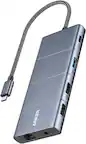
Anker Steam Deck Dock, Docking Station for Steam Deck (OLED)/ROG Ally/Legion Go(Not for Rog Ally X), 6-in-1 USB C Hub with HDMI 4K@60Hz, 1Gbps Ethernet, 2 USB-A and 1 USB-C Port, 90W Fast Charging
- 6-in-1 USB-C Hub: Connect, charge, and play without limits thanks to a 100W PD-IN port for fast charging, a 4K HDMI output, a 1Gbps Ethernet port, two USB-A ports at 5Gbps each, and one USB-C port at 5Gbps.
- See Every Detail: The 4K@60Hz HDMI port brings your games to life with stunning resolution and crystal-clear imagery.(Note: The USB-C data port does not support screen mirroring.)
- Ultra-Speed Ethernet: Dominate online play with lightning-fast 1,000 Mbps Ethernet, where every millisecond counts.
- Unlimited Connections: Maximize your gameplay with versatile USB ports, offering 5Gbps speed for mice, keyboards, game controllers, and more.
- What You Get: Anker USB-C Hub (6-in-1, For Handheld Game Console), 8.66-inch (220 mm) built-in USB C cable, welcome guide, 18-month warranty, and our friendly customer service.
A: From the information provided, we do not have direct specifics regarding the Asus ROG Xbox Ally or the Asus ROG Ally X compatibility with the Anker Steam Deck Dock. However, for docking stations in general, compatibility often depends on the hardware specifications, particularly the type of USB-C port and its support for DisplayPort Alt Mode and Power Delivery. Asus ROG Xbox Ally: It is labeled as compatible with this dock. This likely means that this device has the necessary USB-C hardware capabilities (DisplayPort Alt Mode and Power Delivery support) to function properly with the dock. Asus ROG Ally X: It is marked as not compatible with the dock. This could be due to a lack of certain hardware support, such as DisplayPort Alt Mode, Power Delivery, or other specific port functionalities that the dock requires. Another potential reason could be differences in the device design or system configurations that prevent full function when connected to the dock. To ensure function, it is recommended to consult the device's user manual to check whether its USB-C port supports all the necessary requirements for the dock.
Q: Can this dock exceed 60Hz at 1080p resolution? What's the max refresh rate?
A: The Steam Deck Dock supports a maximum refresh rate of 60Hz at 1080p resolution when connected to a compatible device. Based on the available specifications for similar docks, 60Hz is the capped refresh rate at that resolution. If you'd like additional clarification for your setup, refer to display settings and compatibility with your host device.
A: The compatibility of Anker docks with specific devices like the Legion Go S (Z1 Extreme Steam OS version) depends on whether the dock supports Power Delivery (PD) and DisplayPort (DP) Alt Mode through the USB-C port. For example, Anker docking stations typically require the device to have a fully functional USB-C port, supporting USB-C Power Delivery and DisplayPort Alt Mode. Based on the details of supported laptops, compatibility is focused on devices with these specifications. I recommend confirming whether the USB-C port on your Legion Go S supports these features. If it does, the dock should work with your device. Otherwise, it may not be compatible. Additionally, Anker docks, including those designed for gaming devices like the Steam Deck, are not explicitly listed with compatibility for specific versions of gaming devices like the Legion Go S. It's best to validate the USB-C specifications of the Legion Go S to ensure compatibility.
Q: Does the dock station charge your Legion Go?
A: The Anker Steam Deck Dock, which supports devices like the Legion Go, is designed to be a docking solution. However, based on the information, it supports USB Power Delivery (PD). This implies that it can provide charging for compatible devices like the Legion Go if the device adheres to Power Delivery specifications. Keep in mind the dock's USB-C upstream port provides up to 100W for device charging. For best results, ensure that your Legion Go's power input requirements are compatible with the dock's PD 3.0 capability.
Q: Is it compatible with the Steam Deck (LCD)?
A: it works with my oled, and since its just a usb c port, i dont see why it shouldnt
Compare similar products

Anker Steam Deck Dock, Docking Station for Steam Deck (OLED)/ROG Ally/Legion Go(Not for Rog Ally X), 6-in-1 USB C Hub with HDMI 4K@60Hz, 1Gbps Ethernet, 2 USB-A and 1 USB-C Port, 90W Fast Charging

Take your Steam Deck gaming to the big screen with the UGREEN Docking Station. This powerful hub transforms your handheld device into a full desktop setup, featuring a 4K@60Hz HDMI port for stunning visuals on your TV or monitor. Connect your favorite peripherals with two USB-A 3.0 ports and a USB-C data port for accessories like keyboards, controllers, and headsets. A Gigabit Ethernet port ensures a lag-free online gaming experience, while the dedicated PD charging port keeps your Steam Deck powered for marathon sessions. It’s the ultimate expansion for your gaming arsenal.

Take your gaming to the next level with the Lenovo Legion Go USB-C Dock. This all-in-one gaming accessory transforms your Legion Go console, delivering a seamless and exhilarating gaming experience. Whether you’re powering up your console, sharing epic gameplay in ultra-high-definition, or ensuring stutter-free performance with reliable Ethernet, this dock has got your back.
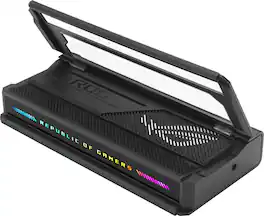
The ROG Bulwark Dock is a compact, sleek, 7-in-1 docking station that offers 4K at 144Hz and 8K at 30Hz output via HDMI 2.1, 1 x USB-C and 3 x USB-A for superfast up to 10 Gbps file transfers, gigabit Ethernet, audio jack and up to 100 watt USB Power Delivery to laptops and mobile devices.
| Pros for Anker - Steam Deck Dock, Docking Station for Steam Deck (OLED)/ROG Ally/Legion Go(Not for Rog Ally X) - Gray | |||
|---|---|---|---|
| Overall Performance | There were no pros for this product— | Build Quality | Overall Performance, Connectivity, Portability, RGB Lighting, Compatibility |
| Cons for Anker - Steam Deck Dock, Docking Station for Steam Deck (OLED)/ROG Ally/Legion Go(Not for Rog Ally X) - Gray | |||
| There were no cons for this product— | There were no cons for this product— | There were no cons for this product— | Power Supply |
Specs
Reviews
Customer Images
The vast majority of our reviews come from verified purchases. Reviews from customers may include My Best Buy members, employees, and Tech Insider Network members (as tagged). Select reviewers may receive discounted products, promotional considerations or entries into drawings for honest, helpful reviews.
- Rated 5 out of 5 stars
Simple and effective
Good charging stand for handheld devices. Works without hassle on my Legion Go. That said, it would be nice if the bottom was raised about 1/4" to allow the right angle USB-C port to plug into the bottom connector on the LeGo. I have also used the dock with my Galaxy S23 to enable the desktop mode with an external monitor and keyboard/mouse.
pwn3d3d3d Posted
- Rated 5 out of 5 stars
Great for steam deck owners
Arrived on time and works right out of the box. There is no "start up" process, just plug in your steam deck / supported device and start playing
KavinA Posted
- Rated 5 out of 5 stars
Totally worth it!
Absolutely amazing product!!! And at just pennies on the dollar compared to the actual Steam dock! Not a problem at all with the connectivity or anything. You try it and you’ll have a solid piece of tech for your Steam Deck!
PerryD Posted