Winter SaleEnds 1/19. Limited quantities. No rainchecks.Shop now

Main Content

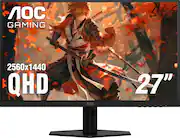
AOC - 27" Q27G40XMN Mini-LED, QHD, 180hz Gaming Monitor - Black

Model: Q27G40XMN
SKU: 6617199
$229.99
Save $70
Comp. Value: $299.99
or
Finance OptionsView your offers
Special OffersOn related products
Standard Geek Squad Protection
Availability
Fulfillment Options
Pickup at
Act fast - Only 1 left at your store!
Sold by Best Buy

Highlights

  • Key Specs
    • Refresh Rate: 180Hz (The number of frames per second the device can produce natively without enhancement. Higher rates help produce smooth, seamless pictures.)
    • Maximum Resolution: 2560 x 1440 (Maximum resolution refers to the highest number of pixels that a screen can process and display. Higher resolution signals produce more detailed images.)
    • Response Time: 1 milliseconds (The speed at which pixels can change colors is called response time. It is measured in milliseconds (ms).)
    • Panel Type: VA (Technology that affects response time and image quality.)
    • Synchronization Technology: G-SYNC Compatible (NVIDIA Adaptive Sync) (Generally, these technologies allow syncing between a computer/console game's frame rate and the device's refresh rate for a smoother display without tearing.)
    • Screen Size: 27 inches (Size of the screen, measured diagonally from corner to corner.)
    • Display Connector(s): 1 x DisplayPort 1.4, 1 x HDMI 2.0 (The number and type of connectors used to connect to an external display.)
  • General
    • Brand: AOC
    • Model Number: Q27G40XMN
    • Product Name: 27" Q27G40XMN Mini-LED, QHD, 180hz Gaming Monitor
    • Color: Black
    • Operating System Compatibility: Windows, Mac, Linux
  • Display
    • Refresh Rate: 180Hz (The number of frames per second the device can produce natively without enhancement. Higher rates help produce smooth, seamless pictures.)
    • Maximum Resolution: 2560 x 1440 (Maximum resolution refers to the highest number of pixels that a screen can process and display. Higher resolution signals produce more detailed images.)
    • Native Resolution: 2560 x 1440 (Native resolution of a screen refers to its single, fixed resolution. Sometimes screens must scale an image up or down in order to fit the native resolution. This can cause a loss of resolution or detail.)
    • Contrast Ratio: 1200:1 (Measured difference between a displayed image's brightest whites and darkest blacks. The larger the first number, the more detail and color that can be displayed.)
    • Response Time: 1 milliseconds (The speed at which pixels can change colors is called response time. It is measured in milliseconds (ms).)
    • Display Type: LED
    • Panel Type: VA (Technology that affects response time and image quality.)
    • Synchronization Technology: G-SYNC Compatible (NVIDIA Adaptive Sync) (Generally, these technologies allow syncing between a computer/console game's frame rate and the device's refresh rate for a smoother display without tearing.)
    • Aspect Ratio: 16:9 (The measurement of the width of a screen compared to the height of a screen, expressed as a ratio.)
    • Curved Screen: false
    • Brightness: 450 candela per square meter (A measure of the total light output.)
    • Screen Size: 27 inches (Size of the screen, measured diagonally from corner to corner.)
    • High Dynamic Range (HDR): false (An HDR-compatible 4K TV or other HDR-compatible product displays HDR video content when it's available from sources like 4K Ultra HD Blu-ray Discs and 4K streaming services.)
    • Horizontal Viewing Angle: 178 degrees (The maximum angle at which the display can be viewed with acceptable visual performance from either side.)
    • Vertical Viewing Angle: 178 degrees (The maximum angle at which the display can be viewed with acceptable visual performance from above or below.)
    • Touch Screen: false (Touch-screen devices make navigating more intuitive. Using a touch-screen display, you can do things such as tap to select, hold and drag to move items, swipe to scroll, and pinch to zoom.)
    • On-Screen Display Languages: English, French, Czech, Russian, German, Chinese, Spanish, Portuguese, Italian, Dutch, Swedish, French, Finnish, 5 additional (The available language options for displayed text.)
    • Display Surface: Anti-glare
  • Connectivity
    • Number of DisplayPort Inputs (Total): 1
    • Number of HDMI Inputs (Total): 1
    • Number of VGA Ports: 0 (VGA (Video Graphics Adapter or Video Graphics Array) is a display standard that transmits via analog signals. This type of interface is typically used to connect a computer to a display device such as a monitor, projector, or TV.)
    • Number of DVI Inputs: 0 (The number of digital cables carrying analog (VGA) video signals that can be connected to the product.)
    • Number of Mini DisplayPort Inputs: 0
    • Number of Thunderbolt Ports (Total): 0
    • Display Connector(s): 1 x DisplayPort 1.4, 1 x HDMI 2.0 (The number and type of connectors used to connect to an external display.)
    • Headphone Jack: true (The device features an interface that allows for the connection of headphones.)
  • Compatibility
    • Wall Mountable: true (The product is able to be secured to a wall. Some products are designed ready to mount, while others may require additional hardware/accessories for installation.)
    • VESA Wall Mount Standard: 100mm x 100mm (VESA wall mount standards refer to the spacing of screw holes built into a TV in order to fit with standard TV wall mounts. These standards are implemented into most TVs and monitors.)
    • Voice Assistant Built-in: No (A digital assistant built into the device that uses voice commands to answer questions and control smart devices.)
  • Features
    • Tiltable: true
    • Adjustable Stand Height: false
    • Anti-Glare: true (Product has features, such as a matte finish, that reduce the likelihood for screen glare.)
    • Eye Relief Features: Flicker free
    • Built-In Webcam: false
    • Integrated Speaker(s): false
  • Dimensions
    • Product Height With Stand: 18.9 inches
    • Product Height Without Stand: 14.44 inches
    • Product Width: 24.2 inches (The out of box width of the item. Width is measured as the horizontal distance from one side of the item to the other as it would be primarily used or placed.)
    • Product Depth (With Stand): 7.6 inches
    • Product Depth Without Stand: 2.36 inches
    • Product Weight: 14 pounds (The out of box weight of the item.)
    • Stand Included: true
  • Power
    • Power Consumption: 37 watts
    • Power Saving/Off Mode: 0.5 watts (This mode will turn the display and/or the device off, or into a standby mode, after a preset length of time with no activity to conserve power.)
  • Certifications Listings & Approvals
    • ENERGY STAR Certified: false (Devices carrying the ENERGY STAR service mark, such as computer products and peripherals, kitchen appliances, and other products, generally use 20% to 30% less energy than required by federal standards.)
    • EPEAT Qualified: false (The Electronic Product Environmental Assessment Tool (EPEAT) was designed to provide an environmental assessment tool for purchasers. In order to qualify for EPEAT, a product must meet all 23 required criteria.)
  • Warranty
    • Warranty - Parts: 3 years
    • Warranty - Labor: 3 years
  • Other
    • UPC: 685417739684

Witness stunning visuals with AOC Q27G40XMN, 27" Mini-LED backlight technology, delivering deeper blacks, brighter whites, and more vibrant colors.

  • Mini-LED panel technology: Experience clarity, vibrant colors, and richer contrast with Mini-LED technology.
  • Quad HD Resolution: Experience stunning clarity and immersive detail with Quad HD (QHD) resolution. At 2560x1440, QHD strikes the perfect balance between Full HD and 4K, offering sharper visuals and smoother gameplay without straining your system. Enjoy crisper textures, enhanced depth, and a wider field of view—giving you a visual and competitive edge.
  • 180Hz Refresh Rate: Enjoy a smooth and responsive gaming experience with a lightning-fast 180Hz refresh rate, 1ms response time.
  • Blazing fast 0.5ms pixel response time: In gaming, every millisecond counts and can be the differentiator between hitting or missing a shot. Fast response time also eliminates ghosting and motion blur.
  • Ultra smooth gameplay with Adaptive Sync: Virtually eliminates stuttering, tearing, and judder by matching your' monitor's frame rate with that of your GPU. Also useful for watching media.
  • Breathtaking HDR realism with VESA CERTIFIED HDR1000: VESA HDR certification ensures ultra-bright highlights, deep contrast, and vibrant, true-to-life colors for a more immersive experience. Whether you're navigating dark dungeons or sunlit battlefields, HDR1000 delivers stunning visual depth and detail—bringing every moment to life like never before.
  • Re-Spawn 3-Year Warranty: Enjoy peace of mind with an industry leading Re-Spawn warranty that inclludes 3-year dead pixel coverage, 3-year advance placement coverage, and 1-year, one-time accidental damage replacement.
  • G-Menu customization: AOC G-Menu is a free tool that you can install on your PC to have complete customization paired with maximum convenience.
  • Mini-LED panel technology: Experience clarity, vibrant colors, and richer contrast with Mini-LED technology.
  • Quad HD Resolution: Experience stunning clarity and immersive detail with Quad HD (QHD) resolution. At 2560x1440, QHD strikes the perfect balance between Full HD and 4K, offering sharper visuals and smoother gameplay without straining your system. Enjoy crisper textures, enhanced depth, and a wider field of view—giving you a visual and competitive edge.
  • 180Hz Refresh Rate: Enjoy a smooth and responsive gaming experience with a lightning-fast 180Hz refresh rate, 1ms response time.
  • Blazing fast 0.5ms pixel response time: In gaming, every millisecond counts and can be the differentiator between hitting or missing a shot. Fast response time also eliminates ghosting and motion blur.
  • Ultra smooth gameplay with Adaptive Sync: Virtually eliminates stuttering, tearing, and judder by matching your' monitor's frame rate with that of your GPU. Also useful for watching media.
  • Breathtaking HDR realism with VESA CERTIFIED HDR1000: VESA HDR certification ensures ultra-bright highlights, deep contrast, and vibrant, true-to-life colors for a more immersive experience. Whether you're navigating dark dungeons or sunlit battlefields, HDR1000 delivers stunning visual depth and detail—bringing every moment to life like never before.
  • Re-Spawn 3-Year Warranty: Enjoy peace of mind with an industry leading Re-Spawn warranty that inclludes 3-year dead pixel coverage, 3-year advance placement coverage, and 1-year, one-time accidental damage replacement.
  • G-Menu customization: AOC G-Menu is a free tool that you can install on your PC to have complete customization paired with maximum convenience.
Whats Included
  • 27" Monitor with Stand
  • Power cord
  • HDMI Cable
  • 27" Monitor with Stand
  • Power cord
  • HDMI Cable

Q: What is the response time of this monitor?

A: The response time of the monitor is 1ms GTG (Grey-to-Grey).

Q: Is this monitor compatible with G-Sync?

A: Yes, this monitor is compatible with G-Sync through NVIDIA Adaptive Sync.

Q: What type of backlight technology does this monitor use?

A: This monitor uses Mini-LED backlight technology.

Q: What is the resolution of this monitor?

A: The monitor has a QHD resolution of 2560 x 1440.

Q: Does this monitor have a high refresh rate?

A: Yes, the monitor has a refresh rate of 180Hz.

Q: How long is the warranty on this monitor?

A: This monitor comes with a Re-Spawn 3-year warranty, including a year of accidental damage replacement.

Q: Does this monitor have built-in speakers?

A: No, this monitor does not have built-in speakers.

Q: Does this monitor have VESA mounting support?

A: AOC Q27G40XMN supports VESA Wall Mount Compliant (100mmx100mm).

Sponsored

Compare similar products

AOC - 27" Q27G40XMN Mini-LED, QHD, 180hz Gaming Monitor - Black
4.2(93)

Witness stunning visuals with AOC Q27G40XMN, 27" Mini-LED backlight technology, delivering deeper blacks, brighter whites, and more vibrant colors.

AOC - 27” QD-OLED, QHD, 240hz, G-Sync Compatible, .03ms, Gaming Monitor - Black
4.7(97)

The Q27G41ZDF delivers lightning-fast 240Hz refresh rates, 0.03ms GtG pixel response, and low input lag for ultra-responsive gameplay. The ultra-responsive QD-OLED panel and 10-bit color space provides sharp visuals with unbelievable contrast and vibrant colors, while the NVIDIA G-SYNCA Compatible AdaptiveSync and HDR ready panel enhances clarity and fluidity. Built for eSports, its stable base ensures a solid setup for intense matches.

MSI - MAG 275QPF X30 27" QHD 300Hz 1ms Adaptive Sync Gaming Monitor (DisplayPort, HDMI) - Black

MAG 275QPF X30 design language that conveys ruggedness and toughness, embodying the very essence of the MAG style. For gamers who are determined to dominate their digital battlegrounds, the MAG series is here to stand with you, establishing the ultimate defense.

AOC - CU34G2XP 34" VA Curved Gaming Monitor, WQHD (3440x1440), 180Hz, 1ms, Freesync, HDR 400 - Black/Silver/Red

AOC CU34G2XP 34” Curved Gaming Monitor with WQHD 3440 x 1440 resolution delivers stunning visuals and world-class responsiveness, featuring FreeSync Premium tear-free immersion, VESA Certified DisplayHDR 400 mode visual enhancement, and 180Hz refresh rate and 1ms response time. The VA Wide View also allows for 178/178-degree viewing angles, and consistent image quality when viewing the monitor from all angles. In addition, this monitor comes with Low Blue Mode and Flick-Free technology to protect the user's eyes, as well as 2 HDMI, 2 DisplayPort and 4 USB 3.2 interface ports for convenient connectivity.

Pros for AOC - 27" Q27G40XMN Mini-LED, QHD, 180hz Gaming Monitor - Black
Color Quality, HDR Performance, Contrast, VRR PerformanceOverall Performance, OLED QualityOverall Performance, Refresh Rate, Resolution, Connectivity, AdjustabilityOverall Performance, Refresh Rate, Resolution, Screen Size, Curvature
Cons for AOC - 27" Q27G40XMN Mini-LED, QHD, 180hz Gaming Monitor - Black
Local Dimming, Refresh Rate, Viewing Angle, Monitor StandThere were no cons for this productSpeakers, Bezel Size, Stand DesignSpeakers, Buttons

Specs

Reviews

Customers are saying

Customers recognize the 27" Q27G40XMN Mini-LED gaming monitor for its impressive color quality, contrast, and HDR performance. Many users have not experienced VRR flickering issues. However, some customers have noted concerns about locked brightness when local dimming is enabled and less than ideal viewing angles. There were also a few comments about the monitor stand.

This summary was generated by AI based on customer reviews.

Customer Images

The vast majority of our reviews come from verified purchases. Reviews from customers may include My Best Buy members, employees, and Tech Insider Network members (as tagged). Select reviewers may receive discounted products, promotional considerations or entries into drawings for honest, helpful reviews.

  • Rated 3 out of 5 stars

    Amazing value on paper, but corners were cut.

    Good value overall on paper, but it has a lot of drawbacks I think people should be aware of. The good: HDR is FANTASTIC, true HDR 1000 with amazing colors and the monitor can get SUPER bright. Even in SDR the colors look great and the VA smear you normally get is easily fixed by setting overdrive to "fast". Sadly, the main reason I got this was to play HDR content on Nintendo Switch 2. I found out quickly that while the DisplayPort connection looks normal, HDMI connection has a weird screen-door CRT effect to it. It's not super noticeable but every time I boot into Mario Kart World I just sit there staring at it thinking "... man, I should've spent a little more money." It's not bad enough to want to go through a return but... Also, local dimming is NOT going to be even close to OLED, I just keep it off. You get this super annoying dimming effect while using it for desktop things, like browsing youtube or apps. For example, one video in your feed will look really bright, but the next will have a super dim thumbnail and the video title is at like half brightness. It's super janky. The worst thing about it though is black screens almost look purple, ESPECIALLY at off-angles. Every time I shut my PC down I see the black screen and it looks like a weird smeary purple mess. (see pic) It's not noticeable too much in day to day use but I'm still disappointed. Build quality is crap but that's to be expected, I had to put it on a cardboard box. The OSD/Menu is decent but it doesn't have a directional nub, just crappy stiff buttons so the screen sways like its in a hurricane whenever you wanna adjust something. I would only recommend this for people who want to get into HDR content for cheap using Display Port only. For everyone else I'd say save a little and get a 150 dollar IPS display or jump up to OLED. This is a compromise for sure, but not one so bad I feel like I got scammed or anything.

    Posted by Colby7888

  • Rated 5 out of 5 stars

    A great value monitor for PC games snd movies.

    Pros, 1. This is a great looking 1440p 180hz display that's great for PC and console gaming, watching movies, watching internet videos and content creation. 2. It's a VA panel with mini led technology so it give a great display for a great price. It's picture is close yo some OLED oanel, but not that good though. 3. 180hz refresh rate with single player games is great. 4. Having Adaptive Sync makes this monitor idea for Nvidia and AMD GPUs so you don't get screen tearing. 5. It's HDR 1200 and has over 1100 local dimming zones do the contrat it great, the brightness is great and the black are good(look under cons). Thus is great for warching movies and HDR gaming. 6. The stand is better than I expected from other reviewers(look under cons). 7. It has a 100 VESA mount for mounting to a wall or using a better stand. 8. It had an included Display Port cable of good quality. 9. For being mostly plastic the build quality seems decent. 10. The response latency is below 1ms. Very smooth. Cons, 1. This is a VA panel so for best viewing you have to be looking at the display at a fairly straight angle. 2. Even though the blacks are good it's still a good bit behind an OLED monitors, but I'll say OLED monitors do cost a lot moe money and risk screen burn in. 3. If you're a competitive Esports and First person shooter player this monitor probably isn't ideal for you. IMO you're better off getting a 240hz non-HDR 1440p monitor which many are of good quality and can be found cheaper. 4. This is a sidegrade from the previous 27 inch budget display. The stand is cheaper eith limited motion, it has less video inputs and the input are slower at HDMI 2.0 and DP 1.2 so the response time isn't going to always be as great. 5. From point 4, some users have reported their Nvidia GPUs can't go beyond 170hz while using Adaptive Sync. I didn't encounter this issue, but my momitor may have never firmware. By the way, there's no USB ports for firmware updates. 6. Even though the stand is usable I'd recommend either getting an aftermarket VESA mount stand or VESA mount to the wall so you don't risk this monitor being knocked over. 7. Last, this us only a 1440p momitor so don't expect 4k out of it. I will say since it's only 27 inches the display seems really sharp. I was considering buying a 32 inch monitor, but I don't have enough room in my desk area, the pixel per square inch wouldn't be as sharp and 32 inches is overkill for my vision. Orher people nay have a different prefer so again may sure you know what you want. All in all I don't regret this monitor since I'm not a competitive gamer and I love the smoothness of 180hz and less than 1ms of response time. I'm using a RTX 5099 which you may say that HPU is overkill for tgat monitor, but my use for that GOU is more than gaming, it's also about upscaling and editing my old DVDs, Blurays, movie files and pictures so monitor size isn't as important as it clearity. This monitor has great clarity.

    Posted by Realmofreal

  • Rated 3 out of 5 stars

    Good picture quality…but returns galore

    Coming from an ASUS VG279Q1A, a 27-inch 1080p165 IPS monitor, I was cautious of the VA panel on this monitor, especially because of the lack of ergonomic adjustments unlike its predecessor, the Q27G3XMN. Fortunately, I always look at my monitor dead on and the tilt it is set to out of the box with my desk’s height works out just right. The terrible black smearing GIFs I’ve seen with scrolling white text on a black background? Not an issue — it looks just like my old monitor. There is a single dead pixel, ironically fairly close to the same spot as one on my old monitor. But this one shows as black for most colors and not red, which is a lot less distracting. Not bad enough for me to initiate a return. Regarding the elephant in the room: this unit does have the strong local dimming + DisplayHDR bug that persists into SDR mode, which is unfortunate. However, given I rarely (okay, never) consume HDR content, I stick to SDR mode. According to AOC G-MENU, this is running Firmware v1.4 which is the same version as the unit reviewed by Rtings. This unit was manufactured in July 2025. I’m not sure there is an updated version of this monitor as some have suspected given how this issue still persists nearly half a year after the initial units. But if you intend on using the DisplayHDR mode with Strong Local Dimming and not Medium, I would turn away. There is not a way to activate that combination without colors being washed out. If the AOC logo turns Yellow and not Orange after turning on those settings, you know your unit has the issue. I use the “HDR Picture” mode. Yes, this does oversaturate the colors and locks out most of the OSD controls. One of the HDR options (even in SDR) is required to pass the Blur Busters Black Level test. With it on, I am barely able to see the “0” and black bars moving, which is not the case with it off. Side note, I am unable to see the numbers below 4 on my old monitor unless I crank up its Shadow Boost setting to max, which makes everything else look worse. However, the HDR settings do oversaturate the colors in general. I can tone it down in the AMD driver settings (which also lets you adjust brightness after it gets locked out by the OSD), but I found a better solution. If I apply Windows Auto Color Management on top, the saturation is toned down and looks about what I would like it to look. Out of the box I do find all the modes to be a bit too red, so I use Windows’ color calibration utility to tone those down a fair bit, along with a tiny bit of blue. Thanks to ACM, the monitor is still capable of displaying Display P3 colors despite using said utility which isn’t meant to be used for configuring wide-gamut profiles. Regarding local dimming: I keep it on low for general use in Windows. It is very obviously brighter than the highest brightest setting with it off (I believe reviews mention a 500 —> 600 nits jump). Low is the only mode where I find it very difficult to notice uneven lighting on the Windows desktop. Any higher and it’s very obvious where AOC’s algorithm has dimmed bright pixels to mask blooming, especially on full black backgrounds with small bright spots. In game though? Crank it up all the way to Strong. Despite complaints about the OSD, I find it fairly intuitive to use and adjust the local dimming for my needs (albeit wobbles the monitor on its included stand). The fact that this monitor can display pure blacks like an OLED can is amazing and really enhances the viewing experience in dark environments when gaming. On the optimal Overdrive mode of Faster, I do notice overshoot in various spots while running around in Counter-Strike 2, such as the ceiling when entering B tunnels from T spawn on Dust II. It gets less and less noticeable as I turn the refresh rate down (165 feels like a sweet spot). That said I’m keeping it at 180 because it would be annoying swapping it around just to play one game. And this may be software-related, but I get flickering when flipping my mouse between monitors while in any game if the refresh rate is set to anything but 180Hz. I did try out the HDR briefly, but I simply don’t play games where it would benefit, so I would just be using Windows’ Auto HDR feature. It looks good in some spots but washes out colors in others. I just didn’t think it was worth it, especially when it blinds my eyes when viewing the Genshin Impact loading screen (a full 1300 nits of pure white!). Final verdict: I am keeping this monitor as it fulfills my needs and is an upgrade over my old monitor (especially with contrast + blacks), but there are a lot of caveats. It is very obvious that cost cutting measures were put in to get the price down to this level (in my case, $219.99 during the Black Friday sale after applying a $10 certificate). If any of the negatives I mentioned above are dealbreakers after purchasing this, the return button is right there for 30 days.

    Posted by Kevin

No content
Sponsored

Similar products from outside of Best Buy

sponsored

Finance Options

My Best Buy® Credit Card
10% back in rewardson your first day of purchases when approved for the My Best Buy® Credit Card.
Buy Now, Pay Later
4 payments starting at $62.50
Lease to own
Apply today with no credit needed and enjoy flexible payment options.

Special Offers

Included with Purchase
Free 6-month security software & 1 more: $29.99 value