Outlet EventEnds Oct. 26. Limited quantities. No rainchecks.Shop now

Main Content
product image

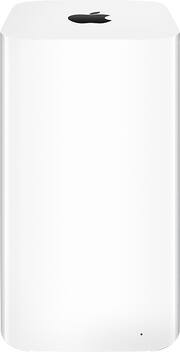
Apple - AirPort Extreme Base Station - White

Model: ME918LL/A
SKU: 6943097
This item is no longer available in new condition. See similar items below
  • Key Specs
    • Wi-Fi Speed: 1300 gigabits per second (The maximum rate at which data is transferred between a network device and wireless router.)
    • Wireless Standard: AC, N (The wireless networking protocol used by the device. Each iteration of the protocol is based on the 802.11 standard developed by the Institute of Electrical and Electronics Engineers (IEEE) Standards Association. Denoted by letters following 802.11 (802.11a, 802.11ac, etc.), each version, published in alphabetical order, encompasses all previous versions.)
    • Form Factor: Plug-in (The size, arrangement, and physical configuration of the product.)
    • Band Technology: Dual (Refers to the number of frequency bands used to wirelessly transmit an internet signal. For example, dual-band devices may use one 2.4 and one 5 GHz band, while tri-band devices may use one 2.4 and two 5 GHz bands. Multiple bands also provide more flexibility for designating connected devices to specific band use.)
    • Frequency Band: 5.0 GHz (Bands may be grouped into categories such as low- and high-band VHF (Very High Frequency), low- and high-band UHF (Ultra High Frequency), or certain frequency channels (measured in MHz or GHz). Generally, higher frequencies transmit information faster but have shorter range than lower frequencies.)
    • Antenna Type: Internal
    • Number of LAN Ports: 1 (Number of devices able to be connected to the Local Area Network (LAN). LAN ports allow wired connections to other networking devices (wireless access points, range extenders, etc.) in order to share the internet connection received through a WAN port.)
  • General
    • Brand: Apple
    • Model Number: ME918LL/A
    • Product Name: AirPort Extreme Base Station
    • Color: White
  • Security
    • Security Features: Built-in firewall
    • Data Encryption: false
    • Encryption Type: Other (The security protocols or certification programs that protect the Wi-Fi network.)
    • Firewall Type: Other (The method the firewall uses to filter and process data to increase network security, primarily by blocking malicious traffic requests while allowing legitimate traffic through.)
  • Features
    • App Compatible: true (The product can be connected to a program or software application on a mobile device, which then receives collected data from the product.)
    • App Name: AirPort Utility APP
    • Auto Detecting: true
  • Ports
    • Number of WAN Ports: 1 (Number of devices able to be connected to the Wide Area Network (WAN). This type of port may simply be labeled "Internet," and it allows the device to share its internet connection with all devices connected to it via LAN ports.)
    • Port Type(s): RJ-45, USB (USB 2.0 connects external drives, gaming controllers, smartphones, MP3 players and other accessories.USB 3.0 transfers data faster than USB 2.0, but only when used with USB 3.0 devices.USB Type-C provides fast speeds and versatile power, featuring connectors with identical ends that plug in upside down or right side up. Adapters allow for video as well as backward compatibility.Thunderbolt provides ultra-high bandwidth for fast data transfer between devices featuring a Thunderbolt or MiniDisplayPort connection.HDMI allows you to connect a projector or display HD media on your HDTV or monitor.Media card slots allow you to transfer photos from your digital camera or camcorder.)
  • Compatibility
    • System Requirements: Mac with OS X 10.7.5 or later and AirPort Utility 6.3; iOS device with iOS 6 or later and AirPort Utility 1.3; Printing: Mac OS X 10.2.7 or later; PC with Windows 8, 7 SP1, Vista SP2 or XP SP3; Shared USB drive: Mac with OS X 10.4.8 or later; PC (The software that a product must have for it to be able to integrate with another product.)
    • Bluetooth Enabled: true (The device is capable of communicating with another device via Bluetooth, provided they are within the required range of each other. A Bluetooth-enabled device must also be the same Bluetooth version or higher than the accessory it is intended to pair with.)
  • Power
    • Power Source: Power over Ethernet (PoE)
  • Dimensions
    • Product Height: 6.6 inches (The out of box height of the item. Height is measured as the vertical distance from the bottom of the item to the top as it would be primarily used or placed.)
    • Product Length: 3.85 inches (The out of box length of the item. Length is measured as the longest dimension of the item.)
    • Product Width: 3.85 inches (The out of box width of the item. Width is measured as the horizontal distance from one side of the item to the other as it would be primarily used or placed.)
    • Product Weight: 2.08 pounds (The out of box weight of the item.)
  • Warranty
    • Warranty - Parts: 1 year limited
    • Warranty - Labor: 1 year limited
  • Other
    • UPC: 885909746040

The intelligent, easy-to-use AirPort Extreme Base Station with simultaneous dual-band support is the perfect wireless access point for home, school or office. It offers next-generation 802.11ac Wi-Fi technology and delivers high-performance wireless access for Mac computers, PCs and Wi-Fi devices such as iPhone®, iPad®, iPod® touch and Apple TV.

  • Ultrafast 802.11ac Wi-Fi: With 802.11ac technology and a powerful beamforming antenna array, AirPort Extreme gives you up to 3x faster Wi-Fi and a stronger, clearer signal.
  • Designed with performance in mind: With the antennas at the top of the elevated design, AirPort Extreme now has a higher platform for dispersing the signal. We also increased the number of antennas.
  • Easy setup for iOS and OS X: Connect your DSL or cable modem to AirPort Extreme and use the built-in setup assistant to create your new wireless network in just a few taps from your iPhone, iPad or iPod touch.
  • Share your hard drive or printer: AirPort Extreme can turn any external USB hard drive into a secure drive you can share across your Wi-Fi network.
  • Compatibility and security: Any Wi-Fi device you have will work with AirPort Extreme. That's because it's compatible with devices using the 802.11a, 802.11b, 802.11g, 802.11n, and 802.11ac specifications.
  • Ultrafast 802.11ac Wi-Fi: With 802.11ac technology and a powerful beamforming antenna array, AirPort Extreme gives you up to 3x faster Wi-Fi and a stronger, clearer signal.
  • Designed with performance in mind: With the antennas at the top of the elevated design, AirPort Extreme now has a higher platform for dispersing the signal. We also increased the number of antennas.
  • Easy setup for iOS and OS X: Connect your DSL or cable modem to AirPort Extreme and use the built-in setup assistant to create your new wireless network in just a few taps from your iPhone, iPad or iPod touch.
  • Share your hard drive or printer: AirPort Extreme can turn any external USB hard drive into a secure drive you can share across your Wi-Fi network.
  • Compatibility and security: Any Wi-Fi device you have will work with AirPort Extreme. That's because it's compatible with devices using the 802.11a, 802.11b, 802.11g, 802.11n, and 802.11ac specifications.
Whats Included
  • AirPort Extreme Base Station
  • Owner's manual
  • Power cord
  • AirPort Extreme Base Station
  • Owner's manual
  • Power cord

Q: I have an older AirPort Extreme. Is the newer model more powerful. The old one doesn’t cover the whole house.

A: Apple claims that the newer model boasts multiple internal antennas and offers 3X the performance of earlier access pointers and routers (802.11ac vs. n). I am not in a position to benchmark it speedwise, but I live in a large (4500 sq.ft) concrete block construction house with difficult WiFi coverage, and with the new Extreme I get strong signal in almost every room - even the garage.

Q: Will it replace ATT router?

A: Yes, I used it to replace my AT&T-installed wifi router. Had to convince the AT&T technician to disable the AT&T wifi router who said, “This may not work” and replace theirs with this AirPort Extreme, but my wifi range is much better and it works great. All the vendors want to sell you their router, but for AT&T, you don’t need it — you can use this Apple AirPort Extreme just as well. Before AT&T, I had Cox Internet and used this same AirPort Extreme connected to the Cox modem as my wifi router.

Q: Do you need at least one apple device to set up the router, or can you set it up with a windows or android device all the same?

A: no - you do not need any other apple products- you can set it up with windows -

Q: How many Ethernet ports are there?

A: There’s 1 in and 3 out.

Q: What is the approx square footage that one device will cover? How may devices will be needed to cover a 4000sp from home ?

A: I just solved that problem and have some advice! I used the AirPort Extreme in my last house 2600 sq ft with no issues, recently I bought a new house, with 4100 sq ft on half an acre with 2 stories I noticed the AirPort Extreme was not running like before. The connections would drop often and the signal was weak in numerous areas, I added a second AirPort Extreme as a range extender with no real improvement unfortunately. I decided to upgrad to a mesh system since Apple discontinued the AirPort Extreme, first I went with the Linksys Velop (3 node) system. I was immediately disappointed as the speed actually slowed down compared to the AirPort Extreme by almost half! I researched some more and exchanged it for the Eeros system (3 access points) and have been blown away! The speed almost doubled across the house, no more dropped signals and it is extremely easy to manage. My Ring doorbell has never responded so quick, my security camera load in a fraction of the time and the smart switches/plugs do not drop from the network. I can stream 4K on 2 separate TV’s while the kids and wife are online without any issues. I have over 50 smart home devices and they all respond quicker then ever before. I would highly recommend the Eeros system or at least a mesh system for a large house. I would highly recommend the Eeros system or at least a mesh system for a large house. Good Luck, I hope this saves you a headache or two!

Q: will this router work with my windows computers

A: It works with my Windows laptop, my Android tablet, and my I phone.

Q: Does this help extend the wifi for non-apple electronics? Our home is mixed with Apple and other brands of electronics and i want to make sure it works with both. Thanks!

A: It will work as a WiFi router for any WiFi device regardless of brand. If you are Looking to extend an existing WiFi network it must be an Apple airport or you cannot extend it.

Q: Are there updates available for my Airport Extreme Router which I purchased 8/18/16? Does the Router affect the wifi speed on my PC, Mac laptop and Apple phone?

A: There are updates available. From an iPhone install the app for this product and you can start the update from there.