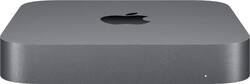
Apple - Mac mini - Intel Core i3 - 8GB Memory - 128GB Solid-State Drive - Space Gray
- Key Specs
- Processor Model: Intel Core 5 Series 1 (Your computer's processor is like its brain. Working in combination with system memory, the power of the processor determines the complexity of software you can run, how many programs you can have open at the same time, and how fast those programs will run. Most computers feature an AMD, Intel or Snapdragon processor.)
- Storage Type: SSD
- Total Storage Capacity: 128 gigabytes
- System Memory (RAM): 64 gigabytes (Random-access memory (RAM) is a computing device's short-term data storage, which allows active information to be accessed quickly. The size and type of RAM determines how efficiently the device can handle large amounts of information at one time. For example, gaming or video editing requires more RAM for optimal performance.)
- Graphics Type: Integrated (Dedicated graphics uses a separate graphics card for processing video images. Because it does not use memory from the system's RAM, there is no extra burden on the CPU and graphics are processed more efficiently. Integrated graphics shares system RAM to process video images.)
- Graphics: Intel HD Graphics 630 (Often referred to as a "graphics processing unit" (GPU), this device is responsible for displaying image content and decoding/encoding video content in programs and games.)
- General
- Brand: Apple
- Model Number: MRTR2LL/A
- Product Name: Mac mini - Intel Core i3 - 8GB Memory - 128GB Solid-State Drive
- Color: Space Gray
- Year of Release: 2018
- Processor
- Processor Brand: Intel
- Processor Model: Intel Core 5 Series 1 (Your computer's processor is like its brain. Working in combination with system memory, the power of the processor determines the complexity of software you can run, how many programs you can have open at the same time, and how fast those programs will run. Most computers feature an AMD, Intel or Snapdragon processor.)
- Processor Model Number: Not provided
- CPU Base Clock Frequency: 3.6 gigahertz (Actual central processing unit (CPU) speed may vary by device configuration and design. The average rate at which the processor is able to execute tasks under normal operating conditions as asserted by the manufacturer.)
- Storage
- Storage Type: SSD
- Total Storage Capacity: 128 gigabytes
- Solid State Drive Capacity: 128 gigabytes (The amount of data that can be stored on the device's solid state drive (SSD). SSD is a flash-based storage with faster speeds than a hard disk drive (HDD).)
- Memory
- System Memory (RAM): 64 gigabytes (Random-access memory (RAM) is a computing device's short-term data storage, which allows active information to be accessed quickly. The size and type of RAM determines how efficiently the device can handle large amounts of information at one time. For example, gaming or video editing requires more RAM for optimal performance.)
- Type of Memory (RAM): DDR4 (Each type of RAM delivers a different level of speed, bandwidth, energy efficiency and performance.)
- System Memory RAM Expandable To: 8 gigabytes (Adding more random-access memory (RAM) to a computer speeds up performance and improves efficiency. Upgrades to memory are limited by the number of expansion slots for additional RAM and existing RAM installed on the device.)
- Graphics
- Graphics Type: Integrated (Dedicated graphics uses a separate graphics card for processing video images. Because it does not use memory from the system's RAM, there is no extra burden on the CPU and graphics are processed more efficiently. Integrated graphics shares system RAM to process video images.)
- GPU Brand: Intel
- Graphics: Intel HD Graphics 630 (Often referred to as a "graphics processing unit" (GPU), this device is responsible for displaying image content and decoding/encoding video content in programs and games.)
- Compatibility
- Operating System: Mac OS (The operating system manages all software and hardware, including files, memory and connected devices. Most importantly, it lets you interact with your device and your programs in a visual way; otherwise, you'd be typing computer code to get anything done.)
- Connectivity
- Display Connector(s): 4 x Thunderbolt 3 (The number and type of connectors used to connect to an external display.)
- Number of HDMI Outputs (Total): 0
- Number of DisplayPort Outputs (Total): 0
- Number of Thunderbolt Ports (Total): 4
- USB Ports: 2 x USB-A 3.0 (The number and type of USB ports the product has.)
- Number of USB Ports (Total): 2
- Number Of Ethernet Ports: 1
- Expansion
- Number Of External 3.5" Expansion Bays: 1
- Features
- Size: Mini
- Dimensions
- Product Height: 7.7 inches (The out of box height of the item. Height is measured as the vertical distance from the bottom of the item to the top as it would be primarily used or placed.)
- Product Width: 2.9 inches (The out of box width of the item. Width is measured as the horizontal distance from one side of the item to the other as it would be primarily used or placed.)
- Product Depth: 8 inches (The out of box depth of the item. Depth is measured as the distance from the front of the item to the back as it would be primarily used or placed.)
- Product Weight: 4 pounds (The out of box weight of the item.)
- Certifications Listings & Approvals
- ENERGY STAR Certified: false (Devices carrying the ENERGY STAR service mark, such as computer products and peripherals, kitchen appliances, and other products, generally use 20% to 30% less energy than required by federal standards.)
- EPEAT Qualified: true (The Electronic Product Environmental Assessment Tool (EPEAT) was designed to provide an environmental assessment tool for purchasers. In order to qualify for EPEAT, a product must meet all 23 required criteria.)
- EPEAT Level: Gold (The Electronic Product Environmental Assessment Tool (EPEAT) was designed to provide an environmental assessment tool for purchasers. In order to qualify for EPEAT, a product must meet all 23 required criteria. Products are rated Bronze, Silver or Gold based on how many of 28 optional criteria they meet (below 50%, 50%, 75%).)
- Included
- Optical Drive Type: None (An optical disk drive (ODD) uses a laser light to read data from or write data to an optical disc. These discs include CDs, DVDs, and Blu-ray Discs. This allows you to play music or watch movies using prerecorded discs.)
- Keyboard Included: false
- Mouse Included: false
- Warranty
- Warranty - Parts: 1 year
- Warranty - Labor: 1 year
- Other
- UPC: 190198755247
It's a huge update to Mac mini, ever. Eighth-generation quad-core processor. Faster 2666MHz DDR4 memory. A variety of new ports, including Thunderbolt 3, HDMI 2.0, and available 10Gb Ethernet.¹ And blazing-fast all-flash storage so you can load giant files and launch apps faster than ever.² The re-engineered Mac mini offers perfect performing. Ready for the desktop. And beyond.
Whats Included
- Apple Mac mini - Intel Core i3 - 8GB Memory - 128GB Solid-State Drive
- Power cord
A: This is my 3rd Mac Mini. My first was a PowerPC version from early 2006. I ran into the obsolescence issue with the switch to Intel chips but was able to continue to use the machine and its legacy software until 2017, although I did not have it connected to the internet after 2011. Obsolescence can be a gradual thing, but it catches up to all of us.
A: I own the same late model 2012 Mac mini, i5 2.5GHz. If the new Mac mini multi-core scores are between about 3 and 5 times higher than the 2012 Mac Mini 2.5GHz i5, that would even put it faster than my Dell XPS 3.6GHz i7. That would be nice! William, do you recommend the i3 or the i5? The research I have done so far indicates the i3 and i5 single core performance is about the same. However the multi-core performance of the i5 is at least 20% higher than the i3. What do you think?
Q: Can one upgrade the memory, or is the unit unaccessible?
A: The RAM can be upgraded on this. The hard drive cannot.
Q: Can I hook this up to the back of my tv An us my tv as an monitor
A: You can if your Television uses HDMI. One thing to note, depending on your TV, you may need to go into system preferences and adjust the UNDERSCAN. Otherwise the top bar may be "hidden."
Q: Would the lowest tech specs of this support Adobe Photoshop?
A: I have the smallest older version of the new one and I have Adobe Photoshop on it with no problems. It runs beautifully.
A: undefined
Q: Can I install Word. Will it be compatible with my iPhone email programs?
A: You can install Word if you already own it. I wouldn’t buy it though. Mac computers come with an app called Pages which is a great document editor/publisher. It can open and save Word documents (you may have some formatting issues) and PDF. Another alternative that I use is Google Docs. It is also a great free alternative. I use Microsoft Word at work because we use PCs. But all out computers at home are Macs and none of them have Microsoft on it. Is there something specific you’re trying to do? If you are just drafting e-mails you can do that with any text editor such as notepad. Sometimes I draft emails on my MacBook email app and then send it to myself at work. Then I continue editing there.
Q: Can I run Logic pro X on this?
A: Yes. I’m running it right now. Sound editing is not as resource hungry as video editing, which I’m doing with this too, using Final Cut Pro X and Camtasia. Of course the faster your processor the faster it will be to publish your final product. Since we’re only using it for home, we’re rarely in a rush.
People also viewed
 $5,422.13The price was $6,170.73