60th Anniversary SaleEnds Sunday. Exclusions, terms and conditions apply.Shop now

Skip to contentGo to Product Search
Main Content

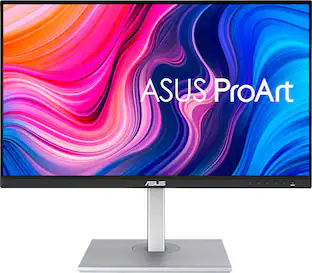
ASUS - ProArt 27" 5K IPS Professional Monitor with HDR (DisplayPort, HDMI) - Black

Model: PA27JCV
SKU: 12587529
Sold & shipped by

Customers are saying

Customers often highlight the exceptional color accuracy, noting it is superb right out of the box. They also appreciate its flexible connectivity, ample port count, high resolution, and adjustability. However, some customers find the speaker quality to be underwhelming and express a desire for a higher refresh rate.

Generated by AI based on customer reviews.

Highlights

Features
  • 27-inch 5K (5120 x 2880)

    LuxPixel AGLR display with IPS 178° wide viewing angle panel

  • International Color Standard

    99% DCI-P3 and 100% sRGB wide color gamut

  • Calman Verified

    Factory calibrated for excellent Delta E < 2 color accuracy

  • Extensive Connectivity

    DisplayPort over USB-C with 96W Power Delivery, DisplayPort, HDMI and USB hub

  • Light Sync Solution

    Ambient Light Sensor and Backlight Sensor for reliable color performance from the start

  • Built-in Auto KVM

    Allows for effortless switching between two connected laptops or PCs with a single keyboard and mouse

  • Ergonomic Design

    With tilt, swivel, pivot and height adjustments for a comfortable viewing experience

  • Green Sustainability

    Paper packaging and energy-efficient environmental standards

See all features
Specifications
  • Refresh Rate
    60Hz
    Maximum Resolution
    5120 x 2880 (5K)
    Response Time
    5 milliseconds
    Panel Type
    IPS
    Synchronization Technology
    Not Applicable
Sponsored

Reviews

Rating 4.5 out of 5 stars with 58 reviews

91% would recommend to a friend
Customers are sayingCustomers often highlight the exceptional color accuracy, noting it is superb right out of the box. They also appreciate its flexible connectivity, ample port count, high resolution, and adjustability. However, some customers find the speaker quality to be underwhelming and express a desire for a higher refresh rate.
This summary was generated by AI based on customer reviews.
  • Color Accuracy (42)
  • Connectivity (9)
  • Port Count (9)
  • Resolution (6)
  • Adjustability (4)
  • Speaker Quality (11)
  • Refresh Rate (6)

Customer Images

The vast majority of our reviews come from verified purchases. Reviews from customers may include My Best Buy members, employees, and Tech Insider Network members (as tagged). Select reviewers may receive discounted products, promotional considerations or entries into drawings for honest, helpful reviews.


  • Rated 5 out of 5 stars

    Mac Display? Absolutely.

    I was looking for a compatible external display for my iMac, that didn’t compromise the clarity you get with a Retina display. After 3 tries, I have finally found a monitor that gives Apple a run for its money, and saves you some. It is super close to the native colors of a Mac. I love it!!!

    This review is from ASUS - ProArt 27" 5K IPS Professional Monitor with HDR (DisplayPort, HDMI) - Black

    Posted by KayW

  • Rated 5 out of 5 stars

    Amazing 5K clarity and color reproduction

    This ASUS ProArt 5K 27" monitor is a beauty. As a content creator and home office user, I was blown away by the precise clarity and color detail provided by the 218 PPI pixel density. While I'm working on my projects the text is sharp, the images are detailed, and the color is accurate. The LuxPixel technology is a great way to minimize and reduce glare and reflection while I'm working on my projects. This also allows for a nice and wide 178 degree viewing angle. Calman Verified with factory calibration works really well for me right out of the box. Color critical photographers or videographers will appreciate the accuracy of the depth of color. The monitor is easy to use with minimal borders and an easy to use joystick button for menu navigation. The ProArt 5K will support HDR10 and DisplayHDR 500, which gives a nice wide dynamic range for all your HDR content. The display type is an LED display, with an IPS panel. The refresh rate is 60Hz, and it has a 5ms response time. In regards to the ports and plugs, there is USB-C with 96 watt power delivery which helps for data and video transmission. 1 DisplayPort 1.4 over USB-C, 1 HDMI 2.1 (a cable is provided in the box), 3 USB-A 3.2, 1 USB-C, 1 USB-C 3.2. There is also a headphone jack, but this also comes with built in speakers. The speakers are good and work adequately, but I prefer having an upgraded external speaker setup for my home office needs. Another nice feature is built in Auto KVM that allows for switching between 2 connected PC's with a single keyboard and mouse. This is great for multi-tasking especially when you're juggling different types of projects. I like the stable stand with a metallic silver base and neck as it securely keeps the monitor in place. The monitor will tilt, swivel, and pivot from portrait to landscape mode. The height adjustable neck is very easy to move up and down for your needs. The backlight sensor and ambient light sensor can be helpful to keep pace with the light conditions in your working space. And another nice feature that I have appreciated is the TUV Eye Care that keeps a flicker free and ultra low blue light technology on the monitor screen. Overall, I really like this monitor for its true niche of content creation and photo/video editing. I think artists will appreciate the colors and precision, but I honestly feel that anyone can benefit from a screen as sharp and precise as this 5K ProArt monitor by ASUS.

    This review is from ASUS - ProArt 27" 5K IPS Professional Monitor with HDR (DisplayPort, HDMI) - Black

    Posted by JKinSYR

  • Rated 4 out of 5 stars

    Configure ASUS ProArt 27" 5K Monitor to Your Needs

    The ASUS ProArt 27-inch 5K IPS LED Professional Monitor is just that—a large, flat 5K monitor that is an excellent display for content creators, graphic designers, photographers, and others who want a configurable high-definition display. Unboxing the ASUS PROArt 27-inch Monitor was quick. It ships in a sturdy tuck-flap box with a molded recycled paper insert that holds the parts in place. The monitor screen and adjustable stand components ship in protective plastic envelopes. This monitor is fairly intuitive to set up. You can use the stylish metal stand or use the VESA screen mount holes on the back. The stand has three parts; the base, the adjustable column, and the plate that fits into the back of the monitor. No tools are required to assemble the stand and attach it to the monitor. Use the included HDMI or USB-C cable to connect the monitor to your computer, or use your own cable with the DisplayPort. Plug the power cord into a standard A/C outlet on your power strip, and the white indicator light glows. Use the on-screen menu to configure the ASUS Pro Art Monitor's settings. Use the joystick on the bottom right corner of the monitor's frame to move through the menu. Choose the source, either HDMI or USB-C; the color profile, and much more. I tested the monitor with the provided USB-C cable and The Adobe RGB setting on a MacBook Pro 16-inch laptop. Though this monitor has a native resolution of 5120 x 2880 pixels, the actual resolution is lower if you want to mirror your laptop (or have the laptop mirror the ASUS 27-inch ProArt Display. Pros: • The Monitor has a native resolution of 5120 X 2880 pixels, or 5K. • The User can configure (adjust) the ProArt monitor from eight different presets, and configure palette, brightness, and more settings for the chosen preset. This allows flexibility for content creators, graphic designers, photographers, and others who require a high-res monitor. • The User can adjust the monitor height, tilt, and swivel. The monitor also pivots ±90 degrees for Portrait mode. • A small bezel on three sides and a larger bezel on the bottom make the monitor appear nearly frameless. • The high resolution allows more on-screen content, such as two large windows or two+ pages of content side-by side. • The monitor has a choice of many different ports on the back of the monitor; three options for connecting the display; multiple USB ports including one powered USB-C where you can connect other devices; an earphone jack. Cons: • The setup instructions consisted of diagrams only, and the diagrams were very small. For a more detailed explanation of the monitor's features and setup, you must download the User Manual from ASUS. • The Joystick and controls for the onscreen menu are nearly invisible; I found the joystick by accident. When you press the joystick, icons appear onscreen above each of the monitor's control buttons. • The onscreen menu apparently works only with the joystick and control buttons; it would be much easier if the User could also adjust settings using a mouse or other input device with dedicated ASUS software. • The User may need to reduce the resolution for readability on the ASUS ProArt Monitor and/or the attached computer's screen. Overall Assessment: The ASUS ProArt 5K IPS LED Professional Monitor is a powerful tool for content creators, graphic designers, photographers, and others who need a high-resolution display. It is highly configurable to meet the needs of different types of users. It has a sturdy, adjustable stand with height, tilt, swivel and pivot capabilities. I can envision using this monitor to stream content and screen movies in a small space. I suggest that you download and read the User Manual to understand all of its many capabilities.

    This review is from ASUS - ProArt 27" 5K IPS Professional Monitor with HDR (DisplayPort, HDMI) - Black

    Posted by iconoclast

  • Rated 1 out of 5 stars

    Bought 2 - May 2025 - Both died Jan 26

    Got vertical lines (that's how it starts, then the monitor just dies) in month 8. Stay away there's an obvious design/manufacturing problem. Nice monitor when it did work but why gamble with your money if the product can't last a year. Both monitors died within 3 weeks of each other. Good news is that they have a 3 yr warranty, bad news is that you have to wait a month before you get the replacement.

    This review is from ASUS - ProArt 27" 5K IPS Professional Monitor with HDR (DisplayPort, HDMI) - Black

    Posted by JohnK

  • Rated 5 out of 5 stars

    Stunning 5K Graphics at an affordable price

    PRODUCT ASUS - ProArt 27" 5K IPS LED Professional Monitor Model: PA27JCV SUMMARY REVIEW I’m transitioning from a 32 inch monitor for my everyday work from home monitor to this ASUS ProArt 27 inch 5K monitor. I was worried that the size would be a letdown, but honestly it feels more natural (the 27 inch) and the 5K real estate is amazing. I was blown away by the color and clarity and crispness of everything. IMPRESSIONS The build quality is great for this price point. It is not 100% metal, who cares? I don’t need my monitor to look like a hot rod on the outside if it performs like one on the inside, which it does. Setup/assembly was easy, with no issues. The parts all felt strong and good quality. Out of the box the monitor is “pre-calibrated” and of course you can fine tune it to your environment and usage. Disclaimer, I’m not a graphics artist, but the colors and everything seemed spot on out of the box, rich and vibrant. The monitor looked great at any angle and was not overly glossy or reflective. FEATURES For me, the winning feature is included USB-C (display port) connectivity which I prefer over HDMI and traditional Display Port. I also like that ASUS still included the “legacy” ports for added flexibility and allowing for connecting more than one system. PRO’s - Video Ports (HDMI, Display Port, USB-C) - USB Hub (3 Ports Type A, Plus 1 Port USB-C) - Buttons on the front for easy access / fine tuning - KVM capability (2 systems, 1 monitor) - Earphone Jack and Built in Speakers - Rotating Stand for Portrait Mode - HDR 500 (very bright) with ambient light sensor to automatically dim - Built in Power Supply (no bricks) - Dedicated On / Off Power Switch The speakers are not going to win any awards for audio quality, but I already have my own dedicated sound bar, which I prefer anyway. It is nice they are there in a pinch. I like the fact that the controls are on the front instead of behind the monitor. This makes it much easier when you complete the initial setup and fine tune settings. NOTE: This is not a high-speed gaming monitor, it only supports 60p and 5ms. MY USE In general, this is my everyday monitor for boring work stuff and the added 5K real estate is a big help. However, every so often, I need to process and edit large 4K video files and 25MP photos. With the built in KVM I can just fire up my graphics editing computer and be off and running with the 5K monitor. It looks fantastic! RECOMMENDATION This is a huge step up in quality over my older but similarly priced 4K monitor. If you are thinking about 4K take a closer look at 5K. I think you will be very impressed. I recommend this monitor for all professional uses.

    This review is from ASUS - ProArt 27" 5K IPS Professional Monitor with HDR (DisplayPort, HDMI) - Black

    Posted by TheOffice1234

From the Manufacturer

Compare similar products

ASUS - ProArt 27" 5K IPS Professional Monitor with HDR (DisplayPort, HDMI) - Black
4.5(58)

ProArt Display PA27JCV is a 27-inch 5K HDR monitor designed for professional content creators. This Calman Verified display boasts a wide gamut with 99% DCI-P3, 100% sRGB and 95% Adobe RGB coverage, and it’s factory calibrated to Delta E<2 for exceptional color accuracy. Built-in Auto KVM allows for convenient, effortless switching between two connected laptops or PCs using a single keyboard and mouse. To ensure brightness and color temperature accuracy, ambient light and backlight sensors automatically adjust visual settings. Plus, a USB-C port offers DisplayPort support and enables superfast data transfers and 96-watt power delivery via a single cable.
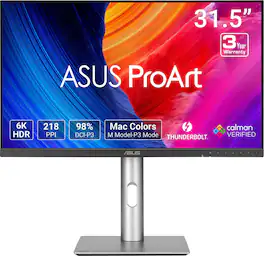
ASUS - ProArt 32" 6K IPS Professional Monitor with HDR 10 (DisplayPort, HDMI) - Black
4.5(19)

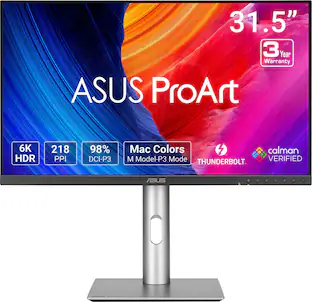
ASUS ProArt Display PA32QCV is a 31.5-inch 6K HDR monitor designed for professional content creators. This Calman Verified display boasts a wide gamut with 98% DCI-P3 coverage and Delta E<2 color accuracy. The ProArt Preset feature now includes the new M Model-P3 mode to deliver seamless and consistent colors when working with MacBook devices. Dual Thunderbolt™ 4 ports support daisy-chaining and enable superfast data transfers and 96-watt power delivery via a single cable.

Apple - Studio Display - Standard glass - Tilt-adjustable stand - Silver

Introducing Studio Display. An immersive 27-inch 5K Retina display* with a 12MP camera with Center Stage, studio-quality mics, and six-speaker sound system. Pairs beautifully with any Mac.

ASUS - ProArt 27" 4K IPS Professional Monitor with HDR (DisplayPort, HDMI, USB-C) - Black

4 times the resolution of full HD 1080p with HDR for stunning details and image quality. IPS technology is optimized for the finest image quality with 178° wide-viewing-angle.

Pros for ASUS - ProArt 27" 5K IPS Professional Monitor with HDR (DisplayPort, HDMI) - Black
Color Accuracy, Connectivity, Resolution, Port Count, AdjustabilityDisplay Quality, ResolutionDisplay Quality, Resolution, Speakers, DesignColor Accuracy, Resolution, Connectivity, USB-C, Build Quality
Cons for ASUS - ProArt 27" 5K IPS Professional Monitor with HDR (DisplayPort, HDMI) - Black
Refresh Rate, Speaker QualityThere were no cons for this productRefresh Rate, Price, Power Cord, Compatibility, ConnectivityRefresh Rate, Speakers

Specs

Questions & Answers
  • What type of warranty does it have?

    The ASUS ProArt PA27JCV Professional Monitor comes with a 3‑year manufacturer warranty.

    Answered by ASUS Answers
    ASUS Answers response
  • is this product returnable with a members plus for 60 days?

    The ASUS PA27JCV monitor should be returnable within 60 days under My Best Buy Plus, but to be certain, please contact Best Buy support at 1‑888‑237‑8289 to confirm your specific purchase details.

    Answered by ASUS Answers
    ASUS Answers response
  • What is the Adobe RGB color space coverage.... 80%, 95%, 100%, etc?

    The ASUS ProArt Display PA27JCV provides 95% Adobe RGB color space coverage.

    Answered by ASUS Answers
    ASUS Answers response
  • What is the response time of this monitor?

    The response time is 5 milliseconds.

    This question and answer was generated by AI based on customer and product data.
  • What is the resolution of this monitor?

    The monitor has a 5K resolution (5120 x 2880).

    This question and answer was generated by AI based on customer and product data.
Ask a question
No content

Customers often buy these together

Sponsored

Finance Options

My Best Buy® Credit Card
Choose a benefit:Or
Buy Now, Pay Later
Lease to own

Finance Options

My Best Buy® Credit Card
Choose a benefit:Or
Buy Now, Pay Later
Lease to own