Black Friday is hereNew Doorbusters added. Ends 11/29.Shop now

Main Content

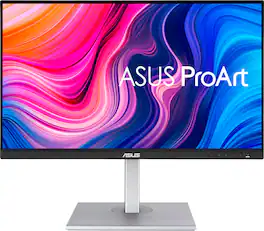
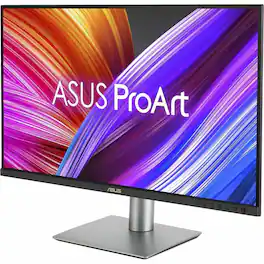
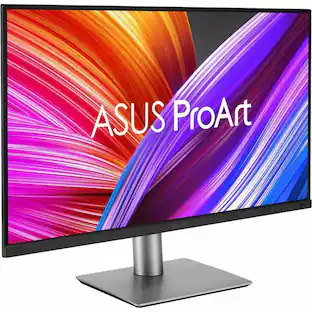
ASUS - ProArt 27" 4K IPS Professional Monitor with HDR (DisplayPort, HDMI, USB-C) - Black

Model: PA279CV
SKU: 6450748
$399.99
Save $80
Comp. Value: $399.99
or
$26.67/mo.
suggested payments with12-Month Financing
Show me how
Finance OptionsView your offers
Special OffersOn related products
Standard Geek Squad Protection
Availability
Fulfillment Options
Order now for pickup on Thu, Dec 4 at
Sold by Best Buy

More Buying Options

Highlights

  • Key Specs
    • Refresh Rate: 60Hz (The number of frames per second the device can produce natively without enhancement. Higher rates help produce smooth, seamless pictures.)
    • Maximum Resolution: 3840 x 2160 (Maximum resolution refers to the highest number of pixels that a screen can process and display. Higher resolution signals produce more detailed images.)
    • Response Time: 5 milliseconds (The speed at which pixels can change colors is called response time. It is measured in milliseconds (ms).)
    • Panel Type: IPS (Technology that affects response time and image quality.)
    • Synchronization Technology: Not Applicable (Generally, these technologies allow syncing between a computer/console game's frame rate and the device's refresh rate for a smoother display without tearing.)
    • Screen Size: 27 inches (Size of the screen, measured diagonally from corner to corner.)
    • Display Connector(s): 1 x DisplayPort 1.2, 2 x HDMI 2.0, Display connection via USB port (The number and type of connectors used to connect to an external display.)
  • General
    • Brand: ASUS
    • Model Number: PA279CV
    • Product Name: ProArt 27" 4K IPS Professional Monitor with HDR (DisplayPort, HDMI, USB-C)
    • Color: Black
    • Operating System Compatibility: Windows, Mac, Chrome, Linux
  • Display
    • Refresh Rate: 60Hz (The number of frames per second the device can produce natively without enhancement. Higher rates help produce smooth, seamless pictures.)
    • Maximum Resolution: 3840 x 2160 (Maximum resolution refers to the highest number of pixels that a screen can process and display. Higher resolution signals produce more detailed images.)
    • Contrast Ratio: 1000:1 (Measured difference between a displayed image's brightest whites and darkest blacks. The larger the first number, the more detail and color that can be displayed.)
    • Response Time: 5 milliseconds (The speed at which pixels can change colors is called response time. It is measured in milliseconds (ms).)
    • Display Type: LED
    • Panel Type: IPS (Technology that affects response time and image quality.)
    • Synchronization Technology: Not Applicable (Generally, these technologies allow syncing between a computer/console game's frame rate and the device's refresh rate for a smoother display without tearing.)
    • Aspect Ratio: 16:9 (The measurement of the width of a screen compared to the height of a screen, expressed as a ratio.)
    • Curved Screen: false
    • Brightness: 350 candela per square meter (A measure of the total light output.)
    • Screen Size: 27 inches (Size of the screen, measured diagonally from corner to corner.)
    • High Dynamic Range (HDR): true (An HDR-compatible 4K TV or other HDR-compatible product displays HDR video content when it's available from sources like 4K Ultra HD Blu-ray Discs and 4K streaming services.)
    • High Dynamic Range Format: HDR 10 (There are a few HDR formats that tell the TV or other HDR-compatible product how to best utilize its capabilities to display HDR content. HDR technology can support one or multiple formats, each with various benefits to picture quality.)
    • Horizontal Viewing Angle: 178 degrees (The maximum angle at which the display can be viewed with acceptable visual performance from either side.)
    • Vertical Viewing Angle: 178 degrees (The maximum angle at which the display can be viewed with acceptable visual performance from above or below.)
    • On-Screen Display Languages: English (The available language options for displayed text.)
    • Display Surface: Anti-glare
    • Color Gamut (Standard RGB): 100 percent
  • Connectivity
    • Number of DisplayPort Inputs (Total): 1
    • Number of HDMI Inputs (Total): 2
    • Display Connector(s): 1 x DisplayPort 1.2, 2 x HDMI 2.0, Display connection via USB port (The number and type of connectors used to connect to an external display.)
    • Number of USB Ports (Total): 4
    • USB Ports: 4 x USB-A 3.2 (The number and type of USB ports the product has.)
    • Headphone Jack: true (The device features an interface that allows for the connection of headphones.)
  • Compatibility
    • Wall Mountable: true (The product is able to be secured to a wall. Some products are designed ready to mount, while others may require additional hardware/accessories for installation.)
    • VESA Wall Mount Standard: 100mm x 100mm (VESA wall mount standards refer to the spacing of screw holes built into a TV in order to fit with standard TV wall mounts. These standards are implemented into most TVs and monitors.)
  • Features
    • Tiltable: true
    • Adjustable Stand Height: true
    • Anti-Glare: true (Product has features, such as a matte finish, that reduce the likelihood for screen glare.)
    • Eye Relief Features: Anti-glare, Flicker free, Low blue light
    • Built-In Webcam: false
    • Integrated Speaker(s): true
  • Dimensions
    • Product Height With Stand: 20.61 inches
    • Product Height Without Stand: 14.56 inches
    • Product Width: 24.17 inches (The out of box width of the item. Width is measured as the horizontal distance from one side of the item to the other as it would be primarily used or placed.)
    • Product Depth (With Stand): 8.97 inches
    • Product Depth Without Stand: 2.36 inches
    • Product Weight: 18.96 pounds (The out of box weight of the item.)
    • Stand Included: true
  • Power
    • Power Consumption: 32 watts
    • Power Saving/Off Mode: 0.5 watts (This mode will turn the display and/or the device off, or into a standby mode, after a preset length of time with no activity to conserve power.)
  • Certifications Listings & Approvals
    • ENERGY STAR Certified: true (Devices carrying the ENERGY STAR service mark, such as computer products and peripherals, kitchen appliances, and other products, generally use 20% to 30% less energy than required by federal standards.)
    • EPEAT Qualified: false (The Electronic Product Environmental Assessment Tool (EPEAT) was designed to provide an environmental assessment tool for purchasers. In order to qualify for EPEAT, a product must meet all 23 required criteria.)
  • Warranty
    • Warranty - Parts: 3 years
    • Warranty - Labor: 3 years
  • Other
    • UPC: 192876853214

4 times the resolution of full HD 1080p with HDR for stunning details and image quality. IPS technology is optimized for the finest image quality with 178° wide-viewing-angle.

  • 4K Resolution: 4 times the resolution of full HD 1080p with HDR for stunning details and image quality
  • 5ms Response Time: Delivers ultra-fast performance, minimizing lag and time-to-screen
  • Frameless Design: Frameless panel design for an ideal multi display setup
  • 27" LED IPS Monitor: Efficient screen type uses leds to provide precise backlighting to pixels
  • USB Type-C Monitor: USB-C connection for displayport, USB data transmission and supports 65W power delivery
  • 178° Horizontal and 178° Vertical Viewing Angles: Allow you to view the screen from a wide range of angles
  • 2-Watt Built-In Speakers: Let you enjoy your favorite entertainment in stereo sound
  • 350cd/㎡Brightness: Produces bright images that can clearly be seen even in well-lit rooms
  • 4K Resolution: 4 times the resolution of full HD 1080p with HDR for stunning details and image quality
  • 5ms Response Time: Delivers ultra-fast performance, minimizing lag and time-to-screen
  • Frameless Design: Frameless panel design for an ideal multi display setup
  • 27" LED IPS Monitor: Efficient screen type uses leds to provide precise backlighting to pixels
  • USB Type-C Monitor: USB-C connection for displayport, USB data transmission and supports 65W power delivery
  • 178° Horizontal and 178° Vertical Viewing Angles: Allow you to view the screen from a wide range of angles
  • 2-Watt Built-In Speakers: Let you enjoy your favorite entertainment in stereo sound
  • 350cd/㎡Brightness: Produces bright images that can clearly be seen even in well-lit rooms
Whats Included
  • PA279CV Monitor
  • DisplayPort Cable
  • HDMI Cable
  • USB-C Cable
  • Power Cable
  • Calibration Report
  • Quick Start Guide
  • Warranty Card
  • PA279CV Monitor
  • DisplayPort Cable
  • HDMI Cable
  • USB-C Cable
  • Power Cable
  • Calibration Report
  • Quick Start Guide
  • Warranty Card

Q: What is the contrast ratio for the ASUS ProArt monitor?

A: The ASUS ProArt monitor has a dynamic contrast ratio of 100,000,000:1 and a typical contrast ratio of 1,000:1.

Q: Can this monitor be wall mounted?

A: No, this monitor cannot be wall mounted.

Q: What is the response time of this ASUS monitor?

A: This ASUS monitor has a response time of 5ms.

Q: What type of panel does this monitor use?

A: This monitor uses an IPS panel.

Q: Does this monitor have built-in speakers?

A: Yes, the monitor has 2-watt built-in speakers for stereo sound.

Q: What is the screen resolution of this monitor?

A: This monitor has a 4K resolution of 3840 x 2160.

Q: How many HDMI ports does this monitor have?

A: This monitor is equipped with 2 HDMI ports.

Q: Will it work with a MacBook Pro with the M1 processor?

A: Worked with my M1 Macbook Air, so i would say it should with your M1 Macbook Pro as they share the same hardware minus the active cooling fan. I was also able to connect my Macbook Air via the USB C cable & the monitor was able to charge my Macbook as well while outputting video. Hope this helps!

Sponsored

Compare similar products

ASUS - ProArt 27" 4K IPS Professional Monitor with HDR (DisplayPort, HDMI, USB-C) - Black

4 times the resolution of full HD 1080p with HDR for stunning details and image quality. IPS technology is optimized for the finest image quality with 178° wide-viewing-angle.

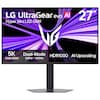
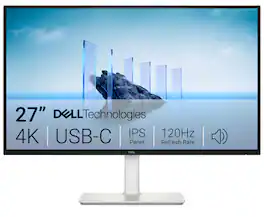
Dell - S2725QC 27" IPS LED 4K UHD 120Hz FreeSync Premium Monitor (USB-C, HDMI) - Ash White

Dell 27 Plus 4K USB-C Monitor - S2725QC. Whether you're watching movies or playing games, enjoy an immersive viewing experience with improved eye comfort on a 4-star certified monitor*.

ASUS - ZenScreen 27" 4K IPS Smart Monitor with HDR (DisplayPort, HDMI, USB-C) - Silver
4.6(10)

Level up your desktop setup with ZenScreen Smart MS27UC ― a 27-inch monitor that’s ideal for more than work. View images or play games on its stunning 4K HDR panel, or watch anything you want with Google TV and its library of over 10,000+ apps*. And if you’re a streamer, go live on all your favorite sites with ZenScreen Smart MS27UC’s multi-platform streaming app. Work hard, play harder, all on one sleek screen.

ASUS - ProArt 27" 5K IPS Professional Monitor with HDR (DisplayPort, HDMI) - Black
4.6(43)

ProArt Display PA27JCV is a 27-inch 5K HDR monitor designed for professional content creators. This Calman Verified display boasts a wide gamut with 99% DCI-P3, 100% sRGB and 95% Adobe RGB coverage, and it’s factory calibrated to Delta E<2 for exceptional color accuracy. Built-in Auto KVM allows for convenient, effortless switching between two connected laptops or PCs using a single keyboard and mouse. To ensure brightness and color temperature accuracy, ambient light and backlight sensors automatically adjust visual settings. Plus, a USB-C port offers DisplayPort support and enables superfast data transfers and 96-watt power delivery via a single cable.

Pros for ASUS - ProArt 27" 4K IPS Professional Monitor with HDR (DisplayPort, HDMI, USB-C) - Black
Color Accuracy, Resolution, Build Quality, Connectivity, USB-CConnectivity, Port Count, Screen Quality, Refresh Rate, Overall PerformanceSound QualityColor Accuracy, Build Quality, Connectivity, Port Count, Resolution
Cons for ASUS - ProArt 27" 4K IPS Professional Monitor with HDR (DisplayPort, HDMI, USB-C) - Black
Refresh Rate, SpeakersThere were no cons for this productThere were no cons for this productRefresh Rate

Specs

Reviews

Customers are saying

Customers are delighted by the ProArt 27" monitor's exceptional color accuracy, convenient USB-C connectivity, and sturdy build quality. The high resolution and HDR capabilities also contribute to a positive user experience. The built-in speakers are the only commonly reported drawback.

This summary was generated by AI based on customer reviews.

Customer Images

The vast majority of our reviews come from verified purchases. Reviews from customers may include My Best Buy members, employees, and Tech Insider Network members (as tagged). Select reviewers may receive discounted products, promotional considerations or entries into drawings for honest, helpful reviews.

  • Rated 5 out of 5 stars

    Worth it if you need accuracy

    I’ve done a ton of research on monitors over the last 2 months trying to find the right one. Please remember this is just my opinions. Situation: I am a graphic/web design student and manage a website professionally for a major organization, I do have some financial freedoms, this monitor is not cheap and not needed for students but a huge bonus to have. I originally was looking for an ultra-wide (45”+). However, if you need color/image accuracy, bigger is worse. There is no right size but 24-32” is a good range. I went with the 27” which is perfect for my design, I run a 2nd monitor for my other programs through my work computer, it’s not ideal for “non-technical designers”. If you want a big screen for multi-tasking and other stuff, don’t spend the money on this. If you are looking for color/image accuracy, I think you found what you are looking for. System: I am running a 2020 M1 Mac Air w/ 16g ram, connection is through the usb-c port (touch on that later). Projects completed: I recently finished up some work and have completed about 3 illustrator projects and 5 photoshop projects since my purchase. I was working off my 13” screen and an HDMI connected 27” Acer. When I opened a few projects I had been working, I ended up changing all of my colors that weren’t part of the style guides, man was it off on the Acer. This Asus has everything a designer needs. RGB and CYMK are both very accurate, the cymk is not perfect but, you are looking at print colors on a screen. 4K is beautiful. I did hook up my Xbox series s and it looks good but doesn’t have frame rate needed so meh there but like I said, this is a monitor for designers. Movies play great through both HDMI, DP, and USB-C. I am still trying to get used to the board in this monitor charging my computer and other devices, It acts as a connection hub. Basically, this monitor hit every need. However……. If you plan on using usb-c connections (recommended), you will need to be a little tech savvy. These monitors do not work from the manufacturer with Apple. They just don’t. But. You can go to the asus website, download the firmware and drivers, install the drivers through commander, then move firmware to a thumb drive, plug it in to a usb 2.0, hit a sequence of monitor buttons which opens the hardware up for service. You run the file on the thumb drive through the monitor and then boom, it works. I typed this all out because it seemed daunting, but I was a first time to by following the directions step by step. Now, if you are looking at a monitor like this, you probably have the capacity to do what I just described, it’s worth it and will work fine with HDMI/DP until you do this. It seems like a big deal and I wish they did this at the factory but I know more about my monitor and how to troubleshoot it locally as opposed to shipping it back, waiting, and possibly being denied. It’s a pain in the butt but trust me, it’s totally worth the 15min it took. Overall, I’m very satisfied and would recommend this to designers/artists (digital). I would not recommend it to anyone outside of that field. If you are a student on a budget, you’ll get there eventually and be just fine.

    Posted by BrianTief

  • Rated 5 out of 5 stars

    ASUS - ProArt 27" 4K IPS PA279CV

    I spent a long time choosing the right model. I spend more than 8 hours a day in front of a monitor. In my opinion, this monitor offers excellent value for the price. Great display quality, solid build quality. The height-adjustable stand is very convenient. It can rotate 90 degrees in both directions. My setup: MacBook connected via USB-C – very convenient since both video and charging work through a single cable. An older Dell running Linux connected via HDMI. When needed, I switch the video source – this is my main way of using it. The monitor also supports displaying two signals from two sources at the same time, but this feature isn’t very useful for me, so I don’t use it. One small downside: when rotating the monitor, the USB-C cable sometimes disconnects. I think this is a common issue with this type of connection since it doesn’t lock in place like DisplayPort. ___ Долго выбирал подходящую модель. Я много времени провожу за монитором от 8 часов и более в день. Мое мнение - очень хорошее соотношение цена/качество. Хорошее качество дисплея, хорошее качество сборки. Регулируемая по высоте подставка монитора - очень удобно. Поворачивается на 90 градусов в обе стороны. Мой вариант использования: - macbook подключен по usb-c - удобно что можно и видео синал и заряжаться по одному кабелю - старенький DELL с linux подключен по HDMI - Встроенный USB хаб для подключения переферии При необходимости меняю источник видео сигнала - основной вариант использования. Монитор позволяет выводить два сигнала из двух источников на один монитор, но этот вариант для меня не сильно применим, не использую. Из небольших минусов могу отметить что при повороте монитора иногда может отходить кабель USB-C, думаю что это общая проблема для данного подключения, так как оно жестко не фиксируется в отличии от displayport.

    Posted by KirillD

  • Rated 4 out of 5 stars

    Fantastic colors

    The biggest reason to purchase this is if you do photo and video editing and care about highly accurate color representstion, which this large beautiful monitor does very well. Its solidly built and sturdy. However at its price point I wonder if chosing something a couple hundred dollars less may be a better choice.

    Posted by MyBbYsAnCa

No content
Sponsored

Similar products from outside of Best Buy

sponsored

Finance Options

My Best Buy® Credit Card
Choose a benefit:
$26.67/mo.suggested payments with 12-Month Financing
Or
10% back in rewardson your first day of purchases when approved for the My Best Buy® Credit Card.
Buy Now, Pay Later
4 payments starting at $80.00
Lease to own
Apply today with no credit needed and enjoy flexible payment options.

Special Offers

Included with Purchase
Free 6-month security software: $29.99 value