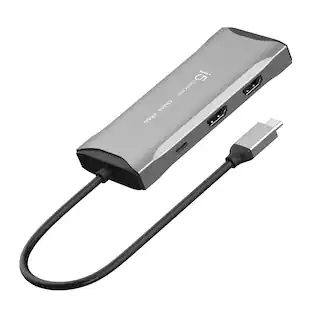
Insignia™ - USB-C to Dual 4K HDMI Adapter - Gray
Customers are saying
Customers find value in the USB-C to Dual 4K HDMI Adapter's ease of use, HDMI connectivity, compatibility, and quality. Many appreciate its simple setup and high-quality feel, as well as its ability to work with various devices. Some customers have reported issues with display extension, while others have noted no overheating during extended use. The adapter's compact size and support for dual monitors are also appreciated features.
USB-C to dual HDMI conversion
Extends or mirrors most USB-C devices to an HDMI-enabled display to help your work more efficiently.
Up to 4K resolution at 60 Hz
Displays true-to-life images.
Plug-and-play technology
Requires no additional drivers for an easy hookup.
Built-in braided cable
Adds long-lasting durability and flexible placement options.
System requirements
Works with Windows 11 & 10, MacOS 10.2, iPad OS 12, and Chrome OS 48 0 2564.82 and Android OS 8.0.
Brought to you by Best Buy
Insignia brings you affordable, dependable products with all the features you need.
- Cable Length0.38 feetConnector Type (End 1)USB-CGender (End 1)MaleConnector Type (End 2)HDMI Type AGender (End 2)FemaleConductor MaterialTinned copper
Reviews
Rating 4.5 out of 5 stars with 189 reviews
- Ease of use (34)
- HDMI (22)
- Compatibility (18)
- Quality (17)
- Connectivity (6)
- Display Extension (3)
- Heat (3)
Customer Images
The vast majority of our reviews come from verified purchases. Reviews from customers may include My Best Buy members, employees, and Tech Insider Network members (as tagged). Select reviewers may receive discounted products, promotional considerations or entries into drawings for honest, helpful reviews.
Compare similar products

This USB-C to HDMI adapter converts a USB-C output to dual HDMI inputs, letting you connect your computer to two HDMI-enabled TVs, monitors or projectors. Resolutions up to 4K Ultra HD deliver outstanding presentations or movie showings with crystal clear video quality. The compact design makes it easy to carry, and an attached braided cable gives you flexible placement options.

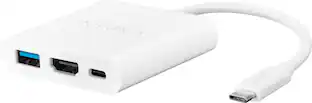
Expand the possibilities of your computer by adding ports that allow you to do more with it. The Insignia USB-C to HDMI Multiport Adapter adds an extra HDMI, USB-C and USB-A port to your USB-C device. With a 4K HDMI output, deliver outstanding presentations or movie showings with crystal clear video quality. A USB-C power passthrough allows you to charge an extra device while staying connected to a display, granting you more use out of a single adapter. The compact design makes it easy to carry and white color makes it easy to conceal. Increase the usefulness of your device by adding the ports you require today.

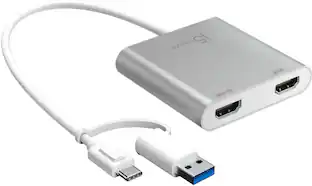
The USB-C to Dual HDMI Multi-Monitor Adapter acts as an external video card for your MacBook or Windows laptops. It allows you to add two additional displays through your USB-C port, boosting your productivity by giving you more screen space to work from. One of the HDMI ports can output resolutions up to 4K, while the other can output resolutions up to 2048 x 1152. Simply install the driver for the USB-C to Dual HDMI Multi-Monitor Adapter by plugging-in the adapter and then connect your monitors using HDMI cables for a dual-display workstation!

This USB 3.0 to Dual HDMI Multi-Monitor Adapter acts as an external video card for your MacBook or Windows computers. It allows you to add two additional displays through your USB 3.0 port, boosting your productivity by giving you more screen space to work from. One of the HDMI ports can output resolutions up to 4K, while the other can output resolutions up to 2048 x 1152. This is the perfect alternative to a costly video card. With this USB 3.0 Multi-Monitor Adapter, you can quickly install the driver with a simple USB plug-in. Afterwards, connect the device to your monitors using HDMI cables and then you will have a dual-display workstation!
| Pros for Insignia™ - USB-C to Dual 4K HDMI Adapter - Gray | |||
|---|---|---|---|
| Ease of use, HDMI, Compatibility, Quality, Connectivity | Compatibility, Ease of use, HDMI, Quality, Data Transfer | Ease of use, Overall Performance, Connectivity, HDMI, Price | Ease of use, Overall Performance, HDMI, Compatibility, Connectivity |
| Cons for Insignia™ - USB-C to Dual 4K HDMI Adapter - Gray | |||
| Heat, Display Extension | Resolution, Cord Length, Charging | Compatibility | Resolution, Heat, Price, Driver, Lag |
Specs
What would the refresh rate be if the resolution is 1080p on both hdmi outputs??
Answered by InsigniaCustomerSupportHi louiienation, we appreciate your inquiry! When using 1080p on both HDMI outputs via HDMI adapter, the refresh rate depends on the HDMI version and the capabilities of your display. Ensure that your monitor or TV supports the desired resolution and refresh rate for optimal resolution. With HDMI 2.0, you can achieve 240 Hz refresh rate at 1080p resolution. For more information about this product, you may click this link: https://www.bestbuy.com/site/insignia-usb-c-to-dual-4k-hdmi-adapter-gray/6521721.p?skuId=6521721. Carlo | Insignia Support | https://www.bestbuy.com/site/insignia-usb-c-to-dual-4k-hdmi-adapter-gray/6521721.p?skuId=6521721

Can I get 4 monitors to work if I have two of this?
Answered by InsigniaCustomerSupportHello, Thank you for contacting us. Yes, you can use two Insignia USB‑C to Dual 4K HDMI Adapters to run up to four monitors, as long as your laptop supports multiple external displays through USB‑C. Each adapter can output to two HDMI monitors. Narendra | Insignia
Is this compatible with hp pavilion laptop
Answered by InsigniaCustomerSupportHello, Thank you for the question. Yes, this adapter is compatible with most HP Pavilion laptops that run Windows 10 or Windows 11, as long as the USB‑C port supports video output (DisplayPort Alt Mode). Allen | Insignia
What is the maximum resolution supported by this adapter?
This USB-C to HDMI adapter supports resolutions up to 4K Ultra HD at 60Hz.
This question and answer was generated by AI based on customer and product data.Does this Insignia adapter require any additional drivers to use?
No, this adapter uses plug-and-play technology and does not require any additional drivers.
This question and answer was generated by AI based on customer and product data.

Customers often buy these together
 $49.99The price was $59.99
 Top Deal$79.99The price was $119.99
 Top Deal$149.99The price was $199.99
 Top Deal$89.99The price was $119.99
 Top Deal$109.99The price was $139.99


More to consider




Explore tech essentials Sponsored




Discover related products
 $39.99The price was $53.99








Keep exploring
 $10.99The price was $12.99