ASUS - ROG Harpe II Ace Ultralight Optical Gaming Mouse with ROG SpeedNova Wireless Technology - Wireless - Black
ASUS - ROG Harpe II Ace Ultralight Optical Gaming Mouse with ROG SpeedNova Wireless Technology - Wireless - Black
Color
BlackMore Buying Options

Specifications
- Lighting TypeRGBMaximum Sensitivity42000 dots per inchNumber of Buttons (Total)5Connection TypeWireless, Wired
- Key Specs
- Lighting Type: RGB
- Maximum Sensitivity: 42000 dots per inch (Mouse sensitivity is measured in dots per inch (DPI). The higher the DPI, the more sensitive the mouse is and may be more useful for high-density pixel screens. Lower DPI typically means more precision and accuracy in mouse movement.)
- Number of Buttons (Total): 5
- Connection Type: Wireless, Wired
- General
- Brand: ASUS
- Model Number: P723 ROG HARPE II ACE/BLK
- Product Name: ROG Harpe II Ace Ultralight Optical Gaming Mouse with ROG SpeedNova Wireless Technology
- Color: Black
- System Requirements: Windows 10 and up (The software that a product must have for it to be able to integrate with another product.)
- Features
- Mouse Type: Gaming
- Lighting Type: RGB
- Customizable Lighting: true
- Performance
- Mouse Operation: Button(s), Scroll wheel
- Mouse Grip Style: Claw grip, Fingertip grip, Palm grip, Standard (In comparison to many palm and claw grips, ergonomic grip mice are designed for a specific handedness and put the hand and wrist in a position to promote comfort. Customizable grips feature buttons/keys that can be configured to perform specific actions and may also have customizable calibration and sensitivity settings.)
- Handedness: Ambidextrous
- Tracking Method: Optical (There are several types of computer mice, optical and laser being among the most common. Optical mice detect less detail and provide more precise and accurate movement. Laser mice detect more detail and can be used on a wider variety of surfaces, but are more sensitive to small movements.)
- Maximum Sensitivity: 42000 dots per inch (Mouse sensitivity is measured in dots per inch (DPI). The higher the DPI, the more sensitive the mouse is and may be more useful for high-density pixel screens. Lower DPI typically means more precision and accuracy in mouse movement.)
- Number of Buttons (Total): 5
- Number of Thumb Buttons: 2
- Number of Programmable Buttons: 5
- Designed for Game Genre: FPS, MMO, MOBA
- Adjustable Weight: false
- Connectivity
- Connection Type: Wireless, Wired
- Wireless Connectivity: Bluetooth, Radio Frequency (RF - 2.4 Ghz/Low Latency) (The manner in which a device sends data to another device over a short distance without the use of wires or cables.)
- Operating System Compatibility: Windows
- Plug and Play Operation: true
- Power
- Mouse Power Source: Battery-powered
- Rechargeable Battery (Mouse): true
- Wireless Charging: false
- Charging Interface(s): USB-C (The connection for transmitting power to charge the device.)
- Battery Chemistry: Lithium-ion
- Included
- Mouse Pad Included: false
- Dimensions
- Product Height: 1.56 inches (The out of box height of the item. Height is measured as the vertical distance from the bottom of the item to the top as it would be primarily used or placed.)
- Product Length: 4.96 inches (The out of box length of the item. Length is measured as the longest dimension of the item.)
- Product Width: 2.52 inches (The out of box width of the item. Width is measured as the horizontal distance from one side of the item to the other as it would be primarily used or placed.)
- Product Weight: 48 grams (The out of box weight of the item.)
- Warranty
- Warranty - Parts: 1 year
- Warranty - Labor: 1 year
- Other
- UPC: 197105986602
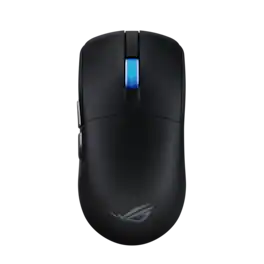
The ROG Harpe II Ace is an ultralight 48-gram semi-symmetrical gaming mouse with a shape developed with the help of esports professionals. It packs a raft of pro-approved technology, including the 42,000-dpi ROG AimPoint Pro optical sensor, ROG Optical Micro Switches and 8,000Hz polling wireless performance with SpeedNova 8K wireless technology.
- Shaped by Esports Pros: Engineered in collaboration with world-class esports professionals, perfectly balanced to enable effortless flicks and swift swipes for absolute precision in every play
- 48g Ultralight Design: Built with an innovative bio-based nylon material that reduces weight and enhances impact resistance
- ROG AimPoint Pro Optical Sensor: 42,000 dpi optical sensor with track-on-glass technology
- ROG Optical Micro Switches: Crisp, instant actuation and a 100-million-click lifespan
- ROG SpeedNova 8K Wireless Technology: Experience maximized precision and reliability at up to 8KHz polling rate with ROG SpeedNova 8K wireless technology
- Zone Mode: Cuts straight into optimal, top-level hardware performance, customized to your standards
- Web-Based Configurations: Configure and customize your gear directly on a browser via Gear Link
- Large 100% PTFE Mouse Feet: Wide, friction-reducing mouse feet with rounded edges facilitate smooth and fast movements
- Flexible Connectivity: Tri-mode connectivity plus an ROG Omni Receiver supporting multiple-device wireless connection with a single receiver
Whats Included
- P723 ROG HARPE II ACE/BLK Mouse
- Wireless Receiver
- Wireless Receiver Extender
- ROG Paracord
- Mouse Grip Tape Set (4pcs, one-time stick)
- 100% PTFE Mouse Feet Set (2 semi-circle, 1 for sensor)
- ROG Sticker
- Quick Start Guide
- Warranty Card
Compare similar products
The ROG Harpe II Ace is an ultralight 48-gram semi-symmetrical gaming mouse with a shape developed with the help of esports professionals. It packs a raft of pro-approved technology, including the 42,000-dpi ROG AimPoint Pro optical sensor, ROG Optical Micro Switches and 8,000Hz polling wireless performance with SpeedNova 8K wireless technology.

ASUS ROG Harpe II Ace Wireless Esports Gaming Mouse (2025) Pro-Tested, 48g Lightweight, Tri-Mode Connectivity, 42K DPI, 8K Polling, 101Hr Battery, Web-Based Tool, PC/Mac Support - White
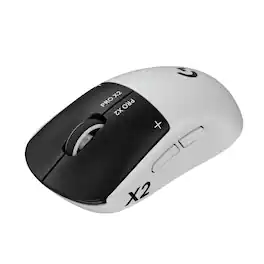
Logitech G partnered with top esports athletes to create The Fastest, Fully Customizable Click. Equipped with the Haptic Inductive Trigger System, the advanced HERO 2 sensor, and the robust LIGHTSPEED wireless. PRO X2 SUPERSTRIKE is a revolutionary PRO mouse delivering The Winning Click.
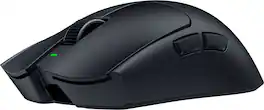
The choice of champions has a new successor. Enter the Razer Viper V4 Pro—fully upgraded with our latest mouse technologies, designed with and trusted by pros. From power to speed to precision, push your play with a wireless esports mouse that delivers more of everything the world’s best demand.
| Pros for ASUS - ROG Harpe II Ace Ultralight Optical Gaming Mouse with ROG SpeedNova Wireless Technology - Wireless - Black | |||
|---|---|---|---|
| There were no pros for this product— | There were no pros for this product— | Performance | There were no pros for this product— |
Specs
Reviews
Customer Images
The vast majority of our reviews come from verified purchases. Reviews from customers may include My Best Buy members, employees, and Tech Insider Network members (as tagged). Select reviewers may receive discounted products, promotional considerations or entries into drawings for honest, helpful reviews.
- Rated 5 out of 5 stars
Super Lightweight and Responsive Gaming Mouse
The weight is definitely the first thing I noticed about this mouse. Though the mouse I have been using prior to this is not ‘heavy’ by any means at just under 70g, it really is something picking up this mouse that only weighs 48g. It also feels very responsive and the wireless connection has been rock solid for me. Included with the mouse is a 2.4GHz dongle, a USB-C to USB-A cable, a receiver extension, and a set of grips and skates.The 2.4GHz USB-A receiver is very small and great for laptops where you don’t want a big 2.4GHz receiver sticking out. It also stores inside the mouse for travel so you don’t lose it. The mouse as stated before is extremely light - it’s hard to believe that there’s a battery inside of this thing. The build quality is great. It has a matte black finish that so far has been resisting smudges pretty well with occasional cleanings. The buttons left and right click buttons have great feedback and are easy to press rapidly. Though it’s not going to be great for scrolling thousand page documents, the scroll wheel has just the right amount of resistance and incrementing for things like switching inventory or weapons in game. The scroll wheel is also the only part of the mouse that gets any RGB lighting, which is fine with me as I appreciate the understated look. The bottom side of the mouse has a 3-position switch for going between wired, 2.4GHz, and Bluetooth modes. There is also a DPI button for switching between the programmed values and there is a color indication on the scroll wheel for each DPI mode. The mouse is comfortable in my large-ish hands, I believe I have what they call a fingertip grip, and I haven’t experienced any fatigue after a few gaming sessions and a full day of work. I have been primarily using this mouse in the 2.4GHz mode with the USB receiver plugged into the back of my desktop. I haven’t been using the receiver extender and so far I haven’t had any connectivity issues at all using this mouse. Out of the box, it’s set at a default polling rate of 1000Hz, but this can go all the way up to 8000Hz. I’ve chosen to leave mine at the default value. The DPI presets are 400, 800, 1600, and 3200 DPI and that value can go all the way up to an insane 42000. I have mostly been alternating between the 1600 and 3200 presets, depending on what I’m doing. The tracking is excellent and you can calibrate the mouse even further within the software. The software, called Gear Link, is web based and does not require any local installation. It’s nice to not have to have one more piece of software to manage, but I do sometimes forget the name of it and have to Google the URL. Gear Link lets you customize the angle you hold the mouse, DPI presets, polling rates, and more. There is also something called SpeedShift, which lets you create a secondary layer of functions on the mouse buttons by holding one down, similar to the Shift key on a keyboard. I’m sure Asus is not the only company that offers this, but it was cool to see. There is a ‘Zone Mode’, which puts the mouse into a higher performance configuration when needed. The performance of this mode is configurable, but I didn’t really see the utility of it and the button press combination (both side buttons and the DPI button for 3 seconds) is hard to remember. Battery life so far for me has been excellent. I was at 94% after about 8 hours of usage with the scroll wheel LED on. The rated life by Asus with the LED lighting on is 84 hours, so I have to think I'm on track to exceed or at the very least meet that battery life. I would not consider myself a hyper-competitive gamer, but it feels like the Harpe II Ace really ticks all the boxes in that regard. I haven’t found any real shortcomings with this mouse and I might finally be ready to retire my Logitech G703.
SamG Posted
- Rated 5 out of 5 stars
The Mouse That Clicked All the Right Buttons
The Asus ROG Harpe II Ace Ultralight is great. I have been building computers and gaming for thirty plus years, and this is one of the best performing mice I have ever used. It feels highly tuned. It has excellent features. The web-based configuration utility removes the need to have a third-party app taking up system resources. Asus includes grips, extra feet / skates, and an extender for the wireless dongle that clips to your mouse pad. I am honestly surprised by how much this mouse has wowed me. After a week of heavy use, I have only dropped about 20 percent of my battery life. I have not found anything wrong with this mouse and that might be the most praise I can heap on it. It is solid. Unboxing: As said above, Asus includes the mouse, USB-C to USB-A braided cable, wireless 2.4ghz dongle, extra feet / skates, the wireless dongle extender with built-in mousepad clip, and texture grips that stick to the mouse if you choose. All-in-all, you get a pretty complete package. Experience: This mouse feels great in my hand. The weight is perfect, the skates are smooth, the scroll wheel has the perfect level of resistance, the clicks are quiet and snappy, and the side button placement is perfect. Asus has transitioned the mouse away from Armory Crate (which was a bit bloated IMO) to the web based GearLink. Firmware updates and mouse configuration can be changed from the web-based UI. The mouse has built-in profiles that can be adjusted via button press combinations, but I prefer the web-based UI. The mouse has RGB lighting in the mouse scroll wheel. It is not much, but I never understood putting a light on a mouse that my hand would cover up. For what it is worth, the lighting is bright and effective. Battery life has been great. I have fluctuated the polling rate for the mouse, but so far, I have only used around 20 percent of the battery life over a week’s testing. Surface calibration works well and I noticed a huge improvement in performance after I ran the calibration utility from GearLink. The mouse movement smoothed out after running the calibration utility. Nitpicks: I have none. Conclusion: This is an easy mouse to recommend. I have no complaints. After testing numerous games and applications, I truly have nothing negative to say about this mouse. I feel like ASUS made this mouse for people like me and I cannot recommend it highly enough. 5/5
RedScorpion Posted
- Rated 5 out of 5 stars
Super light with outstanding performance!
I was surprised as to how light the Harpe II mouse is. I almost chucked it while taking it out of the box! The mouse has a classic design akin to high-end mice in the gaming space. I appreciate the matte finish which does not attract fingerprints and smudges. The front buttons have a satisfying click that is not too loud or “clacky”. The side buttons have decent travel and are in the right place as well. Ergonomically, this is one of the best I’ve held recently. I have medium-sized hands and the mouse fits very nicely. I can use it in a cradle, claw, and full rest positions. Because the mouse is so light, I can even lift it with just my thumb and pinky fingers. The wheel has good grip and satisfying rolling and click. And lastly, the PTFE thick feet slide easily in fabric or vinyl mouse pads. Yes, this mouse comes at a premium price tag but also provides plenty of premium features. For starters, I can connect it wired via USB, Bluetooth, and RF with the provided dongle. These options can be selected with a toggle underneath. The dongle is tucked in neatly there as well. Out of the box, the DPI is set to 1600, and the polling rate is 1000. For most applications, this is quite enough. However, if you need to change them on the fly, the buttons are on the bottom. The Harpe II is not compatible with Armoury Crate but can be customized on the web-based app Gear Link. There, you can adjust DPI and polling rates, change RGB lights, change button assignments, macros, and perform calibration. So even if it’s web-based, it is quite robust, and better yet accessible from anywhere without the need to download an app. The performance is top-notch. At default settings, I tested it using point-and-click applications and reflex training modules. I also played where performance matters most: high frame rate FPS matches and twitch-click MOBA games. I was not disappointed. I adjusted the polling and DPI as needed. This mouse, in conjunction with my hall-effect keyboard, made me feel that I was better than I really am. In the end, I am very happy with this mouse, and it will certainly become my main from now on. I certainly recommend checking it out!
insomniak1 Posted