
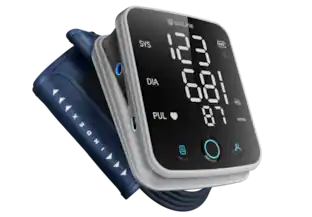
Beurer - Talking Upper Arm Blood Pressure Monitor - White
Model: BM50
SKU: 6473838
This item is no longer available in new condition. See similar items below
- Key Specs
- Color: White
- Operation: Automatic, Automatic
- Irregular Heart Beat Detection: true
- Automatic Time/Date Stamp: true (View the time and date of previous readings saved in the device memory.)
- Voice-Assist Talking Function: true (Indicates whether the device has a voice assist function that delivers audible prompts and can read test results.)
- General
- Brand: Beurer
- Model Number: BM50
- Product Name: Talking Upper Arm Blood Pressure Monitor
- Color: White
- Dimensions
- Product Width: 5.5 inches (The out of box width of the item. Width is measured as the horizontal distance from one side of the item to the other as it would be primarily used or placed.)
- Product Depth: 3.5 inches (The out of box depth of the item. Depth is measured as the distance from the front of the item to the back as it would be primarily used or placed.)
- Product Length: 6.9 inches (The out of box length of the item. Length is measured as the longest dimension of the item.)
- Product Weight: 1.6 pounds (The out of box weight of the item.)
- Cuff Size: Adjustable
- Features
- Operation: Automatic, Automatic
- Irregular Heart Beat Detection: true
- Memory Recall (Number Of Readings): 100
- Number Of Users Stored: 2
- Automatic Time/Date Stamp: true (View the time and date of previous readings saved in the device memory.)
- Testing Site: Upper arm
- Indicator Light(s): true
- Voice-Assist Talking Function: true (Indicates whether the device has a voice assist function that delivers audible prompts and can read test results.)
- Compatibility
- App Compatible: true (The product can be connected to a program or software application on a mobile device, which then receives collected data from the product.)
- Voice Assistant Built-in: No (A digital assistant built into the device that uses voice commands to answer questions and control smart devices.)
- Included
- Storage Case Included: true
- USB Cable Included: false
- Power
- Power Source: Battery-powered
- Rechargeable Battery: false
- Battery Chemistry: Alkaline
- Battery Size: AA (The battery size required for operation.)
- Number of Batteries Required: 4
- Number Of Batteries Included: 4
- Auto Shut-Off: true (Feature automatically turns off the product.)
- Display
- Digital Display: true
- Warranty
- Warranty - Parts: Limited lifetime
- Warranty - Labor: Limited lifetime
- Other
- UPC: 850003500676
Effortlessly track you and your family’s blood pressure levels in the comfort of your own home. Your measurements will be clear and easy to read with the XL display and backlight and can also be read aloud through the device’s talking feature. This product is engineered in Germany for accuracy of measurements and features.
- Accuracy: Medical class accuracy measuring and storing systolic and diastolic blood pressures and heart rates & equipped with a risk indicator and irregular heartbeat detection
- Adjustable Cuff: Adjustable soft cuff and easy to use
- Stored Records: Stores up to 100 records for 2 users
- Talking Feature: Talking feature with voice output
- Includes: Includes storage pouch, cuff (for upper arms 8.7”-16.5”), instruction manual, quick start guide, and batteries Includes storage pouch, cuff (for upper arms 8.7”-16.5”), instruction manual, quick start guide, and batteries
Whats Included
- Talking Upper Arm Blood Pressure Monitor
Q: Where to buy the mains adapter?
A: Universal adapter will work on this product good luck
Q: How do I adjust the time and date and voice volume ?
A: It should be on your instructions if not maybe you could Google it good luck
A: Yes its adjustable anyway
People also viewed
Today's top picks
 $449.99The price was $829.99
 $2,449.99The price was $3,199.99
 $199.99The price was $249.99
 $999.98The price was $1,639.98










