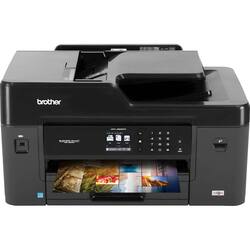
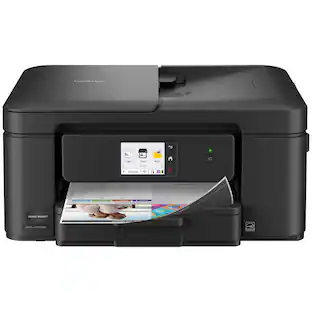
Brother - Business Smart Pro MFC-J6530DW Wireless All-In-One Inkjet Printer - Black
- Key Specs
- Networking: Wired, Wireless
- ENERGY STAR Certified: true (Devices carrying the ENERGY STAR service mark, such as computer products and peripherals, kitchen appliances, and other products, generally use 20% to 30% less energy than required by federal standards.)
- Printer Type: All In One, Copier, Fax, Scanner
- ISO Color Print Speed: 20 pages per minute (The number of color pages able to be printed per minute in the device's default single-side mode, as tested by the International Standards Organization (ISO).)
- ISO Mono Print Speed: 22 pages per minute (The number of black ink (grayscale) pages able to be printed per minute in the device's default single-side mode, as tested by the International Standards Organization (ISO).)
- Output Tray Capacity: 100
- Touch Screen: true (Touch-screen devices make navigating more intuitive. Using a touch-screen display, you can do things such as tap to select, hold and drag to move items, swipe to scroll, and pinch to zoom.)
- General
- Brand: Brother
- Model Number: MFC-J6530DW
- Product Name: Business Smart Pro MFC-J6530DW Wireless All-In-One Inkjet Printer
- Color: Black
- Display Screen: true
- Display Screen Size: 2.7 inches
- Dimensions
- Product Height: 12 inches (The out of box height of the item. Height is measured as the vertical distance from the bottom of the item to the top as it would be primarily used or placed.)
- Product Width: 22.6 inches (The out of box width of the item. Width is measured as the horizontal distance from one side of the item to the other as it would be primarily used or placed.)
- Product Depth: 19.3 inches (The out of box depth of the item. Depth is measured as the distance from the front of the item to the back as it would be primarily used or placed.)
- Product Weight: 42.8 pounds (The out of box weight of the item.)
- Features
- Automatic Document Feeder: true
- Photo Printing: true
- Monochromatic/Color: Color
- Automatic Reduction/Enlargement: true
- Automatic Two-Sided Printing: false
- Tray Capacity: 250
- Duty Cycle: Up to 30,000 (The maximum number of pages per month that the device can produce without failing, as specified by the manufacturer.)
- Certifications Listings & Approvals
- EPEAT Qualified: true (The Electronic Product Environmental Assessment Tool (EPEAT) was designed to provide an environmental assessment tool for purchasers. In order to qualify for EPEAT, a product must meet all 23 required criteria.)
- EPEAT Level: Bronze (The Electronic Product Environmental Assessment Tool (EPEAT) was designed to provide an environmental assessment tool for purchasers. In order to qualify for EPEAT, a product must meet all 23 required criteria. Products are rated Bronze, Silver or Gold based on how many of 28 optional criteria they meet (below 50%, 50%, 75%).)
- TWAIN Compliant: true (Products with this label are compliant with standards set by the TWAIN Working Group for regulating communication between software and digital imaging devices. Devices that are TWAIN compliant are compatible for use with each other without requiring additional software, even if they have different capabilities.)
- Scanner Info
- Scanner Type: Flatbed
- Duplex Scan Function: true
- Scanner Resolution: Up to 19200 x 19200 (Refers to the number of pixels/dots, both horizontally and vertically, of the image produced by the scanner. Generally, the higher the resolution, the sharper and cleaner the produced image.)
- Fax Info
- Integrated Fax: true
- Ink
- Compatible Cartridges: LC3019BK, LC3019Y, LC3019C, LC3019M, LC3017BK, LC3017Y, LC3017C, LC3017M
- Memory
- Memory Card Slot: false
- Paper Info
- Automatic Document Feeder Capacity: 50 sheets
- Maximum Document Length: 17 inches
- Maximum Document Width: 11 inches
- Supported Paper Sizes: Letter, Ledger, Executive, Envelope (Com-10, DL Envelope, Monarch), A3, A4, A5, A6 Photo 4"x6", 3.5"x5", 5"x7", 5"x8", 3.5" x 5" to 11" x 17"
- Paper Feeder: Multipurpose tray
- Media Weight (Minimum): 64 grams per square meter
- Media Weight (Maximum): 260 grams per square meter
- Compatible Media Types: Plain Paper, Inkjet Paper (coated paper), Glossy Paper, Recycled Paper
- Performance
- Printer Resolution (Black): Up to 4800 x 1200 (Refers to the number of pixels/dots, both horizontally and vertically, of the image produced by the printer in black ink. Generally, the higher the resolution, the sharper and cleaner the produced image.)
- Printer Resolution (Color): Up to 4800 x 1200 (Refers to the number of pixels/dots, both horizontally and vertically, of the image produced by the printer in colored ink. Generally, the higher the resolution, the sharper and cleaner the produced image.)
- Approximate Page Yield (Black): 3000
- Approximate Page Yield (Color): 1500
- Copier Info
- Copier Resolution (Black): Up to 4800 x 1200 (Refers to the number of pixels/dots, both horizontally and vertically, of the image produced by the copier in black ink. Generally, the higher the resolution, the sharper and cleaner the produced image.)
- Copier Resolution (Color): Up to 4800 x 1200 (Refers to the number of pixels/dots, both horizontally and vertically, of the image produced by the copier in colored ink. Generally, the higher the resolution, the sharper and cleaner the produced image.)
- Connectivity
- Minimum System Requirements: Windows 10, Windows 8.1, Windows 8, Windows 7, Windows Vista, Windows Server 2012 R2, Windows Server 2012, Windows Server 2008 R2, Windows Server 2008, macOS (10.12), OS X (10.11), OS X (10.10), OS X (10.9)
- Other
- UPC: 012502643654
Create bold, brilliant prints with this Brother multifunction printer. It produces documents at up to 35 pages per minute so that you can get on with work, and borderless printing lets you create promotional literature. A four-cartridge ink system on this Brother multifunction printer ensures you replace only the inks you use when printing, scanning or faxing.
- Prints up to 22 ISO ppm* in black, up to 20 ISO ppm* in color: To generate documents quickly.
- Be sure you have the right cartridge: Enter your printer's model number into our Ink and Toner Finder to find compatible cartridges. Get started ›
- Inkjet printers are best for home or small business use: They offer excellent print quality for photos and documents and accept a variety of paper types and sizes.
- Wireless and mobile printing capability: Connect this printer to your home or office network with built-in Ethernet or wireless LAN. Plus, print from your mobile device with the free Brother iPrint&Scan.
- Apple® AirPrint enabled: For Apple iPad® and iPhone® printing.
- Up to 4800 x 1200 dpi (dots per inch) color resolution: High resolution for producing incredible quality and detail in documents and photos.
- 4 individual print cartridges are economical: Simply replace the ink cartridge (black, cyan, magenta and yellow) when its color runs out.
- Large paper tray for high-volume printing and copying: Reload less often with the 250-sheet input tray and 100-sheet output tray. Copy, scan or fax multiple pages easily with the 50-sheet automatic document feeder.
- 2.7" color touch screen: Use the intuitive touch screen to print, copy or send faxes directly from the printer.
- 1 USB port for simple connectivity: 1 high-speed USB 2.0 port offers a standard connection to your PC or a simple way to plug in and print with a USB drive, camera or other device.
- More print, copy and scan solutions: Automatically print 2-sided documents, scan documents to your computer or directly to popular cloud services, send quick faxes and more.
Whats Included
- Brother Business Smart Pro MFC-J6530DW Wireless All-In-One Inkjet Printer
- CD-ROM - Assembly for Windows and Mac
- LC3017BK/C/M/Y High Yield Ink Cartridges
- Quick Setup Guide
- Telephone line cord
- User Manual
Product Manuals
Q: Is Brother a compatible printer with an HP PC laptop?
A: Yes, MFC-J6530DW is compatible with the operation system on your HC PC laptop.
A: yes it has a touch screen , but for menu items and buttons only...has buttons also
Q: Does this printer do duplex printing..ie both sides of the paper?
A: Yes, the printer will duplex print.
Q: Will it print photos onto 8.5x11 photo paper?
A: Yes, this unit will print onto 8.5 x 11 inch photo paper.
Q: what is the manufacturer's warranty?
A: This product has a 2-year warranty for parts and labor.
A: The high yield ink cartridges yields approximately 550 pages each.
Q: can i print a picture from my phone to the printer?
A: Yes, you can print to the Brother MFC-J6530DW using AirPrint®, Google Cloud Print™, Brother iPrint&Scan, Wi-Fi Direct®, Mopria®.
Q: Is this 64 bit compatible, Mac Catalina?
A: Most models offer support for macOS Catalina (macOS v10.15.x). Here is a FAQ that may help. https://help.brother-usa.com/app/answers/detail/a_id/166678?R3ModelID=MFCJ6530DW
People also viewed
 $299.89The price was $429.89
 $119.89The price was $179.89
 $99.89The price was $179.89
 $79.89The price was $109.89
 $449.00The price was $450.45
 $119.89The price was $159.89





Today's top picks
 $199.99The price was $249.99
 $479.99The price was $729.99
 $789.99The price was $1,049.99
 $799.99The price was $1,199.99










