
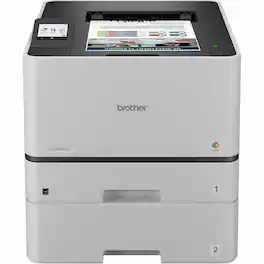
Brother - HL-L8430CDWT Business Laser Printer with Dual Paper Trays, Low-Cost Printing, and Wireless Networking - Color
More Buying Options

Specifications
- NetworkingWired, WirelessPrinter TypePrinterMonochromatic/ColorColor
- Key Specs
- Networking: Wired, Wireless
- Printer Type: Printer
- Monochromatic/Color: Color
- General
- Brand: Brother
- Product Name: Brother HL-L8430CDWT Business Color Laser Printer with Dual Paper Trays, Low-Cost Printing, and Wireless Networking
- Color: Color
- Display Screen: true
- Dimensions
- Product Height: 31 inches (The out of box height of the item. Height is measured as the vertical distance from the bottom of the item to the top as it would be primarily used or placed.)
- Product Width: 29 inches (The out of box width of the item. Width is measured as the horizontal distance from one side of the item to the other as it would be primarily used or placed.)
- Product Depth: 20 inches (The out of box depth of the item. Depth is measured as the distance from the front of the item to the back as it would be primarily used or placed.)
- Product Weight: 15.0 pounds (The out of box weight of the item.)
- Features
- Automatic Document Feeder: false
- Photo Printing: false
- Automatic Two-Sided Printing: true
- Connectivity
- Wired Connectivity: Ethernet, USB-A
- Wireless Connectivity: Wi-Fi (The manner in which a device sends data to another device over a short distance without the use of wires or cables.)
- Ink
- Compatible Cartridges: Brother BTD180
- Ink Cartridges Required: 1 x Black, 1 x Tri-color (The quantity and color of ink cartridges required for the printer to operate.)
- Ink Cartridges Included: 1 x Cyan, 1 x Magenta, 1 x Yellow, 2 x Black (The quantity and color of ink cartridges included.)
- Performance
- Approximate Page Yield (Black): 1200
- Paper Info
- Supported Paper Sizes: Plain Paper
- Tray Capacity: 2
- Warranty
- Warranty - Parts: C230/DNI
- Warranty - Labor: 1 year limited
- Other
- UPC: 012502677499
Stay engaged while controlling your presentation in 4K. Complete control from one screen, so your eyes can stay on your audience. Make any presentation more interactive and adaptive. Write, draw, and annotate directly with your fingers, or with the precise EM pen. Control multiple displays without ever turning your back to the audience. Annotate over any screen image or video with QOMO Flow!Works Pro. More power in your pen. With dual touch technology-you can write, draw, and annotate with a precise tough pen or your fingers on the anti-glare, anti-fingerprint screen. Pressure Sensitive TouchPrecise EM technology allows you to draw heavy or faint lines - just like a pen on paper. Even better, the battery-free pen never needs charging. Intuitive Capacitive TouchMulti-touch for fingertips makes it easy and intuitive to use - just like using your smartphone. And, unique to QOMO, this feature can be turned on/off with the touch of a button. Designed to fit your set upAdjust the PresenStation to the most comfortable writing angle, between 90 degrees and almost completely flat, allowing nearly limitless positioning. The back of the PresenStation has a standard VESA pattern. Attach to virtually any 3rd-party mount, directly to your podium or desk.
- Brother LB3692 Auto Adapter - 12 V DC Input: Allied Telesis Web Smart Ethernet Switch - 20 Ports - Gigabit Ethernet - 1000Base-T, 1000Base-X - 2 Layer Supported - 4 SFP Slots - 370 W PoE Budget - Twisted Pair, Optical Fiber - PoE Ports
- Extended Paper Capacity: Additional trays reduce refills and support large print jobs.
- Fast Professional Results: High-speed laser technology delivers quick reliable performance.
- Wireless & Network Ready: Supports Wi-Fi and network connections for easy sharing.
- Automatic Duplex Printing: Create professional two-sided documents automatically.
- Brother LB3692 Auto Adapter - 12 V DC Input: Allied Telesis Web Smart Ethernet Switch - 20 Ports - Gigabit Ethernet - 1000Base-T, 1000Base-X - 2 Layer Supported - 4 SFP Slots - 370 W PoE Budget - Twisted Pair, Optical Fiber - PoE Ports
- Extended Paper Capacity: Additional trays reduce refills and support large print jobs.
- Fast Professional Results: High-speed laser technology delivers quick reliable performance.
- Wireless & Network Ready: Supports Wi-Fi and network connections for easy sharing.
- Automatic Duplex Printing: Create professional two-sided documents automatically.
- Brother LB3692 Auto Adapter - 12 V DC Input: Allied Telesis Web Smart Ethernet Switch - 20 Ports - Gigabit Ethernet - 1000Base-T, 1000Base-X - 2 Layer Supported - 4 SFP Slots - 370 W PoE Budget - Twisted Pair, Optical Fiber - PoE Ports
- Extended Paper Capacity: Additional trays reduce refills and support large print jobs.
- Fast Professional Results: High-speed laser technology delivers quick reliable performance.
- Wireless & Network Ready: Supports Wi-Fi and network connections for easy sharing.
- Automatic Duplex Printing: Create professional two-sided documents automatically.
Whats Included
- MS632dwe Laser Printer, Safety Sheets, Warranty Info, Return Program Imaging Unit, Return Program Toner Cartridge, Power Cord, Printer Setup Sheet
- MS632dwe Laser Printer, Safety Sheets, Warranty Info, Return Program Imaging Unit, Return Program Toner Cartridge, Power Cord, Printer Setup Sheet
- MS632dwe Laser Printer, Safety Sheets, Warranty Info, Return Program Imaging Unit, Return Program Toner Cartridge, Power Cord, Printer Setup Sheet
Compare similar products
Stay engaged while controlling your presentation in 4K. Complete control from one screen, so your eyes can stay on your audience. Make any presentation more interactive and adaptive. Write, draw, and annotate directly with your fingers, or with the precise EM pen. Control multiple displays without ever turning your back to the audience. Annotate over any screen image or video with QOMO Flow!Works Pro. More power in your pen. With dual touch technology-you can write, draw, and annotate with a precise tough pen or your fingers on the anti-glare, anti-fingerprint screen. Pressure Sensitive TouchPrecise EM technology allows you to draw heavy or faint lines - just like a pen on paper. Even better, the battery-free pen never needs charging. Intuitive Capacitive TouchMulti-touch for fingertips makes it easy and intuitive to use - just like using your smartphone. And, unique to QOMO, this feature can be turned on/off with the touch of a button. Designed to fit your set upAdjust the PresenStation to the most comfortable writing angle, between 90 degrees and almost completely flat, allowing nearly limitless positioning. The back of the PresenStation has a standard VESA pattern. Attach to virtually any 3rd-party mount, directly to your podium or desk.

The Brother HL-L6210DWT business monochrome laser printer is a great choice for busy offices and workgroups with higher print volumes that need fast, high-quality output, low-cost printing, large paper capacity and advanced security features. This high-performance printer helps to increase productivity with a fast print speed of up to 50 ppm. Reduce paper refills with dual 520-sheet capacity paper trays. Offers a large, expandable paper capacity that is scalable as your business needs grow. Delivers low-cost printing by using the TN920UXXL Brother Genuine ultra-high-yield replacement toner cartridge. Triple Layer Security features help to limit document and device access and protect against network intrusions. The HL-L6210DWT also provides flexible connectivity with built-in Gigabit Ethernet and dual band wireless networking, plus convenient mobile device printing to meet mobile workforce demands.
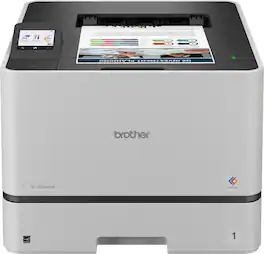
The Brother HL-L8430CDW Business Color Laser Printer is ideal for business work teams, supporting maximum productivity in high-demand environments with reliable performance. It offers fast printing with lifelike color and sharp black output for professional documents, presentations, and marketing collateral. Maximize printing budgets with included Brother Genuine standard yield toner cartridges and achieve low-cost printing using TN635XXL super high yield replacement toner cartridges. Triple Layer Security features help to keep the device secure, protect documents in transit to and from print devices, and safeguard the network against intrusions. The printer includes dual-band (2.4GHz/5GHz) wireless and Gigabit Ethernet for wireless or wired networks, plus convenient mobile device printing(1).

Great for small businesses, the Brother MFC-3780CDW wireless digital color all-in-one printer with copy, scan, and fax functionalities offers remarkable efficiency with impressive print speeds and productivity-centric features. Consistently produces smudge-free, laser-quality prints for documents that garner the attention of colleagues, clients, and customers. Achieves print speeds up to 31 ISO pages per minute (ppm)(1) and scan speeds up to 29/22 ISO images per minute (ipm)(2) (black/color). With its versatile paper handling and an intuitive 3.5” touchscreen, it is engineered to help boost productivity, simplify tasks, and keep your business thriving. Advanced security features help safeguard sensitive information while printing and include the added protection of an NFC card reader for badge authentication. Engineered and supported by Brother, the MFC-L3780CDW is an industrious addition to any small workspace.
| Pros for Brother - HL-L8430CDWT Business Laser Printer with Dual Paper Trays, Low-Cost Printing, and Wireless Networking - Color | |||
|---|---|---|---|
| There were no pros for this product— | There were no pros for this product— | There were no pros for this product— | Print Quality, Overall Performance, Setup, Connectivity, Ease of Use |
| Cons for Brother - HL-L8430CDWT Business Laser Printer with Dual Paper Trays, Low-Cost Printing, and Wireless Networking - Color | |||
| There were no cons for this product— | There were no cons for this product— | There were no cons for this product— | Weight, Size |
Specs
Reviews
This product doesn't have any reviews yet.







