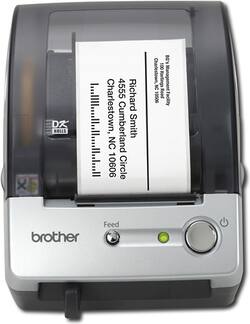
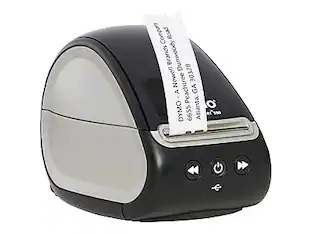
Brother - QL-500 Label Printer - Black/Silver
- General
- Brand: Brother
- Model Number: QL-500
- Product Name: QL-500 Label Printer
- Color: Black/Silver
- Warranty
- Warranty - Parts: 1 year
- Warranty - Labor: 1 year limited
- Other
- Product Width: 5.7 inches (The out of box width of the item. Width is measured as the horizontal distance from one side of the item to the other as it would be primarily used or placed.)
- Product Height: 5.9 inches (The out of box height of the item. Height is measured as the vertical distance from the bottom of the item to the top as it would be primarily used or placed.)
- Product Weight: 5 ounces (The out of box weight of the item.)
- Product Length: 7.6 inches (The out of box length of the item. Length is measured as the longest dimension of the item.)
- Compatible Label Size(s): Labels up to 2.4" wide
- Display (Character x Line): 50
- Handheld or Desktop: Desktop
- Labeling Tape Included: false
- Number Of Lines Per Label: 5
- UPC: 012502610502
Print up to 50 labels per min.* with this label printer that features a built-in cutter to reduce the risk of tears and misaligned labels. Up to 300 x 300 dpi resolution ensures high-quality prints for logos, graphics and images.
- Prints up to 50 labels per min.*: To generate labels quickly.
- Up to 300 x 300 dpi resolution: For high-quality prints and crisp text.
- Prints on labels 2.4" wide: To display more text per label.
- Built-in cutter: Reduces the risk of tears and misaligned labels.
- Drop-in tape rolls: Allow for easy tape replacement and installation.
- USB interface and cable: For easy connectivity.
Whats Included
- QL-500 Label Printer
- P-touch Editor 4.2, P-touch Address Book 1.0
- P-touch Editor 3.2 software
- DK 1201 starter roll
- USB cable
- Owner's manual
Q: Can you down load the program onto your computer? My Mac doesn't have a CD drive.
A: Go online here to download the driver you need. http://support.brother.com/g/b/downloadtop.aspx?c=us&lang=en&prod=lpql500eus&src=download
Q: Can the text be printed vertically instead of horizonally?
A: undefined
Q: What bar code software do you use with this device?
A: undefined
Q: Are there any printers that hook up to iPhone 7 plus so I can print usps labels from my email?
A: Many Epson printers support printing (natively) from iPhones. If you want to print to THIS printer (or any USB printer), you might consider purchasing an AirPort Express, and connecting the printer to the AirPort Express' USB port.
Q: Can my iPhone 7 plus hook up to this so I can print from my email?
A: The printer is USB only, so you need to attach the printer to a computer that your iPhone can "see" (and print through to the printer). You can get an AirPort Express (from Apple, etc.) and connect this printer to the Airport Express' USB port. THEN you can print to if from your iPhone. Hope that helps!
People also viewed
 $44.98The price was $48.64
Today's top picks
 $479.99The price was $729.99
 $69.99The price was $129.99
 $199.99The price was $249.99
 $49.99The price was $62.99