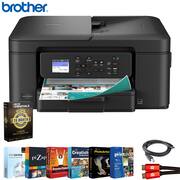
Brother - Work Smart 1360 Wireless All-in-One Inkjet Printer w/ Auto Duplex MFC-J1360DW + 26-Month Extended Warranty Bundle
Reviews coming soon
About this product
What's In The Box: Brother MFC-J1360DW All-in-One Printer|Set of Starter Ink Cartridges (BK/C/M/Y)|Telephone Line Cord|Power Cord|Quick Setup Guide|Product Safety and Reference Guide|CPS 26 Month Extended Protection|Tech Smart USA Printer Essentials Digital Download Card for PC|Deco Gear 6FT Universal 4K HDMI 2.0 Cable with 28AWG Pure Copper Conductors|High-Speed 6FT USB 2.0 Printer Cable, USB Type-A Male to Type-B Male --- The Brother MFC-J1360DW is a compact, wireless all-in-one inkjet printer designed for home offices and small workspaces. With fast print speeds, automatic two-sided printing, and a 1.8" color display, this 3-in-1 printer delivers reliable performance for everyday tasks. It features wireless connectivity, mobile printing support, and a 150-sheet paper tray. The MFC-J1360DW is also compatible with Brother's Refresh EZ Print Subscription service, ensuring you never run out of ink when you need it most. Whether printing documents, scanning forms, or making quick copies, this printer provides smart functionality in a space-saving design.
All-in-One Printer
Print, copy, and scan on one convenient, compact printer, with quick and easy setup.
Cloud App Connection
You can print from and scan to popular Cloud apps, including Google Drive, Dropbox, Box, OneDrive, and more from the easy-to-use 1.8" color display on your printer.
Productivity-Focused Features
This printer includes automatic duplex (2-sided) printing, a 20-sheet single-sided Automatic Document Feeder (ADF), and a 150-sheet paper tray.
Multiple Connection Options
Interface with your printer on your wireless network or via USB.
The Brother Mobile Connect app
Put the power of printing at your fingertips. Go mobile with the simple-to-use Brother Mobile Connect app that delivers easy onscreen menu navigation for printing, copying, scanning, and device management from your mobile device.
- NetworkingWirelessPrinter TypeAll In One, Printer, Copier, Scanner
Reviews
This product doesn't have any reviews yet.
Compare similar products

What's In The Box: Brother MFC-J1360DW All-in-One Printer|Set of Starter Ink Cartridges (BK/C/M/Y)|Telephone Line Cord|Power Cord|Quick Setup Guide|Product Safety and Reference Guide|CPS 26 Month Extended Protection|Tech Smart USA Printer Essentials Digital Download Card for PC|Deco Gear 6FT Universal 4K HDMI 2.0 Cable with 28AWG Pure Copper Conductors|High-Speed 6FT USB 2.0 Printer Cable, USB Type-A Male to Type-B Male --- The Brother MFC-J1360DW is a compact, wireless all-in-one inkjet printer designed for home offices and small workspaces. With fast print speeds, automatic two-sided printing, and a 1.8" color display, this 3-in-1 printer delivers reliable performance for everyday tasks. It features wireless connectivity, mobile printing support, and a 150-sheet paper tray. The MFC-J1360DW is also compatible with Brother's Refresh EZ Print Subscription service, ensuring you never run out of ink when you need it most. Whether printing documents, scanning forms, or making quick copies, this printer provides smart functionality in a space-saving design.

Whether you are a teacher or student, get back-to-school ready for the classroom with this HP Smart Tank wireless all-in-one printer! This high-quality ink tank printer with an automatic document feeder plus fax delivers up to 2 years of ink in bottles included in the box¹. Get faster connections with dual-band Wi-Fi, and easy mobile printing with HP Smart app.

Experience true reliability and ease of use with the Brother Work Smart 1410 Wireless Color Inkjet All-in-One Printer. A 2.7” color touchscreen display lets you connect to popular Cloud apps(1) directly from your printer. Automatic duplex (2-sided) printing, a 20-sheet single-sided automatic document feeder (ADF)(2), and a 150-page paper tray(2) bring modern convenience to this compact printer. Engineered to produce great prints, this color inkjet printer outputs vibrant colors and bold, rich blacks at fast print speeds, and Page Gauge(3) monitors your ink usage so you know when you’re running low. When paired with the Brother Mobile Connect app(4), setup is quick and easy – plus, you can print from virtually anywhere on your mobile device(5). Print Confidently with Brother Genuine LC501 Ink in your Work Smart 1410 for reliable, consistent prints –the only brand we recommend for your Brother printer.

The Brother Work Smart 1360 Wireless All-in-One Refresh Subscription Eligible Inkjet Printer is the perfect choice for a reliable printer with robust efficiency-boosting features. With tools like automatic duplex (2-sided) printing, a 20-page single-sided automatic document feeder(1), and wireless(2) and Cloud connectivity(3) options available on the 1.8” color display, this multifunction printer helps you get your work done with simplicity and ease. Perfect for printing anything from to-do lists to business reports, this color inkjet printer outputs quality prints at fast speeds. Brother Page Gauge(4) monitors your ink usage so you know when you’re running low. When paired with the Brother Mobile Connect app(5), setup is quick and easy – plus, you’ll be able to print from virtually anywhere on your mobile device(6). Print Confidently with Brother Genuine LC501 Ink in your Brother Work Smart 1360 for reliable, consistent prints –it’s the only brand we recommend for your Brother printer.
| Pros for Brother - Work Smart 1360 Wireless All-in-One Inkjet Printer w/ Auto Duplex MFC-J1360DW + 26-Month Extended Warranty Bundle | |||
|---|---|---|---|
| There were no pros for this product— | Print Quality, Overall Performance, Connectivity, Ease of use, Setup | Print Quality, Setup Ease | Overall Performance, Print Quality, Connectivity, Size, Noise Level |
| Cons for Brother - Work Smart 1360 Wireless All-in-One Inkjet Printer w/ Auto Duplex MFC-J1360DW + 26-Month Extended Warranty Bundle | |||
| There were no cons for this product— | There were no cons for this product— | There were no cons for this product— | Setup Difficulty |
Specs
Be the first to ask a question.
We’ll try to get your question answered within 24 hours by a Best Buy customer or brand representative.


