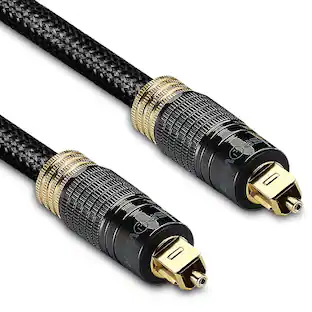
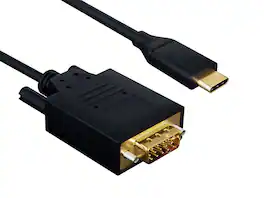
Cable Leader - USB-C to VGA Cable, 1080p Full HD Video for Laptop, Tablet, Phone to Old Monitor, Projector - Black
Reviews coming soon
About this product
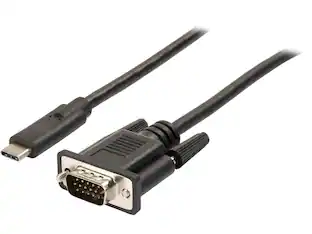
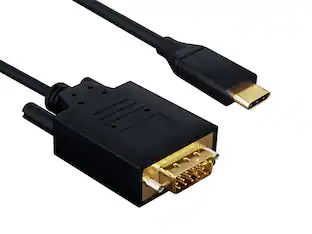
Stuck in a conference room with only a VGA projector — but your MacBook, iPad Pro, or Surface only has USB-C? This Cable Leader USB-C to VGA cable connects directly from a USB-C device with DisplayPort Alt Mode to any VGA monitor or projector at 1080p Full HD (1920 × 1200 @ 60Hz). Skip the trip to the IT closet for a USB-C hub or VGA adapter — one cable, plug and present. Built with double-shielded conductors, gold-plated VGA contacts, and fully molded strain relief. Compatible with MacBook Air / Pro, iPad Pro / Air (USB-C), Surface Pro, Samsung Galaxy with DeX, Pixel, Chromebook, and any USB-C device supporting DisplayPort Alt Mode. ⚠️ Important: not all USB-C ports support video — check your device specs for "DisplayPort Alt Mode". Best for: USB-C laptop or tablet to legacy VGA projectors and monitors. Not for: USB-C charging-only ports. RoHS compliant.
Cable Length
3'Present from USB-C Laptop to VGA Projector
Conference rooms, classrooms, and older corporate setups still rely on VGA projectors and monitors. This cable connects your modern USB-C laptop or tablet directly to legacy VGA displays — no IT support call, no hub, no adapter chain. Plug, mirror, present.
1080p Full HD @ 60Hz — Stable for Presentations
Supports VGA output at 1080p Full HD (1920 × 1200 @ 60Hz) via DisplayPort Alt Mode — sufficient for slides, document sharing, video playback at meeting room scale. Built with double-shielded conductors and gold-plated VGA contacts to prevent the analog signal degradation common in cheap USB-C to VGA cables.
Requires USB-C with DP Alt Mode — Not for All USB-C Ports
Works with MacBook Air / Pro, iPad Pro / Air (USB-C), Surface Pro, Galaxy with DeX, Pixel, Chromebook. Quick check: MacBook to VGA projector — Yes. iPad Pro to VGA monitor — Yes. Phone with USB-C charging only (no DP Alt Mode) — No. 4K output — No, VGA maxes at 1080p. For 4K output, use USB-C to HDMI or DisplayPort cable.
Reversible USB-C + Thumbscrews — Travel Build
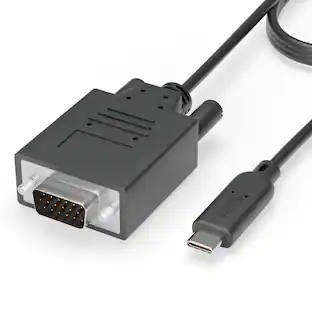
USB-C end plugs in either way. VGA end has thumbscrews to secure into projector and monitor ports. Built with double-shielded conductors, gold-plated contacts, and fully molded strain relief — designed for travel between conference rooms, classrooms, and field presentations.
Sample-Tested Production — Cable Leader Direct Support
Each cable is sample-tested during production for continuity, current rating, and data integrity. Manufactured to RoHS environmental standards (lead, mercury, and cadmium-free). If your cable arrives defective or stops working in normal use, Cable Leader handles replacement requests directly — no manufacturer redirects.
- Cable Length3 feetConnector Type (End 1)USB-CGender (End 1)MaleConnector Type (End 2)VGA (HD-15)Gender (End 2)MaleMaximum Data Transfer Rate480 megabits per second
Reviews
This product doesn't have any reviews yet.
Compare similar products
Stuck in a conference room with only a VGA projector — but your MacBook, iPad Pro, or Surface only has USB-C? This Cable Leader USB-C to VGA cable connects directly from a USB-C device with DisplayPort Alt Mode to any VGA monitor or projector at 1080p Full HD (1920 × 1200 @ 60Hz). Skip the trip to the IT closet for a USB-C hub or VGA adapter — one cable, plug and present. Built with double-shielded conductors, gold-plated VGA contacts, and fully molded strain relief. Compatible with MacBook Air / Pro, iPad Pro / Air (USB-C), Surface Pro, Samsung Galaxy with DeX, Pixel, Chromebook, and any USB-C device supporting DisplayPort Alt Mode. ⚠️ Important: not all USB-C ports support video — check your device specs for "DisplayPort Alt Mode". Best for: USB-C laptop or tablet to legacy VGA projectors and monitors. Not for: USB-C charging-only ports. RoHS compliant.

The Best Buy essentials 6’ HDMI-to-DVI-D Monitor Cable mirrors or extends your computer’s desktop. Simply connect the cable from your computer’s single-link DVI-I or DVI-D port to a HDMI-enabled display. Compatible with monitors, TVs, projectors and more, resolutions from your computer’s single-link DVI-I or DVI-D port up to 1920 × 1200 grant you optimal high-quality images that leave everyone impressed. Nickle-plated connectors with PVC molding make this cable corrosion resistant and give it long-lasting use. Providing flexible placement options, a 6 ft. cable gives you the ideal length to reach your devices. And the cable is backed by Best Buy, so you can have confidence in your computer’s setup.
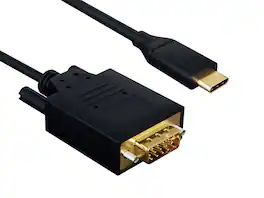
Stuck in a conference room with only a VGA projector — but your MacBook, iPad Pro, or Surface only has USB-C? This Cable Leader USB-C to VGA cable connects directly from a USB-C device with DisplayPort Alt Mode to any VGA monitor or projector at 1080p Full HD (1920 × 1200 @ 60Hz). Skip the trip to the IT closet for a USB-C hub or VGA adapter — one cable, plug and present. Built with double-shielded conductors, gold-plated VGA contacts, and fully molded strain relief. Compatible with MacBook Air / Pro, iPad Pro / Air (USB-C), Surface Pro, Samsung Galaxy with DeX, Pixel, Chromebook, and any USB-C device supporting DisplayPort Alt Mode. ⚠️ Important: not all USB-C ports support video — check your device specs for "DisplayPort Alt Mode". Best for: USB-C laptop or tablet to legacy VGA projectors and monitors. Not for: USB-C charging-only ports. RoHS compliant.
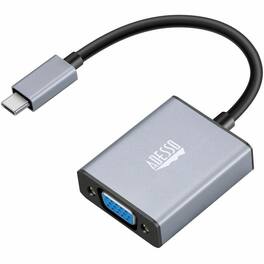
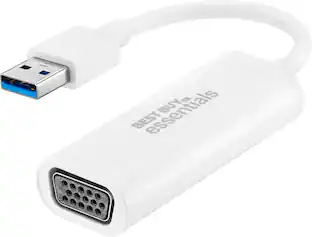
Adesso USB-C to VGA Adapter - 1 x USB Type C - Male - 1 x 15-pin HD-15 VGA - Female - 1920 x 1080 Supported
| Pros for Cable Leader - USB-C to VGA Cable, 1080p Full HD Video for Laptop, Tablet, Phone to Old Monitor, Projector - Black | |||
|---|---|---|---|
| There were no pros for this product— | Overall Performance, Compatibility, HDMI, Price, Ease of use | There were no pros for this product— | There were no pros for this product— |
| Cons for Cable Leader - USB-C to VGA Cable, 1080p Full HD Video for Laptop, Tablet, Phone to Old Monitor, Projector - Black | |||
| There were no cons for this product— | Lag, Resolution | There were no cons for this product— | There were no cons for this product— |
Specs
Be the first to ask a question.
We’ll try to get your question answered within 24 hours by a Best Buy customer or brand representative.
Find more like this
Customers ultimately bought
 $30.16The price was $32.38
Explore tech essentials Sponsored
 $199.99The price was $229.99

Keep exploring

Lian Li - PCIe 5.0 Riser Cable 16X 200mm, Double Bandwidth, PCIe 4.0 Compatible, Black (PW-PCI-520X)
$64.99The price was $88.99