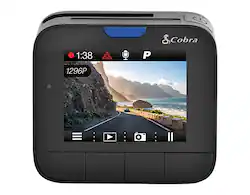
Cobra - Drive HD Dash Cam with iRadar - Black
- Key Specs
- Field of View: 160 degrees
- Automatic Incident Detection: true
- G-Sensor: true
- Recording Resolution: 2304 x 1296 (Refers to the number of pixels, both horizontally and vertically, used to capture video. The higher the resolution the finer the video detail that can be seen.)
- Forward Collision Warning: true
- Compatibility: Universal
- Camera Mounting Location: Windshield
- Vehicle Camera Type: Dashboard
- General
- Brand: Cobra
- Model Number: DASH2308
- Product Name: Drive HD Dash Cam with iRadar
- Color: Black
- Vehicle Camera Type: Dashboard
- Recording & Playback
- Field of View: 160 degrees
- Automatic Incident Detection: true
- G-Sensor: true
- Recording Resolution: 2304 x 1296 (Refers to the number of pixels, both horizontally and vertically, used to capture video. The higher the resolution the finer the video detail that can be seen.)
- Frame Rate: 30 frames per second (The frequency at which consecutive images can be captured. The higher the frame rate, the more detail that can be captured.)
- Loop-Cycle Recording: 3, 5, 10 minutes
- Image Sensor Type: CMOS (CCD and CMOS are the two main technologies used in image sensors. CCD, the older of the two types, turns analog light signals into digital pixels. This conversion happens without distortion, resulting in high-quality images. Newer CMOS sensors use transistors at each pixel to move electrical charges. CMOS sensors are typically less expensive, but also require more light to create distortion-free images.)
- Camera Power Source: Vehicle battery
- Expandable Memory Compatibility: microSD
- Recording Feature: true
- Alert
- Forward Collision Warning: true
- Go Alert: true
- Lane Departure Warning: true
- Traffic Camera Alert: true
- Compatibility
- Compatibility: Universal
- App Compatible: true (The product can be connected to a program or software application on a mobile device, which then receives collected data from the product.)
- Features
- Integrated Microphone: true
- Display
- Screen Included: true
- Screen Size: 2 inches (Size of the screen, measured diagonally from corner to corner.)
- Screen Resolution: 800 x 480 (Screens come in a range of resolutions (measured in pixels, horizontal x vertical). The higher the resolution, the greater the picture quality.)
- On-Screen Display Languages: Chinese, Dutch, English, French, German, Portuguese, Russian, Spanish (The available language options for displayed text.)
- Mounting
- Camera Mounting Location: Windshield
- Mount Included: true
- Mount Type: Adhesive
- Input
- Number Of Auxiliary Inputs: 1
- Number of USB Port(s): 1
- Dimensions
- Product Height: 2.24 inches (The out of box height of the item. Height is measured as the vertical distance from the bottom of the item to the top as it would be primarily used or placed.)
- Product Width: 2.5 inches (The out of box width of the item. Width is measured as the horizontal distance from one side of the item to the other as it would be primarily used or placed.)
- Product Depth: 1.26 inches (The out of box depth of the item. Depth is measured as the distance from the front of the item to the back as it would be primarily used or placed.)
- Product Weight: 0.14 pounds (The out of box weight of the item.)
- Warranty
- Warranty - Parts: 1 year
- Warranty - Labor: 1 year
- Other
- UPC: 028377107498
Drive safely with this Cobra super HD dash cam. Its 1296p recording resolution captures high-quality video footage in any lighting condition, while the extreme temperature protection is tested to withstand sudden fluctuations. This Cobra super HD dash cam provides iRadar route tracking and live police alerts when connected to the iRadar app, so you never miss a thing.
- Peace of mind of a dash cam combined with the power of iRadar: This dash cam connects to the Cobra iRadar app to warn you of upcoming Red Light Cameras, Speed Cameras, and Police Enforcement locations.
- iRadar route tracking: Embeds location, speed, and G-Sensor information at every point of your route when connected to the iRadar app.
- 1296p super HD video: For crystal-clear recording in both daylight and nighttime conditions. Whether for a traffic incident, spectacular road trip, or mundane commute, Drive HD captures all of the details.
- Integrated 2" LCD screen: Provides a clear view and 800 x 480 resolution.
- Built-in G-sensor: Supports emergency video file backup when an accident happens.
- Extreme temperature protection: Built with the supercapacitor technology to withstand extreme temperatures in your vehicle. This dash cam is battle-tested for reliable performance in the most frigid cold snaps or punishing heat waves.
- Advanced driver alert system: Distracted driving is more prevalent than ever. Lane Departure and Forward Collision Warnings let you know if you are drifting out of your lane or quickly approaching an object in front of you.
- Parking mode: While in Parking mode, Drive HD camera will only record video when motion is detected. This feature is helpful for vehicles that have an always-on accessory port or units that are hardwired to power.
- Ready to go: Includes an 8GB microSD card, low-profile adhesive mount, and vehicle power adapter. Simply mount, power, and drive!
Whats Included
- Cobra Drive HD Dash Cam with iRadar
- 8GB microSD card
- Low-profile adhesive mount
- Vehicle power adapter
- Micro-USB power cable
- Micro-USB data cable
Product Manuals
A: The Cobra DASH2308 comes with a 8GB card which holds about 80 minutes of video before the card is full and begins to loop over old video. You can expand the microSD card up to 128GB if you are using at least a class 10 microSD card and make sure to format it in the camera when first installing. With that you should be able to save over 20 hours of videos on the microSD card. Depending on how often you drive during the week, 20 hours will typically be plenty of space to capture all the driving of a typical commuter during the course of a week.
Q: What is iRadar? How does it work
A: iRadar connects via BT to the dash cam. It has a map and alerts. In order to have navigation, you need to purchase the gps module. Waze does a better job IMO.
A: I just installed one in December, and the package only came with one mount. There is little documentation with the packaging and it directs you to a website for more information. I looked at the website for further information on several items, but did not see where another mount could be ordered. I would suggest contacting customer support through the website contact information.
Q: How do you delete the files on the camera?
A: undefined
Q: Installation? Don't you just plug it in?
A: Yes. I believe the sd card is already in the device
People also viewed
 $159.99The price was $199.99
Today's top picks
 $479.99The price was $729.99
 $69.99The price was $129.99
 $199.99The price was $249.99
 $49.99The price was $62.99