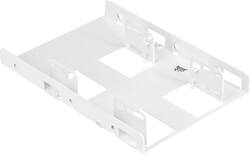
CORSAIR - Dual SATA Drive Enclosure for 2.5" Solid-State Drives - White
- Key Specs
- Drive Form Factor: 2.5 in.
- Internal Interface: SATA
- General
- Brand: CORSAIR
- Model Number: CSSD-BRKT2W
- Product Name: Dual SATA Drive Enclosure for 2.5" Solid-State Drives
- Color: White
- Material: Anodized aluminum
- Compatibility
- Drive Form Factor: 2.5 in.
- Connectivity
- Internal Interface: SATA
- Number of Bays: 1 (Each bay, or enclosure, holds an individual drive.)
- Warranty
- Warranty - Parts: 1 year
- Warranty - Labor: 1 year
- Other
- UPC: 840006638551
The CORSAIR Dual SSD Mounting Bracket lets you easily adapt your PC’s storage capabilities by installing up to 2x 2.5in SATA solid state drives in a single 3.5in HDD bay. Adjustable mounting points allow for variable arrangements for both 7mm and 9.5mm height SSDs. Easily install the bracket with the included screws, and reduce strain on SATA connectors with extra clearance.
- Adapt Your PC’s Storage Capabilities: Convert a single 3.5in HDD bay into a home for up to 2x 2.5in SATA solid state drives.
- Adjustable Mounting Points: Support for multiple dual SSD mounting arrangements.
- Variable SSD Height: Accommodates SSDs of both 7mm and 9.5mm heights.
- Easy Installation: Simply fit your SSDs into the bracket and install it in a 3.5in drive bay with the provided screws.
- Extra Cable Clearance: Connect SATA data and power cables to your SSDs without straining the connectors.
Whats Included
- Dual SSD Mounting Bracket
- 8 x SSD mounting screws
- 4 x bracket mounting screws
Q: does this work for a regular hardrive
A: Short answer is no. This is for an SD drive that is thinner shorter in length and width. hope that helps.
A: No. They do not line up. The only thing this is good for is hooking up with loose cables.
A: The majority of desktop computers accept a 3.5 inch HDD without any need to use an adapter. This adapter mimics the outline of a 3.5 inch drive while holding a 2.5 inch drive - so your goal of mounting a 3.5 inch drive doesn't need this adapter.
A: The HDD I replaced slid into the case. I took the slides from the HDD and attached to this bracket (after installing the SSD) and it worked perfectly.
A: No because you do not need it. The Samsung drive will fit into the MacBook without any additional adapters because the Samsung is the same size as the drive that you will be replacing it with.
Q: Will this adapter fit on iMac 27
A: yes it will
Q: will this be able to be installed in a HP ail in one to replace the HDD with a 2.5 SSD
A: Yes it will fit. As a bonus, you can mount 2 drives with it, but you'll need a second SATA data cable and power cable for the 2nd drive.
Q: Will this work for hp slimline desktop S5-1070t
A: If your Slimline has a 3.5” hard drive, then this should fit it. Even if you only use one 2.5” drive in the enclosure. Otherwise if the Slimline has a 2.5” HD for the original drive, no need for the enclosure.
People also viewed
 $232.49The price was $294.14
Today's top picks
 $479.99The price was $729.99
 $69.99The price was $129.99
 $199.99The price was $249.99
 $49.99The price was $62.99