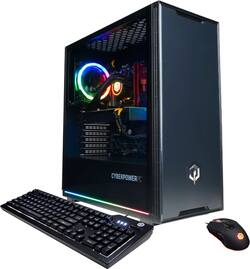
CyberPowerPC - Gamer Supreme Gaming Desktop - Intel Core i9-10900K - 16GB Memory - NVIDIA GeForce RTX 3080 - 1TB SSD - Black
- Key Specs
- Processor Model: Intel 10th Generation Core i9 (Your computer's processor is like its brain. Working in combination with system memory, the power of the processor determines the complexity of software you can run, how many programs you can have open at the same time, and how fast those programs will run. Most computers feature an AMD, Intel or Snapdragon processor.)
- Storage Type: SSD
- Total Storage Capacity: 1000 gigabytes
- System Memory (RAM): 16 gigabytes (Random-access memory (RAM) is a computing device's short-term data storage, which allows active information to be accessed quickly. The size and type of RAM determines how efficiently the device can handle large amounts of information at one time. For example, gaming or video editing requires more RAM for optimal performance.)
- Graphics Type: Dedicated (Dedicated graphics uses a separate graphics card for processing video images. Because it does not use memory from the system's RAM, there is no extra burden on the CPU and graphics are processed more efficiently. Integrated graphics shares system RAM to process video images.)
- Graphics: NVIDIA GeForce RTX 3080 (Often referred to as a "graphics processing unit" (GPU), this device is responsible for displaying image content and decoding/encoding video content in programs and games.)
- General
- Brand: CyberPowerPC
- Model Number: SLC8200BST
- Product Name: Gamer Supreme Gaming Desktop - Intel Core i9-10900K - 16GB Memory - NVIDIA GeForce RTX 3080 - 1TB SSD
- Color: Black
- Processor
- Processor Brand: Intel
- Processor Model: Intel 10th Generation Core i9 (Your computer's processor is like its brain. Working in combination with system memory, the power of the processor determines the complexity of software you can run, how many programs you can have open at the same time, and how fast those programs will run. Most computers feature an AMD, Intel or Snapdragon processor.)
- Processor Model Number: i9-10900K
- Storage
- Storage Type: SSD
- Total Storage Capacity: 1000 gigabytes
- Solid State Drive Capacity: 1000 gigabytes (The amount of data that can be stored on the device's solid state drive (SSD). SSD is a flash-based storage with faster speeds than a hard disk drive (HDD).)
- Solid State Drive Interface: NVMe (Connects the solid state drive to the host system. PCI and SATA interfaces are the most common; PCI interfaces are typically faster, but SATA interfaces are compatible with a wider range of systems.)
- Hard Drive Accelerator: None (A module integrated (or added) into a PC to improve performance speed. By acting as a high-speed cache, an accelerator speeds up access times to the hard drive, which results in faster web browsing, improved gaming experience, and overall more responsiveness.)
- Memory
- System Memory (RAM): 16 gigabytes (Random-access memory (RAM) is a computing device's short-term data storage, which allows active information to be accessed quickly. The size and type of RAM determines how efficiently the device can handle large amounts of information at one time. For example, gaming or video editing requires more RAM for optimal performance.)
- Type of Memory (RAM): DDR4 SDRAM (Each type of RAM delivers a different level of speed, bandwidth, energy efficiency and performance.)
- System Memory RAM Speed: 3000 megahertz (How fast the information-storing hardware operates. The faster the RAM, the faster memory can be transferred to other system components. Ultimately, faster RAM improves operational efficiency.)
- Number Of Memory Slots: 4
- System Memory RAM Expandable To: 64 gigabytes (Adding more random-access memory (RAM) to a computer speeds up performance and improves efficiency. Upgrades to memory are limited by the number of expansion slots for additional RAM and existing RAM installed on the device.)
- Graphics
- Graphics Type: Dedicated (Dedicated graphics uses a separate graphics card for processing video images. Because it does not use memory from the system's RAM, there is no extra burden on the CPU and graphics are processed more efficiently. Integrated graphics shares system RAM to process video images.)
- GPU Brand: NVIDIA
- Graphics: NVIDIA GeForce RTX 3080 (Often referred to as a "graphics processing unit" (GPU), this device is responsible for displaying image content and decoding/encoding video content in programs and games.)
- Compatibility
- Operating System: Windows 10 (The operating system manages all software and hardware, including files, memory and connected devices. Most importantly, it lets you interact with your device and your programs in a visual way; otherwise, you'd be typing computer code to get anything done.)
- Operating System Architecture: 64-bit (An operating system (OS) manages computer hardware, software resources, and programs in conjunction with the system's processor. 64-bit operating systems can handle more data at once than 32-bit systems, resulting in faster speeds, more effiency, and overall improved performance.)
- Motherboard Form Factor: ATX (Physical size of the motherboard, which can determine how many PCIe slots are available. Smaller board means fewer slots and features.)
- Connectivity
- Number of HDMI Outputs (Total): 1
- Number of DisplayPort Outputs (Total): 2
- Number of VGA Ports: 0 (VGA (Video Graphics Adapter or Video Graphics Array) is a display standard that transmits via analog signals. This type of interface is typically used to connect a computer to a display device such as a monitor, projector, or TV.)
- Number of USB Ports (Total): 8
- Number Of PS/2 Ports: 1
- Ethernet Card: 10/100/1000 (Also known as an Ethernet adapter, this card plugs into a computer's motherboard and enables it to access an Ethernet network. Ethernet data transmission speeds are measured in Mbps (megabits per second) and Gbps (gigabits per second). For example, a 10/100 Ethernet port transmits 10 and 100 Mbps, while a 10/100/1000 Ethernet port transmits 10 and 100 Mbps and has a maximum speed of 1000 Mbps (1 Gbps).)
- Number Of Ethernet Ports: 1
- Expansion
- Number Of Internal 2.5" Bays: 2
- Number Of Internal 3.5" Bays: 2
- Features
- Media Card Reader: false (A hardware device that allows for access to data on a memory card and enables the transfer of its files to a computer. These devices may have one or multiple slots for various types of memory cards, and may be integrated into the computer or available as an external device.)
- Customizable Case Lighting: true
- Audio Technology: 7.1-channel surround
- Dimensions
- Product Height: 18.5 inches (The out of box height of the item. Height is measured as the vertical distance from the bottom of the item to the top as it would be primarily used or placed.)
- Product Width: 8.5 inches (The out of box width of the item. Width is measured as the horizontal distance from one side of the item to the other as it would be primarily used or placed.)
- Product Depth: 17.1 inches (The out of box depth of the item. Depth is measured as the distance from the front of the item to the back as it would be primarily used or placed.)
- Product Weight: 32.0 pounds (The out of box weight of the item.)
- Certifications Listings & Approvals
- ENERGY STAR Certified: false (Devices carrying the ENERGY STAR service mark, such as computer products and peripherals, kitchen appliances, and other products, generally use 20% to 30% less energy than required by federal standards.)
- EPEAT Qualified: false (The Electronic Product Environmental Assessment Tool (EPEAT) was designed to provide an environmental assessment tool for purchasers. In order to qualify for EPEAT, a product must meet all 23 required criteria.)
- Included
- Optical Drive Type: None (An optical disk drive (ODD) uses a laser light to read data from or write data to an optical disc. These discs include CDs, DVDs, and Blu-ray Discs. This allows you to play music or watch movies using prerecorded discs.)
- Keyboard Included: true
- Mouse Included: true
- Wireless Keyboard: false
- Wireless Mouse: false
- Other
- UPC: 811842069267
Stay cool under pressure with this CyberPowerPC Gamer Supreme Liquid Cool gaming desktop. The NVIDIA GeForce RTX 3080 graphics card renders games in stunning detail, and the 1TB SSD easily accommodates the largest titles. This CyberPowerPC Gamer Supreme Liquid Cool gaming desktop has an Intel Core i9 processor and 16GB of RAM that let you run multiple programs simultaneously.
- Windows 10 operating system: Brings back the Start menu from Windows 7 and introduces new features, such as the Edge web browser that lets you mark up web pages on your screen. Learn more ›
- 10th Gen Intel® Core i9-10900K: Backed with 10 cores and 20 threads, up to 5.3GHz frequency, and is fully unlocked. New levels of single, multi-threaded, and mega-tasking performance for the latest AAA games and VR.
- 16GB system memory for intense multitasking and gaming: Reams of high-bandwidth DDR4 RAM to smoothly run your graphics-heavy PC games, video-editing applications, numerous programs and browser tabs at the same time.
- 1TB solid-state drive (NVMe): Save files fast, and store more data. With massive amounts of storage and advanced communication power, this NVMe SSD is ideal for major gaming applications, multiple servers, daily backups and more.
- NVIDIA GeForce RTX 3080: Powered by 10GB GDDR6X dedicated video memory to quickly render high-quality images for videos and games.
- Eight USB ports maximize high-speed devices: Its USB 3.0 ports are backward-compatible with USB 2.0 devices at 2.0 speeds.
- Wireless and wired network connectivity: Built-in high-speed wireless LAN connects to your network on the most common Wi-Fi standards. The Gigabit Ethernet LAN port plugs into wired networks.
- Multidisplay capability: Connect the usual single monitor, or add a second monitor to double your viewing space for work and games. (Monitors sold separately.)
- Additional ports: HDMI output for high-definition monitor or HDTV, two DisplayPort outputs, audio jack, one PS/2 port for keyboard or mouse.
Whats Included
- CyberPowerPC Gamer Supreme Gaming Desktop - Intel Core i9-10900K - 16GB Memory - NVIDIA GeForce RTX 3080 - 1TB SSD
- Power cord
- Keyboard
- Mouse
- Driver discs
A: I ordered this for my son and the cooling is not adequate in the long run. The rad for the CPU features both a push and pull fan on both sides of the rad as an exhaust out the back of the case. There are two fans on the metal side of the case that are also exhaust fans. That's it as far as cooling goes. I added 3 fans to the top as exhaust fans and reversed the metal side fans and made them intakes. This keeps the cooling somewhat adequate for now (the CPU and MSI Ventus 3080 both sit in the 60-70 C temp wise under load with this setup). The i9 10900K really needs a 360 rad but this case does not allow one as the CPU power cable would be in the way at the top of the case and the front is blocked off with a solid front panel. All that said, I still think this deal was worth it as if you add up the prices of these components you come out pretty well and you could always add say a Corsair Airflow 4000D case for like $80 and move all the components over to it.
A: Having similar issues although not at idle. The CPU cooling isn't adequate and anything that puts a lot of stress on the CPU is resulting in blue screen crashes and CPU overtemperature errors. I have a 240hz monitor but I need to lower the refresh rate to 144hz to put less stress on the CPU.
Q: What kind of 3080 is in this prebuilt?
A: Mine came with the MSI Ventus 3X 3080!
Q: Just curious if someone received their pre-built PCs earlier than the scheduled pickup date?
A: When I ordered mine, it was Guaranteed for in store pick up on 11/27/20, wasn't there on the date and isn't there yet. I was told to wait for an e-mail but I still check in person from time to time because some people, I've read, didn't even get an e-mail to let them know orders had arrived. I was also told that 12/18/20 should be the latest I should have to wait, which makes me wonder why a company would have a "Guaranteed" date at all if they can't actually Guarantee it on that day.
Q: How many watts is the power supply?
A: Thank you for reaching out to us. This system should include an 800 watt power supply. If you have any further questions or concerns then please do not hesitate to give our tech support agents a call for any assistance; we're always happy to help. Tech Support: (855) 888-2039 TechTeam@CyberpowerPC.com Hours of Operation: Monday - Friday: 8:30AM - 6:00PM PST Saturday: 9:30AM - 3:00PM PST -CyberpowerPC Support
Q: what brand is the motherboard ?
A: Mine came with the Asus PRIME Z490-V
A: Way to go bestbuy for censoring my previous answer. I have the same issue too, just did a clean install of win 10. still getting bsod 133. It's likely a hardware fault somewhere. I'm guessing either between a power supply cyberpower cheaped out on, not 850W gold, or maybe it's the rgb fan too close to the graphics card. If anyone solves this issue can you post here?
Q: How do I control the RGB for the fans and the AIO? Need any apps? Thanks.
A: The RGB for the fans and AIO is wired to a controller with a few preset patterns that's controlled by the button on top of the case, next to the USB ports. There is no software control they way they're set up. If you have an ASUS MB, you can reroute them to the ARGB header and use Aura Sync in Armoury Crate. If the graphics card is an MSI, its RGB can be controlled by Mystic Light in Dragon Center. BTW, Dragon Center uses a bunch of temp files during its installation that often get blocked by antimalware software so make sure you temporarily disable your AV (especially if you have "protected folders" enabled in Bitdefender).
People also viewed
 $2,059.99The price was $2,299.99
 $1,726.99The price was $2,199.99
- $2,699.99The price was $3,049.99
 $4,699.00The price was $4,769.99
 $1,599.99The price was $1,699.99
 $1,949.99The price was $2,149.99

Today's top picks
 $199.99The price was $249.99
 $149.99The price was $239.99
 $789.99The price was $1,049.99











