
Dobe - TP5-3532B PS5/PS5 Slim Stand and Multifunctional Cooling Station with RGB LED Controller Charging Station
About This Item
- Key Specs
- Compatible Platform(s): PlayStation 5
- General
- Brand: Dobe
- Model Number: TP5-3532B
- Product Name: TP5-3532B PS5/PS5 Slim Stand and Multifunctional Cooling Station with RGB LED Controller Charging Station
- Features
- Accessory Type: Stand
- Compatibility
- Compatible Platform(s): PlayStation 5
- Other
- UPC: 841106112613
1.After the product is powered on, the controller icons on the display window of this product are all blue. Insert the controller smoothly into the left (right) controller charging socket for charging, and the corresponding left (right) controller display window will immediately turn to red display; When charging is complete, the display window turns to blue again 2.The PS5 controller is not connected to the console for charging: the charging indicator on the controller is an orange breathing display; when charging is complete, the indicator on the controller is off 3.The PS5 controller is successfully connected to the console for charging: the charging indicator on the controller is solid white. If the controller is being charged in the game, the controller will light blue and white for a long time 4.When the charging power of the PS5 controller reaches about 80% or more, if you unplug the controller and then plug it in to charge, the controller may not be charged due to the battery protection function of the controller; you need to wait for the controller battery to drop below 80%. The battery will continue to charge
- Fan gear switch: It can turn the fan on and off, and the wind power can be adjusted. Each time the switch is pressed, the working status of the fan can be switched, which are: fast gear -medium gear
- Cooling fans: The product has 2 high-speed fans, which can speed up the air circulation inside the console to achieve the purpose of heat dissipation
- Fan gear indicator blue: The indicator lights in the three states of "strong/weak/dark" respectively indicate the "fast/medium/slow" wind speed of the fan, and the indicator light will turn off when it is turned off
- White light display of the fan gear icon: The white light corresponding to the three icons respectively displays the fan speed of "fast/medium/slow" in three gears, and the icon goes out after it is turned off
- Charging deck: It can charge two original PS5 controllers at the same time. According to the picture, insert the PS5 controller smoothly into the left (right) charging deck to charge
Reviews
This product doesn't have any reviews yet.
Compare similar products
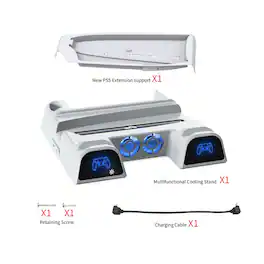
1.After the product is powered on, the controller icons on the display window of this product are all blue. Insert the controller smoothly into the left (right) controller charging socket for charging, and the corresponding left (right) controller display window will immediately turn to red display; When charging is complete, the display window turns to blue again 2.The PS5 controller is not connected to the console for charging: the charging indicator on the controller is an orange breathing display; when charging is complete, the indicator on the controller is off 3.The PS5 controller is successfully connected to the console for charging: the charging indicator on the controller is solid white. If the controller is being charged in the game, the controller will light blue and white for a long time 4.When the charging power of the PS5 controller reaches about 80% or more, if you unplug the controller and then plug it in to charge, the controller may not be charged due to the battery protection function of the controller; you need to wait for the controller battery to drop below 80%. The battery will continue to charge

The Moza R3 Racing Wheel and Pedals Bundle delivers high-performance sim racing at an exceptional price. This bundle is designed for PC users and includes the precision-driven R3 Racing Wheel with advanced force feedback and the Moza SR-P Lite pedals for responsive, realistic control. It offers unbeatable value without sacrificing performance—perfect for both experienced racers and newcomers seeking immersive racing on PC.
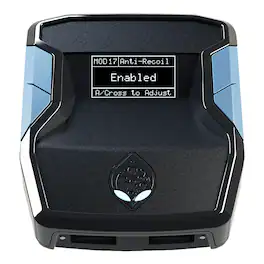
Cronus Zen is a breakthrough device founded on the rich legacy of the award-winning CronusMAX devices, universally recognized as the definitive controller adapter. Zen moves that legacy forward, giving the gamer the most powerful platform on the market, allowing advanced crossover platform gaming technology, unparalleled keyboard and mouse precision, combined with unsurpassed MOD scripting capability of combos and macros with the new Zen Studio software. Cronus Zen unleashes the true power of your controller, unlocking more features than ever before. Re-designed from the ground up, you now have access to powerful modes such as Crossover Gaming which allows you to use your favorite controller on PS5 BETA, XBOX SERIES X|S BETA, PS4, XBOX ONE, NINTENDO SWITCH, PS3, XBOX 360, and WINDOWS PC. It also converts your controller into a fully loaded war machine without installing any chips or wires. There are thousands of free MODs developed by the Cronus Community for all the latest games, including Rapidfire, Anti-Recoil, Aim Assist, Quickscope, Strafe Shot, Drop Shot, Fast Reload, Auto Sprint, Sniper Breath, Steady Aim, and much more - without spending hundreds of dollars on an expensive modded controller

Turn your Switch 2 into the ultimate portable gaming machine with the dbrand Killswitch. This Switch 2 case features ergonomic hand grips that detach alongside your Joy-Cons, a built-in Dock Adapter to preserve dock compatibility, and a crushproof protective travel cover with built-in game card storage.
| Pros for Dobe - TP5-3532B PS5/PS5 Slim Stand and Multifunctional Cooling Station with RGB LED Controller Charging Station | |||
|---|---|---|---|
| There were no pros for this product— | Build Quality, Force Feedback, Setup Ease, Noise Level, Realism | Overall Performance, Compatibility, Customization, Accuracy | Build Quality, Ergonomics, Protection, Fit, Feel |
| Cons for Dobe - TP5-3532B PS5/PS5 Slim Stand and Multifunctional Cooling Station with RGB LED Controller Charging Station | |||
| There were no cons for this product— | Pedal Stability, Wheel Size | Ease of Use, Connectivity | Compatibility, Weight |