FREE shipping to
Personalize your video game streaming workflow with this Elgato Stream Deck mini interface. Six programmable one-touch LCD keys provide quick access to your favorite apps and functions, and its Multi Actions feature lets you program multiple tasks to a single key. Assign ready-made icons or design your own to further customize this Elgato Stream Deck mini interface.
Q: do i need a capture card also or will this work like a capture card?
A: Hi ghost, You'd need a capture device/card to capture gameplay, this would not be anything like a capture card but it'd help with your stream.
A: I don’t think so. I have a PS4 and pc but even tho the PS4 has a USB port just like this plug, the stream deck is used with things like streamlabs which can only be used on pc. I would not buy it if you have a PS4 because you don’t want to take the risk.
Q: When will this be in stock again?
A: Hi Ash, Please contact BB directly for that information. If you have any questions about the product itself, do reach out to us: help.elgato.com -Art
Q: Is this the same thing as an elgato because of the start and end. Action button for YouTube ?
A: yes only for youtube you get chat and viewers nothing else
Q: Does this only work for pc or can it be used on console as well
A: This only works on PC.

Personalize your video game streaming workflow with this Elgato Stream Deck mini interface. Six programmable one-touch LCD keys provide quick access to your favorite apps and functions, and its Multi Actions feature lets you program multiple tasks to a single key. Assign ready-made icons or design your own to further customize this Elgato Stream Deck mini interface.

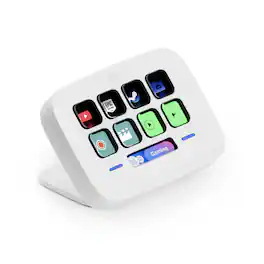
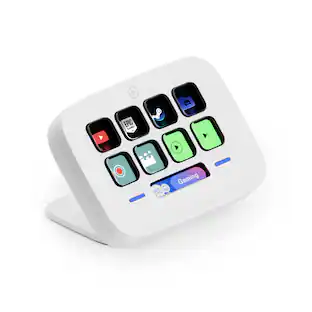
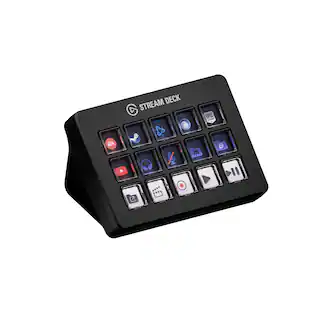
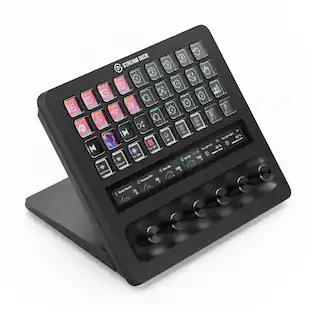
Stream Deck gives you 15 LCD keys to control your apps and tools. Trigger actions, launch social posts, adjust audio, play sound clips, activate lights, and much more. Get visual feedback to confirm your commands. Set Stream Deck to automatically switch key configurations as you jump between apps. It’s the ultimate workflow hack, and it’s fully customizable. Personalize your Stream Deck with custom icons, screensavers, and a growing range of interchangeable faceplates. Use the app to configure keys with ease, and hit the Stream Deck Store for app plugins, icon packs, thousands of royalty free tracks, effects, and more.

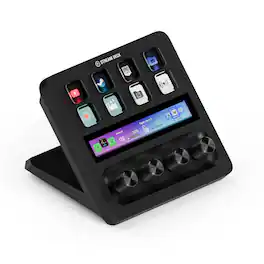
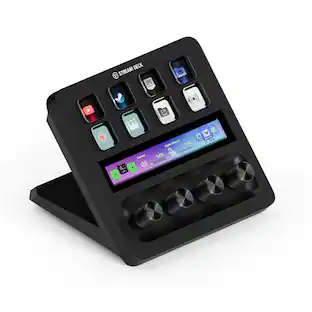
Iconic Stream Deck tech with LCD keys, dials, and touch strip. Fully customizable. Perfect for any workflow. Stream Deck + is your audio mixer, studio controller, production console – anything you want it to be. Trigger actions. Control mics and cameras. Adjust volume, lighting, and much more. Create limitless pages for different apps and swipe between them on the fly. Set up with ease in the Stream Deck app. Unlock Elgato Wave Link mixing software, and hit the Stream Deck Store for plugins, icon packs, thousands or royalty-free music tracks, sound effects, and more. With new plugins and updates added regularly, Stream Deck + evolves with your workflow.

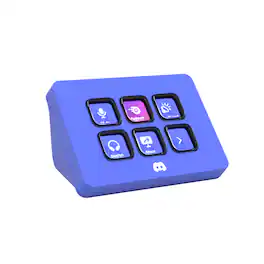
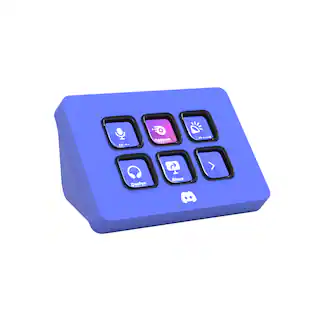
Meet the Elgato Stream Deck Mini – Discord Edition, the ultimate companion for Discord power users. With six fully 1. 2. 3. 4. 5. 6. 7. 8. 9. 10. customizable LCD keys and preloaded Discord actions, you can mute, deafen, screen share, and switch chats in a single tap. Wrapped in Discord’s iconic blurple and bundled with a free 1-month Discord Nitro voucher, this Stream Deck Mini goes beyond voice and chat. Whether you’re in-game, live streaming, or just hanging with friends, it lets you move fast, stay organized, and express yourself with ease. Plug it in, power up, and take control—because it’s your deck, your rules.
| Pros for Elgato - Stream Deck Mini - Black | |||
|---|---|---|---|
| There were no pros for this product— | Ease of use, Customization, Overall Performance, LCD Keys, Software | Ease of use, Customization, Quality, Knobs, Volume Control | There were no pros for this product— |
| Cons for Elgato - Stream Deck Mini - Black | |||
| There were no cons for this product— | Price, Stand | There were no cons for this product— | There were no cons for this product— |
The vast majority of our reviews come from verified purchases. Reviews from customers may include My Best Buy members, employees, and Tech Insider Network members (as tagged). Select reviewers may receive discounted products, promotional considerations or entries into drawings for honest, helpful reviews.

Video game streaming’s meteoric rise from a handful of live streams spread about the internet to a global phenomenon with prime time spots on ESPN has spawned countless specialty products intended to make streaming more accessible, convenient, and high-quality for amateurs and professionals alike. The popularity of Elgato’s full-size Stream Deck is unmistakable, giving streamers a large slate of versatile shortcuts without sacrificing any valuable keyboard keys. The Stream Deck Mini aims to provide the same experience in a portable form factor, and very little was lost in the transition down to the smaller size, making this a great companion for streamers, content creators, gamers, and pretty much anyone who could use an extra set of highly customizable function keys. - Setup and Software My first impressions were quite positive. The Stream Deck Mini was smaller than I had anticipated, but the unit feels solidly built, decently weighted, and has a rubberized anti-skid base that keeps it firmly in place on most surfaces. Setup was very easy as the quickstart guide not only shows where to download the Stream Deck software, but walks through basic configuration, key customization, and profile management within the software itself. It’s a small touch but one that’s very welcome, as there was no guesswork needed to get up and running. The Stream Deck Mini uses the same software suite as its larger brethren, so existing Stream Deck users will have no trouble getting the smaller device configured for their needs. Speaking as a first-time user, the Stream Deck software itself is very intuitive. Any key on the Stream Deck Mini can be set to execute a command with a simple click-and-drag approach, and “Multi Action” macros can be programmed for a key as well. Stream Deck has built-in functions for users of Elgato’s Game Capture devices, internal Stream Deck commands (such as wait, switch profile, change brightness), and application hooks for many of the most popular software packages used by streamers, listed below. Of course, there are also plenty of system-level commands available, such as hotkey mapping, multimedia playback, text input, and file open instructions. There’s also a built-in soundboard should you wish to meme-blast your viewers. Supported software packages and social media as of the time of this review are: Mixer, OBS Studio, Streamlabs (and Streamlabs OBS), TipeeeStream, Twitch, Twitter, XSplit, and YouTube. I would have liked to see more integration with chat apps that streamers commonly use, such as Discord, but the software is in constant development and more apps should be added in the future. See Elgato’s website for more information on supported software. - Customization All of the above features are useful in and of themselves, but would be difficult to remember if the function keys had static labels. The 72x72 pixel screens that lie under each key make the Stream Deck Mini an invaluable tool, as every individual function can have its own image or animated GIF displayed to represent the action(s) the key will perform. Text can also be displayed in lieu of an image, and I found that the screens were crisp and clear enough to read the text at about two feet away, though you’re limited to about 8 to 10 characters per line. The two most important features that allow a smaller Stream Deck to work as well as the full-size device are folders and profiles, both fully integrated into the software package. The folders allow a single key on the Stream Deck Mini to load up five further functions (with the top left key being reserved for a “Back” button to exit the folder), letting the user group their commands as they see fit. Folders can nest several layers deep as well, letting creative streamers have a plethora of commands at their fingertips or letting a content creator have all of their creative suite shortcuts at hand. While one could separate a specific application’s commands into a single folder as I have, the Stream Deck software not only allows for profile switching with the press of a button, but also load specific profiles automatically when a specified application is launched. This function exists in the drivers of many gaming peripherals, and I’m glad to see the same user-centric approach taken by Elgato. - In Use This immense versatility prompted me to use the Stream Deck Mini outside its intended use for a streamer or content creator, and use it as a gaming peripheral. In my case the device became a “button box,” a control panel attached to a driving simulator cockpit for non-operating controls (such as brake bias adjustment, pit speed limiter, etc). Once I set my folders up with hotkey binds and a few multi-action commands for timed inputs, I had a dynamic device that adapted seamlessly from game to game. I did not encounter any noticeable input delay or dropped commands after logging many hours on it, and the keys were all large enough to display a graphic representing each control that was clearly visible from a distance. The Stream Deck Mini helped eliminate the need to reach for a keyboard in the middle of a session, and freed up other buttons on my racing wheel for more useful commands. I did find some limitations to the device after a couple hours. The biggest issue I had is that the key spacing appears closer together than on the full-size Stream Deck, which led to the occasional wrong keypress. I would’ve liked to have seen them spaced a bit further apart. Additionally, as the keys are common “membrane” style switches, they sometimes tend to depress at an angle or in a way where they feel like they could get stuck. Fortunately the keystroke recognition is very light and sensitive so this is a minor complaint all things considered. The only other shortcoming I found is that the Stream Deck software must be running at all times for the device to function. While I understand the reasoning behind that with all the macros that are possible to assign, onboard storage for a single common profile would have been a great feature for those who switch between computers regularly and want to bring their workflows with them without the need to install the software and copy their profiles multiple times. The software also does not currently allow for Stream Deck devices to act as joystick inputs, limiting its functionality for non-streaming purposes, but as this is outside its intended use I cannot count this against the review score. - Bottom Line That the Stream Deck Mini shares all its versatility and customization with the larger device means it does something refreshingly honest: it cuts down both size and price without cutting the functionality. I have barely scratched the surface of how this device could be used to improve work and streaming experiences alike, and it works very well as a supplemental input for games. All told, the niche nature of this product justifies the asking price, and I would suggest this to streamers looking to step up to the next level and optimize their workflow without committing to shelling out for the larger device. Recommended!
This review is from Elgato - Stream Deck Mini - Black
Posted by Turbolence
I’m always trying to find ways to make my workflow more functional. Not too long ago, Elgato introduced the Stream Deck programmable broadcasting tool. It’s a panel of buttons that are completely customizable. The full-size Stream Deck has 15 buttons on it, which was a bit much for my set-up. I like to keep things on the minimal size to conserve desk space. Fortunately for me, Elgato released the Stream Deck Mini recently which is perfect for my set-up. I have a love—hate relationship with the packaging for the Stream Deck Mini. First, it is branded well and you can easily see what the product is supposed to be. There is quite a bit of information includes on the box so many questions will be answered right from the writing on the box. That said, it’s a lot of box for such a little device. The box is about 10 inches tall and the Stream Deck Mini device is only 3.3 x 2.4 x 2.3 inches in size. The only items in the box are the Stream Deck Mini with its attached cable and a quick start guide. Even though I’m not what I would consider an ‘environmentalist’, I do appreciate packing that is minimal and not wasteful. I would love to see Elgato rethink their packaging for this product. Moving on, the Stream Deck Mini is an incredible little device. The first step to its set-up process is to download the Stream Deck app for your operating system. For me, it is for Mac and it appears as a menu bar utility. After you’ve downloaded the app, you can connect the Stream Deck Mini to your computer using the attached USB cable. At this point, you can launch the app and start customizing the buttons. To get started, you simply drag actions from the panel on the right side of the screen to the desired keys on the left. The LCD within the buttons can be programmed in any way you wish. You can choose to create your own icons or configure graphics using Elgato’s web interface. One thing I was a little concerned about was the amount of customization I could achieve with this smaller interface. As it turns out, there are limitless possibilities with the Stream Deck Mini since you can create folders for keys. You can literally nest folders inside folders and have a huge library of commands on the tiny deck of buttons. So far, the Stream Deck Mini has performed flawlessly. I love being able to tap a single button and have these locations open with no other interaction. The only downside is that the programming is tied to the computer it’s connected to. If I move the Stream Deck to a different machine, I will have to reprogram it there. I do wish that the deck had onboard storage to accommodate for saved preferences, but that is really the only issue I have with the device. I absolutely love having the Stream Deck Mini be apart of my work ecosystem. It’s a magical little device that makes my life a lot easier. I’m looking forward to using it more and more as time goes on and can’t wait to see what it does for my productivity. I can recommend it to anyone looking to make their workflow more concise or for broadcasters who want a simple way to add a switcher to their system. It is well worth the cost in my opinion.
This review is from Elgato - Stream Deck Mini - Black
Posted by nickcal
I bought this to help with producing shows with OBS,great switching between sides and cameras videos. The thing I like is the ability to switch between desktop app. "Sweet".
This review is from Elgato - Stream Deck Mini - Black
Posted by Ty71057