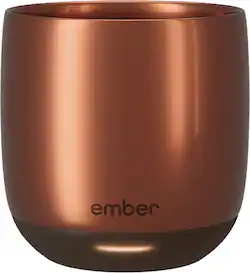
The Ember Smart mugs aim to solve a small inconvenience that many coffee and tea drinkers often encounter -- that the drinks just don’t stay hot enough from the first sip to the last. This latest model, dubbed the Ember Cup, has the smallest capacity in their lineup at 6 oz, but if you’re not a “big mug” coffee or tea drinker, it just might be the perfect size for your needs.
The cup itself has a minimalist design: a smooth, matte finish, no handle, and inconspicuous branding with a single status LED at the bottom. The cup sits 3.25” tall with a 3” diameter, and 2” interior depth. The reason why the cup is so much shallower than the overall height is due to the electronics and re-chargeable Li-ion battery packed into the base. So while the cup may look larger from the exterior, it still only holds 6 oz. On the bottom of the cup is a single power button in the center, and around it are two gold metal ring charging contacts.
When placed on the accompanying charging saucer/base, two small pins will touch the rings no matter how the cup is oriented, so precise placement is not needed. Since charging is not accomplished through induction, you won’t be able to charge the mug with other wireless charging pads like a Qi charger, however, additional charging bases can be purchased separately and are compatible with all Ember mug models if you want to have multiple places where you can set your mug down to charge. The coaster bases use a standard barrel-style plug with wall adapter and need to be plugged into an outlet. A full charge takes about 2 - 3 hours.
The way the device functions is pretty straightforward; power it on, fill it with your hot beverage of choice, and a heating element in the base keeps it at a temperature of your choosing between 120°F to 145°F (or 50°C - 62.5°C). If the drink is hotter than the set temperature, the cup simply allows the drink to cool until it reaches the target temp. When it falls below that temperature, the heating element kicks in, and the LED will pulse white and remains a solid white while holding at the target temperature. It can keep your drink hot for up to 90 minutes on battery power, perfect if you want to take it when you roam, but be cautious of spills as it has no lid/cover.
If you set the cup on its charging base, the temperature can be held constant indefinitely, though there is a 2-hour inactivity auto-shutoff feature that can be reset by simply picking up the mug. Note that the battery won’t increase in charge if the mug is actively maintaining temperature on the charging coaster. It’ll only charge when the cup is empty or is powered off by pressing and holding the power button for 3 seconds.
Out-of-the-box the default holding temperature is 135°F, which I found to be a pleasantly hot and drinkable temperature for café au lait and cappuccino. The reasoning for not allowing higher temperatures is that this can degrade the flavor of a beverage over time, curdle drinks containing milk, and is a potential scald risk as well. To change the temperature setting, you’ll need to pair the mug to a mobile device via Bluetooth and install the Ember app, which requires you to register for an account. To enter pairing mode, simply press and hold the power button for 5 seconds.
In the app you can also customize whether or not to receive push notifications when your beverage has reached the set temperature, change the temperature units to Celsius, and choose a custom color for the status LED. Your LED color will illuminate upon powering on/off and each time you pick up the mug, as it has a built-in accelerometer to detect motion and help multi-mug households identify individual mugs quickly and easily. When the cup is empty, it’ll automatically enter sleep mode and will not actively heat, though it will remain paired with a mobile device.
Keep in mind this cup is not designed to “heat up” cold drinks quickly, as the heating element delivers only gentle warming and increases the beverage’s temperature about 1 degree every 10 seconds. In fact, if the temperature of its contents is under 100°F, the heating element will remain off, unless you manually change the holding temperature; changing this value will engage the heating element even if your drink is cold, but not if the mug is empty. Pouring in any drink that is at least luke warm, above 100°F, will automatically start the heating element if the cup is on and below the target temperature.
One quirk I found is that if the cup is placed onto the charging base within about 15 seconds of powering it off, it will automatically power on again and connect to the most recently paired mobile device, if it’s in range. While it should still power off after 2 hours of inactivity, I nonetheless found this behavior a bit strange. The mug is neither microwave nor dishwasher safe, so hand washing with a soft sponge is the recommended cleaning method. You should also completely dry the mug before placing it on the charging base as the gold contacts and rings may be corroded by liquid, which can in turn cause charging issues. It seems a bit unexpected that the coaster base would not be waterproof though, since they're usually meant to catch spills and drips. You also won’t want to use metal utensils in the Ember, as this can damage the finish, so you can pre-mix your drinks before pouring into the Ember or use wooden or plastic spoons instead.
Overall, the Ember Cup does the job it’s intended to and keeps a small amount of my hot beverages precisely at my desired drinking temperature, whether that’s tea, coffee, espresso, mulled wine, a hot toddy, etc. The battery life is decently long, and the charging base can extend that to last the whole day if need be. Its care requires a little extra mindfulness to keep it pristine, but I suppose that’s the trade-off for a relatively niche, "nice-to-have," luxury gadget.