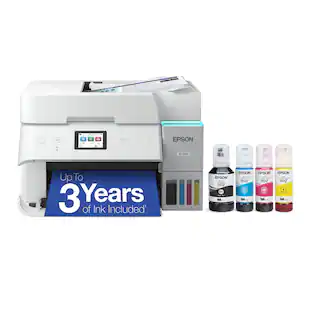
Epson - Expression EcoTank ET-2700 Wireless All-in-One Inkjet Printer - Black
- Key Specs
- Networking: Wireless
- ENERGY STAR Certified: true (Devices carrying the ENERGY STAR service mark, such as computer products and peripherals, kitchen appliances, and other products, generally use 20% to 30% less energy than required by federal standards.)
- Printer Type: All In One
- ISO Color Print Speed: 5 pages per minute (The number of color pages able to be printed per minute in the device's default single-side mode, as tested by the International Standards Organization (ISO).)
- ISO Mono Print Speed: 10.5 pages per minute (The number of black ink (grayscale) pages able to be printed per minute in the device's default single-side mode, as tested by the International Standards Organization (ISO).)
- Output Tray Capacity: 30
- General
- Brand: Epson
- Model Number: ET 2700
- Product Name: Expression EcoTank ET-2700 Wireless All-in-One Inkjet Printer
- Color: Black
- Display Screen: false
- Dimensions
- Product Height: 7.4 inches (The out of box height of the item. Height is measured as the vertical distance from the bottom of the item to the top as it would be primarily used or placed.)
- Product Width: 14.8 inches (The out of box width of the item. Width is measured as the horizontal distance from one side of the item to the other as it would be primarily used or placed.)
- Product Weight: 11 pounds (The out of box weight of the item.)
- Features
- Automatic Document Feeder: false
- Photo Printing: true
- Monochromatic/Color: Color
- Automatic Two-Sided Printing: true
- Tray Capacity: 100
- Duty Cycle: Up to 6,500 (The maximum number of pages per month that the device can produce without failing, as specified by the manufacturer.)
- Certifications Listings & Approvals
- EPEAT Qualified: false (The Electronic Product Environmental Assessment Tool (EPEAT) was designed to provide an environmental assessment tool for purchasers. In order to qualify for EPEAT, a product must meet all 23 required criteria.)
- Scanner Info
- Scanner Type: Flatbed
- Duplex Scan Function: false
- Scanner Resolution: Up to 1200 x 2400 (Refers to the number of pixels/dots, both horizontally and vertically, of the image produced by the scanner. Generally, the higher the resolution, the sharper and cleaner the produced image.)
- Fax Info
- Integrated Fax: false
- Ink
- Compatible Cartridges: 502 black, cyan, magenta, yellow ink bottles
- Ink Subscription Service Available: false (The printer monitors ink usage and alerts the subscription provider when levels are low. A purchased subscription provides refills of ink based on usage.)
- Memory
- Memory Card Slot: false
- Paper Info
- Maximum Document Length: 47.2 inches
- Maximum Document Width: 8.5 inches
- Supported Paper Sizes: 3.5" x 5", 4" x 6", 5" x 7", 8" x 10", 8.5" x 11", 8.5" x 14", A4, A6, half letter, legal, executive, No. 10, plain paper, bond paper, air mail
- Paper Feeder: Tray loader
- Compatible Media Types: Plain paper, Epson Bright White paper, Glossy photo paper, Matte pape, Double-sided matte paper
- Performance
- Printer Resolution (Black): Up to 5760 x 1440 (Refers to the number of pixels/dots, both horizontally and vertically, of the image produced by the printer in black ink. Generally, the higher the resolution, the sharper and cleaner the produced image.)
- Printer Resolution (Color): Up to 5760 x 1440 (Refers to the number of pixels/dots, both horizontally and vertically, of the image produced by the printer in colored ink. Generally, the higher the resolution, the sharper and cleaner the produced image.)
- Connectivity
- Minimum System Requirements: Windows 10, Windows 8, 8.1, Windows 7, Windows Server 2003 - Windows Server 2016 (32-bit, 64-bit), Mac OS X 10.6 - macOS 10.12.x
- Other
- UPC: 010343936300
Cut down on ink costs for your household with this Epson Expression EcoTank printer, which uses a tank instead of cartridge refills. The high-capacity ink tank lets you go longer between refills, and the 3-in-1 design handles printing, copies and scan. Print from your mobile phone using Wi-Fi compatibility on this Epson Expression EcoTank printer.
- Cartridge-free printing: Comes with up to 2 years of ink in the box¹.
- Prints up to 10.5 ISO ppm* in black, up to 5 ISO ppm* in color: Lets you generate documents quickly.
- Ideal for home or small business use: Offers excellent print quality for photos and documents and accepts a variety of paper types and sizes.
- Wireless and mobile printing capability: Connect computers or devices easily with built-in Wi-Fi. Plus, print from your mobile device with Epson's free mobile printing app.
- Tablet and smartphone printing: Epson Connect enables simple wireless printing from most smartphones, tablets and more.
- Up to 5760 x 1440 dpi (dots per inch) color resolution: High resolution for producing incredible quality and detail in documents and photos.
- Cartridge-free printing with four high-capacity ink tanks: Includes enough ink to print up to 6,500 pages black/5,200 color**.
- Standard paper handling: 100-sheet input and 30-sheet output capacity.
- User-friendly control panel: Features intuitive buttons for fast, easy navigation.
- USB port for simple connectivity: The high-speed USB 2.0 port offers a standard connection to your PC or a simple way to plug in and print with a USB drive, camera or other device.
Whats Included
- 502 Black bottle (127 ml)
- 502 Cyan bottle (70 ml)
- 502 Magenta bottle (70 ml)
- 502 Yellow bottle (70 ml)
- CD-ROM for product setup
- Epson Expression EcoTank ET-2700 Wireless All-in-One Inkjet Printer
- Owner's manual
- Power cord
A: I have the same problem as well. I can't AirPrint but I'm able to print wirelessly with the iPhone app. My Apple products won't recognize the printer that's on the WiFi. I haven't been able to find the solution anywhere.
Q: Does it have double sided printing capability?
A: Yes, it does double sided printing (all three ET models). The largest model is the only one that has a direct paper feed for scanning. The other ones you would have to use the glass. Otherwise, the only difference I can see in the three models is the paper tray capability and the amount of ink they hold. The smallest model, the ET-2700 does pretty much the same as the larger models, just with a smaller ink tank size and paper tray size - plus if you want to scan documents, you need to do them one at a time on the glass (no auto feed).
Q: Does the $50 inkjet printer trade-in program qualify on the Epson ET-2700?
A: Yes, I was just in the Roseville store last night asking about the three ET models and all three qualify for the $50 old printer trade in "recycling" program.
Q: Does this printer have usb connectability?
A: Yes, it has USB connectivity.
Q: can you print 5x7 and 8x10 photos with this printer
A: I am a Kindergarten teacher and I asked about price vs quality on photo printing for my classroom. Canon has a professional photo printer for about the same price range as the largest model Epson ET. However, photo printers use more ink cartridge colors (the Canon had 5 cartridges I think). The ET has four - black, cyan, yellow and magenta. The Canon uses a LOT of ink and the cartridges are replaced a LOT. Each page costs at a minimum .05, depending on the size of the picture. I opted to go with the ET just because it prints decent pictures and it can print documents as well, for a cost of .0001 - a HUGE difference when you are printing in volume. Considering that I do print a lot of photos for my kids and their parents I wanted decent photo quality without spending a fortune out of my own pocket. I am hopeful that this printer will do just that with the ink costing even less if I buy it in bulk or on sale. I also love the fact that I'm not contributing to thousands of used empty cartridges or having to recycle them - it's model name is ET for Eco-Tank. In the long run I'm going to be saving a ton of $ on ink.
Q: Can I print from my phone or camera? Can I lighten or darken images?
A: Yes, you can print from your phone.
Q: Can I send and receive faxes with this printer?
A: No, this model print, copies, and scans.
People also viewed
 $299.99The price was $419.99
 $119.89The price was $179.89
 $99.89The price was $179.89
 $79.89The price was $109.89
 $449.00The price was $450.45







Today's top picks
 $479.99The price was $729.99
 $199.99The price was $249.99
 $799.99The price was $1,199.99
 $789.99The price was $1,049.99