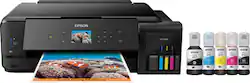
Epson - Expression Premium EcoTank ET-7750 Wireless All-in-One Inkjet Printer - Black
- Key Specs
- Networking: Wired, Wireless
- Printer Type: All In One
- ISO Color Print Speed: 10 pages per minute (The number of color pages able to be printed per minute in the device's default single-side mode, as tested by the International Standards Organization (ISO).)
- ISO Mono Print Speed: 13 pages per minute (The number of black ink (grayscale) pages able to be printed per minute in the device's default single-side mode, as tested by the International Standards Organization (ISO).)
- Output Tray Capacity: 100
- Touch Screen: false (Touch-screen devices make navigating more intuitive. Using a touch-screen display, you can do things such as tap to select, hold and drag to move items, swipe to scroll, and pinch to zoom.)
- General
- Brand: Epson
- Model Number: ET 7750
- Product Name: Expression Premium EcoTank ET-7750 Wireless All-in-One Inkjet Printer
- Color: Black
- Display Screen: true
- Display Screen Size: 2.7 inches
- Dimensions
- Product Height: 6.6 inches (The out of box height of the item. Height is measured as the vertical distance from the bottom of the item to the top as it would be primarily used or placed.)
- Product Width: 20.7 inches (The out of box width of the item. Width is measured as the horizontal distance from one side of the item to the other as it would be primarily used or placed.)
- Product Weight: 24.3 pounds (The out of box weight of the item.)
- Features
- Automatic Document Feeder: true
- Photo Printing: true
- Monochromatic/Color: Color
- Automatic Two-Sided Printing: true
- Tray Capacity: 100
- Duty Cycle: Up to 5,000 (The maximum number of pages per month that the device can produce without failing, as specified by the manufacturer.)
- Certifications Listings & Approvals
- EPEAT Qualified: false (The Electronic Product Environmental Assessment Tool (EPEAT) was designed to provide an environmental assessment tool for purchasers. In order to qualify for EPEAT, a product must meet all 23 required criteria.)
- Scanner Info
- Scanner Type: Flatbed
- Duplex Scan Function: false
- Scanner Resolution: Up to 1200 x 2400 (Refers to the number of pixels/dots, both horizontally and vertically, of the image produced by the scanner. Generally, the higher the resolution, the sharper and cleaner the produced image.)
- Ink
- Compatible Cartridges: 512 black, cyan, magenta, yellow ink bottles
- Ink Subscription Service Available: false (The printer monitors ink usage and alerts the subscription provider when levels are low. A purchased subscription provides refills of ink based on usage.)
- Memory
- Memory Card Type: Secure Digital Extended Capacity (SDXC) Card, Secure Digital High Capacity (SDHC)
- Memory Card Slot: true
- Paper Info
- Automatic Document Feeder Capacity: 100 sheets
- Maximum Document Length: 44 inches
- Maximum Document Width: 11.7 inches
- Paper Feeder: Tray loader
- Paper Handling: 3.5" x 5", 4" x 6", 5" x 7", 8" x 10", 8.5" x 11", 8.5" x 14", A4, A6, half letter, executive, A3, 11" x 17", user definable (3.5" - 47.2" in length)
- Compatible Media Types: Plain paper, Epson bright white papet, Matte paper, Double-sided matte paper, Photo paper, Glossy photo paper, Envelope No. 10
- Performance
- Printer Resolution (Black): Up to 5760 x 1440 (Refers to the number of pixels/dots, both horizontally and vertically, of the image produced by the printer in black ink. Generally, the higher the resolution, the sharper and cleaner the produced image.)
- Printer Resolution (Color): Up to 5760 x 1440 (Refers to the number of pixels/dots, both horizontally and vertically, of the image produced by the printer in colored ink. Generally, the higher the resolution, the sharper and cleaner the produced image.)
- Connectivity
- Minimum System Requirements: Windows 10, Windows 8, 8.1, Windows 7, Windows Server 2003 - Windows Server 2016 (32-bit, 64-bit), Mac OS X 10.6 - macOS 10.12.x
- Other
- UPC: 010343936225
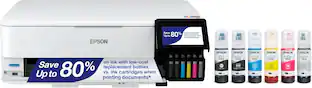
Print high-quality photographs without wasting time or ink on this Epson Expression EcoTank printer. Designed to create 11" x 17" prints in clear colors, this cartridge-free printer features a large easy-to-fill tank that reduces the need for frequent refills. Featuring 3-in-1 function, this Epson Expression EcoTank printer copies, scans and prints all in one spot.
- Cartridge-free printing: Comes with up to 2 years of ink in the box¹.
- Prints up to 13 ISO ppm* in black, up to 10 ISO ppm* in color: Lets you generate documents quickly.
- Ideal for home or small business use: Offers excellent print quality for photos and documents and accepts a variety of paper types and sizes.
- Wireless and mobile printing capability: Connect computers or devices easily with built-in Wi-Fi. Plus, print from your mobile device with Epson's free mobile printing app or Apple® AirPrint.
- Tablet and smartphone printing: Epson Connect enables simple wireless printing from most smartphones, tablets and more.
- Apple® AirPrint enabled: Provides Apple iPad® and iPhone® printing.
- Up to 5760 x 1440 dpi (dots per inch) color resolution: High resolution for producing incredible quality and detail in documents and photos up to 11" x 17".
- Cartridge-free printing with five high-capacity ink tanks: Icludes enough ink to print documents up to 14,000 pages black/9,000 color.**
- Standard paper handling: 100-sheet input tray capacity.
- 2.7" LCD screen: Preview your images on the screen, and edit them before you print.
- More connectivity options: Built-in memory card slots and USB ports let you simply plug in your memory cards, USB drives, cameras or other devices and print.
Whats Included
- CD-ROM for product setup
- Epson Expression Premium EcoTank ET-7750 Wireless All-in-One Inkjet Printer
- Owner's manual
- Power cord
- Two 512 Black bottles (140 ml)
- Two 512 Cyan bottles (70 ml)
- Two 512 Magenta bottles (70 ml)
- Two 512 Yellow bottles (70 ml)
- Two 512 photo black bottles (70 ml)
Q: Will it take card stock paper? 60-80lb?
A: Yes, It will. I found that trying to run it in the back paper feed as suggested & or recommended did not work out well, the 110 lb kept jamming, as well as the 80 lb although the 80 lb I purchased was a semi -gloss. I tried all the paper settings, and had been able to get just a few 110 to work in the rear feed, I then realized that when I ran the photo paper which is also a heavier stock and glossy, I used tray 2, not the back feed. So I loaded 110 lb in tray 2 and left the setting at plain paper, and it worked perfect for single sided. I was hesitant to try to duplex the 110 card stock in tray 2, so I just run the one side then do a manual duplex, where I put the printed side face up since it flips it when it feeds. So your answer to the 60 and 80 lb stock, yes, for letter, legal and below sizes. I ran 80 and 110 both in tray 2 without any jamming whatsoever. I have not tried the 80 or 110 lb in the 11x17" size yet, I am going to assume you will need to fight with all the heavier stock in the back feed regardless of size, it just jams too much. Regular weight - 20lb feeds just fine in the back feed.
A: Yes, you must place it in the rear tray, and tell the system which size you've inserted. You can put in as many as you may need.
A: Yes, it has an auto duplexer but I believe it only works for 8.5x11 and A4 plain paper (enforced by the print driver). I don't know why Epson has completely left it off the description!
A: So far besides using this printer for 8 x 10 prints both photo and plain paper I have run a few 4 x 6 prints. I have not used the borderless aspect on single photos but have on have used it when doing a 4 print per page - I still had some outer border only because of the particular size of the 4 prints I was using. but the option is available in my print preferences. This printer does have 3 separate paper trays. Two are variable paper size larger cassettes . One smaller for 4 x 6 paper. You can choose which tray / cassette you wish for the primary regular use. And at time of printing you can also go into your print preferences then at this time switch to any other tray cassette / tray for a single print job. But you have to be diligent if you wish to switch around. I do not find this to be an issue at all personally. I have used this units scanner deck to scan and copy plain paper copies I've not scanned any photos to this point So far I've been very satisfied! Much more so than any of my HP printers!
Q: does the epson ET-7750 scan and copy A3
A: No. The ET-7750 can only scan letter size and A4 paper on the scanner according to the User Guide and my experience. Having the ability to print up to 11 x 17 is a plus, wish the scanner went this large but it does not. Trust this helps and answers your question.
Q: Does this print in A3 (double letter)?
A: Yes, it does. The ET 7750 prints Tabloid and A3
Q: Does it print borderless-to end of page?
A: Yes, it can print borderless to end of page.
Q: What are the dimensions in inches? You only show mm. on the ET- 7750.
A: The dimensions of the product are 20.7" x 29.3" x 17.8" (W x D x H).
People also viewed
 $799.99The price was $849.99
 $229.99The price was $379.99
 $299.99The price was $419.99



Today's top picks
 $479.99The price was $729.99
 $69.99The price was $129.99
 $199.99The price was $249.99
 $49.99The price was $62.99