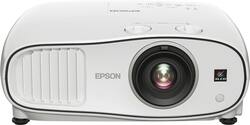
- Key Specs
- Product Weight: 15.2 pounds (The out of box weight of the item.)
- Contrast Ratio: 70,000:1 (Measured difference between a displayed image's brightest whites and darkest blacks. The larger the first number, the more detail and color that can be displayed.)
- Projector Use: Home Theater
- General
- Brand: Epson
- Model Number: V11H799020
- Product Name: Home Cinema 3700 1080p 3LCD Projector
- Color: Gray/White
- Dimensions
- Product Height: 6.4 inches (The out of box height of the item. Height is measured as the vertical distance from the bottom of the item to the top as it would be primarily used or placed.)
- Product Width: 16.1 inches (The out of box width of the item. Width is measured as the horizontal distance from one side of the item to the other as it would be primarily used or placed.)
- Product Depth: 12 inches (The out of box depth of the item. Depth is measured as the distance from the front of the item to the back as it would be primarily used or placed.)
- Product Weight: 15.2 pounds (The out of box weight of the item.)
- Display
- Resolution (Native): 1920 x 1080 (Native resolution of a screen refers to its single, fixed resolution. Sometimes screens must scale an image up or down in order to fit the native resolution. This can cause a loss of resolution or detail.)
- 3-Chip Technology: true (Projectors with this technology are able to display images with optimal brightness, color, and detail. Because of their high-performance design, these projectors are primarily used in large venues and digital cinemas.)
- Contrast Ratio: 70,000:1 (Measured difference between a displayed image's brightest whites and darkest blacks. The larger the first number, the more detail and color that can be displayed.)
- Aspect Ratio: 16:9 (The measurement of the width of a screen compared to the height of a screen, expressed as a ratio.)
- Throw Ratio Range: 1.32 - 2.15:1 (This measurement indicates what size of projected image can be produced from a certain distance. The smaller the ratio, the closer the projector can be to the screen while still producing a large image.)
- Digital Keystone Correction: true ("Keystone effect" refers to the distortion of an image when it is projected on an angled surface or when the projector is positioned too high or too low from the center of the display. Projectors with a digital keystone correction feature are able to scale the image as needed before it is projected, resulting in the correct image orientation no matter where it is displayed.)
- 3D Technology: true
- Viewing
- Minimum Projector Distance: 3 feet (Minimum distance that the projector can be placed from the screen to produce a display with acceptable visual performance.)
- Maximum Projector Distance: 26.6 feet (Maximum distance that the projector can be placed from the screen to produce a display with acceptable visual performance.)
- Minimum Viewable Screen Size: 29.9 inches
- Maximum Viewable Screen Size: 300 inches
- Features
- Projector Use: Home Theater
- Remote Control Included: true
- Exposure Control
- Focus Adjustment: Manual (The method used to focus the device in order to view or display a sharper image.)
- Minimum Aperture: 1.51 (The smallest opening of a lens, typically expressed in f-numbers. The larger the number, the smaller the aperture and the less light that can enter the lens. A smaller aperture creates a larger depth of field, which keeps both foreground and background in focus.)
- Maximum Aperture: 1.99 (The limit to how wide a lens can be open, typically expressed in f-numbers. The smaller the number, the larger the aperture and the more light that can enter the lens. A larger aperture creates a shallower depth of field, helpful for keeping subjects in focus and blurring background details.)
- Connectivity
- Number of USB Port(s): 1
- Audio
- Sound Mode: Stereo
- Integrated Speaker(s): true
- Speaker(s) Included: true
- Watts Per Channel: 10 watts
- Other
- UPC: 010343929425
See blockbuster movies in Full HD with this Epson home cinema projector. Three-chip technology provides this projector with 3000 lumens of white and color brightness and a 70,000:1 contrast ratio, making it ideal for gaming. Watch 2D or 3D videos with this Epson home cinema projector and enjoy high-quality sound from its two built-in 10W speakers.
- 3LCD 3-chip technology: Delivers best-in-class Color Brightness* and reliable performance with no rainbow effect.
- ±30° keystone correction: For distortion-free images.
- 3000 lumens of color brightness and 3000 lumens of white brightness: Boost display visibility and produce clear, vibrant on-screen images.
- Lens shift: Vertical and horizontal lens shift for the ultimate installation flexibility.
- 1080p (1920 x 1080) native resolution: Creates a sharp, detailed high-definition picture.
- Dual HDMI inputs: Make it easy to connect to high-definition sources.
- 29.9" - 300" viewable screen size: Allows everyone in the room to enjoy a clear view.
- 1.32 - 2.15:1 throw ratio range: Reproduces wide images in their correct proportions.
- Supports a variety of signals: Including 480p, 720p, 1080i, 1080p, 480i, 576i and 576p for a wide range of compatibility options.
- Manual zoom: Offers setting versatility.
- UHE 250W lamp: Delivers up to 5,000 hours of lamp life in ECO mode and up to 3,500 hours of lamp life in normal mode for extended use.
- 35-24dBA fan noise: Ensures quiet operation.
- Built-in 10W speakers: Provide crisp sound.
- Remote: Enables operation from a distance.
Whats Included
- Epson Home Cinema 3700 1080p 3LCD Projector
- Wireless remote control
Product Manuals
Q: What is the max viewable distance for this model?
A: I have used this about 16 feet from my screen and it expands easily with the zoom lens to 12 feet wide from that distance. The zoom lens keeps the projector stationary and allows for different viewing size. The Brightness is AMAZING.
A: No. It is not a smart projector and does not have Wi-Fi built in either. Must purchase Wi-Fi dongle . I have amazon firestick hooked up to it and works perfect for apps.
Q: What is the best sound system with this projector?
A: Klipsch speakers, 26f/28f floor standing speakers. 1) R25C- Center 2)Woofer-R-12SW-400w 3)Pioneer Vsx 90 or latest version 4)R-26F- front speakers 5)Backside speakers:bookshelf-R-14m All klipsch
Q: i need to know if this projector give me the option to watch a wide screen movie full screen
A: There is a Manual zoom function, and plenty of cropping options, but why would you ruin widescreen by forcing it to be full screen?
A: I have a similar setup. I have not gotten this error. Is the ROKU giving the error message? If so, hook up the ROKU directly to the HDMI on the 3700 and see if you get the error. Make sure the ROKU is set up to 1080p and not 4K, by hooking it up to a different TV. If the message is from the 3700, where the ROKU is hooked up through your receiver, make sure the Onkyo is set to 1080p video if it has that ability. Usually, it should choose this automatically. I have also heard of this error happening with bad HDMI cables in reports online for 4K especially, or for times when the length of cable is too long or there is cheap HDMI cable used. These are some things you can use to diagnose, but I'm not entirely sure of the issue. It definitely is a video problem. Something isn't passing on your video OR your 3700 is having problems with HDMI and needs to be returned. AGain, hooking the ROKU and a DVD player etc to the 3700 directly should tell you if the 3700 has a bad Video port. If it does, it won't show video. Also, did you hook up the HDMI to the normal HDMI port on the 3700? There are 2 ports, but the instructions suggest hooking it to one normally (not the MHC or whatever its called). THese may help you to diagnose a few things. Hope it helps. PS.... as you are doing tests, use a different HDMI cable and one as short as possible. I moved all my receiver and roku and dvd player to near the 3700 to not have HDMI length video problems. D
A: You may try contacting the Best Buy representative to get help with your replacement inquiry. Just dial 1-888-BEST BUY or (1-888-237-8289).
A: Yes I have firestick hooked up to it also on a wireless modem
People also viewed
 $189.99The price was $379.99
 $189.98The price was $199.99



Today's top picks
 $499.99The price was $749.99
 $199.99The price was $249.99
 $789.99The price was $1,049.99










