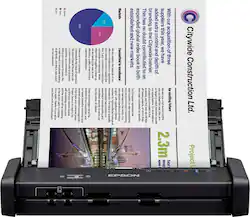
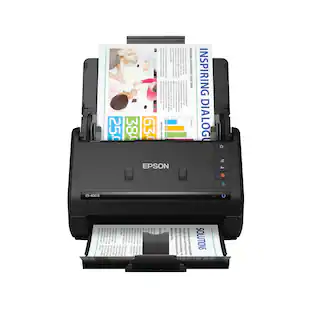
Epson - Workforce ES-200 Duplex Mobile Document Scanner - Black
- Key Specs
- Networking: Not Applicable
- Scan (Color) Speed: 25 copies per minute (The number of color pages able to be scanned per minute.)
- Scan Method: Single pass
- Duplex Scan Function: true
- General
- Brand: Epson
- Model Number: ES-200 DOC SCANER B11B241201
- Product Name: Workforce ES-200 Duplex Mobile Document Scanner
- Color: Black
- Connectivity
- Scanner Connectivity: USB 3.0
- Minimum System Requirements: Microsoft Windows 7 / 8 / 8.1 / 10, Apple MacOS X 10.6.8 - 10.12.x
- Dimensions
- Product Height: 2 inches (The out of box height of the item. Height is measured as the vertical distance from the bottom of the item to the top as it would be primarily used or placed.)
- Product Width: 11.3 inches (The out of box width of the item. Width is measured as the horizontal distance from one side of the item to the other as it would be primarily used or placed.)
- Maximum Document Length: 44 inches
- Maximum Document Width: 8.5 inches
- Product Weight: 2.4 pounds (The out of box weight of the item.)
- Features
- Automatic Document Feeder Capacity: 20 sheets
- Automatic Document Feeder Included: true
- Scanner Type: Document, Business Card
- Scanner Resolution: Up to 600 x 600 (Refers to the number of pixels/dots, both horizontally and vertically, of the image produced by the scanner. Generally, the higher the resolution, the sharper and cleaner the produced image.)
- Document Size: Letter
- Image Scanner Type: Contact Image Sensor (CIS)
- Scanner Info
- Scan (Monochromatic) Speed: 25 copies per minute (The number of monochromatic grayscale pages able to be scanned per minute.)
- Scanner Bit Depth: 48 (Refers to the number of bits used to define each pixel in the captured image and determines the number of colors or tones that can be represented. Generally, the greater the bit depth, the better the image quality.)
- Included
- Included Software: EPSON Scan, NewSoft Presto! BizCard, EPSON Document Capture Pro, ABBYY FineReader OCR, EPSON Document Capture
- Certifications Listings & Approvals
- ENERGY STAR Certified: true (Devices carrying the ENERGY STAR service mark, such as computer products and peripherals, kitchen appliances, and other products, generally use 20% to 30% less energy than required by federal standards.)
- TWAIN Compliant: true (Products with this label are compliant with standards set by the TWAIN Working Group for regulating communication between software and digital imaging devices. Devices that are TWAIN compliant are compatible for use with each other without requiring additional software, even if they have different capabilities.)
- Warranty
- Warranty - Parts: 1 year
- Warranty - Labor: 1 year
- Other
- UPC: 010343929036
Convert your paperwork to digital files with this Epson WorkForce document scanner. The 20-page auto-document feeder makes it easy to scan large batches of paper, and the convenient setup lets you send your documents directly to online storage accounts. Capable of scanning recipes, business cards, and two-sided documents, this Epson WorkForce document scanner makes a versatile addition to your office.
- Up to 600 x 600 dpi optical resolution (1200 x 1200 dpi interpolated resolution): To capture every word and image detail with clarity.
- 48-bit internal color depth: Along with 24-bit external color depth for realistic detail.
- 8.5" x 44" maximum scan size: Enables you to capture entire pages.
- Up to 25 ppm scan speeds*: For rapidly preserving a variety of files. Duplex scanning helps you get the job done quickly.
- Portable design: Enables you to easily take the scanner on the go.
- Easily scan a variety of documents: Including business card and plastic card.
- Contact image sensor (CMOS CIS): Provides high-quality visuals.
- 3-color RGB LEDs: Enable fast scanning with no warm-up time.
- 20-sheet automatic document feeder: Helps you quickly complete your scanning tasks.
- High-speed USB 3.0 interface: Offers easy connectivity.
- ENERGY STAR certified: Designed to use less energy and meets strict energy efficiency guidelines set by the Environmental Protection Agency and U.S. Department of Energy.
Whats Included
- Epson WorkForce ES-200
- SuperSpeed USB cable
- EPSON Scan, NewSoft Presto! BizCard, EPSON Document Capture Pro, ABBYY FineReader OCR, EPSON Document Capture
Product Manuals
A: Yep! I bought this for my wedding slideshow three days before the event. My sister had them all (about 200) scanned in and the slideshow ready to go in under an hour. Attaching one of the scans -- me circa 1992. Pretty true to color and clarity of the original.
A: It will scan into one file if you scan the pages altogether.
A: My cable came with the 200, however one side will fit into the USB computer connection. The one going into the scanner seems to be a proprietary design that I have seen only on that model. Hope that helps.
Q: Does it scan to jpegs or only pdf?
A: You can select the output file format. JPG and PDF both options as well as others such as PNG, TIF...
Q: Does it scan in color? It is described as "black" but the picture shows a color document.
A: Yes, color, grayscale or b&w all options
Q: Can this scan all my documents directly to a flash drive?
A: Yes and no. If you mean "can you connect a flash drive directly to the scanner?" then the answer is no. If you mean, "can you insert a flash drive into the computer and have the scanner save scans to that flash drive?" then the answer is yes.
Q: Does it have a feeder for receipt
A: Yes. The document feeder has adjustable guides, which can be sized to any size from 1.75" - 8.875."
A: This scans on my hard drive on my desktop computer, and since a laptop functions the same as a desktop, I am sure it will work the same and save on the laptop hard drive.
People also viewed
 $379.99The price was $449.99
 $229.99The price was $279.99
 $169.99The price was $199.99



Today's top picks
 $449.99The price was $829.99
 $2,449.99The price was $3,199.99
 $199.99The price was $249.99
 $999.98The price was $1,639.98










