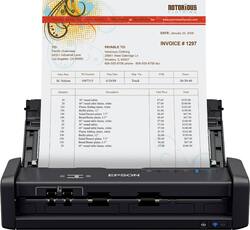
Epson - WorkForce ES-300WR Wireless Color Receipt Scanner - Black
- Key Specs
- Networking: Wireless
- Scan (Color) Speed: 25 copies per minute (The number of color pages able to be scanned per minute.)
- Scan Method: Single pass
- Duplex Scan Function: true
- General
- Brand: Epson
- Model Number: B11B242201R
- Product Name: WorkForce ES-300WR Wireless Color Receipt Scanner
- Color: Black
- Connectivity
- Scanner Connectivity: USB 3.0, Wi-Fi
- Minimum System Requirements: Microsoft Windows 10 (32-bit, 64-bit), Windows 8/8.1 (32-bit, 64-bit), Windows 7 (32-bit, 64-bit) SP1; Mac OS X 10.11.x to macOS 10.13.x
- Dimensions
- Product Height: 2.6 inches (The out of box height of the item. Height is measured as the vertical distance from the bottom of the item to the top as it would be primarily used or placed.)
- Product Width: 11.3 inches (The out of box width of the item. Width is measured as the horizontal distance from one side of the item to the other as it would be primarily used or placed.)
- Maximum Document Length: 44 inches
- Maximum Document Width: 8.5 inches
- Product Weight: 2.9 pounds (The out of box weight of the item.)
- Features
- Automatic Document Feeder Capacity: 20 sheets
- Automatic Document Feeder Included: true
- Scanner Type: Document, Portable, Receipt Scanners
- Scanner Resolution: Up to 600 x 600 (Refers to the number of pixels/dots, both horizontally and vertically, of the image produced by the scanner. Generally, the higher the resolution, the sharper and cleaner the produced image.)
- Image Scanner Type: Contact Image Sensor (CIS)
- Scanner Info
- Scan (Monochromatic) Speed: 25 copies per minute (The number of monochromatic grayscale pages able to be scanned per minute.)
- Included
- Included Software: Epson ScanSmart Accounting Edition, Nuance Power PDF (Windows), Nuance PDF Converter for Mac, NewSoft Presto! BizCard
- Certifications Listings & Approvals
- ENERGY STAR Certified: true (Devices carrying the ENERGY STAR service mark, such as computer products and peripherals, kitchen appliances, and other products, generally use 20% to 30% less energy than required by federal standards.)
- TWAIN Compliant: true (Products with this label are compliant with standards set by the TWAIN Working Group for regulating communication between software and digital imaging devices. Devices that are TWAIN compliant are compatible for use with each other without requiring additional software, even if they have different capabilities.)
- Warranty
- Warranty - Parts: 1 year
- Warranty - Labor: 1 year
- Other
- UPC: 010343945531
Create digital files for receipts, bills and other important paperwork with this Epson Workforce wireless document scanner. Epson Single-Step Technology provides two-sided scanning capabilities so you can get through piles of documents quickly, and the included software lets you create searchable PDF files for each item you scan. This Epson Workforce wireless document scanner features simple controls and a compact footprint, making it a smart addition to your home office.
- Up to 600 x 600 dpi optical resolution (1200 x 1200 dpi interpolated resolution): To capture every word and image detail with clarity.
- 8.5" x 44" maximum scan size: Enables you to capture entire pages.
- Scan speeds of up to 25 ppm in color, black and white, and gray*: For rapidly preserving a variety of files.
- Duplex scanning: The duplex function allows you to create two-sided documents. The Single-Step technology captures both sides in one pass.
- Total portability: Choose AC, battery or USB power, wherever your business takes you.
- Versatile scanning: Scan two-sided documents, receipts, invoices, business cards/IDs, extra-long pages, and more.
- 20-sheet automatic document feeder: Helps you quickly complete your scanning tasks.
- Contact image sensor (CMOS CIS): Provides high-quality visuals.
- RGB LED array: Enables fast scanning with no warm-up time.
- Wi-Fi technology and SuperSpeed USB 3.0 interface: This scanner works with a variety of Mac and PC workspaces. Also compatible with iOS and Android devices for wireless scanning.
- Powerful software: Includes the intuitive Epson ScanSmart Accounting Edition Software to preview, email, organize, upload, and more. The software requires Internet connection for download and installation.
- ENERGY STAR certified: Designed to use less energy and meets strict energy efficiency guidelines set by the Environmental Protection Agency and U.S. Department of Energy.
Whats Included
- AC adapter and power cable
- Epson WorkForce ES-300WR Wireless Color Receipt Scanner
- Nuance software license card
- Start Here poster
- SuperSpeed USB cable
Product Manuals
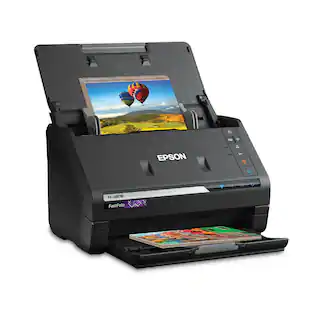
A: Hi, The WorkForce ES-300WR Wireless Color Receipt Scanner can scan photos but that is not its primary purpose. It is a receipt scanner. Epson makes a dedicated photo scanner, the FastFoto FF-680W that has a straighter feed path, scans faster, and comes with photo management software. The FF-680W is available at Bestbuy.com (inventory levels can vary). Regards, Mark - The Epson Team.
A: Hello MamaBear. The ES-300WR includes Epson ScanSmart software. The software allows you to take data from your scanned files and export it to your QuickBooks account. Regards, Kevin - The Epson Team.
A: Hi Grammylove, You can set the file type to save as a bitmap, JPEG, PNG, TIFF, Multi-TIFF, PDF or searchable PDF. Any system that can read these files types can open the scanned document. Regards, Mark - The Epson Team.
Q: Can it scan a drivers license or a dental insurance card?
A: Hello. The ES-300WR can scan plastic cards. They must be 2.1" × 3.3" in size and no more than 0.04 inch (1.0 mm) in thickness. Regards, Kevin - The Epson Team.
Q: Does this scanner have a memory port for thumb drives?
A: Hello Sue. The ES-300WR can only be used via a USB connection. Unfortunately, there is no memory port for a thumb drive on the scanner. Regards, Kevin - The Epson Team.
Q: Does the software allow you to choose tax categories for filing income tax
A: Hello Walker. Yes, the Epson Scan Smart software allows you to choose the tax category of your scanned document; if necessary, you can save receipt data as a TurboTax file. Regards, Kevin - The Epson Team.
A: Hello Irisjpr1.You can use the ES-300WR with the Epson DocumentScan app to scan from a network scanner to an iOS over a direct Wi-Fi connection. Please refer to the User's Guide for more information. Regards, Sam - The Epson Team.
People also viewed
 $169.99The price was $199.99
 $379.99The price was $449.99
 $229.99The price was $279.99
 $299.99The price was $399.99
 $849.00The price was $1,049.99

Today's top picks
 $1,199.99The price was $1,399.99
 $479.99The price was $729.99
 $199.99The price was $249.99
 $69.99The price was $129.99
 $799.99The price was $1,199.99
 $789.99The price was $1,049.99