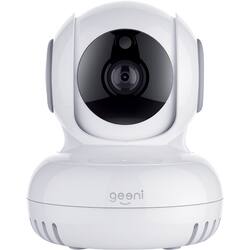
Geeni - Pan and Tilt Indoor Wi-Fi Wireless Network Surveillance Camera - White
- Key Specs
- Video Camera Resolution: HD (720p) (Refers to the number of pixels, both horizontally and vertically, used to capture video/images. The higher the resolution the finer the detail that can be seen.)
- Field Of View: 120 degrees (The area of a target, measured as an angle from the location of viewing, that can be observed.)
- Night Vision: true
- Number Of Cameras Included: 1
- Camera Power Source: Cable with AC Adapter/Plug-in
- Wireless Connectivity: Wi-Fi (The manner in which a device sends data to another device over a short distance without the use of wires or cables.)
- Storage Type: Memory card
- Indoor Or Outdoor Use: Indoor (Indicates the appropriate environment product was designed to be used in.)
- Audio Communication: 2-way (1-way communication devices allow a user to hear detected audio, while 2-way communication adds the ability for a user to talk back through the device.)
- General
- Brand: Geeni
- Model Number: GN-CW010-199
- Product Name: Pan and Tilt Indoor Wi-Fi Wireless Network Surveillance Camera
- Color: White
- Camera
- Video Camera Resolution: HD (720p) (Refers to the number of pixels, both horizontally and vertically, used to capture video/images. The higher the resolution the finer the detail that can be seen.)
- Camera Resolution: 720 (Refers to the number of pixels, both horizontally and vertically, used to capture video/images. The higher the resolution the finer the detail that can be seen.)
- Field Of View: 120 degrees (The area of a target, measured as an angle from the location of viewing, that can be observed.)
- Night Vision: true
- Night Vision Distance: 10 feet
- Night Vision Image: Black and white
- Number Of Cameras Included: 1
- Day/Night Mode: true (Captures images/video with optimal clarity by automatically adjusting settings to various light levels.)
- IP Camera: true (An Internet Protocol (IP) camera is able to record and display image/video data via the internet, without need for a local recording device.)
- Image Sensor Type: CMOS (CCD and CMOS are the two main technologies used in image sensors. CCD, the older of the two types, turns analog light signals into digital pixels. This conversion happens without distortion, resulting in high-quality images. Newer CMOS sensors use transistors at each pixel to move electrical charges. CMOS sensors are typically less expensive, but also require more light to create distortion-free images.)
- Power
- Camera Power Source: Cable with AC Adapter/Plug-in
- Compatibility
- App Compatible: true (The product can be connected to a program or software application on a mobile device, which then receives collected data from the product.)
- Compatibility: Universal
- Operating System Compatibility: Windows, Android, Apple iOS
- Voice Assistant Built-in: No (A digital assistant built into the device that uses voice commands to answer questions and control smart devices.)
- Connectivity
- Camera Connectivity: Wireless (Security system cameras can be set up in several ways. Wired cameras require cables for power and footage transmission, while wire-free cameras don't need cables for either. Wireless cameras still require cables for receiving power but are able to transmit footage via a wireless network.)
- Wireless Connectivity: Wi-Fi (The manner in which a device sends data to another device over a short distance without the use of wires or cables.)
- Recording & Playback
- Records Audio: true
- Subscription: None
- Storage
- Storage Type: Memory card
- Memory Card Type: Secure Digital card
- Lighting
- Lighting Type: None
- Performance
- Indoor Or Outdoor Use: Indoor (Indicates the appropriate environment product was designed to be used in.)
- Features
- Audio Communication: 2-way (1-way communication devices allow a user to hear detected audio, while 2-way communication adds the ability for a user to talk back through the device.)
- Dimensions
- Product Height: 4.9 inches (The out of box height of the item. Height is measured as the vertical distance from the bottom of the item to the top as it would be primarily used or placed.)
- Product Width: 3.5 inches (The out of box width of the item. Width is measured as the horizontal distance from one side of the item to the other as it would be primarily used or placed.)
- Product Depth: 3.5 inches (The out of box depth of the item. Depth is measured as the distance from the front of the item to the back as it would be primarily used or placed.)
- Product Weight: 0.5 pounds (The out of box weight of the item.)
- Sensor
- Sensors: Motion sensor (Detects stimuli such as heat, light, sound, motion, or pressure and responds accordingly by operating a control or initiating a function of the device.)
- Motion Detection Range: 10 feet
- Display
- Color Display: true
- Warranty
- Warranty - Parts: 1 year
- Warranty - Labor: 1 year
- Other
- UPC: 844702079595
Capture HD surveillance footage from an optimal angle with this Geeni Sentinel smart security camera. It lets you control its pan and tilt functions remotely and receive motion detection alerts on your smartphone via the Geeni app. This Geeni Sentinel smart security camera has a built-in speaker and microphone for real-time two-way communication.
- 2-way communication: Built-in microphone and speaker let you hear what happens around the camera and talk back through your phone, no matter where you are.
- Infrared night vision lets you see in the dark: Keep an eye on things up to 10' away when there's little to no light.
- 120° field of view: Captures a wide area of your property for high-level security at all times.
- Save essential images: Use a SD memory cards to store your footage.
- Connects to your Wi-Fi network: For convenience and simple setup.
Whats Included
- Geeni Sentinel
- Mounting kit
A: Yes but does anyone know if one person deletes screenshots from their phone, does it automatically delete from other devices?
Q: I'm hoping to use this on an Amazon Fire tablet, is the Geeni app compatible?
A: Thank you for bringing this to our attention. The Geeni app is not yet compatible with Amazon Fire Tablet. We will forward your request to our developers and hopefully, it will be added in future updates. If you have any issues moving forward, please let us know via email at support@mygeeni.com or call us at +1 (888) 232-3143, available from Mon-Sun, 9:00 AM to 9:00 PM EST.
Q: Are these compatible with google assitant as well as Alexa? What about home kit or cortana?
A: The bulbs do, the cameras do not!!!
Q: Will it connect to 5GHz router?
A: We're sorry for this, Eric. All Geeni devices are designed to only work for 2.4 GHz for a wider range, unlike the 5 GHz that cannot penetrate walls and floor. Since most routers today is a dual-band, you can ask your Internet Service provider to separate the 2.4 GHz and 5 GHz so you can use your device. For assistance, please contact us via email at support@mygeeni.com, phone +1 (888) 232-3143, from Mon-Sun, 9:00 AM to 9:00 PM EST.
A: No it doesn't work for display. I was told after sitting on hold for 20 min that the only thing alexa can do with geeni is turn on and off motion detection.
Q: can it be used with more then one unit, operating at the same time?
A: Not clear about your question! However, if you wanted to know if you can operate mulitiple units using the Genie app, then the answer is Yes.
Q: Does this have a motion sensor?
A: Hello! Our Geeni Smart WiFi camera does capture motion detection and we will send you a notification which is a screenshot once it has detected motion. If you need assistance, please contact us via email at support@mygeeni.com, phone +(888) 232-3143, support.mygeeni.com for online chat support. We are available from Mon-Sun, 7:00 AM to 12:00 AM EST
Q: Can the SD card's recordings be transferred to and be played on a Mac?
A: Good day, thank you for letting us know your concern. To answer your question, yes. However, what you are going to do is to go to the playback feature and hit the record button. Once done, It will be directly saved on the phone storage as you can now transfer it to your PC/Laptop. For more details, please call us at +1 (888) 232-3143 or send us an email at support@mygeeni.com. You may also visit our support website support.mygeeni.com for live chat support. We are available from Mon-Sun from 10:00 AM to 7:00 PM EST.
People also viewed
 $29.99The price was $34.99
 $70.99The price was $79.99
Today's top picks
 $199.99The price was $249.99
 $789.99The price was $1,049.99
 $799.99The price was $1,199.99











