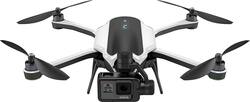
GoPro - Karma Quadcopter with HERO5 Black - Black/White
- General
- Brand: GoPro
- Model Number: QKWXX-511
- Product Name: Karma Quadcopter with HERO5 Black
- Color: Black/White
- Assembly Required: Partial
- Recommended Minimum Age: 16 years
- Recommended Maximum Age: 16 years
- Product Set: w/ HERO5 Black
- Series: Karma (Part of a group of the same product type with similar features.)
- Flight
- Autonomous Flight Modes: Landing, Other, Return to take-off point
- Directional Controls: All
- Maximum Wind Speed Resistance: 22 miles per hour
- Number of Rotors: 4
- Camera
- Integrated Camera: true
- First Person View (FPV): false
- Camera Gimbal: Included (A support that pivots and stabilizes the camera.)
- Autofocus: true (Allows the camera to automatically focus through the lens, rather than by adjusting the lens manually.)
- Burst Mode: true (Also referred to as continuous shooting. This feature captures multiple shots in rapid succession.)
- Environmental
- Indoor Or Outdoor Use: Outdoor (Indicates the appropriate environment product was designed to be used in.)
- Compatibility
- Mobile Device Holder: false
- Features
- Integrated GPS: Yes
- Records Audio: true
- Landing Gear/Legs Included: Landing Legs
- Storage
- Memory Card Compatibility: microSD, microSDHC, microSDXC (The type of memory card(s) recommended for use with the product.)
- Memory Card Included: false (Indicates whether a memory card is included.)
- Power
- Charging Interface(s): USB Type C (The connection for transmitting power to charge the device.)
- Interface(s): USB Type C (Refers to the types of connections that devices use to interact and communicate with each other.)
- Battery Capacity: 4200 milliampere hours (The amount of energy stored in the battery.)
- Battery Voltage: 14.8 volts
- Charging Time: 60 minutes
- Number Of Controller Batteries Required: 1
- Controller Batteries Included: true
- Controller Battery Size: Battery pack
- Other
- UPC: 818279021455
Take aerial shots with this GoPro Karma drone. Its Karma Stabilizer lets the included HERO5 Black action camera capture shake-free videos, while the Karma Grip provides reliable stabilization for handheld and mounted filming. The game-style controller with an integrated touch display makes Karma easy and fun to fly.
Fly Responsibly:
Before takeoff, update all software and firmware, and read the instructions thoroughly.
See the FAA website for registration requirements and information about flying a drone safely: https://www.faa.gov/uas/getting_started/. Additional state or local requirements may apply. Check your local jurisdiction. The following websites may help you make informed decisions about flying your drone: www.knowbeforeyoufly.org and www.modelaircraft.org.
- Ultra portable drone: The Karma Drone folds to fit into the included lightweight case. Take it anywhere. When you're ready to fly, just unfold, attach the propellers and go.
- Includes GoPro HERO5 Black and detachable camera stabilizer: Stunning 4K video and 12MP photos. In Single, Burst, and Time Lapse modes.
- See what your drone sees: The built-in touch display of the Karma controller streams a live, first-person view of what Karma sees.
- Game-style controller with ultra bright touch display: Flying is fun with a game-style controller that makes it easy to fly the drone and control your camera at the same time.
- Total camera control: Designed from the ground up to give you full control of your GoPro in flight, Karma lets you remotely control all camera modes and capture settings, add HiLight Tags and more using its built-in touch display.
- Automatic takeoff, landing and return home: Automatic one-button takeoff and landing helps first-time pilots fly with confidence. Karma safely flies back to you when out of range, if there's a lost connection or when the battery runs low.
- Take your friends for a ride: The GoPro Passenger™ App lets friends view your flight and control your GoPro while you fly.
- Replacement parts help keep you flying: Arms, landing gear and other components are easily replaceable. Extra propellers are included.
- Fly Responsibly:: The following website may help you make informed decisions about flying your drone: KnowBeforeYouFly.org. Additional state or local requirements may apply. Check your local jurisdiction.
Whats Included
- 6 propellers
- Battery and charger
- Case and mounting ring
- Controller with touch display
- GoPro HERO5 BLACK
- Grip handle
- Harness and frame (for HERO5 Black)
- Karma Drone
- Stabilizer
- USB-C cable
Product Manuals
Disclaimers
- Fly Responsibly: The following website may help you make informed decisions about flying your drone: KnowBeforeYouFly.org. Additional state or local requirements may apply. Check your local jurisdiction.
Q: Does this come like the Gopro website?, with the carrying backpack case and stabilization grip.
A: Yup...has everything.
A: Given that the camera is required to fly I wouldn't think that the camera is considered payload. I've never tried to fly with any payload mostly because I haven't needed to and it doesn't seem equipped to hold anything (you would have to use some ingenuity to attach something to it). I can speak as to how long it flies without any payload but obviously with the camera. And in my use, it's been between 18-19 minutes of flight time. The very first time I flew it, it landed itself due to low battery around the 18 minutes mark, even though on the handheld controller, the screen said there was 2 minutes of flight time left. I haven't flown it enough while taking video/stills to determine how much that drains the battery. Hope that helps.
A: The Karma comes configured with a safety to travel no more than 3280 feet at which point it won't let you take it further. However, within the control pad, there is an option to turn off the Safe Distance feature. Admittedly, I forget exactly what the menu item is called. It is an off/on menu item toggled by touching it. I have flown the drone nearly 6000 feet which is a little over a mile, mind you with clear line of sight. At that point, the drone lost the signal from my controller. Immediately upon the drone losing controller signal, it will return to your home point using a similar GPS path it took to get to where it is. It returns at an altitude and speed which you set in preferences. When the drone comes back into range of the controller, you can again take control of it.
Q: Does it still come with the karma grip? It should that's how they sold it before.
A: Yes, it comes with the KARMA grip stabilizer which is a $299.99 value alone. The thing is awesome for body mount activities and walk and shoot video capture. Unbelievable value vs. the competitor products out there. You just pop the harness and camera from the drone and lock it into the grip and you are good to go. I love it!
Q: Do you really have Go Pro Karma Drone in stock?
A: I ordered my online 2/5/17 and was notified that UPS is scheduled to deliver 2/8/17!
Q: Does this drone have a Return to Home feature?
A: Yes, there is a physical button on the controller to bring the Karma home. I actually prefer this to just a software button.
A: Yes you can!
Q: Will the drone crash into tree or building etc or does it automatically move away.
A: Yes it will crash into anything that gets in the way. It does not have proximity sensors like some of the other models. The placement for hovering is dependent on GPS location so I find it may have some drift (1-2ft tops) at very low elevation. Like many of the reviews say, it isn't the BEST drone but it is a full system for action photography which the other drones aren't.
People also viewed
 $1,279.00The price was $1,599.00
 $769.00The price was $799.99
 $1,629.95The price was $1,749.95
 $685.00The price was $799.00
Today's top picks
 $499.99The price was $749.99
 $199.99The price was $249.99
 $789.99The price was $1,049.99










