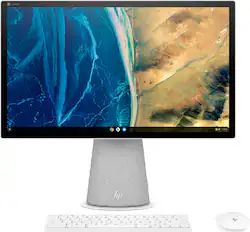
HP - Chromebase 21.5" Touch-Screen All-In-One - Intel Pentium Gold - 4GB Memory - 64GB eMMC - Snowflake White
- Key Specs
- Screen Size: 21.5 inches (Size of the screen, measured diagonally from corner to corner.)
- Processor Model: Intel Pentium Gold (Your computer's processor is like its brain. Working in combination with system memory, the power of the processor determines the complexity of software you can run, how many programs you can have open at the same time, and how fast those programs will run. Most computers feature an AMD, Intel or Snapdragon processor.)
- Storage Type: eMMC
- Total Storage Capacity: 64 gigabytes
- System Memory (RAM): 4 gigabytes (Random-access memory (RAM) is a computing device's short-term data storage, which allows active information to be accessed quickly. The size and type of RAM determines how efficiently the device can handle large amounts of information at one time. For example, gaming or video editing requires more RAM for optimal performance.)
- Graphics: Intel UHD Graphics (Often referred to as a "graphics processing unit" (GPU), this device is responsible for displaying image content and decoding/encoding video content in programs and games.)
- General
- Brand: HP
- Model Number: 22-aa0010
- Product Name: Chromebase 21.5" Touch-Screen All-In-One - Intel Pentium Gold - 4GB Memory - 64GB eMMC
- Color: Snowflake White
- Year of Release: 2021
- Display
- Display Type: LED
- Screen Size: 21.5 inches (Size of the screen, measured diagonally from corner to corner.)
- Screen Resolution: 1920 x 1080 (Full HD) (Screens come in a range of resolutions (measured in pixels, horizontal x vertical). The higher the resolution, the greater the picture quality.)
- Stylus Input: Passive (An active stylus/pen is able to communicate directly with a compatible device; active electromagnetic resonance (EMR) pens are powered via a device's screen and active electrostatic (AES) pens require an additional power source. A passive stylus does not have electronic features and is compatible with most capacitative touch screens.)
- Touch Screen: true (Touch-screen devices make navigating more intuitive. Using a touch-screen display, you can do things such as tap to select, hold and drag to move items, swipe to scroll, and pinch to zoom.)
- Processor
- Processor Brand: Intel
- Processor Model: Intel Pentium Gold (Your computer's processor is like its brain. Working in combination with system memory, the power of the processor determines the complexity of software you can run, how many programs you can have open at the same time, and how fast those programs will run. Most computers feature an AMD, Intel or Snapdragon processor.)
- Processor Model Number: G6405U
- Storage
- Storage Type: eMMC
- Total Storage Capacity: 64 gigabytes
- eMMC Capacity: 64 gigabytes (The amount of data that can be stored on the device's embedded Multimedia Card (eMMC). eMMC is a flash-based storage used in smartphones and personal computers; it typically has a smaller capacity than HDD or SSD storage.)
- Memory
- System Memory (RAM): 4 gigabytes (Random-access memory (RAM) is a computing device's short-term data storage, which allows active information to be accessed quickly. The size and type of RAM determines how efficiently the device can handle large amounts of information at one time. For example, gaming or video editing requires more RAM for optimal performance.)
- Type of Memory (RAM): DDR4 (Each type of RAM delivers a different level of speed, bandwidth, energy efficiency and performance.)
- Number Of Memory Slots: 2
- Number of Memory Sticks Included: 1
- System Memory RAM Expandable To: 16 gigabytes (Adding more random-access memory (RAM) to a computer speeds up performance and improves efficiency. Upgrades to memory are limited by the number of expansion slots for additional RAM and existing RAM installed on the device.)
- Graphics
- Graphics Type: Integrated (Dedicated graphics uses a separate graphics card for processing video images. Because it does not use memory from the system's RAM, there is no extra burden on the CPU and graphics are processed more efficiently. Integrated graphics shares system RAM to process video images.)
- GPU Brand: Intel
- Graphics: Intel UHD Graphics (Often referred to as a "graphics processing unit" (GPU), this device is responsible for displaying image content and decoding/encoding video content in programs and games.)
- Compatibility
- Operating System: Chrome OS (The operating system manages all software and hardware, including files, memory and connected devices. Most importantly, it lets you interact with your device and your programs in a visual way; otherwise, you'd be typing computer code to get anything done.)
- Voice Assistant Built-in: Google Assistant (A digital assistant built into the device that uses voice commands to answer questions and control smart devices.)
- Connectivity
- Number of HDMI Outputs (Total): 0
- Number of DisplayPort Outputs (Total): 0
- Number of Thunderbolt Ports (Total): 0
- Number of VGA Ports: 0 (VGA (Video Graphics Adapter or Video Graphics Array) is a display standard that transmits via analog signals. This type of interface is typically used to connect a computer to a display device such as a monitor, projector, or TV.)
- Number Of DVI Ports: 0
- Number of USB Ports (Total): 4
- Wireless Connectivity: Bluetooth, Wi-Fi (The manner in which a device sends data to another device over a short distance without the use of wires or cables.)
- Number Of Ethernet Ports: 0
- Network Connectivity: None (The manner in which a device sends data to another device over a long distance using a cellular network.)
- Expansion
- Number of M.2 Slots: 2 (This interface is most commonly used for high-speed solid state drives (SSDs), and is often used in laptops due to its small size.)
- Camera
- Built-In Webcam: true
- Front-Facing Camera: true
- Front Facing Camera Megapixels: 5 megapixels (The more megapixels, the more detail that the camera facing the user can capture.)
- Built-In Microphone: true
- Features
- Media Card Reader: false (A hardware device that allows for access to data on a memory card and enables the transfer of its files to a computer. These devices may have one or multiple slots for various types of memory cards, and may be integrated into the computer or available as an external device.)
- Audio Technology: Audio by B&O
- Dimensions
- Product Height: 17.89 inches (The out of box height of the item. Height is measured as the vertical distance from the bottom of the item to the top as it would be primarily used or placed.)
- Product Width: 19.98 inches (The out of box width of the item. Width is measured as the horizontal distance from one side of the item to the other as it would be primarily used or placed.)
- Product Depth: 6.87 inches (The out of box depth of the item. Depth is measured as the distance from the front of the item to the back as it would be primarily used or placed.)
- Product Weight: 15.37 pounds (The out of box weight of the item.)
- Certifications Listings & Approvals
- ENERGY STAR Certified: true (Devices carrying the ENERGY STAR service mark, such as computer products and peripherals, kitchen appliances, and other products, generally use 20% to 30% less energy than required by federal standards.)
- EPEAT Qualified: true (The Electronic Product Environmental Assessment Tool (EPEAT) was designed to provide an environmental assessment tool for purchasers. In order to qualify for EPEAT, a product must meet all 23 required criteria.)
- EPEAT Level: Bronze (The Electronic Product Environmental Assessment Tool (EPEAT) was designed to provide an environmental assessment tool for purchasers. In order to qualify for EPEAT, a product must meet all 23 required criteria. Products are rated Bronze, Silver or Gold based on how many of 28 optional criteria they meet (below 50%, 50%, 75%).)
- Included
- Included Software: Chrome OS | Google Play Store | Google Assistant
- Optical Drive Type: None (An optical disk drive (ODD) uses a laser light to read data from or write data to an optical disc. These discs include CDs, DVDs, and Blu-ray Discs. This allows you to play music or watch movies using prerecorded discs.)
- Wireless Keyboard: true
- Wireless Mouse: true
- Speaker(s) Included: true
- Stylus Included: false
- Other
- UPC: 195908889298
Flexible family fun: Seamlessly switch from homework to home life with the power of an Intel® processor. Handle online learning with Google Classroom and pivot to enjoy entertainment with a 21.5 inch 90-degree rotating screen and dual speakers with Audio by B&O. With Google User profiles, everyone in the family can have their own unique experience. Built to respond: Your voice is your key to the world with built in Google Assistant and with a Google Everything Key on the certified keyboard, it’s never been more convenient to access search. Plus, the large HP Chromebase All-In-One touchscreen makes it so simple to use in portrait or landscape mode. The worry-free family device: Chrome OS is always up-to-date. Plus, a privacy camera and parental controls give you peace of mind.
- Chrome OS: This easy-to-use operating system was designed to be fast in every possible way, while keeping you safe and more secure on the web.
- 10-point touch-enabled 21.5" diagonal FHD (1920 x 1080), IPS, three-sided micro-edge, anti-glare, 250 nits, 72% NTSC: Control your entertainment right from the screen and get crystal-clear quality with 178-degree wide-viewing angles
- Intel® Pentium® Gold G6405U processor: The perfect combination of performance, power consumption, and value helps your device run smoothly.
- 4 GB DDR4-2400 SDRAM memory: With higher bandwidth, you get more of a boost in performance for improved multitasking.
- 64 GB eMMC storage: An embedded multimedia card provides reliable flash-based storage.
- See more with less scrolling: Easily rotate the screen 90-degrees for portrait mode to see more of your photo libraries, recipes, documents and more with less scrolling.
- SuperSpeed USB Type-A 10Gbps signaling data rate: Plug in your external storage with this Superspeed USB Type-A port, featuring 10Gbps signaling data rate.
- SuperSpeed USB Type-C® Power + Display + 5Gbps signaling rate: Power your device or connect to an external display from just one USB Type-C® port with 5Gbps signaling rate. And it's reversible, so you never have to worry about plugging in upside down.
- Effortlessly connected: Enjoy a smoother wireless experience with a Wi-Fi 6 (2x2) and Bluetooth® 5.0 combo–all your connections are solid, with up to 3x faster file transfer speeds than Wi-Fi 5.
- HP True Vision 5MP with privacy camera: Video chat with peace of mind with a privacy camera you can close when not in use.
- A truly powerful audio experience: HP Dual Speakers and audio custom-tuned in collaboration with the experts at B&O deliver rich, authentic audio. Let the sound move you.
- Energy efficiency your way: HP is committed to global citizenship and environmental responsibility. Do the environment—and your wallet—a favor when you use the HP Chromebase All-in-One that meets strict energyefficiency and helps reduce your carbon footprint.
Whats Included
- HP 910 white Bluetooth keyboard with magnetic stripe reader and mouse combo
Product Manuals
A: Google Chrome OS does not have spyware on it. This is a Internet hoax by people who only love Microsoft Windows. Matter of fact Chrome OS over the last 10 years has had less virus and spyware then the Window OS. So don't spread a untrue rumor. There is a very robust Linux under the hood and the system was design from day one to stop virus and other malicious software. At the price point of this HP it is half the price of most other OS systems on the market and I am planning on getting one later this year.
Q: Can the memory be upgraded from 4 GB to 8 GB or even 16GB?
A: Yes, the RAM on this Chromebase All-In-One is expandable to 16 GB.
A: Hello; it is eMMc memory module. I have the exact same 4GB HP chromebase model and I think it is upgradable to 16 GB. I have bought memory modules from crucial.com in the past.
Q: What is the chrome OS end of update life?
A: The Auto-Update Expiration date on this Chromebase All-In-One is June 2028.
Q: Is it possible to use a stylus with this chromebase, and if so, what kind (e.g. USI)?
A: The only stylus that works is the cheap rubber stylus that comes on a pen. Other than that it is useless to spend money trying to figure out which will work. I’ve tried 8 and none work.
Q: Does it support USI stylus, like most other modern ChromeOS touch screens?
A: It depends one the stylus but yes.
Q: No ethernet port how do you connect to router
A: You'd use an adapter that plugs into one of the USB-C ports, and takes an Ethernet cable in the other end. Or you can connect it to your network wirelessly.
A: Thank you for the question. Yes, the Chromebase All-in-One Desktop 22-aa0010 can do all of the things your student does with a Chromebook laptop, but bigger and better. This desktop will receive automatic updates until June, 2028.
People also viewed
 $599.99The price was $689.99



Today's top picks
 $449.99The price was $829.99
 $2,449.99The price was $3,199.99
 $999.98The price was $1,639.98
 $199.99The price was $249.99
 $1,349.99The price was $1,499.99
 $549.99The price was $749.99








