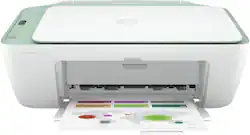
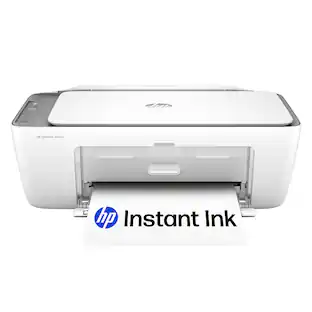
HP - DeskJet 2724 Wireless All-In-One Instant Ink Ready Inkjet Printer - White & Sage
- Key Specs
- Networking: Wireless
- Printer Type: All In One
- ISO Color Print Speed: 5.5 pages per minute (The number of color pages able to be printed per minute in the device's default single-side mode, as tested by the International Standards Organization (ISO).)
- ISO Mono Print Speed: 7.5 pages per minute (The number of black ink (grayscale) pages able to be printed per minute in the device's default single-side mode, as tested by the International Standards Organization (ISO).)
- Output Tray Capacity: 25
- General
- Brand: HP
- Model Number: DeskJet 2724
- Product Name: DeskJet 2724 Wireless All-In-One Instant Ink Ready Inkjet Printer
- Color: White & Sage
- Display Screen: false
- Dimensions
- Product Height: 9.8 inches (The out of box height of the item. Height is measured as the vertical distance from the bottom of the item to the top as it would be primarily used or placed.)
- Product Width: 16.7 inches (The out of box width of the item. Width is measured as the horizontal distance from one side of the item to the other as it would be primarily used or placed.)
- Product Depth: 21.5 inches (The out of box depth of the item. Depth is measured as the distance from the front of the item to the back as it would be primarily used or placed.)
- Product Weight: 7.55 pounds (The out of box weight of the item.)
- Features
- Automatic Document Feeder: false
- Photo Printing: true
- Wide Format Printing: false (Machines with this function support printing on media with widths between 18 and 100 inches, such as posters, banners, canvases, and more.)
- Wide Format Scanning: false
- Monochromatic/Color: Color
- Automatic Reduction/Enlargement: false
- Automatic Two-Sided Printing: false
- Tray Capacity: 60
- Scanner Info
- Scanner Type: Flatbed
- Duplex Scan Function: false
- Scanner Resolution: Up to 1200 x 1200 (Refers to the number of pixels/dots, both horizontally and vertically, of the image produced by the scanner. Generally, the higher the resolution, the sharper and cleaner the produced image.)
- Fax Info
- Integrated Fax: false
- Ink
- Compatible Cartridges: HP 67 Black Original Ink Cartridge, HP 67XL Black High Yield Original Ink Cartridge, HP 67XXL Black Extra High-Yield Original Ink Cartridge, HP 67 Tri- Color Original Ink Cartridge, HP 67XL Tri-Color High-Yield Original Ink Cartridge, HP 67XXL Tri- Color Extra High-Yield Original Ink Cartridge
- Ink Subscription Service Available: true (The printer monitors ink usage and alerts the subscription provider when levels are low. A purchased subscription provides refills of ink based on usage.)
- Memory
- Memory Card Slot: false
- Paper Info
- Maximum Document Length: 14 inches
- Maximum Document Width: 8.5 inches
- Supported Paper Sizes: Letter; legal; 4 x 6 in; 5 x 7 in; 8 x 10 in; No. 10 envelopes; 3 x 5 to 8.5 x 14 in
- Paper Feeder: Top loader
- Paper Handling: Input Capacities: Up to 60 sheets Standard; Up to 5 envelopes; Up to 20 cards; Up to 10 sheets Labels; Up to 60 sheets Legal Output Capacities: Up to 25 sheets Standard; Up to 5 envelopes; Up to 20 cards; Up to 10 sheets Labels; Up to 25 sheets Legal
- Media Weight (Minimum): 16 grams per square meter
- Media Weight (Maximum): 32 grams per square meter
- Compatible Media Types: Letter; legal; 4 x 6 in; 5 x 7 in; 8 x 10 in; No. 10 envelopes, 3 x 5 to 8.5 x 14 in
- Copier Info
- Maximum Number Of Copies: 9
- Copier Resolution (Black): Up to 300 x 300 (Refers to the number of pixels/dots, both horizontally and vertically, of the image produced by the copier in black ink. Generally, the higher the resolution, the sharper and cleaner the produced image.)
- Copier Resolution (Color): Up to 300 x 300 (Refers to the number of pixels/dots, both horizontally and vertically, of the image produced by the copier in colored ink. Generally, the higher the resolution, the sharper and cleaner the produced image.)
- Performance
- Printer Resolution (Black): Up to 1200 x 1200 (Refers to the number of pixels/dots, both horizontally and vertically, of the image produced by the printer in black ink. Generally, the higher the resolution, the sharper and cleaner the produced image.)
- Printer Resolution (Color): Up to 4800 x 1200 (Refers to the number of pixels/dots, both horizontally and vertically, of the image produced by the printer in colored ink. Generally, the higher the resolution, the sharper and cleaner the produced image.)
- Approximate Page Yield (Black): 120
- Approximate Page Yield (Color): 100
- Connectivity
- Minimum System Requirements: PC: Windows 10, 7: 1 GHz 32-bit (x86) or 64-bit (x64) processor, 2 GB available hard disk space, USB port, Internet Explorer.; Mac: MacOS Sierra v10.12, macOS High Sierra v10.13, macOS Mojave v10.14, macOS Catalina v10.15, 2 GB Available Space.
- Other
- UPC: 195122303907
All the basics, now with easy-to use features. Print, scan, and copy everyday documents, and get worry-free wireless. Simple setup with HP Smart app means you’re ready on any device.
- Worry-free wireless: Get better range and faster, more reliable connections using dual-band Wi-Fi with selfreset.
- Simple setup. Simple printing.: Get started fast with simple setup that guides you through each step, using HP Smart app.
- All In One Printer: Easily handle tasks and get a lot from one device – print, scan, and copy.
- HP Smart App: Easily print everyday documents, get high-quality scanning and sharing – plus easily make copies from your smartphone, using HP Smart app.
- HP Instant Ink Compatible: Save up to 50% on Ink with HP Instant Ink and never run out
- Bluetooth Built in: Get connected with Bluetooth and start printing fast from your smartphone or tablet – easy setup.
- Hi-Speed USB 2.0: Get connected and start printing. Easily connect your printer to your computer with the built-in USB port.
- Display: Icon LCD display
- Paper Handling: 60-sheet input tray; 25-sheet output tray
Whats Included
- HP DeskJet 2724 All-in-One Printer
- HP 67 Setup Instant Ink Ready Black Cartridge; HP 67 Setup Tri-color Instant Ink Ready Cartridge
- Regulatory flyer; Setup guide; Reference guide;
- Power cord 1.5 m; Instant Ink Flyer
Product Manuals
A: The black cartridge is rated at 120 pages, and the color at 100. If one cartridge runs out, you can continue to print. In fact, you can remove the empty cartridge and the printer will go into "single cartridge mode" and print using only the cartridge still in the printer.
Q: What does it mean by all in one instant ink ready?
A: Instant Ink readiness refers to our HP Instant Ink program! The printer is ready to be activated with the service, should you choose to enroll, right out of the box! This is optional and you can purchase cartridges at retail or online if you don't choose the HP Instant Ink program.
Q: Does it require internet if useing android phone
A: If you do not have internet, we recommend using WiFi Direct. Wireless Direct (WiFi Direct) allows you to directly connect to a printer from a mobile device or computer without the need for internet access or a wireless network. You would connect to the printer’s wireless direct signal just like you would connect to a wireless network. The printer would have a unique name in your wireless connections, i.e. Direct-04-Printer. For more information, you can go to https://bit.ly/3jqsGQ8
Q: What printer cartridge works
A: This printer will use the HP 67 ink.
Q: If one ink cartridge runs out can I still print with one?
A: Yes. You can use the HP Deskjet 2724 All-In-One Printer in the single-cartridge mode. I would recommend using the setup cartridges first. Then, when the tricolor ink cartridge is empty or low, you would take that ink cartridge out. The printer will automatically go into the single-cartridge mode. Then, you can print with just the black ink cartridge if you wanted to. So, you don't have to replace the tricolor ink cartridge.
Q: Does this printer come with ink?
A: This printer comes with setup cartridges in the box. The yield of setup cartridges varies by model but tends to be enough to get the average user through setup and initial printing jobs. You can learn more about Ink and Toner by the model at www.hp.com/go/learnaboutsupplies
Q: Can you enlarge a document?
A: Yes you can using the HP full scanning software or the HP Smart app.
Q: What is the height, with the output extension retracted into the printer?
A: Here are the dimensions without the output extension fully out: (W x D x H) 16.7 x 11.97 x 6.06 inches.
People also viewed
 $79.89The price was $109.89
 $99.89The price was $179.89
 $119.89The price was $179.89
 $449.00The price was $450.45
 $119.89The price was $159.89
 $299.89The price was $429.89





Today's top picks
 $199.99The price was $249.99
 $279.99The price was $479.99
 $789.99The price was $1,049.99
 $799.99The price was $1,199.99