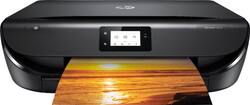
HP - ENVY 5010 All-In-One Instant Ink Ready Printer - Black
- Key Specs
- Networking: Wireless
- ENERGY STAR Certified: true (Devices carrying the ENERGY STAR service mark, such as computer products and peripherals, kitchen appliances, and other products, generally use 20% to 30% less energy than required by federal standards.)
- Printer Type: All In One, Copier, Printer, Scanner
- ISO Color Print Speed: 7 pages per minute (The number of color pages able to be printed per minute in the device's default single-side mode, as tested by the International Standards Organization (ISO).)
- ISO Mono Print Speed: 10 pages per minute (The number of black ink (grayscale) pages able to be printed per minute in the device's default single-side mode, as tested by the International Standards Organization (ISO).)
- Output Tray Capacity: 25
- Touch Screen: true (Touch-screen devices make navigating more intuitive. Using a touch-screen display, you can do things such as tap to select, hold and drag to move items, swipe to scroll, and pinch to zoom.)
- General
- Brand: HP
- Model Number: ENVY 5010
- Product Name: ENVY 5010 All-In-One Instant Ink Ready Printer
- Color: Black
- Display Screen: true
- Display Screen Size: 2.2 inches
- Dimensions
- Product Height: 5.04 inches (The out of box height of the item. Height is measured as the vertical distance from the bottom of the item to the top as it would be primarily used or placed.)
- Product Width: 17.5 inches (The out of box width of the item. Width is measured as the horizontal distance from one side of the item to the other as it would be primarily used or placed.)
- Product Depth: 17.52 inches (The out of box depth of the item. Depth is measured as the distance from the front of the item to the back as it would be primarily used or placed.)
- Product Weight: 11.9 pounds (The out of box weight of the item.)
- Features
- Automatic Document Feeder: false
- Photo Printing: true
- Monochromatic/Color: Color
- Automatic Two-Sided Printing: true
- Tray Capacity: 100
- Duty Cycle: Up to 1,000 (The maximum number of pages per month that the device can produce without failing, as specified by the manufacturer.)
- Scanner Info
- Scanner Type: Flatbed
- Scanner Resolution: Up to 1200 x 1200 (Refers to the number of pixels/dots, both horizontally and vertically, of the image produced by the scanner. Generally, the higher the resolution, the sharper and cleaner the produced image.)
- Ink
- Compatible Cartridges: N9K02A HP 65 Black Ink Cartridge, N9K01A HP 65 Tri-color Ink Cartridge, N9K04A HP 65XL Black Ink Cartridge, N9K03A HP 65XL Tri-color Ink Cartridge
- Paper Info
- Maximum Document Length: 14 inches
- Maximum Document Width: 8.5 inches
- Supported Paper Sizes: Letter, legal, 4 x 6 in, 5 x 7 in, 8 x 10 in, No. 10 envelopes, 3x5 to 8.5x14, 3 x 5.5 to 8.5 x 12.2 in
- Performance
- Printer Resolution (Black): Up to 1200 x 1200 (Refers to the number of pixels/dots, both horizontally and vertically, of the image produced by the printer in black ink. Generally, the higher the resolution, the sharper and cleaner the produced image.)
- Printer Resolution (Color): Up to 4800 x 1200 (Refers to the number of pixels/dots, both horizontally and vertically, of the image produced by the printer in colored ink. Generally, the higher the resolution, the sharper and cleaner the produced image.)
- Copier Info
- Copier Resolution (Black): Up to 600 x 300 (Refers to the number of pixels/dots, both horizontally and vertically, of the image produced by the copier in black ink. Generally, the higher the resolution, the sharper and cleaner the produced image.)
- Copier Resolution (Color): Up to 600 x 300 (Refers to the number of pixels/dots, both horizontally and vertically, of the image produced by the copier in colored ink. Generally, the higher the resolution, the sharper and cleaner the produced image.)
- Other
- UPC: 193015117709
Print smudge-free documents and gorgeous photos with this HP ENVY all-in-one printer. Featuring powerful dual-band Wi-Fi connectivity, this versatile printer makes it easy to print photos and documents directly from mobile devices. This HP ENVY all-in-one printer lets you quickly print large numbers of documents with speeds of up to 10 ppm. Prints up to 10 ISO ppm* in black, up to 7 ppm* in color
- Prints up to 10 ISO ppm* in black, up to 7 ISO ppm* in color: Produces documents quickly.
- Be sure you have the right cartridge: Enter your printer's model number into our Ink and Toner Finder to find compatible cartridges. Get started ›
- Perfect for home or small business use: This inkjet printer offers excellent print quality for photos and documents and accepts a variety of paper types and sizes.
- Wireless and mobile printing capability: Get simple Wi-Fi setup in less than a minute, and start printing fast. Easily print from a variety of smartphones and tablets.**
- Dual-band Wi-Fi: Have confidence in your connection with steady performance.
- HP Smart app: Scan on the go, print from social media and the cloud, and easily order ink.
- Works with HP 65 ink cartridges: Including HP 65 black, HP 65 tri-color, HP 65XL black, and HP 65XL tri-color ink cartridges.
- Up to 4800 x 1200 dpi (dots per inch) color resolution: High resolution for producing incredible quality and detail in documents and photos. Up to 1200 x 1200 dpi when printing black only.
- HP Instant Ink compatible: HP Instant Ink delivers the right ink, right on time, so you never run out again.
- Standard paper handling: 100-sheet input and 25-sheet output trays.
- 2.2" Hi-Res Mono LCD: Helps control printing, copying and scanning.
- 1 USB port for simple connectivity: This high-speed USB 2.0 port offers a standard connection to your PC or a simple way to plug in and print from a USB drive, camera or other devices.
- Built-in duplex printing: Speed through multipage print jobs with automatic two-sided printing.
Whats Included
- HP ENVY 5010 All-In-One Instant Ink Ready Printer
- HP 65 Setup Black Instant Ink Ready Cartridge
- HP 65 Setup Tri-color Instant Ink Ready Cartridge
- Power Cord
- Ink Caution Flyer and Instant Ink Flyer
- Owner's manual
Product Manuals
Q: Can it continue to print in black/greyscale even when color cartridges are empty?
A: If your color ink runs out you can remove it from the printer and it will enter single cartridge mode to allow printing.
A: *Instant Ink ready. Instant Ink is HP's program to supply you with a number of pages to print per month based on your printing needs and has multiple levels to choose from. In turn, they will make sure you never run out of ink. The cartridges that come with the printer are Instant Ink cartridges, meaning they have a chip in them that allows them to only be used when you sign up for Instant Ink program. I urge you to do your research on this before signing up. I did and decided I would give it a try. If you want to buy your own ink as you go, do not install these cartridges, but buy another set from the store that are not Instant Ink.
A: I don't know where it says that or what it would mean, but indeed you can put a stack of paper in the tray, up to 100 I believe, and it will use them automatically for normal print jobs until you want a different type or size, and then you would have to put it in there.
A: You can print those photo sizes but you will need to remove your regular paper and resize the margins to accommodate the photo paper.
Q: Does this printer print good quality photos?
A: This printer will print great photos! For even better photo quality I would recommend the HP Envy Photo line which has a photo pigment black ink.
A: Yes, this Envy is enabled for Google Cloud Printing, and is compatible with Chromebooks!!
Q: Does printer feature scanner?
A: Yes, you can scan and copy (one page at a time; there is no document feeder for multi-page scans).
Q: Is the USB cord included with the Printer
A: Unfortunately no, the USB cable is not included.
People also viewed
 $79.89The price was $109.89
 $119.89The price was $159.89
 $49.89The price was $89.89
 $149.89The price was $239.89
 $119.89The price was $179.89
 $99.89The price was $179.89
 $299.89The price was $429.89
 $229.89The price was $309.89





Today's top picks
 $949.00The price was $1,099.00
 $199.99The price was $249.99