HP - Envy Photo 7275 Wireless AI-Enabled All-in-One Inkjet Printer w/ 3 Months Instant Ink - White

Key Accessories:
- Elementree - Sustainable Printer Paper For Everyday Printing and Copying, 8.5 x 11 20lb/ 75gsm 500 Sheets Per Ream (00918) - White$6.99



More Buying Options from Best Buy
Related Item

Specifications
- NetworkingWired, WirelessENERGY STAR CertifiedYesPrinter TypeAll In OnePrinter Resolution (Color)Up to 4800 x 1200
- Key Specs
- Networking: Wired, Wireless
- ENERGY STAR Certified: true (Devices carrying the ENERGY STAR service mark, such as computer products and peripherals, kitchen appliances, and other products, generally use 20% to 30% less energy than required by federal standards.)
- Printer Type: All In One
- Printer Resolution (Color): Up to 4800 x 1200 (Refers to the number of pixels/dots, both horizontally and vertically, of the image produced by the printer in colored ink. Generally, the higher the resolution, the sharper and cleaner the produced image.)
- General
- Brand: HP
- Model Number: B63JSA#B1H
- Product Name: Envy Photo 7275 Wireless AI-Enabled All-in-One Inkjet Printer w/ 3 Months Instant Ink
- Color: White
- Dimensions
- Product Height: 7.5 inches (The out of box height of the item. Height is measured as the vertical distance from the bottom of the item to the top as it would be primarily used or placed.)
- Product Width: 18.11 inches (The out of box width of the item. Width is measured as the horizontal distance from one side of the item to the other as it would be primarily used or placed.)
- Product Depth: 15.08 inches (The out of box depth of the item. Depth is measured as the distance from the front of the item to the back as it would be primarily used or placed.)
- Product Weight: 17.9 pounds (The out of box weight of the item.)
- Connectivity
- Wired Connectivity: USB-A
- Wireless Connectivity: Wi-Fi (The manner in which a device sends data to another device over a short distance without the use of wires or cables.)
- Connector Type(s): USB 2.0 (Type of interface connection found on the device.)
- Minimum System Requirements: PC: Windows 11, Windows 10 32 bit or 64 bit; 2 GB available hard disk space, MicrosoftInternet Explorer or Edge; Internet connection; Mac: macOS 15 Sequoia, macOS 14 Sonoma,macOS 13 Ventura; 2 GB HD; Internet required
- Power
- Rechargeable Battery: false
- Certifications Listings & Approvals
- EPEAT Qualified: true (The Electronic Product Environmental Assessment Tool (EPEAT) was designed to provide an environmental assessment tool for purchasers. In order to qualify for EPEAT, a product must meet all 23 required criteria.)
- EPEAT Level: Gold (The Electronic Product Environmental Assessment Tool (EPEAT) was designed to provide an environmental assessment tool for purchasers. In order to qualify for EPEAT, a product must meet all 23 required criteria. Products are rated Bronze, Silver or Gold based on how many of 28 optional criteria they meet (below 50%, 50%, 75%).)
- Ink
- Compatible Ink Cartridge(s): HP 64, HP 64XL
- Paper Info
- Instant Film Compatible: false
- Maximum Photo Length: 14 inches
- Maximum Photo Width: 8.5 inches
- Paper Feeder: Bottom loader
- Supported Paper Sizes: Main Tray: Letter, Executive, Statement (8.5 x 5.5 in), Legal, 4 x 6 in, 5 x 7 in, 8 x 10 in, 4 x 12in, Envelope (#10, A2); Photo Tray: 5 x 5 in, 4 x 6 in, 5 x 7 in
- Tray Capacity: 125
- Memory
- Memory Card Slot: false
- Features
- Touch Screen: true (Touch-screen devices make navigating more intuitive. Using a touch-screen display, you can do things such as tap to select, hold and drag to move items, swipe to scroll, and pinch to zoom.)
- Warranty
- Warranty - Parts: 1 year
- Warranty - Labor: 1 year
- Other
- UPC: 198990280189
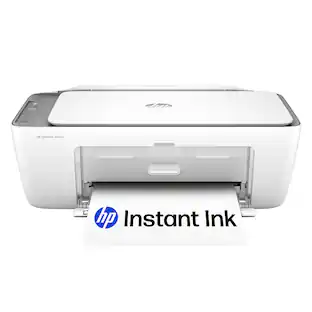
From America's most trusted printer brand, the HP Envy Photo 7275 delivers color printing, scanning and copying, plus 125-sheet paper capacity and separate photo tray. Seamlessly go from printing vibrant, high-quality photos and personalized creations to everyday documents. It's AI-enabled to intuitively adapt to your workflow, with wireless and security features that keep your multifunction printer up to date and secure.
- Perfect for home: The HP Envy Photo 7275 is great for home printing including documents, high-quality true-to-screen borderless photos, creative projects and more. Print speeds up to 10 pages per minute color, 15 pages per minute black.
- Perfectly formatted prints with HP AI: Print web pages and emails with precision—no wasted pages or awkward layouts; HP AI easily removes unwanted content, so your prints are just the way you want
- Key features: Print, copy, scan, automatic 2-sided printing, advanced photo features, separate photo tray, intuitive color touchscreen, mobile and wireless printing
- 3 months of free Instant Ink: Subscribe to Instant Ink delivery service to get ink delivered directly to your door before you run out. After 3 months, monthly fee applies unless cancelled, and you save up to 50%.
- Dedicated photo tray: With a dedicated photo tray, easily go from printing photos to everyday documents without switching paper. Tray supports up to 5 x 6" photo paper.
- Vibrant photos: Print documents and borderless photos that look like they do on your screen with HP's true-to-screen tech, plus customize the backs of photos for personalized cards with HP's exclusive automatic 2-sided photo printing
- HP app: Print, scan, copy, or fax right from your smartphone with the easiest-to-use print app
- Wireless printing: Stay connected with our most reliable dual-band Wi-Fi, which automatically detects and resolves connection issues
- Sustainable design: This photo printer is made with 60% recycled plastic content
- Dynamic security: This printer is intended to work only with cartridges with original HP chips or circuitry and will block cartridges using non-HP chips or circuitry. Periodic firmware updates will maintain the effectiveness of these measures.
Whats Included
- HP Envy Photo 7975 All-in-One Printer
- Original HP 64 Ink Cartridges: Black, Tri-color
- Reference guide
- Setup guide
- Power cord
Product Manuals
Q: Can this printer print on both sides of the paper automatically?
A: Yes, this printer supports automatic 2-sided printing.
Q: Does this printer have a touch screen?
A: Yes, this printer has an intuitive color touch screen.
Q: Does this printer have wireless printing capability?
A: Yes, this printer features wireless printing.
Q: What type of connectivity does this printer support?
A: This printer supports both wired and wireless connectivity.
Q: Does this printer have a dedicated photo tray?
A: Yes, this printer has a dedicated photo tray.
Q: Is this printer ENERGY STAR certified?
A: Yes, this printer is ENERGY STAR certified.
Q: What is the maximum photo width supported by this printer?
A: The maximum photo width supported is 8.5 inches.
Q: can you email a scanned document directly
A: Yes. Very easy
Compare similar products
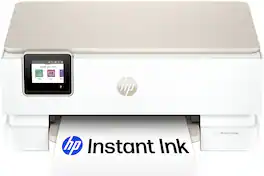
From America's most trusted printer brand, the HP Envy Photo 7275 delivers color printing, scanning and copying, plus 125-sheet paper capacity and separate photo tray. Seamlessly go from printing vibrant, high-quality photos and personalized creations to everyday documents. It's AI-enabled to intuitively adapt to your workflow, with wireless and security features that keep your multifunction printer up to date and secure.

From America's most trusted printer brand, the HP Envy 6155e All-in-One delivers color printing, scanning and copying, plus 100-sheet paper capacity. It's AI-enabled to intuitively adapt to your workflow, with wireless and security features that keep your multifunction printer up to date and secure, and prints high-quality documents and photos every time with true-to-screen tech. This inkjet printer also lets you easily navigate print jobs with its intuitive color touchscreen.

From America's most trusted printer brand, the HP Envy Photo 7975 delivers color printing, scanning and copying, plus an automatic document feeder, 125-sheet paper capacity and separate photo tray. Seamlessly go from printing vibrant, high-quality photos and personalized creations to everyday documents. It's AI-enabled to intuitively adapt to your workflow, with wireless and security features that keep your multifunction printer up to date and secure.
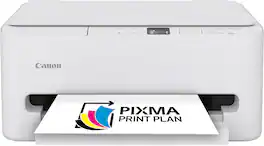
The PIXMA TS6520 strikes a perfect balance between functionality and affordability. While it doesn’t include an ADF like the TR7120, it still offers high-quality printing, scanning, and copying for everyday tasks. Its auto 2-sided printing helps save on paper and its 1.42” OLED display and simple setup make it user-friendly, and its compact design fits easily into any home workspace. With reliable Wi-Fi and mobile printing support, it’s great for printing school projects, recipes, and vibrant photos—without the extra bells and whistles. Best for: Families and students who want a reliable, easy-to-use printer for occasional use without needing advanced features.
| Pros for HP - Envy Photo 7275 Wireless AI-Enabled All-in-One Inkjet Printer w/ 3 Months Instant Ink - White | |||
|---|---|---|---|
| Print Quality, Setup Ease, Connectivity, Noise Level | Print Quality, Overall Performance, Ease of Use, Setup, Size | Print Quality, Setup Ease | Setup Ease, Print Quality, Connectivity |
| Cons for HP - Envy Photo 7275 Wireless AI-Enabled All-in-One Inkjet Printer w/ 3 Months Instant Ink - White | |||
| Size | There were no cons for this product— | There were no cons for this product— | There were no cons for this product— |
Specs



Reviews
Rating 4.6 out of 5 stars with 213 reviews
- Print Quality (71)
- Setup Ease (43)
- Connectivity (21)
- Noise Level (12)
- Size (4)
Customer Images
The vast majority of our reviews come from verified purchases. Reviews from customers may include My Best Buy members, employees, and Tech Insider Network members (as tagged). Select reviewers may receive discounted products, promotional considerations or entries into drawings for honest, helpful reviews.
Explore tech essentials Sponsored
 $119.89The price was $179.89
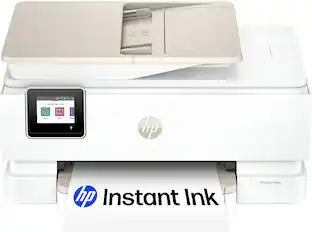 Memorial Day Deal$159.89The price was $239.89
 $49.89The price was $89.89