Deals Worth GiftingShop now

Main Content

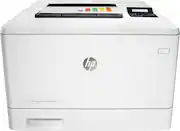
HP - LaserJet Pro m452dn Color Printer - White

Model: CF389A#BGJ
SKU: 11098101
$839.00
or
$34.96/mo.
suggested payments with24-Month Financing
Show me how
Finance OptionsView your offers
Availability
Fulfillment Options

FREE shipping to

Sold & shipped by
EZ Tech
(17)
Specifications
  • Networking
    Wired
    ENERGY STAR Certified
    No
    Printer Type
    Printer
    Duty Cycle
    Up to 50,000
    ISO Color Print Speed
    28 pages per minute
    ISO Mono Print Speed
    28 pages per minute
  • Key Specs
    • Networking: Wired
    • ENERGY STAR Certified: false (Devices carrying the ENERGY STAR service mark, such as computer products and peripherals, kitchen appliances, and other products, generally use 20% to 30% less energy than required by federal standards.)
    • Printer Type: Printer
    • Duty Cycle: Up to 50,000 (The maximum number of pages per month that the device can produce without failing, as specified by the manufacturer.)
    • ISO Color Print Speed: 28 pages per minute (The number of color pages able to be printed per minute in the device's default single-side mode, as tested by the International Standards Organization (ISO).)
    • ISO Mono Print Speed: 28 pages per minute (The number of black ink (grayscale) pages able to be printed per minute in the device's default single-side mode, as tested by the International Standards Organization (ISO).)
    • Monochromatic/Color: Color
  • General
    • Brand: HP
    • Model Number: CF389A#BGJ
    • Product Name: LaserJet Pro m452dn Color Printer
    • Color: White
    • Display Screen: true
    • Display Screen Size: 3 inches
  • Dimensions
    • Product Height: 13.4 inches (The out of box height of the item. Height is measured as the vertical distance from the bottom of the item to the top as it would be primarily used or placed.)
    • Product Width: 16.2 inches (The out of box width of the item. Width is measured as the horizontal distance from one side of the item to the other as it would be primarily used or placed.)
    • Product Depth: 16.2 inches (The out of box depth of the item. Depth is measured as the distance from the front of the item to the back as it would be primarily used or placed.)
    • Product Weight: 41.7 pounds (The out of box weight of the item.)
  • Features
    • Automatic Document Feeder: true
    • Photo Printing: false
    • Automatic Reduction/Enlargement: false
    • Touch Screen: false (Touch-screen devices make navigating more intuitive. Using a touch-screen display, you can do things such as tap to select, hold and drag to move items, swipe to scroll, and pinch to zoom.)
    • Automatic Two-Sided Printing: false
  • Certifications Listings & Approvals
    • EPEAT Qualified: true (The Electronic Product Environmental Assessment Tool (EPEAT) was designed to provide an environmental assessment tool for purchasers. In order to qualify for EPEAT, a product must meet all 23 required criteria.)
    • EPEAT Level: Silver (The Electronic Product Environmental Assessment Tool (EPEAT) was designed to provide an environmental assessment tool for purchasers. In order to qualify for EPEAT, a product must meet all 23 required criteria. Products are rated Bronze, Silver or Gold based on how many of 28 optional criteria they meet (below 50%, 50%, 75%).)
  • Paper Info
    • Automatic Document Feeder Capacity: 10 sheets
    • Maximum Document Length: 14 inches
    • Maximum Document Width: 8.5 inches
    • Paper Feeder: Tray loader
    • Paper Handling: 50-sheet multipurpose tray, 250-sheet input tray; 150-sheet output bin
    • Supported Paper Sizes: Letter, legal, executive, Oficio (8.5" x 13"), 3" x 5", 4" x 6", 5" x 8", envelopes (No. 10, Monarch)
    • Tray Capacity: 250
    • Media Weight (Minimum): 60 grams per square meter
    • Media Weight (Maximum): 176 grams per square meter
  • Ink
    • Compatible Cartridges: HP 410A: CF410A, CF411A, CF412A, CF412A, HP 410X: CF410X, CF411X, CF412X, CF413X
  • Performance
    • Approximate Page Yield (Black): 2300
    • Approximate Page Yield (Color): 2300
    • Printer Resolution (Black): Up to 600 x 600 (Refers to the number of pixels/dots, both horizontally and vertically, of the image produced by the printer in black ink. Generally, the higher the resolution, the sharper and cleaner the produced image.)
    • Printer Resolution (Color): Up to 600 x 600 (Refers to the number of pixels/dots, both horizontally and vertically, of the image produced by the printer in colored ink. Generally, the higher the resolution, the sharper and cleaner the produced image.)
    • Output Tray Capacity: 150
    • Recommended Monthly Volume: 750 to 4000 (The maximum number of pages that can be printed per month, as recommended by the manufacturer. Printing in excess of this number may reduce the machine's overall lifespan or print quality over time.)
    • First Page Out Time: 9 seconds (The time it takes the printer to print and deliver the first page in the output tray. May depend on the complexity of the copy being printed.)
  • Connectivity
    • Minimum System Requirements: PC: 233MHz processor; Windows XP (SP2, 32-bit) or later; 512MB RAM; 400MB hard disk space; CD-ROM drive; Mac: OS X 10.7 or newer; 1GB hard disk space; USB or Internet connection
  • Other
    • UPC: 888793383131

HP LaserJet Pro Printer: Print crisp, easy-to-read documents quickly with this printer, which features up to 28 ISO ppm* print speeds and built-in duplex printing for efficient operation. The free HP ePrint app lets you print right from your mobile device.

Printer Buying Guide

  • Easy Replenish: With a printer set up for Easy Replenish, you'll automatically receive shipments of the ink you need. The printer monitors its own ink levels, so you'll only receive ink when you need it.
  • >Laser printers are best for high-volume printing: They handle large volumes quickly and at a low cost per page. Toner (powder) is used instead of ink, so you get smudge-free images and text.
  • Be sure you have the right cartridge: Enter your printer's model number into our Ink and Toner Finder to find compatible cartridges. Get started ›
  • Mobile printing capability: Connect this printer to your home or office network with built-in Ethernet. Plus, print from your mobile device with the free HP ePrint app, Apple® AirPrint or Google Cloud Print.
  • Take control of devices and settings: HP Web JetAdmin software provides a comprehensive suite of tools for simple, yet powerful, management.
  • 600 dpi (dots per inch) for good print quality: Sufficient resolution for producing good quality documents and photos.
  • 4 individual print cartridges are economical: Only replace toner cartridges (black, cyan, magenta and yellow) when a color runs out.
  • Large paper trays for high-volume printing and copying: Reload less often with the 250-sheet input tray and 150-sheet output tray.
  • Easy-to-use control panel: 2-line LCD screen offers simple operation.
  • 1 USB port for simple connectivity: 1 high-speed USB 2.0 port offers a standard connection to your PC.
  • Built-in duplex printing: Print on both sides of the page without turning it over manually, to minimize your printing costs and help the environment.
  • Easy Replenish: With a printer set up for Easy Replenish, you'll automatically receive shipments of the ink you need. The printer monitors its own ink levels, so you'll only receive ink when you need it.
  • >Laser printers are best for high-volume printing: They handle large volumes quickly and at a low cost per page. Toner (powder) is used instead of ink, so you get smudge-free images and text.
  • Be sure you have the right cartridge: Enter your printer's model number into our Ink and Toner Finder to find compatible cartridges. Get started ›
  • Mobile printing capability: Connect this printer to your home or office network with built-in Ethernet. Plus, print from your mobile device with the free HP ePrint app, Apple® AirPrint or Google Cloud Print.
  • Take control of devices and settings: HP Web JetAdmin software provides a comprehensive suite of tools for simple, yet powerful, management.
  • 600 dpi (dots per inch) for good print quality: Sufficient resolution for producing good quality documents and photos.
  • 4 individual print cartridges are economical: Only replace toner cartridges (black, cyan, magenta and yellow) when a color runs out.
  • Large paper trays for high-volume printing and copying: Reload less often with the 250-sheet input tray and 150-sheet output tray.
  • Easy-to-use control panel: 2-line LCD screen offers simple operation.
  • 1 USB port for simple connectivity: 1 high-speed USB 2.0 port offers a standard connection to your PC.
  • Built-in duplex printing: Print on both sides of the page without turning it over manually, to minimize your printing costs and help the environment.
Whats Included
  • LaserJet Pro m452dn Color Printer
  • 4 preinstalled introductory HP 410A LaserJet toner cartridges (black, cyan, magenta, yellow)
  • Power cord
  • Software drivers and documentation CD-ROM
  • Owner's manual
  • LaserJet Pro m452dn Color Printer
  • 4 preinstalled introductory HP 410A LaserJet toner cartridges (black, cyan, magenta, yellow)
  • Power cord
  • Software drivers and documentation CD-ROM
  • Owner's manual

Q: How many and What ink cartridges does this product take?

A: Good question. This is a laser printer so it does not take ink cartridges. It takes toner cartridges. It has 1 black, cyan, magenta, and yellow toner so that is a total of 4 toners. It takes HP 410A and 410X toners. The 410X toners are the high yield toners that have a higher page yield. The standard yield toners all print up to 2,300 sheets. The high yield black toner prints up to 6,500 sheets and the high yield color toners print up to 5,000 sheets. I hope this helps.

Q: Does this printer scan?

A: No. This is not a multi-function printer.

Q: How often do you experience paper jams in a month (for those who print 3-4 times a week)?

A: I use this printer on cardstock and it probably jams once or twice a week. It is easy to fix and I use it everyday.

Q: Is this printer quiet?

A: Great question. This printer actually has a Quiet Print Mode that you can configure in the printer's settings. Here is a link to how to configure the setting: http://h20564.www2.hp.com/hpsc/doc/public/display?docId=emr_na-c04886123&sp4ts.oid=5096243 I hope this helps!

Q: Does it have wifi connectivity? Or just USB or Wired Ethernet?

A: This item has usb and wifi connectivity.

Q: Does this print photos (support photo paper)?

A: Yes, this will print photos.

Q: Will the printer stil print B&W if the color Timers are empty?

A: Yes, the printer will print black and white only. The settings should be adjusted to monochrome in this instance.

Sponsored

Compare similar products

HP - LaserJet Pro m452dn Color Printer - White
4.8(53)

HP LaserJet Pro Printer: Print crisp, easy-to-read documents quickly with this printer, which features up to 28 ISO ppm* print speeds and built-in duplex printing for efficient operation. The free HP ePrint app lets you print right from your mobile device.

HP - LaserJet Pro MFP 3301sdw Wireless AI-Enabled Color All-in-One Laser Printer - White

From America's most trusted printer brand, the Color LaserJet Pro MFP 3301sdw provides vibrant laser-quality color and powerful productivity. Super fast and super easy with advanced features for small teams.

HP - LaserJet Pro MFP 4101fdw AI-Enabled Black-and- All-in-One Laser Printer - White

From America's most trusted printer brand, the LaserJet Pro MFP 4101fdw delivers compact design with groundbreaking performance. Get blazing fast black-and-white printing speeds, high-volume scanning, and easy management tools designed for the office.

HP - LaserJet Pro 4301fdw Wireless AI-Enabled Color All-in-One Laser Printer - White/Blue

From America's most trusted printer brand, the Color LaserJet Pro MFP 4301fdw provides vibrant laser-quality color and powerful productivity. Super fast and super easy with advanced features for small teams.

Pros for HP - LaserJet Pro m452dn Color Printer - White
There were no pros for this productPrint Quality, Overall Performance, Setup, Ease of use, ConnectivityPrint Quality, Ease of use, Overall Performance, Setup, SizeThere were no pros for this product
Cons for HP - LaserJet Pro m452dn Color Printer - White
There were no cons for this productWeightSoftware, ScannerThere were no cons for this product

Specs

Reviews

The vast majority of our reviews come from verified purchases. Reviews from customers may include My Best Buy members, employees, and Tech Insider Network members (as tagged). Select reviewers may receive discounted products, promotional considerations or entries into drawings for honest, helpful reviews.

  • Rated 5 out of 5 stars

    Solid SOHO Color Laser Printer

    Easy to setup. Works well on our mixed platform network (Win10/OS X/Linux/cloud). Paper path is well thought out for specialty items (labels, envelopes, etc) and the toner access is simple. Haven't had a paper jam yet, but the paper path seems easy enough to access. The control panel on the m452dn is quite spartan, but was sufficient to get the initial network configuration completed without issues. All of the other settings we have needed to make for print jobs were made via the computer print dialogs. We do not expect to use the direct USB drive print capability (haven't used it a single time on our black 'n white laser printer), so I don't anticipate we will need to access the control panel again. The printer is somewhat larger and heavier than expected, although this is our first color laser printer, so it could be the norm. Just a comment for anyone replacing a color inkjet and will need a little more space for this printer.

    This review is from HP - LaserJet Pro m452dn Color Printer - White

    Posted by AGamer

  • Rated 5 out of 5 stars

    GREAT printer! Even for home use

    Because of everyone else's reviews, I knew printer was probably going to arrive w/o the USB cable necessary to hook it up to my home PC (still really annoying). However, after I got that extra purchase all figured out, everything else went smoothly. Printer was shipped to me in less than 1 week. Very carefully packaged. Easy to set up and install software. Great price! Easy to use. I wanted something that could print on legal paper and card stock as well as the normal letter-sized paper. I have a home PC using Windows 7. This new printer is very easy to use. We had one of these at my old workplace . . . I knew the print quality would be good and that the machine would be a workhorse.

    This review is from HP - LaserJet Pro m452dn Color Printer - White

    Posted by RecentlyRetiredLibrarian

  • Rated 5 out of 5 stars

    excellent printer

    This is a fine printer, used here for office documents, publicity brochures and CD jackets. All come out bright and relable. 'Low cartridge' reset options are great, and using third party replaceables makes this printer extremely affordable in a small office environment. Highly recommend.

    This review is from HP - LaserJet Pro m452dn Color Printer - White

    Posted by octoberbarry

No content
Sponsored

Similar products from outside of Best Buy

sponsored

Finance Options

My Best Buy® Credit Card
Choose a benefit:
$34.96/mo.suggested payments with 24-Month Financing
Or
10% back in rewardson your first day of purchases when approved for the My Best Buy® Credit Card.
Buy Now, Pay Later
8 payments starting at $104.87
Lease to own
Apply today with no credit needed and enjoy flexible payment options.