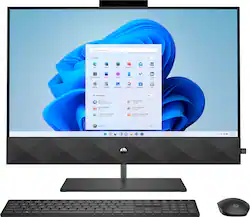
HP - Pavilion 27" Touch-Screen All-In-One - Intel Core i7 - 16GB Memory - 1TB SSD - Sparkling Black
- Key Specs
- Screen Size: 27 inches (Size of the screen, measured diagonally from corner to corner.)
- Processor Model: Intel 10th Generation Core i7 (Your computer's processor is like its brain. Working in combination with system memory, the power of the processor determines the complexity of software you can run, how many programs you can have open at the same time, and how fast those programs will run. Most computers feature an AMD, Intel or Snapdragon processor.)
- Storage Type: SSD
- Total Storage Capacity: 1000 gigabytes
- System Memory (RAM): 16 gigabytes (Random-access memory (RAM) is a computing device's short-term data storage, which allows active information to be accessed quickly. The size and type of RAM determines how efficiently the device can handle large amounts of information at one time. For example, gaming or video editing requires more RAM for optimal performance.)
- Graphics: Intel UHD Graphics 630 (Often referred to as a "graphics processing unit" (GPU), this device is responsible for displaying image content and decoding/encoding video content in programs and games.)
- General
- Brand: HP
- Model Number: 27-d0044
- Product Name: Pavilion 27" Touch-Screen All-In-One - Intel Core i7 - 16GB Memory - 1TB SSD
- Color: Sparkling Black
- Year of Release: 2021
- Display
- Display Type: LCD
- Screen Size: 27 inches (Size of the screen, measured diagonally from corner to corner.)
- Screen Resolution: 1920 x 1080 (Full HD) (Screens come in a range of resolutions (measured in pixels, horizontal x vertical). The higher the resolution, the greater the picture quality.)
- Stylus Input: Passive (An active stylus/pen is able to communicate directly with a compatible device; active electromagnetic resonance (EMR) pens are powered via a device's screen and active electrostatic (AES) pens require an additional power source. A passive stylus does not have electronic features and is compatible with most capacitative touch screens.)
- Touch Screen: true (Touch-screen devices make navigating more intuitive. Using a touch-screen display, you can do things such as tap to select, hold and drag to move items, swipe to scroll, and pinch to zoom.)
- Multi-Touch Screen: true (A screen that recognizes multiple points of contact, allowing for intuitive navigation functions such as pinch to zoom.)
- Processor
- Processor Brand: Intel
- Processor Model: Intel 10th Generation Core i7 (Your computer's processor is like its brain. Working in combination with system memory, the power of the processor determines the complexity of software you can run, how many programs you can have open at the same time, and how fast those programs will run. Most computers feature an AMD, Intel or Snapdragon processor.)
- Processor Model Number: 10700T
- Storage
- Storage Type: SSD
- Total Storage Capacity: 1000 gigabytes
- Solid State Drive Capacity: 1000 gigabytes (The amount of data that can be stored on the device's solid state drive (SSD). SSD is a flash-based storage with faster speeds than a hard disk drive (HDD).)
- Solid State Drive Interface: NVMe (Connects the solid state drive to the host system. PCI and SATA interfaces are the most common; PCI interfaces are typically faster, but SATA interfaces are compatible with a wider range of systems.)
- Hard Drive Accelerator: None (A module integrated (or added) into a PC to improve performance speed. By acting as a high-speed cache, an accelerator speeds up access times to the hard drive, which results in faster web browsing, improved gaming experience, and overall more responsiveness.)
- Memory
- System Memory (RAM): 16 gigabytes (Random-access memory (RAM) is a computing device's short-term data storage, which allows active information to be accessed quickly. The size and type of RAM determines how efficiently the device can handle large amounts of information at one time. For example, gaming or video editing requires more RAM for optimal performance.)
- Type of Memory (RAM): DDR4 (Each type of RAM delivers a different level of speed, bandwidth, energy efficiency and performance.)
- Number Of Memory Slots: 2
- Number of Memory Sticks Included: 1
- System Memory RAM Expandable To: 32 gigabytes (Adding more random-access memory (RAM) to a computer speeds up performance and improves efficiency. Upgrades to memory are limited by the number of expansion slots for additional RAM and existing RAM installed on the device.)
- Graphics
- Graphics Type: Integrated (Dedicated graphics uses a separate graphics card for processing video images. Because it does not use memory from the system's RAM, there is no extra burden on the CPU and graphics are processed more efficiently. Integrated graphics shares system RAM to process video images.)
- GPU Brand: Intel
- Graphics: Intel UHD Graphics 630 (Often referred to as a "graphics processing unit" (GPU), this device is responsible for displaying image content and decoding/encoding video content in programs and games.)
- Compatibility
- Operating System: Windows 10 Home (The operating system manages all software and hardware, including files, memory and connected devices. Most importantly, it lets you interact with your device and your programs in a visual way; otherwise, you'd be typing computer code to get anything done.)
- Connectivity
- Number of HDMI Outputs (Total): 1
- Number of DisplayPort Outputs (Total): 0
- Number of Thunderbolt Ports (Total): 0
- Number of VGA Ports: 0 (VGA (Video Graphics Adapter or Video Graphics Array) is a display standard that transmits via analog signals. This type of interface is typically used to connect a computer to a display device such as a monitor, projector, or TV.)
- Number Of DVI Ports: 0
- Number of USB Ports (Total): 5
- Wireless Connectivity: Bluetooth, Wi-Fi (The manner in which a device sends data to another device over a short distance without the use of wires or cables.)
- Ethernet Card: 10/100/1000 (Also known as an Ethernet adapter, this card plugs into a computer's motherboard and enables it to access an Ethernet network. Ethernet data transmission speeds are measured in Mbps (megabits per second) and Gbps (gigabits per second). For example, a 10/100 Ethernet port transmits 10 and 100 Mbps, while a 10/100/1000 Ethernet port transmits 10 and 100 Mbps and has a maximum speed of 1000 Mbps (1 Gbps).)
- Number Of Ethernet Ports: 1
- Network Connectivity: None (The manner in which a device sends data to another device over a long distance using a cellular network.)
- Expansion
- Number of M.2 Slots: 2 (This interface is most commonly used for high-speed solid state drives (SSDs), and is often used in laptops due to its small size.)
- Number Of Internal 2.5" Bays: 1
- Camera
- Built-In Webcam: true
- Front-Facing Camera: true
- Front Facing Camera Megapixels: 5 megapixels (The more megapixels, the more detail that the camera facing the user can capture.)
- Front Facing Camera Video Resolution: 1080p (Refers to the number of pixels, both horizontally and vertically, used by the camera facing the user to capture video. The higher the resolution the finer the video detail that can be seen.)
- Built-In Microphone: true
- Features
- Media Card Reader: true (A hardware device that allows for access to data on a memory card and enables the transfer of its files to a computer. These devices may have one or multiple slots for various types of memory cards, and may be integrated into the computer or available as an external device.)
- Audio Technology: Audio by B&O
- Stylus Dock: None
- Dimensions
- Product Height: 18.73 inches (The out of box height of the item. Height is measured as the vertical distance from the bottom of the item to the top as it would be primarily used or placed.)
- Product Width: 24.12 inches (The out of box width of the item. Width is measured as the horizontal distance from one side of the item to the other as it would be primarily used or placed.)
- Product Depth: 8.19 inches (The out of box depth of the item. Depth is measured as the distance from the front of the item to the back as it would be primarily used or placed.)
- Product Weight: 19.6 pounds (The out of box weight of the item.)
- Certifications Listings & Approvals
- ENERGY STAR Certified: true (Devices carrying the ENERGY STAR service mark, such as computer products and peripherals, kitchen appliances, and other products, generally use 20% to 30% less energy than required by federal standards.)
- EPEAT Qualified: true (The Electronic Product Environmental Assessment Tool (EPEAT) was designed to provide an environmental assessment tool for purchasers. In order to qualify for EPEAT, a product must meet all 23 required criteria.)
- EPEAT Level: Bronze (The Electronic Product Environmental Assessment Tool (EPEAT) was designed to provide an environmental assessment tool for purchasers. In order to qualify for EPEAT, a product must meet all 23 required criteria. Products are rated Bronze, Silver or Gold based on how many of 28 optional criteria they meet (below 50%, 50%, 75%).)
- Included
- Included Software: Windows 10 Home
- Optical Drive Type: None (An optical disk drive (ODD) uses a laser light to read data from or write data to an optical disc. These discs include CDs, DVDs, and Blu-ray Discs. This allows you to play music or watch movies using prerecorded discs.)
- Wireless Keyboard: true
- Wireless Mouse: true
- Speaker(s) Included: true
- Stylus Included: false
- Other
- UPC: 195908326014
Lights, camera, and all the action: Speakers with Audio by B&O deliver incredible sound quality, and every scene comes to life with incredible resolution. Thoughtfully crafted: Made for the modern eye. With a micro-edge display, and a sleek and slim design, this PC is wrapped in sophistication. Conveniently placed ports on the side and back of the device allow for easy access and reduced cord-clutter. Because peace of mind matters: Stream and browse carefree with a pop-up privacy camera, the performance of a reliable processor, and abundant storage. We've got your back: For 80 years, we've had your back. That’s why our PCs go through over 230 individual tests to ensure you’re getting a powerful, reliable PC that's going to last.
- Windows 10 Home: Do great things confidently with the familiar feel of Windows - only better.
- 27" FHD IPS touchscreen: Control your entertainment right from the screen and get crystal-clear quality with 178-degree wide-viewing angles.
- 10th Generation Intel® Core™ i7-10700T processor: Outstanding performance and immersive multimedia entertainment with 4K visuals.
- 16GB system memory for intense multitasking and gaming: Reams of high-bandwidth DDR4 RAM to smoothly run your graphics-heavy PC games and video-editing applications, as well as numerous programs and browser tabs all at once.
- 1TB PCIe® NVMe™ SSD storage: Get up to 15x faster performance than a traditional hard drive
- Intel® UHD graphics: Smoothly stream 4K content and play your favorite games.
- HP Wide Vision 5MP IR camera: Securely log in using Windows Hello and video chat with the whole family in stunning detail.
- A truly powerful audio experience: HP speakers, custom-tuned in collaboration with experts at B&O, deliver rich, authentic sound.
- SuperSpeed USB Type-A 5Gbps signaling data rate: Plug in your external storage with this Superspeed USB Type-A port, featuring 5Gbps signaling data rate.
- SuperSpeed USB Type-C® 5Gbps signaling data rate: Plug in your external storage with this Superspeed USB Type-C® port, featuring 5Gbps signaling data rate. And it’s reversible, so you never have to worry about plugging in upside down.
- HDMI out: Transmit digital HD video and sound to an external display.
- HDMI in: Plug in and enjoy your favorite content on a bigger screen.
- Wi-Fi 5 (2x2) & Bluetooth® 5.0: With a Wi-Fi 5 (2x2) WLAN adapter and Bluetooth® 5.0, all your connections are rock solid.
- Wireless charging: Experience a new level of convenience with wireless charging built right into the base. Just place any compatible smartphone onto the base for completely cord-free charging.
- Energy efficiency your way: HP is committed to global citizenship and environmental responsibility. Do the environment—and your wallet—a favor when you use the HP ENVY All-in-One that meets strict energy-efficiency and helps reduce your carbon footprint.
Whats Included
- USB black wireless keyboard and mouse combo
Product Manuals
Q: How can this computer have only 2 gigahertz and be fast?
A: Because 2 GHz is the "base frequency" of the processor-the speed it runs when it's not doing any heavy work. Think about the base frequency as being like the idle speed of a car engine. As the workload on the computer increases, the processor speeds itself up, all the way up to a maximum of 4.5 GHz.
Q: Can this be setup with multiple displays? If so, how many additional monitors can it support?
A: This Pavilion All-In-One can support up to 2 monitors. 1 with the HDMI port and 1 with the USB C port.
A: Hi, thank you for the question. The external optical drive can be used with the HP 27-d0044 computer to play DVDs.
Q: Is this computer compatible with the upcoming release of windows 11? Thanks much!
A: Yes, this Pavilion All-In-One will be upgradable to Windows 11.
A: Hello! Thank you for your question! To increase your available ram to 32 GB you would need to match these specifications: 16 GB DDR4-2933 MHz or replace both with a new set.
Q: Do you peel off the clear label on the base of computer where you charge iphone wireless
A: Hi Mary and thanks for your question. You can leave the label on the base or take it off of the HP Pavilion 27".
Q: Can I transfer data/files from my old Dell computer to this HP computer? If so, how easy is it?
A: Hi Betty! Thanks for your question. Microsoft offers several suggestions as to how to do this. Geek Squad, also provides this as a service you can purchase. Here is a link to the Microsoft solutions: https://www.microsoft.com/en-us/windows/transfer-your-data
Q: can you play music cd's on this computer
A: You can play music CDs, however you'll have to purchase an external CD player to do so. The computer doesn't have its own CD port.
People also viewed
 $949.99The price was $1,219.99
 $1,069.99The price was $1,369.99
 $1,369.00The price was $1,429.99
 $1,899.00The price was $1,949.99
 $599.99The price was $689.99
Today's top picks
 $479.99The price was $729.99
 $69.99The price was $129.99
 $199.99The price was $249.99
 $49.99The price was $62.99










