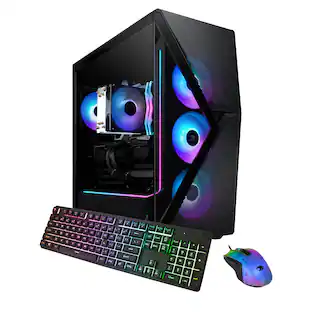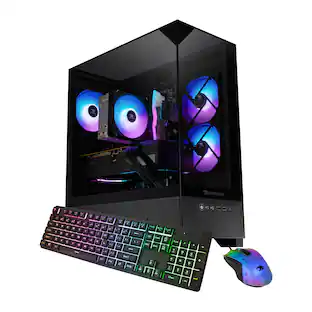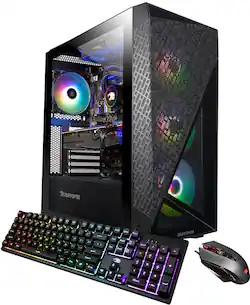
iBUYPOWER - SlateMesh Gaming Desktop - Intel Core i9-13900KF - 32GB DDR5 RGB Memory - NVIDIA GeForce RTX 4070 12GB - 1TB NVMe SSD - Black
- Key Specs
- Processor Model: Intel 13th Generation Core i9 (Your computer's processor is like its brain. Working in combination with system memory, the power of the processor determines the complexity of software you can run, how many programs you can have open at the same time, and how fast those programs will run. Most computers feature an AMD, Intel or Snapdragon processor.)
- Storage Type: SSD, HDD
- Total Storage Capacity: 1000 gigabytes
- System Memory (RAM): 32 gigabytes (Random-access memory (RAM) is a computing device's short-term data storage, which allows active information to be accessed quickly. The size and type of RAM determines how efficiently the device can handle large amounts of information at one time. For example, gaming or video editing requires more RAM for optimal performance.)
- Graphics Type: Dedicated (Dedicated graphics uses a separate graphics card for processing video images. Because it does not use memory from the system's RAM, there is no extra burden on the CPU and graphics are processed more efficiently. Integrated graphics shares system RAM to process video images.)
- Graphics: NVIDIA GeForce RTX 4070 (Often referred to as a "graphics processing unit" (GPU), this device is responsible for displaying image content and decoding/encoding video content in programs and games.)
- General
- Brand: iBUYPOWER
- Model Number: SlateMeshI9N4701
- Product Name: SlateMesh Gaming Desktop - Intel Core i9-13900KF - 32GB DDR5 RGB Memory - NVIDIA GeForce RTX 4070 12GB - 1TB NVMe SSD
- Color: Black
- Year of Release: 2023
- Processor
- Processor Brand: Intel
- Processor Model: Intel 13th Generation Core i9 (Your computer's processor is like its brain. Working in combination with system memory, the power of the processor determines the complexity of software you can run, how many programs you can have open at the same time, and how fast those programs will run. Most computers feature an AMD, Intel or Snapdragon processor.)
- Processor Model Number: 13900KF
- CPU Base Clock Frequency: 3 gigahertz (Actual central processing unit (CPU) speed may vary by device configuration and design. The average rate at which the processor is able to execute tasks under normal operating conditions as asserted by the manufacturer.)
- CPU Boost Clock Frequency: 5.8 gigahertz (Actual central processing unit (CPU) speed may vary by device configuration and design. The maximum rate at which the processor is able to execute tasks, typically only used for a short period of time as needed. This rate may temporarily boost the processor's performance, but may result in overheating, shutdown, or damage to equipment if sustained.)
- Number of CPU Cores: 24-core (A core, or "brain" of a CPU, allows it to receive and execute instructions. Each core can work independently or together to perform parallel operations.)
- Number of CPU Threads: 32 (Generally, the more threads, the faster and more responsive the operating system.)
- Storage
- Storage Type: SSD, HDD
- Total Storage Capacity: 1000 gigabytes
- Solid State Drive Capacity: 1000 gigabytes (The amount of data that can be stored on the device's solid state drive (SSD). SSD is a flash-based storage with faster speeds than a hard disk drive (HDD).)
- Hard Drive Capacity: 0 gigabytes (The amount of data that can be stored on the device's mechanical hard drive. Hard disk drives (HDDs) typically have larger capacities than solid state drives (SSDs) but may have slower speeds.)
- Solid State Drive Interface: NVMe (Connects the solid state drive to the host system. PCI and SATA interfaces are the most common; PCI interfaces are typically faster, but SATA interfaces are compatible with a wider range of systems.)
- Memory
- System Memory (RAM): 32 gigabytes (Random-access memory (RAM) is a computing device's short-term data storage, which allows active information to be accessed quickly. The size and type of RAM determines how efficiently the device can handle large amounts of information at one time. For example, gaming or video editing requires more RAM for optimal performance.)
- Type of Memory (RAM): DDR5 (Each type of RAM delivers a different level of speed, bandwidth, energy efficiency and performance.)
- System Memory RAM Speed: 5200 megahertz (How fast the information-storing hardware operates. The faster the RAM, the faster memory can be transferred to other system components. Ultimately, faster RAM improves operational efficiency.)
- Graphics
- Graphics Type: Dedicated (Dedicated graphics uses a separate graphics card for processing video images. Because it does not use memory from the system's RAM, there is no extra burden on the CPU and graphics are processed more efficiently. Integrated graphics shares system RAM to process video images.)
- GPU Brand: NVIDIA
- Graphics: NVIDIA GeForce RTX 4070 (Often referred to as a "graphics processing unit" (GPU), this device is responsible for displaying image content and decoding/encoding video content in programs and games.)
- Advanced Graphics Rendering Technique(s): DLSS 3 (Deep Learning Super Sampling), Ray tracing (Imaging technology designed to improve graphics rendering.)
- GPU Video Memory Type (RAM): GDDR6 (Each type of RAM delivers a different level of speed, bandwidth, energy efficiency and performance.)
- Compatibility
- Operating System: Windows 11 Home (The operating system manages all software and hardware, including files, memory and connected devices. Most importantly, it lets you interact with your device and your programs in a visual way; otherwise, you'd be typing computer code to get anything done.)
- Motherboard Form Factor: ATX (Physical size of the motherboard, which can determine how many PCIe slots are available. Smaller board means fewer slots and features.)
- Motherboard Model Number: Z790 D5
- Connectivity
- Display Connector(s): 3 x DisplayPort, 1 x HDMI (The number and type of connectors used to connect to an external display.)
- Number of HDMI Outputs (Total): 1
- Number of DisplayPort Outputs (Total): 3
- Number of USB Ports (Total): 4
- Wireless Connectivity: Wi-Fi (The manner in which a device sends data to another device over a short distance without the use of wires or cables.)
- Number Of Ethernet Ports: 1
- Network Connectivity: None (The manner in which a device sends data to another device over a long distance using a cellular network.)
- Cooling
- CPU Cooling System: Liquid
- Power
- Power Supply Maximum Wattage: 700 watts
- Features
- Keyboard Type: RGB
- Customizable Keyboard Lighting: RGB
- Keyboard Technology: Membrane (Type of technology that detects a key press.)
- Customizable Case Lighting: true
- Dimensions
- Product Height: 17.9 inches (The out of box height of the item. Height is measured as the vertical distance from the bottom of the item to the top as it would be primarily used or placed.)
- Product Width: 8.6 inches (The out of box width of the item. Width is measured as the horizontal distance from one side of the item to the other as it would be primarily used or placed.)
- Product Depth: 18 inches (The out of box depth of the item. Depth is measured as the distance from the front of the item to the back as it would be primarily used or placed.)
- Product Weight: 38 pounds (The out of box weight of the item.)
- Certifications Listings & Approvals
- ENERGY STAR Certified: false (Devices carrying the ENERGY STAR service mark, such as computer products and peripherals, kitchen appliances, and other products, generally use 20% to 30% less energy than required by federal standards.)
- EPEAT Qualified: false (The Electronic Product Environmental Assessment Tool (EPEAT) was designed to provide an environmental assessment tool for purchasers. In order to qualify for EPEAT, a product must meet all 23 required criteria.)
- Included
- Included Software: Windows 11 Home Advanced
- Optical Drive Type: None, None, None, None, None (An optical disk drive (ODD) uses a laser light to read data from or write data to an optical disc. These discs include CDs, DVDs, and Blu-ray Discs. This allows you to play music or watch movies using prerecorded discs.)
- Keyboard Included: true
- Mouse Included: true
- Wireless Keyboard: false
- Wireless Mouse: false
- Warranty
- Warranty - Parts: 1 year
- Warranty - Labor: 1 year
- Other
- UPC: 848604045313
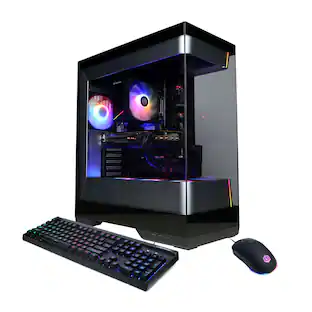
Level up your setup with the iBUYPOWER SlateMeshI9N4701 the perfect PC build for someone looking to upgrade their computer system for art, editing, and gaming. This prebuilt utilizes professionally vetted components to create a high-performance machine that lets you work on everything you need to all at once. With 32GB of DDR5 RAM and a strong processor, this PC can handle multiple spreadsheets and browsers, HD video rendering, art and animation, and running your favorite AAA video games at a high resolution with great frame rates. You can take your gaming and content creation to a whole new level with the Intel Core i9-13900KF 24-core 32-thread processor and the Nvidia GeForce RTX 4070 12GB video card. Enjoy fast system and application start-up times as well as ample storage space for all of your favorite games and important files with the 1 TB NVMe solid state drive. Work harder and play longer thanks to the RGB Fan Cooler, which will keep your PC running smoothly and quietly. iBUYPOWER balances functionality and aesthetic with the unique and sleek geometric Slate 6 MESH chassis, utilizing tempered glass to protect and showcase a gorgeous RGB build. This iBUYPOWER desktop gaming computer comes equipped with an RGB gaming keyboard and mouse as well as Windows 11 Home Advanced. Windows 11 has all the power and security of Windows 10 with a redesigned and refreshed look. It comes with new tools, sounds, and apps, every detail coming together to bring you a refreshing experience on your PC.
- Windows 11 Home Advanced: Windows 11 has all the power and security of Windows 10 with a redesigned and refreshed look. It comes with new tools, sounds, and apps, every detail coming together to bring you a refreshing experience on your PC.
- Intel Core i9-13900KF: Native 24-core processing delivers aggressive yet power-smart performance for advanced gaming, complex modeling and HD video editing.
- NVIDIA GeForce RTX 4070 12GB graphics card: Driven by 12GB of dedicated video memory to quickly render high-quality images for videos and games.
- 32GB of DDR5 5200 MHz RGB Memory: Reams of high-bandwidth DDR5 RAM to smoothly run your graphics-heavy PC games and video-editing applications, as well as numerous programs and browser tabs all at once.
- 1TB NVMe solid state drive: The 1 TB NVMe SSD provides fast boot up and load times as well as plenty of storage space for your favorite games and important files.
Whats Included
- SlateMesh Gaming Desktop - Intel Core i9-13900KF - 32GB DDR5 RGB Memory - NVIDIA GeForce RTX 4070 12GB - 1TB NVMe SSD
A: Hi there, The case shouldn't be an issue for an RTX 4080. However, each GPU may vary in exact size based on the brand/manufacturer you purchase form. In addition, the PSU included in this PC is a 700 Watt power supply that is optimized around the RTX 4070. If you plan to upgrade to an RTX 4080, you'll need a 750 Watt PSU at minimum (we suggest 800W in case of a more powerful CPU too). NVIDIA's own website will list suggested specs for your build.
A: This will depend on the MB that was installed as the slots can vary between brands. Though usually the have them located in the middle and lower parts on the MB.
A: The MB this system comes with has 3 M.2 NVMe SSD ports and 4 SATA ports. If you are trying to install extra storage using the SATA ports make sure that you connect the SATA cable from the Drive to the port on the MB. Also make sure to plug in the power from the PSU to Drive as well. Next once you boot into Windows check disk management to see if your newly installed storage drives are showing up. If they are new drives you will need to initialize the drives and set what kind of drive it will be, best option would be to create a simple drive. If there is stuff already on it, should show up automatically. If you are still having issues please contact the number on the box for further assistance in diagnosing your issue.
A: I got a Black M.2 NVMe 4TB SSD and it works phenomenally. I use that to store all my games and use the 1 TB to run background systems and it has worked out perfectly so far
Q: im buying this pc whats the maximum ram it can hold and is the graphics able tto be upgraded?
A: undefined
A: Hello! I do apologize about the issues you are having. Please reach out to our support team so they can further assist you. You can reach them at https://www.ibuypower.com/support/contact-us.
A: Hello, and thank you for your interest! All of our systems can be upgraded, as we use off the shelf components you can purchase at retailers/etailers. The max capacity of RAM can depend on various factors, however if you can provide out support team with the serial number of the system, they can further assist you. You can reach them at https://www.ibuypower.com/support/contact-us
Q: what brand is the liquid cooler and is it 240mm or 360 mm ? thank you
A: Hi there, The iBUYPOWER SlateMeshI9N4701 model uses a 240mm liquid cooler. It uses an unbranded cooler, typically from DeepCool.
People also viewed
 $1,799.99The price was $1,979.99
 $1,969.99The price was $2,299.99
 $1,199.99The price was $1,299.99
 $2,069.99The price was $2,299.99
 $1,389.99The price was $1,599.99
 $1,467.99The price was $1,468.99
 $1,599.99The price was $1,699.99
 $1,949.99The price was $2,149.99
 $1,129.99The price was $1,299.99
 $929.99The price was $1,219.99