Black Friday is hereNew Doorbusters added. Ends 11/29.Shop now

Main Content

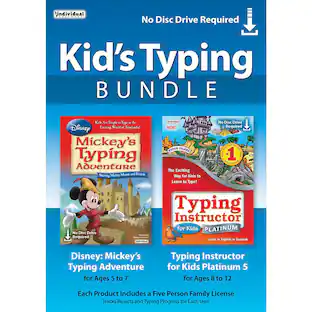
Individual Software - Typing Instructor Bundle - Windows [Digital]

Model: TDB-TIB
SKU: 6231402
$24.34
Save $10.00
Comp. Value: $34.99
Digital delivery
Available soon after purchase. Redemption information is emailed and available in your Order Details. Redeem in US only. Non-returnable. BestBuy.com account required to purchase.
Sold by Best Buy

About This Item

Learn to type on an exciting adventure on Typer Island with Toby and his companion Lafitte, or on a World Travel, Time Travel, or Safari adventure. Step-by-step lessons, challenges, tests, and games motivate typists to keep typing to reach the Castle or complete their typing adventure and fill their passport with stamps from each destination. Typists learn to type by choosing one of several age- or skill-appropriate Typing Plans. They can improve their typing skills quickly and see immediate results. There are a variety of ways to practice typing with games, lessons, drills, advanced skill-building lessons and challenges, plus engaging Practice Stories and magazine articles once typists have learned all the keys on the keyboard. Typing games are automatically played with just the keys the typist has learned so far, which is an exclusive feature.
  • Key Specs
    • Number of Users: 5
    • Number of Licenses: 1
    • Operating System Compatibility: Windows
    • Compatible Platform(s): Windows
    • Software Format: Digital (Physical software requires a disc, cartridge, etc. be inserted into the gaming console or computer to download and/or operate the software. Digital software allows for downloading and/or playing the software on the gaming console or computer without a physical disc, cartridge, etc. Physical (Download Code Only) software is purchased in physical form with a code that allows for downloading and/or playing the software on the gaming console or computer without a physical disc, cartridge, etc.)
  • General
    • Brand: Individual Software
    • Model Number: TDB-TIB
    • Product Name: Typing Instructor Bundle
    • Publisher: Individual Software
  • Features
    • Included Mobile App(s): false
    • Recommended Age Use: 8+
    • Software Subject: Typing
    • Grade Level: None
    • Subject Language(s): English
    • In-Software Purchases: None
    • Language(s): English, Spanish
  • Purchase Rights
    • Number of Users: 5
    • Number of Licenses: 1
    • Purchase Rights: Family License for 5 users
  • Compatibility
    • Operating System Compatibility: Windows
    • Compatible Platform(s): Windows
    • Software Format: Digital (Physical software requires a disc, cartridge, etc. be inserted into the gaming console or computer to download and/or operate the software. Digital software allows for downloading and/or playing the software on the gaming console or computer without a physical disc, cartridge, etc. Physical (Download Code Only) software is purchased in physical form with a code that allows for downloading and/or playing the software on the gaming console or computer without a physical disc, cartridge, etc.)
    • Number Of Discs: 2
  • Requirements
    • System Requirements: Intel Pentium 4 or higher, 128 MB, 480 MB, SVGA or higher, Microsoft DirectX 9.0c, Internet access required for software download and activation, Supported Browsers: Internet Explorer 10.0+, Firefox, Chrome, Safari, Opera (The software that a product must have for it to be able to integrate with another product.)
    • Subscription: false
    • Download Requirements: Internet connection
    • Hard Drive Space Required: 0.48 gigabytes
  • Other
    • UPC: 018527501399

Learn to type on an exciting adventure on Typer Island with Toby and his companion Lafitte, or on a World Travel, Time Travel, or Safari adventure. Step-by-step lessons, challenges, tests, and games motivate typists to keep typing to reach the Castle or complete their typing adventure and fill their passport with stamps from each destination. Typists learn to type by choosing one of several age- or skill-appropriate Typing Plans. They can improve their typing skills quickly and see immediate results. There are a variety of ways to practice typing with games, lessons, drills, advanced skill-building lessons and challenges, plus engaging Practice Stories and magazine articles once typists have learned all the keys on the keyboard. Typing games are automatically played with just the keys the typist has learned so far, which is an exclusive feature.

  • Light way for children and adults to learn to type: This bundle contains two programs - Typing Instructor Platinum 21 for Windows and Typing Instructor for Kids Platinum 5 for Windows. Besides, you get Family License for five users.
  • New typing leader: Typing Instructor Platinum 21 uses the latest technology to provide an educational, entertaining, and motivating experience for beginner, intermediate, and even advanced typists with creative learning themes.
  • Featuring 20+ Typing Plans: Whether you are a beginner, intermediate, or advanced typist, Typing Instructor Platinum has professionally designed lessons to meet your learning needs.
  • Over 100+ professional lessons and tests: Typing Instructor Platinum 21 allows you to learn quickly for faster touch-typing and accuracy. Its step-by-step lessons and tests are built from learned letters and words.
  • Dynamic learning feature: Evaluates your typing results to determine weak typing skill areas and to automatically create specific lessons for you.
  • Multiplay and multilevel games: These fun, challenging, entertaining games offer multiple ways to play for typists of all levels.
  • Award-winning typing program: Typing Instructor for Kids Platinum 5 is educational, entertaining, and motivating software. It will teach your kids all keyboarding basics, proper hand positions, speed, and accuracy.
  • Island adventure theme design: Kids visit lands for lessons, challenges, tests, and games. They search for treasures, earn points, and add gold and jewels to their treasure box on their journey to reach the Castle and become the Ruler of Typer Island.
  • 30+ game challenges: Make learning to type fun and exciting. Kids can play games in a variety of ways by selecting options from the game settings menu. Arcade-style play and multiple levels make games extremely challenging and enjoyable.
  • Creative lessons and exercises help kids learn to type: Step-by-step typing instructions are provided, including proper posture, finger position, and ergonomic features. Visual guides show finger/key placement.
  • Charts and feedback: Detailed results show kids the keys they know well and the keys that need more practice.
  • Light way for children and adults to learn to type: This bundle contains two programs - Typing Instructor Platinum 21 for Windows and Typing Instructor for Kids Platinum 5 for Windows. Besides, you get Family License for five users.
  • New typing leader: Typing Instructor Platinum 21 uses the latest technology to provide an educational, entertaining, and motivating experience for beginner, intermediate, and even advanced typists with creative learning themes.
  • Featuring 20+ Typing Plans: Whether you are a beginner, intermediate, or advanced typist, Typing Instructor Platinum has professionally designed lessons to meet your learning needs.
  • Over 100+ professional lessons and tests: Typing Instructor Platinum 21 allows you to learn quickly for faster touch-typing and accuracy. Its step-by-step lessons and tests are built from learned letters and words.
  • Dynamic learning feature: Evaluates your typing results to determine weak typing skill areas and to automatically create specific lessons for you.
  • Multiplay and multilevel games: These fun, challenging, entertaining games offer multiple ways to play for typists of all levels.
  • Award-winning typing program: Typing Instructor for Kids Platinum 5 is educational, entertaining, and motivating software. It will teach your kids all keyboarding basics, proper hand positions, speed, and accuracy.
  • Island adventure theme design: Kids visit lands for lessons, challenges, tests, and games. They search for treasures, earn points, and add gold and jewels to their treasure box on their journey to reach the Castle and become the Ruler of Typer Island.
  • 30+ game challenges: Make learning to type fun and exciting. Kids can play games in a variety of ways by selecting options from the game settings menu. Arcade-style play and multiple levels make games extremely challenging and enjoyable.
  • Creative lessons and exercises help kids learn to type: Step-by-step typing instructions are provided, including proper posture, finger position, and ergonomic features. Visual guides show finger/key placement.
  • Charts and feedback: Detailed results show kids the keys they know well and the keys that need more practice.

Q: What is the minimum age recommendation for this software?

A: The Typing Instructor Bundle is recommended for ages 8 and up.

Q: Does this software include mobile apps?

A: No, this typing instructor software does not include mobile apps.

Q: What operating system is this software compatible with?

A: This typing software is compatible with the Windows operating system.

Q: Does the software provide feedback on typing skills?

A: Yes, the software provides detailed charts and feedback showing the keys that are well-known and those needing more practice.

Q: What is unique about the typing games?

A: The typing games automatically adjust to use only the keys the typist has learned so far.

Q: Why is this typing program good for kids?

A: Typing Instructor for Kids Platinum 5 is designed to be educational, entertaining, and motivating for young learners.

Q: How many users does the Family License support?

A: The Family License for this typing software bundle supports five users.

Sponsored

Reviews

Customers are saying

Customers are impressed with the Typing Instructor Bundle for its basic essentials for typing accuracy and easy-to-use interface. Customers find the typing games simple to follow.

This summary was generated by AI based on customer reviews.

The vast majority of our reviews come from verified purchases. Reviews from customers may include My Best Buy members, employees, and Tech Insider Network members (as tagged). Select reviewers may receive discounted products, promotional considerations or entries into drawings for honest, helpful reviews.

No content
Sponsored

Similar products from outside of Best Buy

sponsored