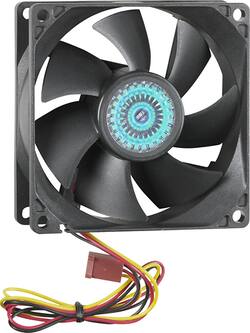
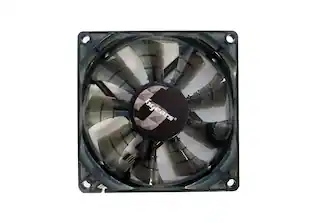
Insignia™ - 80mm Case Cooling Fan - Black
- Key Specs
- Airflow Volume: 23.96 cubic feet per minute
- Cooling System: Air (A computer's CPU generates heat while operating and requires a cooling system to keep internal components functioning properly. Air cooling uses fans to draw in cool air and exhaust hot air, while liquid cooling uses coolant-filled tubes and water blocks to regulate internal temperature more efficiently.)
- Fan Size: 80 millimeters
- Fan Speed: 2000 revolutions per minute
- Noise Level: 22.3 decibels adjusted
- Number of Fans Included: 1
- Lighting Type: None
- Product Height: 0.98 millimeters (The out of box height of the item. Height is measured as the vertical distance from the bottom of the item to the top as it would be primarily used or placed.)
- Product Width: 3.15 millimeters (The out of box width of the item. Width is measured as the horizontal distance from one side of the item to the other as it would be primarily used or placed.)
- Processor Socket: Socket (Type of pin configuration that connects a CPU to a computer’s motherboard.)
- General
- Brand: Insignia™
- Model Number: NS-PCF8050
- Product Name: 80mm Case Cooling Fan
- Color: Black
- Cooling
- Airflow Volume: 23.96 cubic feet per minute
- Cooling Fan Type: Case
- Cooling System: Air (A computer's CPU generates heat while operating and requires a cooling system to keep internal components functioning properly. Air cooling uses fans to draw in cool air and exhaust hot air, while liquid cooling uses coolant-filled tubes and water blocks to regulate internal temperature more efficiently.)
- Fan Size: 80 millimeters
- Fan Speed: 2000 revolutions per minute
- Noise Level: 22.3 decibels adjusted
- Number of Fans Included: 1
- Fan/Cooling System Connector: 3- or 4-pin (The configuration of the connector as it connects a computer component to a fan or cooling system.)
- Features
- Lighting Type: None
- Power
- 12-Volt Rated: false
- Dimensions
- Product Height: 0.98 millimeters (The out of box height of the item. Height is measured as the vertical distance from the bottom of the item to the top as it would be primarily used or placed.)
- Product Width: 3.15 millimeters (The out of box width of the item. Width is measured as the horizontal distance from one side of the item to the other as it would be primarily used or placed.)
- Product Length: 3.15 millimeters (The out of box length of the item. Length is measured as the longest dimension of the item.)
- Product Weight: 0.16 ounces (The out of box weight of the item.)
- Compatibility
- Processor Socket: Socket (Type of pin configuration that connects a CPU to a computer’s motherboard.)
- Other
- UPC: 600603163463
This Insignia NS-PCF8050 80mm case fan features a 2000 rpm (±10%) speed that delivers a 23.96 cfm airflow volume to efficiently cool your computer's components. The included 3-to-4-pin adapter offers flexible installation options.
- Compatible with most cases with 3- or 4-pin connectors: For wide-ranging use.
- 80mm case cooling fan: Helps draw heat away from sensitive components.
- 23.96 cfm airflow volume: Ensures efficient cooling.
- 22.3dBA noise level: For minimal operational sound.
Whats Included
- 3-to-4-pin adapter, screw bag
- Insignia™ 80mm Case Cooling Fan
- Owner's manual
Product Manuals
Q: What voltage is this fan ? AC or DC voltage ?
A: 12 volt DC. Runs off of the motherboard pins or you can get a 4 pin MOLEX to make it work
Q: What is the power of this fan in watts?
A: This fan has 1.08 watts power.
A: The yellow wire is a tachometer, for reporting fan speed. If connected to a motherboard 3 pin lead, the system can monitor the fans, report if a fan is failing, or of you have the right software, tell you the speed. It isn't critical, though, to the functioning of the fan.
Q: Are the fans made with ball or sleeve bearings?
A: undefined
Q: Will any 120 volt class2 transformer with an output of DC 12v 60Hz. 75mA work under continue use?
A: 1st. Direct Current does not have a frequency or Hertz to it. Alternating Current is where you 50 ( Europe Asia places like that) 60 (Stateside) Hetrz comes into play. 2. if your Output is 12V 75 milliamps? Then it should work. However; I would recommend getting something with at least 2 Amps or 2000 milliamps. These motors are DC powered (car battery) not AC ( home power). 3. The 120V AC 60hertz is to tell you that if you are in Germany were they use 220 AC at 50 hertz. You will need a step dowm transfromer. You power supply probably reads something like this: Input: 120VAC 60 Hz. Output: 12VDC 75mA. Help yourself by not mixing the two in a question like this.
Q: Will this particular cooling fan work in a HP laptop model #G42-415DX?
A: Yes actually, if your power bank uses male pins (like 2 to 3 pins) then yes, the little red box’ish wire attached to the fan is a female 3 pin so u can easily connect it to ur power bank as long as your power bank is around 12 volts, if not I suggest getting a de-amplifier to be in between the power bank and the fan so it shortens the voltage going into the fan (wear gloves while doing this, safety first) if this your power bank doesnt use 3-2 male pins then I suggest getting getting a wire with two different sides (example: a usb to headphone jack wire) but this would be like a female 3 pin to a something something something with a lot of pins and if you wanna be safer than safe and just don’t touch the power bank then I suggest getting a male 3 pin to a usb so u can basically plug the fan into the wall ( the only reason I know all of this is because I’m making a raspberry pi laptop) anyway I hope this solved your problem
Q: How many watts does this fan use?
A: On the back of the packaging it says: 1.08W +/- 10%
People also viewed
 $22.49The price was $25.11
 $99.99The price was $139.99
 $149.99The price was $179.99
 $129.99The price was $159.99
 $28.99The price was $34.99
 $109.99The price was $169.99
Today's top picks
 $479.99The price was $729.99
 $69.99The price was $129.99
 $199.99The price was $249.99
 $49.99The price was $62.99