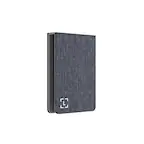
Insignia™ - HDMI to VGA Adapter - Cool gray
About This Item
- Key Specs
- Brand Compatibility: Universal
- Model Compatibility: Computers, gaming consoles, DVD players and more.
- General
- Brand: Insignia™
- Model Number: NS-PAHDVGV2
- Product Name: HDMI to VGA Adapter
- Color: Cool gray
- Number Of Devices Charged Simultaneously: 1
- Power
- Charging Method: Wireless
- Wattage: 2.5 watts (Measurement of electrical power.)
- Amperage: 0.5 amperes (Strength of electrical current.)
- Auto Shut-Off: false (Feature automatically turns off the product.)
- Output Voltage: 5 volts
- Compatibility
- Brand Compatibility: Universal
- Model Compatibility: Computers, gaming consoles, DVD players and more.
- Charging Interface(s): Micro-USB (The connection for transmitting power to charge the device.)
- Features
- Foldable Wall Plug: false
- Removable Cable: true
- Cord Style: Straight
- Dimensions
- Cable Length: 0.25 feet
- Product Height: 1.02 inches (The out of box height of the item. Height is measured as the vertical distance from the bottom of the item to the top as it would be primarily used or placed.)
- Product Length: 2.75 inches (The out of box length of the item. Length is measured as the longest dimension of the item.)
- Product Width: 1 inches (The out of box width of the item. Width is measured as the horizontal distance from one side of the item to the other as it would be primarily used or placed.)
- Product Weight: 0.1 pounds (The out of box weight of the item.)
- Warranty
- Warranty - Parts: 1 year limited
- Warranty - Labor: 1 year limited
- Other
- UPC: 600603326158
This Insignia HDMI to VGA Adapter can mirror the display from a computer or gaming console to any VGA-enabled monitor. Or extend your existing display to a second monitor, making it easier to organize programs and windows for day-to-day use at work or while browsing. This adapter supports resolutions up to 1920 × 1080 at 60Hz for high-quality video, and a 3.5 mm port lets you hook up your audio. Its hassle-free setup requires no additional software.
- HDMI to VGA: Mirrors or extends your screen to a second VGA-enabled display for better presentations, multitasking and gaming.
- Versatile usage: HDMI connection works with computers, gaming consoles, DVD players and more.
- High-quality video: Supports resolutions up to 1920 × 1080 at 60Hz for high-quality video.
- Plug-and-play design: Requires no additional software for easy setup.
- 3.5 mm audio port: Allows you to connect an audio cable (not included).
- Micro USB port: Lets you add additional power if your device doesn’t supply enough (cable not included).
- Flexible placement: 3 in. cable keeps the adapter close to your devices.
- Backed by Best Buy: For quality and reliability that you can trust.
Whats Included
- Insignia HDMI to VGA Adapter
- Quick Setup Guide
Product Manuals
Q: Does this HDMI to VGA adapter require any software to set up?
A: No, this adapter has a plug-and-play design and requires no additional software for setup.
Q: What is the maximum resolution supported by this adapter?
A: This adapter supports resolutions up to 1920 × 1080 at 60Hz.
Q: Can I use this adapter to connect my gaming console to a VGA monitor?
A: Yes, the HDMI connection on this adapter works with computers, gaming consoles, DVD players, and more.
Q: Does this adapter have an audio port?
A: Yes, this adapter has a 3.5 mm audio port that allows you to connect an audio cable.
Q: How long is the cable on this adapter?
A: The cable on this adapter is 3 inches long.
A: Yes, the Insignia™ HDMI to VGA Adapter should help resolve the issue you're experiencing. This adapter is designed to convert the HDMI output from your HP computer to the VGA input on your Dell monitor. Here are the steps to set it up: 1. Connect the Adapter: Plug the HDMI end of the adapter into your HP computer's HDMI port. 2. Connect the VGA Cable: Attach one end of a VGA cable to the VGA port on the adapter and the other end to the VGA port on your Dell monitor. 3. Power the Adapter: If your adapter has a micro-USB port for additional power, connect it to a USB power source to ensure stable performance. 4. Select the Input Source: On your Dell monitor, make sure to select the VGA input source. This setup should allow your monitor to display the output from your computer. If you continue to experience issues, ensure that the monitor is set to the correct input source and that all connections are secure. If you have any other questions or need further assistance, feel free to ask!
A: Hello there, thank you for your interest to our Insignia™ - HDMI to VGA Adapter. Yes, this Video Graphics Array has a 15 pins in three rows. Ivy| Insignia Support. https://www.bestbuy.com/site/insignia-hdmi-to-vga-adapter-cool-gray/6483552.p?skuId=6483552
Q: Is this an "active" converter?
A: yes
Reviews
Customers are saying
Customers consistently note the overall performance and compatibility of the HDMI to VGA adapter. They find it easy to use and appreciate its connectivity. The adapter's price and small size are also well-received features.
Customer Images
The vast majority of our reviews come from verified purchases. Reviews from customers may include My Best Buy members, employees, and Tech Insider Network members (as tagged). Select reviewers may receive discounted products, promotional considerations or entries into drawings for honest, helpful reviews.
Compare similar products
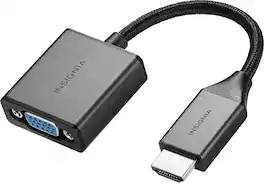
This Insignia HDMI to VGA Adapter can mirror the display from a computer or gaming console to any VGA-enabled monitor. Or extend your existing display to a second monitor, making it easier to organize programs and windows for day-to-day use at work or while browsing. This adapter supports resolutions up to 1920 × 1080 at 60Hz for high-quality video, and a 3.5 mm port lets you hook up your audio. Its hassle-free setup requires no additional software.

The Best Buy essentials DVI-A to VGA Adapter can extend or mirror your screen onto a VGA-enabled monitor. Compatible with DVI-A and DVI-I ports, analog signals grant you a quality viewing experience with high-resolution imagery. Gold-plated connectors and PVC molding offer durability, providing you with long-lasting use. We’ve also made this adapter compact, making it easy to store in your pocket or bag and take wherever you go. Backed by Best Buy, let us help you improve your computer setup with high-quality accessories.
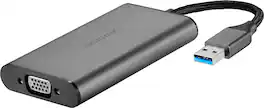
This Insignia USB to VGA Adapter can mirror the display from one computer to any VGA-enabled monitor. Or extend your existing display to a second monitor, making it easier to organize programs and windows for day-to-day use at work or while browsing. Use with USB 3.0 for truly dazzling high-quality 2048 × 1152 resolution. Its hassle-free setup automatically installs the driver on plug-in. (Not compatible with Chrome OS)

This Best Buy Essentials DisplayPort to HDMI Adapter can mirror or extend the display from your DisplayPort device to a HDMI-supported monitor. It supports resolutions up to 1920 × 1080 at 60 Hz for high-quality video (and audio is supported when provided by the source). It has 24K gold plating to help guard against corrosion and loss of quality.
| Pros for Insignia™ - HDMI to VGA Adapter - Cool gray | |||
|---|---|---|---|
| Overall Performance, Compatibility, Ease of use, Price, Connectivity | Compatibility, Overall Performance, Ease of use, Price, DVI | Ease of use, Compatibility, Quality, VGA | Overall Performance, Ease of use, Price, Compatibility, HDMI |
| Cons for Insignia™ - HDMI to VGA Adapter - Cool gray | |||
| There were no cons for this product— | There were no cons for this product— | There were no cons for this product— | Resolution, Refresh Rate, Lag |