Skip to contentGo to Product Search
Main Content
A Best Buy brand

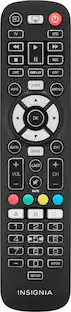
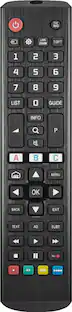
Insignia™ - Replacement Remote for LG TVs - Black

Model: NS-RMTLG025
SKU: 6667394
Sold byBest Buy

Customers are saying

Customers recognize the product for its sturdy build quality and exceptionally quick setup process. Users also appreciate the responsive button feel and the powerful programmability options available. Furthermore, the device is frequently praised for its excellent compatibility with various television systems.

Generated by AI based on customer reviews.

Features

  • Easy setup

    Works with most LG -branded TVs with minimal setup

  • Direct LG TV replacement

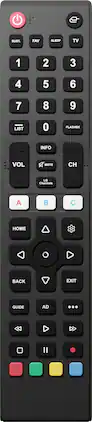
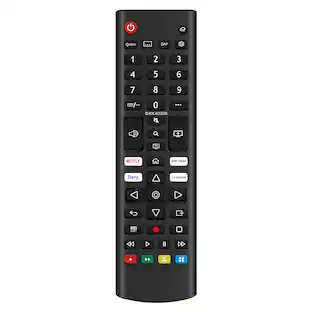
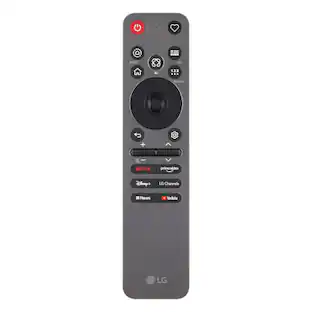
    Designed to mirror original LG remotes with a familiar layout, including navigation pad, home button, settings access and essential controls for seamless everyday use

  • Streaming shortcut keys

    Built-in shortcut buttons provide quick access to apps like Netflix and more for faster navigation and convenient streaming control

  • Learning plus code programming

    Supports learning functions to copy commands from your original remote plus direct code entry for improved compatibility and expanded feature access

  • Comfortable, ergonomic design

    Slim, lightweight remote with responsive buttons and a natural grip for easy, everyday operation

  • Reliable value performance

    Affordable Insignia solution engineered for consistent performance and simple replacement of lost or broken LG TV remotes

Specifications

  • Remote Control Type
    Learning, Dedicated
Sponsored

Reviews

Rating 4.8 out of 5 stars with 22 reviews

100% would recommend to a friend
Customers are sayingCustomers recognize the product for its sturdy build quality and exceptionally quick setup process. Users also appreciate the responsive button feel and the powerful programmability options available. Furthermore, the device is frequently praised for its excellent compatibility with various television systems.
This summary was generated by AI based on customer reviews.
  • Build Quality (9)
  • Ease of Setup (8)
  • Programmability (4)
  • Button Layout (3)

Customer Images

The vast majority of our reviews come from verified purchases. Reviews from customers may include My Best Buy members, employees, and Tech Insider Network members (as tagged). Select reviewers may receive discounted products, promotional considerations or entries into drawings for honest, helpful reviews.

  • Rated 5 out of 5 stars

    Best Replacement I've found for my LG TV Remote

    I bought this to replace the OEM remote that came with my LG TV. I have a mid-range 65" LED LG TV, a few years old in my living room. The original remote that came with my TV was a standard remote with all the typical buttons, and a few shortcuts to streaming services. Cutting to the chase: it worked. I paired it in about 10 seconds, surprisingly. Every button I tried works, and it feels better in my hand than I expected. There are very few differences, and there's a lot of programming that you can do with a pretty good set of instructions. - Design, Build & Unboxing - The box is minimal and nothing but the essentials. You get the remote, a quick setup guide, a code list, and (2) AAA batteries. It's nice to find batteries at the bottom of the box. The remote is longer and slightly wider than my original remote. I do actually prefer the new size. Most buttons are about twice as big as my original remote and spacing is a little better. It's a brushed black matte finish. The build quality is sturdy with no creaking or flex. When you touch the buttons the Power LED will light up. The layout runs from the top to the bottom in clear groups. Power and Input are at top-left and top-right. Then there's a row of four: subtitles, favorites, sleep, and TV. Then you have the number pad with a list key and channel flashback. Then you have Volume, Info, mute, LG Channels (Nice to have this one specific to my LG TV), and Channel button. Then you have 3 buttons: A, B, and C, that you can use for your streaming services. You can program these as necessary. Under these buttons is the navigation group: Home, Settings, OK, Directional pad, Guide, Rewind, Play, FF, Stop, Pause, and Record. Then there are 4 buttons at the bottom , red, green, yellow, and blue. Relative to my original remote, it seems like all of the buttons are there, there are several buttons in different places, but everything is there. - Specs & Features - This is an infrared learning remote running on (2) AAA batteries included in the box. It comes preprogrammed for LG TVs but it can also learn commands from your other remote. Here is a description of each button on the remote and what it does. As you can see, they've got all of your original buttons here: Power - Turns on/off the TV Input - Selects the video source Subtitles - Opens closed caption settings Favorites - Loads favorite channel list. Sleep - Opens the sleep timer menu TV - Returns to the main TV screen Number Pad - Direct channel entry Dash Key - Lets you enter specific digital sub-channels (For Example 24-1, 24-2, 24-3) Flashback - Jumps back to previous channel Volume & Channel Buttons - Adjust them up or down Info - On Screen Info Mute - Mutes volume LG Channels - takes you to the LG Channels guide/channels Home - Opens up the app list Settings - Takes you to the settings menu Directional Pad/Ok - On-Screen navigation and OK/Enter button Back Button - Returns to previous screen Guide - Opens program guide AD - toggles audio 3 dot key - This does various things and is specific to what menu you are on at that given time Playback keys - Handles various playback functions - Programming - The A, B, and C buttons come pre-programmed just like your original controls for Netflix, Prime Video, and Disney +. All three buttons can be reprogrammed. It works more like a macro when you're reprogramming it. For example, You hold down the shortcut key for 2 seconds until you see the LED light come on, then you press the exact sequence of buttons to get to the app (you wait about a second in between button pushes as it records), then you hold the shortcut key for two seconds to save it. To wipe a shortcut you hold it for two seconds, and then another two seconds. Soundbar volume control is built in and there are two ways to do it. The easiest way is to use the brand table in the guide where each soundbar brand has a number. The guide will walk you through the process of finding your match. The learning function on the remote will copy commands from another IR remote. You place both remotes a couple of inches apart, facing each other, and you press keys on each remote to teach the remote the new commmand. The guide has the specific sequence to follow. One thing to note, if you have programmed your soundbar too, holding the power button (instead of a quick press) will turn the power on/off for your TV and your Soundbar. - Performance - Setup was the easiest part. The remote is preprogrammed, so you hold the red and blue keys for two seconds until the LED comes on, then you start with 1 to see if it matches. My remote matched on #1 so it was very quick for me. After matching to my TV, I went through each button one-by-one and tested to make sure everything matched up. I didn't have any problems with programming. Several of the buttons were in different places on my new remote, but they were all there. The IR signal is good. The keys feel good (not mushy), and they have good travel distance. Personally, I didn't need the soundbar programming, my soundbar runs through HDMI ARC so the TV passes volume through and I press the volume buttons like normal. Everything worked like it should, and I do prefer the size of the larger remote in my hands. - Pros - * Setup was really quick * All buttons were present and worked * Batteries come in the box * Buttons have good travel and click * IR signal works well from my couch * Very programmable/customizable remote * Learning functions * Battery saver * Can program soundbars too - Suggestions/Needs Improvement - * Not necessarily bad, but remote is significantly bigger than my original *( Programming keys/macros requires some technical skills I've got three kids in the house and we are constantly losing remote controls and/or finding them months later. For us, we like having a backup remote just in case. If your LG remote is broken, lost, or worn out, I would highly recommend getting this replacement.

    Posted by NanoEthan

  • Rated 5 out of 5 stars

    Just works

    I used the insignia remote for my LG C1 OLED , universal remotes have been around forever but auto pairing ones rarely work so I was a bit skeptical. All my skepticism was gone when I added the included batteries to the remote. I didn’t have to add any codes or push buttons like I was doing a special move in a video game. The remote and shortcuts for apps worked flawlessly. Being a replacement remote I was expecting it to feel cheap , however it has a great heft and the buttons feel better than my OEM LG remote. While it is designed for LG tvs you can still add in controls for your sound bar and the instructions provided are straight forward. One of my issues with replacement remotes is you lose functionality, cant access certain apps or only a portion of the settings. With the insignia I had access to all button functions that I have with my OEM remote(mute/settings/home/source/play-pause-record). While the remote is infrared it doesn’t need to be pointed directly at the TV to use, this is a problem for some remotes and a big reason I prefer Bluetooth ones. However the Insignia worked even when I had pointed away from my TV. The remote excellent, it has a great feel and better buttons than my OEM remote from LG. Everything on it worked as needed, with CEC turned on the remote even controlled other devices connected to my TV (streaming box/AVR). The only thing that’s missing is the shortcut buttons having labels. Hands down the best replacement remote I have used to date.

    Posted by JayS

  • Rated 4 out of 5 stars

    Great replacement, not necessarily an upgrade

    Insignia replacement for LG is a suitable replacement for your remote should something happen to it, but not necessarily an upgrade. My buttons have been fading on many of them so anyone new to the TV doesn't know what to press. It has a good weight and balance. The original remote is back heavy because of the batteries but the insignia has an even weight The buttons are laid out almost the same and the buttons have a good feel. It's a bit longer than the original, but that's not a big deal. The A B C buttons replace the shortcuts for the usual stream app buttons. The default is Netflix (A), Disney (B) and Amazon Prime (C). However B for Disney will not respond. Fortunately you can program the buttons to another app. Unfortunately, it's very inconsistent. You're basically programming a sequence of steps. For example, if I want to launch YouTube normally, I press home and go right twice and hit ok. Now when you press the button you want programed it will then press home then scroll over twice then hit ok. It's not sped up, you watch it in real time. The problem is that sometimes it only registers one press right, so it launches another app. Then I have to hit home again and manually choose my app. It's cumbersome and not worth using. Aside from the programming it's a great replacement, especially for only $20

    Posted by rjv86

  • Rated 5 out of 5 stars

    Works Correctly out of the box, programmable

    Universal remotes have existed for a long time, and it's always been, to me, a chore to get them set up. It seems like Best Buy has done something to alleviate that, at least initially, while still maintaining the ability to be compatible with anything. Packaging: To start, the packaging is simple, a simple box with the remote, 2 batteries and the literature on how to set it up, nothing fancy and doesn't need to be. Use: For me the remote worked perfectly out of the box. I know there are some variations in LG TVs and the manual accounts for that with 9 different settings for the remote to allow it to function as any one of the types of LG TVs that have existed over the years, a simple few buttons can switch it to that. But this also left me to wonder, what if I get rid of my LG TV in the future, is this remote a paperweight. So for good measure I grabbed a TV remote I had sitting around for a different brand and tested programming the power button on that remote to the power button on the Insignia remote and it did accept it and it worked without issue. So while this would not be the ideal method since you would have to program each of the many buttons of the remote, it's good to know that the remote does not become useless after. As another test I also went through the steps on the remote to change the LG type to see if it would reset that power button back to the LG and it did, powering on my LG TV without any additional issues with having to teach it the original LG buttons. Now bear in mind, since this is pre-coded to LG TVs you would need the original remote of an opposing TV brand to set it up, so if you've already lost that remote then there's no capability to teach this one. Overall: While I was skeptical about a remote that is preprogrammed to only a single manufacturer, there's ways around it plus it's nice to not have to jump through the initial programming hoops when you're buying a remote to replace one you've lost or damaged permanently. To me this is a win without creating a paperweight.

    Posted by Beradon

  • Rated 5 out of 5 stars

    Remote for smart LG T.V

    Will not break like the original, The “enter button ( most used button on the remote) just “caved” into the unit. Poorly engineered. from LG. This one does not have that flaw, like the original.

    Posted by Apopleptic

Compare similar products

Insignia™ - Replacement Remote for LG TVs - Black
4.8(22)

Restore effortless control with the Insignia Replacement Remote for LG TVs, designed for instant compatibility with most LG TV models. This preprogrammed LG TV remote works right out of the box — simply insert two AAA batteries (included) and start watching. No pairing, syncing or complicated setup steps required. Built for reliable, everyday use, this remote also supports optional code programming and learning functionality to replicate your original LG remote for broader compatibility. The LG-style button layout delivers a familiar feel, featuring a directional pad, home access, settings navigation and essential controls for smooth browsing. Integrated programmable shortcut keys offer one-touch access to popular streaming apps like Netflix, ESPN+ and more. Finished in a sleek black design with a lightweight, ergonomic grip, this Insignia remote is a dependable, cost-effective solution and the ideal LG TV remote replacement.

Insignia™ - Replacement Remote for LG TVs - Black

Losing or damaging the remote control is a headache, but you can regain control of your TV with the Insignia NS-RMTLG21 Replacement Remote for LG TVs. Our remote is compatible with nearly all LG TVs and pre-programmed for easy pairing. And you can even set up your remote to adjust your soundbar or audio receiver volume, giving you full control of your audio. Program your three favorite apps to the remote to open your most-used streaming services and more. If you still have your old remote, you can even teach your new remote functions from it, guaranteeing that you’ll have access to everything right at your fingertips. This Insignia remote has just what you need.
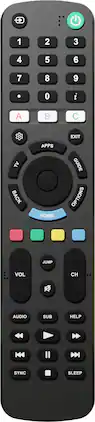
Insignia™ - Replacement Remote for Sony TVs - Black
4.4(19)

Restore control instantly with the Insignia Replacement Remote for Sony TVs, designed for fast, no-setup use with most Sony TV models. This preprogrammed Sony TV remote works right out of the box — just insert two AAA batteries (included) and start watching. No pairing, syncing or complicated setup steps required. Engineered for reliability and everyday convenience, this remote also supports optional code programming and learning functions to mirror your original remote for expanded compatibility. The Sony-style button layout ensures a familiar experience, featuring a directional pad, quick settings and shortcut keys for smooth navigation. Dedicated programmable app buttons provide one-touch access to streaming services like Netflix and ESPN+. With a compact, ergonomic design and classic black finish, this Insignia remote fits comfortably in hand and blends seamlessly into any home entertainment setup, making it the ideal Sony TV remote replacement.

Philips - OneTouch Universal Remote Control for Samsung Smart TV, LG, Sony, VIZIO, Fire TV, Roku TV, Remote Replacement - Black

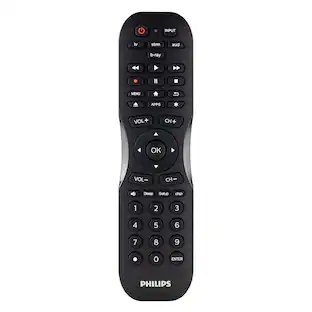
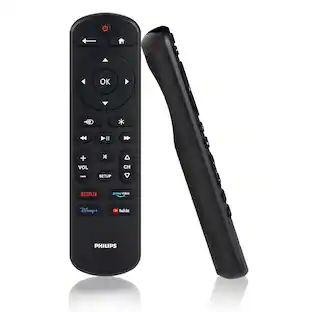
Skip the hassle of programming your replacement remote with the patent-pending Philips OneTouch Streaming Remote. Designed for smart TVs, this remote comes preprogrammed to control six top TV brands and four popular streaming apps — no programming required. Operate your Samsung, LG, Sony and Vizio TVs, as well as Fire TVs and Roku TVs and enjoy direct access to Netflix, Prime Video, Disney+ and YouTube. You’ll soon discover this is the perfect replacement remote for every TV in your home — not to mention the perfect spare to keep on hand for when your TV’s remote breaks or goes missing. Setup is simple. Insert two AAA batteries, then press the TV device button for your TV’s brand. Whether you have a Samsung TV in the living room, a Sony TV in the kitchen, an LG TV in the bedroom, a Vizio TV in the office, a Fire TV in the den or a Roku TV in the home theater, this remote controls them all for endless entertainment at the touch of a button. Additionally, the fully backlit keypad is perfect for bingeing marathons when the lights are low. Take complete control of all your TVs with the Philips OneTouch Streaming Remote.

Pros for Insignia™ - Replacement Remote for LG TVs - Black
Build Quality, Ease of Setup, ProgrammabilityOverall Performance, Compatibility, Ease of use, Remote Functionality, SetupEase of Setup, Build Quality, Button TactilityOverall Performance, Compatibility, Ease of Use, Button Layout, Connectivity
Cons for Insignia™ - Replacement Remote for LG TVs - Black
Button LayoutButton Layout, Response Time, FeaturesThere were no cons for this product—There were no cons for this product—

Specs

Be the first to ask a question.

We’ll try to get your question answered within 24 hours by a Best Buy customer or brand representative.

No content
Sponsored