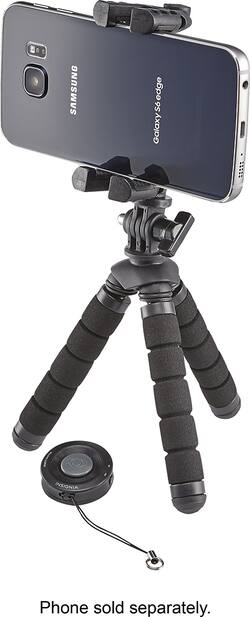
Insignia™ - Tripod and Bluetooth Shutter Remote for Most Cell Phones
- Key Specs
- Compatible Devices: Smartphone
- General
- Product Name: Tripod and Bluetooth Shutter Remote for Most Cell Phones
- Brand: Insignia™
- Model Number: NS-MTRIBT10
- Compatibility
- Compatible Devices: Smartphone
- Warranty
- Manufacturer's Warranty - Parts: 1 year
- Manufacturer's Warranty - Labor: 1 year
- Other
- UPC: 600603200441
Secure your phone and take clearer pictures with this Insignia tripod. It is designed for a variety of phones up to 5.5-inch screens, and it includes a Bluetooth remote control so that you can take images at a distance — ideal for selfies. This Insignia tripod folds up compactly for ease of transport.
- Designed for use most cell phones: Universal phone clip holds phones with screens up to 5.5".
- Bluetooth-enabled remote shutter: Takes photo from a distance. Works with most iOS and Android smartphones.
- Foam rubber legs with non-slip rubber feet: Provide stability and flexibility that allows put tripod on a surface or wrap around objects.
- Always with you: Tripod folds into compact shape for easy transportation when you are out.
Whats Included
- Bluetooth remote control
- CR2032 battery
- Insignia Tripod and Bluetooth Shutter Remote for Most Cell Phones
- Quick Setup Guide
A: The tripod will only hold the phone horizontally. You could probably bend the legs to set up portrait shots, but it would not be ideal. The neck of the tripod can move up and down (like shaking your head yes). It can not rotate left and right.
A: No the legs are flexible and you can wrap it around a pipe or tree limb if outside
Q: Would an iPhone 6s fit in this tripod?
A: Yes it will fit the 6s
A: About 9" total length. See photo
A: Hello sdouglas, you can find the steps on how to replace the battery on our official website, https://www.insigniaproducts.com/pdp/NS-MTRIBT10/5086538 however, if the device has a malfunction, please remember that our products are covered for one year under manufacturer's warranty. Omar S. | Insignia Products Support.
Q: Does the Tripod raise up/extend to make taller?
A: No they don't, they do bend and are flexible, it's very useful to take pictures and group selfies. I also like the wireless remote that comes with it, just connect to your phones bluetooth and click to take pictures, in order for remote to work you must have your phones camera in camera mode, hope this is helpful to you.
Q: Can I point the phone at a surface to take a photo of a photo?
A: A vertical surface easily. Horizontal surface probably but may depend on weight and size of phone. You may need to bend legs and rest something heavy against one leg to counterbalance the phone. Your phone may also be too close to the photo to capture it all or to properly focus. Better place photo against vertical surface and move the tripod closer or further as needed .
Q: Can I use remote to turn on video beside taking pictures remotely?
A: Yes, you can. Just make sure you switch your phone to ideo first. Hit button once to record and hit it again to stop.
People also viewed
 $229.99The price was $242.99


Today's top picks
 $479.99The price was $729.99
 $1,199.99The price was $1,399.99
 $69.99The price was $129.99
 $199.99The price was $249.99
 $799.99The price was $1,199.99
 $49.99The price was $62.99
 $789.99The price was $1,049.99