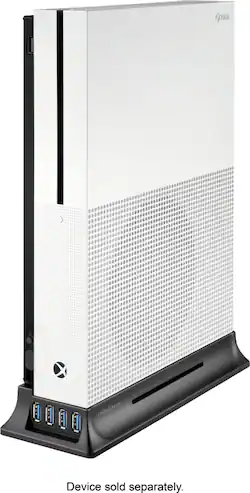
Insignia™ - Vertical USB Stand for Xbox One X and Xbox One S - Black
- Key Specs
- Compatible Platform(s): Xbox One
- General
- Product Name: Vertical USB Stand for Xbox One X and Xbox One S
- Brand: Insignia™
- Model Number: NS-GXBOSXSTUSB19
- Color: Black
- Features
- Orientation: Vertical
- Compatibility
- Compatible Platform(s): Xbox One
- Warranty
- Manufacturer's Warranty - Parts: 1 year
- Manufacturer's Warranty - Labor: 1 year
- Other
- UPC: 600603231780
Secure your Xbox One for daily play with this Insignia vertical stand and hub. The wide base provides stability to keep your console from falling over, while nonslip rubber feet keep it from sliding on flat surfaces. With four USB 3.0 ports that are powered by your console, this Insignia vertical stand and hub offers room for setting up your charging station or plugging in wired headphones.
- Compatible with Xbox One X and Xbox One S: For use with your existing model.
- Four USB 3.0 ports: Let you add controllers, mice, headsets, keyboards, and more to your console.
- Vertical position: Saves space and promotes airflow around your console.
- Nonslip rubber feet: Keep your console from moving.
Whats Included
- Insignia™ Vertical USB Stand for Xbox One X and Xbox One S
- Vertical stand adapter for Xbox One
- USB Y-cable
- Quick setup guide
Product Manuals
Q: Can you play a DVD or Blue Ray with the XBox One X console positioned vertically using this stand?
A: Yes you can. My son plays movies and games.
Q: Do it over heat the Xboxonex
A: That has not been my experience.
Q: Does this work with the xbox 1 s digital
A: If it’s the same as the Xbox One S, it will. I also use it for my Xbox One X with an attachment that came along.
Q: Will this work on my Xbox one? It’s the original, not a one S or One X
A: No, the original Xbox One is not designed to stand vertically as this may damage the disc drive.
Q: Can you hook up a hard drive through the USB port on the stand? How about controllers to play games?
A: You can connect a harddrive but it will time and time again disconnect and kick you out of your game. I ended up not using the ports and connecting my harddrive to the back of the xbox.
People also viewed
 Clearance$6.99The price was $12.99

Today's top picks
 $479.99The price was $729.99
 $69.99The price was $129.99
 $199.99The price was $249.99
 $49.99The price was $62.99