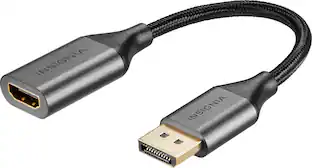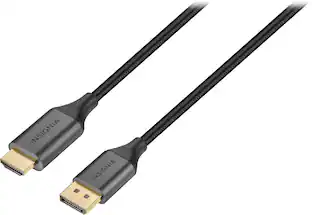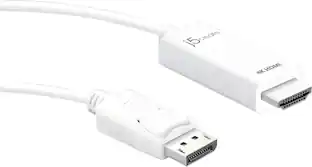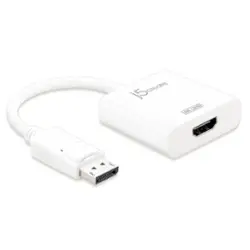
j5create - DisplayPort to 4K HDMI Active Adapter - White
- Key Specs
- Connector Type (End 1): DisplayPort
- Gender (End 1): Male
- Connector Type (End 2): HDMI Type A
- Gender (End 2): Female
- Jacket Material: PVC
- General
- Brand: j5create
- Model Number: JDA158
- Product Name: DisplayPort to 4K HDMI Active Adapter
- Color: White
- Quantity: 1
- Compatibility: Compatibile with PC and Mac
- Connectivity
- Cable Type: Digital audio
- Product Type: Adapter
- Connector Type (End 1): DisplayPort
- Gender (End 1): Male
- Connector Type (End 2): HDMI Type A
- Gender (End 2): Female
- Material
- Jacket Material: PVC
- Warranty
- Warranty - Parts: 1 Year limited
- Warranty - Labor: 1 Year limited
- Other
- UPC: 847626001192
The DisplayPort to 4K HDMI Active Adapter allows you to quickly and easily connect your Mac or PC to a 4K HDTV or other display device using an HDMI input. Simply connect the DisplayPort end of the connector to your computer and plug your existing HDMI cable from the display into the adapter. The adapter seamlessly converts the DisplayPort video signal into an HDMI signal for a fast plug-and-play setup. Fully DisplayPort 1.2 compliant, also compatible with DisplayPort 1.1.
- Suitable for desktop or laptop with DP interface: Extend your desktop workspace by easily extending a second display from your Mac or Windows computer.
- Notebook to large screen audio and video synchronization: Computer-connected output devices (HDTV/projector, etc.) compatible with DisplayPort interface that support DisplayPort's V1.2 specification with a maximum resolution of 4K x 2K @ 60Hz.
- Built-in active chip: Supports the highest resolution of 4K, providing higher picture quality and sound.
- Perfect compatibility and easy connection: Supports both Mac and Windows systems Compatible with HDMI 1.4 specifications.
- Plug and Play: No driver required, easy and fast to use.
Whats Included
- JDA158 DisplayPort to 4K HDMI Active Adapter
- Quick Installation Guide
Product Manuals
Q: will this work with the display port going into my PC and the HDMI port going to my monitor
A: Yes, that is correct. The DP male end connects into your computer and then you connect an HDMI to HDMI cable 10 ft long or less out to the TV, monitor, projector and you are all set. ** Feel free to contact the Technical Support on the packaging if you require further assistance or if you have any other questions and someone will be glad to assist you.
A: No, this adapter supports up to 4k@60hz.
Q: RESOLUTION NEEDED 3840X2160
A: Supports resolutions up to 4K Ultra HD (4096 x 2160 @ 60Hz) and 3D video formats over HDMI. Available DisplayPort 1.2. The maximum resolution for DisplayPort 1.1a is 2560 x 1200.
A: The Adapter supports resolutions up to 4K Ultra HD (4096 x 2160 @ 60Hz) and 3D video formats over HDMI. Fully DisplayPort 1.2 compliant, also compatible with DisplayPort 1.1.
A: no. this is a male displayport to a female hdmi and only converts the one way.