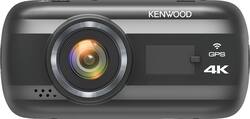
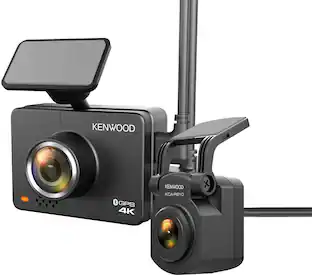
Kenwood - DRV-A601W 4K Dash Cam - Black
- Key Specs
- Field of View: 120 degrees
- Automatic Incident Detection: true
- G-Sensor: true
- Recording Resolution: 3840 x 2160 (4K) (Refers to the number of pixels, both horizontally and vertically, used to capture video. The higher the resolution the finer the video detail that can be seen.)
- Compatibility: Universal
- Wi-Fi Built-in: true (Able to connect directly to a wireless network without the use of an adapter.)
- Camera Mounting Location: Dash
- Vehicle Camera Type: Dashboard
- General
- Brand: Kenwood
- Model Number: DRV-A601W
- Product Name: DRV-A601W 4K Dash Cam
- Color: Black
- Vehicle Camera Type: Dashboard
- Recording & Playback
- Field of View: 120 degrees
- Automatic Incident Detection: true
- G-Sensor: true
- Recording Resolution: 3840 x 2160 (4K) (Refers to the number of pixels, both horizontally and vertically, used to capture video. The higher the resolution the finer the video detail that can be seen.)
- Frame Rate: 30 frames per second (The frequency at which consecutive images can be captured. The higher the frame rate, the more detail that can be captured.)
- Loop-Cycle Recording: Yes
- Image Sensor Type: CMOS (CCD and CMOS are the two main technologies used in image sensors. CCD, the older of the two types, turns analog light signals into digital pixels. This conversion happens without distortion, resulting in high-quality images. Newer CMOS sensors use transistors at each pixel to move electrical charges. CMOS sensors are typically less expensive, but also require more light to create distortion-free images.)
- GPS Enabled: true
- Camera Power Source: Vehicle battery
- Expandable Memory Compatibility: microSD, microSDHC, microSDXC
- Recording Feature: true
- Compatibility
- Compatibility: Universal
- App Compatible: true (The product can be connected to a program or software application on a mobile device, which then receives collected data from the product.)
- Wi-Fi Built-in: true (Able to connect directly to a wireless network without the use of an adapter.)
- Operating System Compatibility: Android, Apple iOS, Mac OS, Windows
- Features
- Integrated Microphone: true
- Display
- Screen Included: true
- Screen Size: 3 inches (Size of the screen, measured diagonally from corner to corner.)
- Screen Resolution: 640 x 360 (Screens come in a range of resolutions (measured in pixels, horizontal x vertical). The higher the resolution, the greater the picture quality.)
- Mounting
- Camera Mounting Location: Dash
- Mount Included: true
- Mount Type: Adhesive, Suction cup
- Input
- Number Of Auxiliary Inputs: 0
- Number of USB Port(s): 0
- Dimensions
- Product Height: 2 inches (The out of box height of the item. Height is measured as the vertical distance from the bottom of the item to the top as it would be primarily used or placed.)
- Product Width: 4.19 inches (The out of box width of the item. Width is measured as the horizontal distance from one side of the item to the other as it would be primarily used or placed.)
- Product Depth: 1.5 inches (The out of box depth of the item. Depth is measured as the distance from the front of the item to the back as it would be primarily used or placed.)
- Product Weight: 0.24 pounds (The out of box weight of the item.)
- Warranty
- Warranty - Parts: 1 year
- Warranty - Labor: 1 year
- Other
- UPC: 019048228871
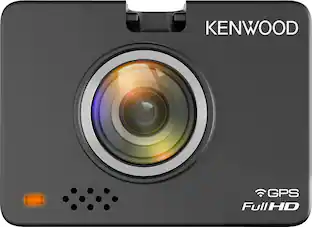
Capture detailed footage in any lighting with this Kenwood 4K front dash cam. The built-in G-Shock sensor detects external impact, forcing the device to save the most recent frame, while the magnetic mount offers cord-free convenience when placing or detaching the camera. This Kenwood 4K front dash cam features a 3-inch color LCD for easier video playback.
- 4K recording: Allows capturing sharp, high-definition footage at 30 fps.
- 120° diagonal viewing angle: Provides expansive shooting coverage with minimal edge-to-edge distortion.
- 3.0" LCD screen: Offers a clear view.
- Built-in G-sensor: Supports emergency video file backup when an accident happens.
- 1/2.8" CMOS image sensor: Ensures crisp, clear images.
- Kenwood Dash Cam Manager: This is a smartphone app for displaying video recorded with this device. Simply access the iTunes App Store or Google Play Store to download.
- Built-in GPS receiver: Automatically records driving information, such as speed and location.
- Built-in microphone and speaker: Capture and play clear audio and provide versatility in use.
- Wi-Fi connectivity: Makes it easy to connect to your smartphone.
- HDR technology: Record clear images in dark or well-lit settings without underexposing or overexposing the image.
- Magnetic mount: Provides easy dash camera removal.
- 16GB microSD card included: Ensures convenient and long-lasting operation. Supports SD cards up to 256GB.
- Two windshield mounts: Features suction and tape mounts.
- Parking Mode: Capable of parking mode when paired with the CA-DR1030 hardwire kit.
Whats Included
- 16GB microSD card
- 3M tape and suction mount
- Cigar lighter car charger adapter
- Kenwood DRV-A601W 4K Dash Cam
- Owner's manual
- USB cable
Product Manuals
Q: Can you see a live view of the camera from the smart phone app?
A: In a way yes, It's kind of tedious getting it to live view. you have to stop recording on the camera. Then you have to connect to it via wifi and then open the kenwood app and view it that way. and record that way if you want to keep live view going. definitely not simultaneous.
A: Hello, Always the same ? I buy this dashcam 1 week ago and I have the same problem. The shop change my camera but still the same. Thanks
A: The camera breaks up video files into smaller clusters on purpose for transferring and editing. This is normal. The camera does not stop recording so you should see all your videos, just broken down into segments.
Q: Does it record continuously and overwrite the oldest recording?
A: So far I have not found 'loop recording' to work. When the card is close to full, it will shrink the size of the .mov files, which then become unplayable. When the card runs out of space, no more recording, and I get a message to format the SD card.
Q: Will Surveillance mode work without hard wiring with a Lithium (or similar) external battery?
A: The hard kit wiring would be needed if wanting to capture an incident when the vehicle is not running. To check into this further please consult with Kenwood's customer service team they have more information about the product.
A: The dash camera doesn't offer night vision.
Q: Do you have to have it professionally installed
A: The camera does not need to be professionally installed if just putting it on the dash. If you want to do the hard kit wiring then at that point you might need to if you are not familiar with the wiring.
A: You need to go into the menu. Go to format and select it. It will erase unsaved files and your good to go. I would suggest printing the owners manual off the web or download it to your phone. The manual will tell you everything you need to know.
People also viewed
 $299.99The price was $399.99
 $119.99The price was $149.99
 $111.99The price was $117.99
 Clearance$319.99The price was $399.99
 $49.99The price was $79.99
Today's top picks
 $159.99The price was $199.99
- $49.99The price was $79.99
- $119.99The price was $149.99
 $381.99The price was $399.99