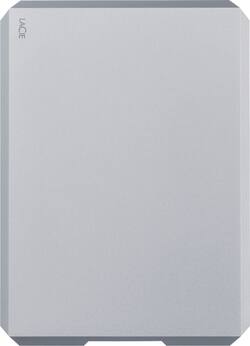
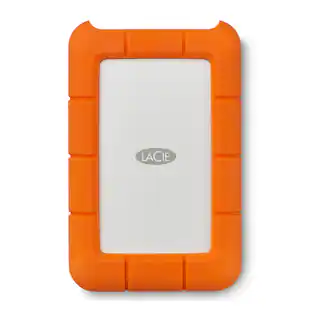
LaCie - Mobile Drive 2TB External USB 3.1 Gen 2 Portable Hard Drive - Space Gray
- Key Specs
- Storage Capacity: 2000 gigabytes (Measured in megabytes (MB), gigabytes (GB) and terabytes (TB), this is the amount available for storing files, music, movies, photos and more. The total includes the capacity of the hard disk drive and solid state drive if both are included on the computer.)
- Storage Drive Type: HDD (Traditional, mechanical hard disk drives are the most common type of storage because they're relatively inexpensive and offer huge capacities. However, they also generate both noise and heat. Solid state drives, also known as SSDs, are many times faster than hard disk drives and have no moving parts to wear out, but typically offer less capacity for the same price.)
- Interface(s): USB Type C (USB 3.1 Gen2) (Refers to the types of connections that devices use to interact and communicate with each other.)
- General
- Brand: LaCie
- Model Number: STHG2000402
- Product Name: Mobile Drive 2TB External USB 3.1 Gen 2 Portable Hard Drive
- Color: Space Gray
- Capacity
- Storage Capacity: 2000 gigabytes (Measured in megabytes (MB), gigabytes (GB) and terabytes (TB), this is the amount available for storing files, music, movies, photos and more. The total includes the capacity of the hard disk drive and solid state drive if both are included on the computer.)
- Performance
- Storage Drive Type: HDD (Traditional, mechanical hard disk drives are the most common type of storage because they're relatively inexpensive and offer huge capacities. However, they also generate both noise and heat. Solid state drives, also known as SSDs, are many times faster than hard disk drives and have no moving parts to wear out, but typically offer less capacity for the same price.)
- Compatibility
- Internal Or External: External
- External Hard Drive Type: Portable (Physical characteristics of the hard drive, including size, weight and how you connect to your device.)
- Interface(s): USB Type C (USB 3.1 Gen2) (Refers to the types of connections that devices use to interact and communicate with each other.)
- Minimum System Requirements: Microsoft Windows 7 or later, Apple MacOS X 10.11 or later
- Features
- Security Features: None
- Usage: Everyday computing, Backup
- Power
- Power Source: USB port
- Dimensions
- Product Height: 4.787 inches (The out of box height of the item. Height is measured as the vertical distance from the bottom of the item to the top as it would be primarily used or placed.)
- Product Width: 3.46 inches (The out of box width of the item. Width is measured as the horizontal distance from one side of the item to the other as it would be primarily used or placed.)
- Product Weight: 0.44 ounces (The out of box weight of the item.)
- Other
- UPC: 763649130612
Expand your computer's storage space with this space gray LaCie mobile HDD. The 2TB capacity offers vast storage space for media files, while data transfer speeds of up to 10 Gbps let you move voluminous files rapidly. This LaCie mobile HDD has a reversible USB Type-C port for compatibility with a wide range of devices, and the compact profile increases portability.
- USB 3.1 Gen 2 interface: Offers an easy-to-use connection to devices. Backward compatible with USB 2.0 for simple connection to your computer. USB-powered.
- Compatible with PC , Mac, and iPad: For flexible installation options.
- 2TB storage capacity: Provides ample space for storing documents, photos, music and more.
- Portable design: Lets you take your data on the go.
Whats Included
- LaCie Mobile Drive STHG2000402 - hard drive
- USB-C 3.1 cable
- USB-C to USB-A cable
Product Manuals
A: SSD stands for solid state drive, (No moving parts) - think if a larger 'Thumb' drive. and External Drive can be an SSD type (no moving parts) or 'disk type' (older technology where the data is stored on disks that spin around) . You can get a lot more capacity with older Disk types. I like SSD type drives, much quieter and I can get the storage I need at reasonable costs. Also, they travel well (because they don't have any moving parts, less opportunity for something internal to move or damage the drive.
A: Yes you can use it with time machine on Mac.
A: You can format it for both Mac and pc and there are multiple cords to accommodate
A: When iPhone updates to USB-C port, it will work. I don’t think the lightning port can power it, even if you have an adapter.
Q: Can this be used for Mac Os Big sur?
A: Yes, it does. *All OS (Mac, Windows etc)
A: Yes, it came with two cords, Thunderbolt and USB.
Q: Does this work with MacBook Air M1?
A: Yes, I have personally used it on a MAC m1 platform without a problem.
A: With this particular drive, if your Mac mini has a USB-C port then this drive should be able to work fine. Once you plug it in, there should be a window that opens with the contents of the drive and a "Start Here Mac" application icon you can click to install the necessary software.
People also viewed
 $549.99The price was $740.99
Today's top picks
 $199.99The price was $249.99
 $789.99The price was $1,049.99












