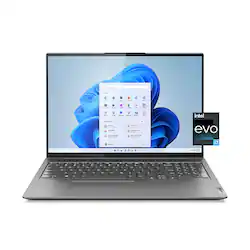
Lenovo - Slim 7i 16" WQXGA Touchscreen Laptop - Intel Core i7-12700H with 16GB Memory - Intel Arc A370M 4GB - 1 TB SSD - Storm Grey
- Key Specs
- Screen Type: IPS
- Screen Size: 16 inches (Size of the screen, measured diagonally from corner to corner.)
- Screen Resolution: 2560 x 1600 (Screens come in a range of resolutions (measured in pixels, horizontal x vertical). The higher the resolution, the greater the picture quality.)
- Touch Screen: true (Touch-screen devices make navigating more intuitive. Using a touch-screen display, you can do things such as tap to select, hold and drag to move items, swipe to scroll, and pinch to zoom.)
- Refresh Rate: 120Hz (The number of frames per second the device can produce natively without enhancement. Higher rates help produce smooth, seamless pictures.)
- Brightness: 500 nits (A measure of the total light output.)
- Processor Model: Intel 12th Generation Core i7 (Your computer's processor is like its brain. Working in combination with system memory, the power of the processor determines the complexity of software you can run, how many programs you can have open at the same time, and how fast those programs will run. Most computers feature an AMD, Intel or Snapdragon processor.)
- CPU Base Clock Frequency: 2.3 gigahertz (Actual central processing unit (CPU) speed may vary by device configuration and design. The average rate at which the processor is able to execute tasks under normal operating conditions as asserted by the manufacturer.)
- Storage Type: SSD
- Total Storage Capacity: 1000 gigabytes
- System Memory (RAM): 16 gigabytes (Random-access memory (RAM) is a computing device's short-term data storage, which allows active information to be accessed quickly. The size and type of RAM determines how efficiently the device can handle large amounts of information at one time. For example, gaming or video editing requires more RAM for optimal performance.)
- Graphics: Intel Arc A370M (Often referred to as a "graphics processing unit" (GPU), this device is responsible for displaying image content and decoding/encoding video content in programs and games.)
- Display Connector(s): 1 x HDMI, 1 x Thunderbolt 4 (The number and type of connectors used to connect to an external display.)
- Battery Life (up to): 7 hours (Battery life will vary depending on the product configuration, product model, applications loaded on the product, power management setting of the product and the product features used by the customer. As with all batteries, the maximum capacity of this battery will decrease with time and usage.)
- Battery Chemistry: Lithium-polymer
- 2-in-1 Design: false (A laptop and a tablet combined in one lightweight, portable device. Sometimes referred to as "convertible" or "hybrid" laptops, these devices deliver the processing power and keyboard of a laptop. When you're ready to play, either detach the screen or fold your 2-in-1 into tablet mode to comfortably watch movies, play games, read an e-book and more.)
- Backlit Keyboard: true (Integrated lights allow for visibility of the keys in low-light conditions.)
- General
- Brand: Lenovo
- Model Number: 82VB0002US
- Product Name: Lenovo Slim 7i 16" WQXGA Touchscreen Laptop - Intel Core i7-12700H with 16GB Memory - Intel Arc A370M 4GB - 1 TB SSD
- Color: Storm Grey
- Year of Release: 2023
- Display
- Display Type: LCD
- Screen Type: IPS
- Screen Size: 16 inches (Size of the screen, measured diagonally from corner to corner.)
- Screen Resolution: 2560 x 1600 (Screens come in a range of resolutions (measured in pixels, horizontal x vertical). The higher the resolution, the greater the picture quality.)
- Touch Screen: true (Touch-screen devices make navigating more intuitive. Using a touch-screen display, you can do things such as tap to select, hold and drag to move items, swipe to scroll, and pinch to zoom.)
- Refresh Rate: 120Hz (The number of frames per second the device can produce natively without enhancement. Higher rates help produce smooth, seamless pictures.)
- Brightness: 500 nits (A measure of the total light output.)
- Color Gamut (Standard RGB): 100 percent
- Processor
- Processor Brand: Intel
- Processor Model: Intel 12th Generation Core i7 (Your computer's processor is like its brain. Working in combination with system memory, the power of the processor determines the complexity of software you can run, how many programs you can have open at the same time, and how fast those programs will run. Most computers feature an AMD, Intel or Snapdragon processor.)
- Processor Model Number: 12700H
- CPU Base Clock Frequency: 2.3 gigahertz (Actual central processing unit (CPU) speed may vary by device configuration and design. The average rate at which the processor is able to execute tasks under normal operating conditions as asserted by the manufacturer.)
- CPU Boost Clock Frequency: 4.6 gigahertz (Actual central processing unit (CPU) speed may vary by device configuration and design. The maximum rate at which the processor is able to execute tasks, typically only used for a short period of time as needed. This rate may temporarily boost the processor's performance, but may result in overheating, shutdown, or damage to equipment if sustained.)
- Number of CPU Cores: 14-core (A core, or "brain" of a CPU, allows it to receive and execute instructions. Each core can work independently or together to perform parallel operations.)
- Number of CPU Threads: 20 (Generally, the more threads, the faster and more responsive the operating system.)
- Storage
- Storage Type: SSD
- Total Storage Capacity: 1000 gigabytes
- Solid State Drive Capacity: 1000 gigabytes (The amount of data that can be stored on the device's solid state drive (SSD). SSD is a flash-based storage with faster speeds than a hard disk drive (HDD).)
- Memory
- System Memory (RAM): 16 gigabytes (Random-access memory (RAM) is a computing device's short-term data storage, which allows active information to be accessed quickly. The size and type of RAM determines how efficiently the device can handle large amounts of information at one time. For example, gaming or video editing requires more RAM for optimal performance.)
- Type of Memory (RAM): LPDDR5 (Each type of RAM delivers a different level of speed, bandwidth, energy efficiency and performance.)
- System Memory RAM Speed: 4800 megahertz (How fast the information-storing hardware operates. The faster the RAM, the faster memory can be transferred to other system components. Ultimately, faster RAM improves operational efficiency.)
- Graphics
- Graphics Type: Dedicated (Dedicated graphics uses a separate graphics card for processing video images. Because it does not use memory from the system's RAM, there is no extra burden on the CPU and graphics are processed more efficiently. Integrated graphics shares system RAM to process video images.)
- GPU Brand: Intel
- Graphics: Intel Arc A370M (Often referred to as a "graphics processing unit" (GPU), this device is responsible for displaying image content and decoding/encoding video content in programs and games.)
- Compatibility
- Operating System: Windows 11 Home (The operating system manages all software and hardware, including files, memory and connected devices. Most importantly, it lets you interact with your device and your programs in a visual way; otherwise, you'd be typing computer code to get anything done.)
- Operating System Architecture: 64-bit (An operating system (OS) manages computer hardware, software resources, and programs in conjunction with the system's processor. 64-bit operating systems can handle more data at once than 32-bit systems, resulting in faster speeds, more effiency, and overall improved performance.)
- Connectivity
- Display Connector(s): 1 x HDMI, 1 x Thunderbolt 4 (The number and type of connectors used to connect to an external display.)
- Number of HDMI Outputs (Total): 1
- Number of DisplayPort Outputs (Total): 2
- Number of Thunderbolt Ports (Total): 1
- USB Ports: 1 x USB-C 3.2, 2 x USB-C (The number and type of USB ports the product has.)
- Number of USB Ports (Total): 3
- Number of USB-C Charging Ports: 1
- Headphone Jack: true (The device features an interface that allows for the connection of headphones.)
- Microphone Input: true (The device features an input for connecting an external microphone.)
- Wireless Connectivity: Wi-Fi, Bluetooth (The manner in which a device sends data to another device over a short distance without the use of wires or cables.)
- Wireless Standard: AX (The wireless networking protocol used by the device. Each iteration of the protocol is based on the 802.11 standard developed by the Institute of Electrical and Electronics Engineers (IEEE) Standards Association. Denoted by letters following 802.11 (802.11a, 802.11ac, etc.), each version, published in alphabetical order, encompasses all previous versions.)
- Wireless Networking Standard: Wi-Fi 6 (The wireless networking standard used by the device. Each iteration of the standard developed by the Wi-Fi Alliance corresponds to an existing IEEE 802.11 protocol; for example, standard 802.11ac (or AC) is termed Wi-Fi 5. Refers specifically to the standard the device is designed to use, but ultimately determines product interoperability and backward compatibility including previous versions.)
- Cooling
- CPU Cooling System: Air
- Power
- Power Supply Maximum Wattage: 135 watts
- Battery Life (up to): 7 hours (Battery life will vary depending on the product configuration, product model, applications loaded on the product, power management setting of the product and the product features used by the customer. As with all batteries, the maximum capacity of this battery will decrease with time and usage.)
- Battery Cells: 4-cell
- Battery Chemistry: Lithium-polymer
- Camera
- Front-Facing Camera: true
- Front Facing Camera Video Resolution: 720p (Refers to the number of pixels, both horizontally and vertically, used by the camera facing the user to capture video. The higher the resolution the finer the video detail that can be seen.)
- Built-In Microphone: true
- Features
- 2-in-1 Design: false (A laptop and a tablet combined in one lightweight, portable device. Sometimes referred to as "convertible" or "hybrid" laptops, these devices deliver the processing power and keyboard of a laptop. When you're ready to play, either detach the screen or fold your 2-in-1 into tablet mode to comfortably watch movies, play games, read an e-book and more.)
- Backlit Keyboard: true (Integrated lights allow for visibility of the keys in low-light conditions.)
- Media Card Reader: false (A hardware device that allows for access to data on a memory card and enables the transfer of its files to a computer. These devices may have one or multiple slots for various types of memory cards, and may be integrated into the computer or available as an external device.)
- Audio Technology: Dolby Atmos Speaker System
- Speaker Type: 2x2W Dolby Atmos Speakers
- Windows AI: Copilot
- Dimensions
- Product Height: 0.79 inches (The out of box height of the item. Height is measured as the vertical distance from the bottom of the item to the top as it would be primarily used or placed.)
- Product Width: 14.05 inches (The out of box width of the item. Width is measured as the horizontal distance from one side of the item to the other as it would be primarily used or placed.)
- Product Depth: 9.74 inches (The out of box depth of the item. Depth is measured as the distance from the front of the item to the back as it would be primarily used or placed.)
- Product Weight: 4.576 pounds (The out of box weight of the item.)
- Certifications Listings & Approvals
- ENERGY STAR Certified: false (Devices carrying the ENERGY STAR service mark, such as computer products and peripherals, kitchen appliances, and other products, generally use 20% to 30% less energy than required by federal standards.)
- EPEAT Qualified: false (The Electronic Product Environmental Assessment Tool (EPEAT) was designed to provide an environmental assessment tool for purchasers. In order to qualify for EPEAT, a product must meet all 23 required criteria.)
- Warranty
- Warranty - Parts: 1 year limited
- Warranty - Labor: 1 year limited
- Other
- UPC: 196380053429
Unlock pure, unstoppable power with the Lenovo Slim 7i. This incredibly compact, ultra-thin laptop packs a 120 Hz touchscreen, offers the best overall mobile performance with Intel Evo, now featuring 12th Generation Intel Core H Series processors and Intel Arc dedicated graphics. The WQXGA 16:10 touchscreen display features 100% sRGB color accuracy and ultra-thin bezels on a huge 16" screen, giving you some crucial added work space.
- Windows 11 operating system: Windows 11 brings back the Start Menu from Windows 7 and introduces new features, like the Edge Web browser that lets you markup Web pages on your screen.
- 16" Full HD touch screen for hands-on control: Natural finger-touch navigation makes the most of Windows 11. The 2560 x 1600 resolution boasts impressive color and clarity. IPS technology for wide viewing angles. Energy-efficient LED backlight.
- Intel Core i7-12700H processor: Powerful fourteen-core, twenty-way processing performance. The Intel Turbo Boost technology delivers dynamic extra power when you need it, while increasing energy efficiency when you don't.
- Intel Arc A370M Graphics: Backed by 4GB GDDR6 dedicated video memory for a fast, advanced GPU to fuel your games. Intel Arc technolofy optimizes the laptop for high end graphics performance.
- 16GB system memory for advanced multitasking: Reams of high-bandwidth LPDDR5 RAM to smoothly run your graphics-heavy PC games and video-editing applications, as well as numerous programs and browser tabs all at once.
- 1TB solid state drive (SSD): While offering less storage space than a hard drive, a flash-based SSD has no moving parts, resulting in faster start-up times and data access, no noise, and reduced heat production and power draw on the battery.
- Built-in stereo speakers: Dolby Atmos Speak System provides immersive audio and maximizes volume output without distortion.
- Weighs 4.5 lbs and measures .79" thin: Ultrathin and ultralight for maximum portability, featuring a smaller screen size and omitting the DVD/CD drive to achieve the compact form factor. 4 cell lithium polymer battery.
- Thunderbolt port for connecting advanced monitors and external drives: This single interface supports both high-speed data and high-def video - plus power over cable for bus-powered devices - ideal for digital content creators.
- Wireless network connectivity: High-speed wireless LAN built into the screen, so it connects to your network or hotspots on the most common Wi-Fi standards in both laptop and tablet modes.
- Built-in HD webcam with microphone: HD resolution generates a clear picture during video chats with your family and friends — or with gaming allies and enemies.
- Backlit keyboard for easy typing in dim or dark locations: Island-style keyboard with chiclet keys. Built-in 10-key numeric keypad to quickly input numbers. Wide-type touchpad with 2-finger multitouch support.
- Basic software package included: 1-month trial of Microsoft Office 365.
- Note: This laptop does not include a built-in DVD/CD drive.: Enjoy 3 Months of Xbox PC Game Pass on Lenovo devices
Whats Included
- Computer, Charger, User Guide
Disclaimers
- *PC Game Pass: Subscription continues automatically at regular monthly price unless cancelled. Subject to xbox.com/oem-offer. By going to this site, you are entering a site hosted and operated by Microsoft. Please review their Privacy Policy. All personal information you provide is subject to that Privacy Policy. Different terms and conditions may apply.
A: I face the same issue it will die after one hour seems this patch is defective
Q: I am a little confused, does this have 16 gb or 4 gb whats the difference between the 2
A: Hello, gbs. We apologize for your confusion. This system features 16GB of RAM or memory with an Intel Arc graphics card with 4GB of dedicated graphics memory. Your system RAM (random access memory) acts as temporary storage for your processor (Intel Core i7 in this case) to use as it needs. Your graphics card has dedicated graphics memory for a similar function, helping to process graphics and video tasks. To learn more, here is a link to two Lenovo webpages -- "What is Video Memory?...": https://www.lenovo.com/us/en/glossary/what-is-video-memory/?orgRef=https%253A%252F%252Fwww.google.com%252F | "What is RAM?": https://www.lenovo.com/us/en/glossary/what-is-ram/
Q: Hi, What is the screen refresh rate? 60 or 120 Hz?
A: Greetings from the Intel team. Thank you for your question. Based on the product specifications reference (PSREF), the Lenovo Slim 7i model 82VB0002US has a display with a 120Hz screen refresh rate. For further information, check the PSREF: https://psref.lenovo.com/Detail/Lenovo_Slim_7_16IAH7?M=82VB0002US For detailed information about the Intel® Core™ i7-12700H processor, visit: https://ark.intel.com/content/www/us/en/ark/products/132228/intel-core-i7-12700h-processor-24m-cache-up-to-4-70-ghz.html Thank you for choosing Intel! Emilio_Intel
Q: Could you tell me if this laptop works with 220 Vac?
A: Greetings from the Intel team. Thank you for your question. Yes, it works with a voltage of 220; however, you might need a power plug adapter. Based on the product specifications reference (PSREF), the Lenovo Slim 7i model 82VB0002US has the following Power Adapter specifications: 135W slim tip (3-pin) AC adapter, 100-240V, 50-60Hz. For further information, check the PSREF: https://psref.lenovo.com/Detail/Lenovo_Slim_7_16IAH7?M=82VB0002US https://psref.lenovo.com/Product/Lenovo/Lenovo_Slim_7_16IAH7 For detailed information about the Intel® Core™ i7-12700H processor, visit: https://ark.intel.com/content/www/us/en/ark/products/132228/intel-core-i7-12700h-processor-24m-cache-up-to-4-70-ghz.html Thank you for choosing Intel! Emilio_Intel
Q: I don't see a power in barrel jack port on this laptop - is it powered/charged by USB-C?
A: It *can* charge by USB-C, up to 100 watts, but its main power is the standard Lenovo "Slim Tip" 135w power adapter that it comes with. To many people that power port looks like an additional USB port, but it is NOT. Don't try to cram a USB device in there :)
A: Hello, cboy39. We are sorry to hear that you are experiencing this issue with your Slim 7i. Apologies in advance for the length of this response, as we want to solve this issue immediately. Here's the steps to help resolve your battery life issue: First, on your Taskbar at the bottom of the screen, type into the search box, “Lenovo Vantage”. After the application populates in the search, select it to open the application (it should have a blue “L” in a square as the logo). If you haven’t used the application before, it may require some setup. Follow the on-screen prompts to set up the application to your preferences. Upon setup completion the home screen of the application should show things such as: a button labeled “Check For System Updates”, or “About My Device”. First, we recommend selecting the “Check For System Updates” button and applying any available updates to help ensure that you are running the latest software, as system bugs or inefficiencies can affect battery life. After applying updates, your system may need to restart. After restarting, reopen the Lenovo Vantage application. This time, along the top of the application, there are several tabs listed. Select the tab labeled “Device”. Under this tab, the section “Power” is what we are after. In this tab you can utilize something called “Smart Power”. This allows you to toggle the thermal and performance profile your is set to ranging from battery saving, intelligent cooling, and maximum performance. These profiles can also be switched by using the keyboard shortcut Fn + Q anytime using the computer. Also, in the “Power” tab are settings that can be adjusted to improve battery life. Should you need further assistance, please reach out to Lenovo Support directly at this number: Lenovo Tech Support at 877-453-6686
A: Hello, JV. With this Slim's dual fan cooling system with heightened clearance under the computer, there are features in place to help keep the computer as cool as possible – even under strenuous workloads. While computers can overheat, with cooling performance in mind, your Slim 7i shouldn't have this problem so long as the device doesn't have any obstructions preventing the air intake and exhaust from performing their normal functionality.
Q: How is the battery? How many hours of use from full charge?
A: Greetings from the Intel team. Thank you for your question. Based on the product specifications reference (PSREF), the Lenovo Slim 7i model 82VB0002US has an Integrated 75Wh battery with the following Max Battery Life: MobileMark® 2018@200nits: 6.98 hr, Local video (1080p) playback@150nits: 12.83 hr. All battery life claims are approximate maximum and based on results using the MobileMark 2014, MobileMark 2018, MobileMark 25, JEITA 2.0, continuous 1080p video playback (with 150nits brightness and default volume level) or Google Power Load Test (PLT) battery-life benchmark tests. Actual battery life will vary depending on many factors, such as product configuration and usage, software use, wireless functionality, power management settings, and screen brightness. The maximum capacity of the battery will decrease with time and use. For further information, check the PSREF: https://psref.lenovo.com/Detail/ThinkPad_E16_Gen_1_Intel?M=21JN003YUS For detailed information about the Intel® Core™ i7-12700H processor, visit: https://ark.intel.com/content/www/us/en/ark/products/132228/intel-core-i7-12700h-processor-24m-cache-up-to-4-70-ghz.html Thank you for choosing Intel! Emilio_Intel
People also viewed
 $578.00The price was $749.99
 $1,049.99The price was $1,249.99
 $1,849.99The price was $2,149.99
 $640.00The price was $799.99
 $2,199.99The price was $2,699.99
 $1,519.99The price was $1,699.99
 $1,839.99The price was $2,079.69



Today's top picks
 $479.99The price was $729.99
 $799.99The price was $1,199.99
 $499.99The price was $629.99
 $499.99The price was $749.99
 $844.99The price was $999.99
 $299.99The price was $399.99
 $379.99The price was $529.99
 $1,099.99The price was $1,449.99
 $889.00The price was $999.99