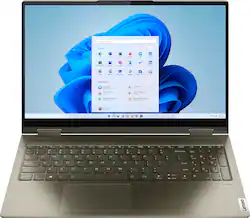
Lenovo - Yoga 7 15ITL5 2-in-1 15.6" Touch-Screen Laptop - Intel Core i7 with 12GB Memory - 512 GB SSD - Dark Moss
- Key Specs
- Screen Type: IPS
- Screen Size: 15.6 inches (Size of the screen, measured diagonally from corner to corner.)
- Screen Resolution: 1920 x 1080 (Full HD) (Screens come in a range of resolutions (measured in pixels, horizontal x vertical). The higher the resolution, the greater the picture quality.)
- Touch Screen: true (Touch-screen devices make navigating more intuitive. Using a touch-screen display, you can do things such as tap to select, hold and drag to move items, swipe to scroll, and pinch to zoom.)
- Processor Model: Intel 11th Generation Core i7 (Your computer's processor is like its brain. Working in combination with system memory, the power of the processor determines the complexity of software you can run, how many programs you can have open at the same time, and how fast those programs will run. Most computers feature an AMD, Intel or Snapdragon processor.)
- CPU Base Clock Frequency: 2.8 gigahertz (Actual central processing unit (CPU) speed may vary by device configuration and design. The average rate at which the processor is able to execute tasks under normal operating conditions as asserted by the manufacturer.)
- Storage Type: SSD
- Total Storage Capacity: 512 gigabytes
- System Memory (RAM): 12 gigabytes (Random-access memory (RAM) is a computing device's short-term data storage, which allows active information to be accessed quickly. The size and type of RAM determines how efficiently the device can handle large amounts of information at one time. For example, gaming or video editing requires more RAM for optimal performance.)
- Graphics: Intel Iris Xe Graphics (Often referred to as a "graphics processing unit" (GPU), this device is responsible for displaying image content and decoding/encoding video content in programs and games.)
- Display Connector(s): 1 x Thunderbolt 4, 1 x Thunderbolt 4 (The number and type of connectors used to connect to an external display.)
- Battery Chemistry: Lithium-polymer
- 2-in-1 Design: true (A laptop and a tablet combined in one lightweight, portable device. Sometimes referred to as "convertible" or "hybrid" laptops, these devices deliver the processing power and keyboard of a laptop. When you're ready to play, either detach the screen or fold your 2-in-1 into tablet mode to comfortably watch movies, play games, read an e-book and more.)
- Backlit Keyboard: true (Integrated lights allow for visibility of the keys in low-light conditions.)
- General
- Brand: Lenovo
- Model Number: 82BJ007WUS
- Product Name: Yoga 7 15ITL5 2-in-1 15.6" Touch-Screen Laptop - Intel Core i7 with 12GB Memory - 512 GB SSD
- Color: Dark Moss
- Year of Release: 2021
- Display
- Screen Type: IPS
- Screen Size: 15.6 inches (Size of the screen, measured diagonally from corner to corner.)
- Screen Resolution: 1920 x 1080 (Full HD) (Screens come in a range of resolutions (measured in pixels, horizontal x vertical). The higher the resolution, the greater the picture quality.)
- Touch Screen: true (Touch-screen devices make navigating more intuitive. Using a touch-screen display, you can do things such as tap to select, hold and drag to move items, swipe to scroll, and pinch to zoom.)
- Processor
- Processor Brand: Intel
- Processor Model: Intel 11th Generation Core i7 (Your computer's processor is like its brain. Working in combination with system memory, the power of the processor determines the complexity of software you can run, how many programs you can have open at the same time, and how fast those programs will run. Most computers feature an AMD, Intel or Snapdragon processor.)
- Processor Model Number: 1165G7
- CPU Base Clock Frequency: 2.8 gigahertz (Actual central processing unit (CPU) speed may vary by device configuration and design. The average rate at which the processor is able to execute tasks under normal operating conditions as asserted by the manufacturer.)
- Number of CPU Cores: 4-core (quad-core) (A core, or "brain" of a CPU, allows it to receive and execute instructions. Each core can work independently or together to perform parallel operations.)
- Storage
- Storage Type: SSD
- Total Storage Capacity: 512 gigabytes
- Solid State Drive Capacity: 512 gigabytes (The amount of data that can be stored on the device's solid state drive (SSD). SSD is a flash-based storage with faster speeds than a hard disk drive (HDD).)
- Memory
- System Memory (RAM): 12 gigabytes (Random-access memory (RAM) is a computing device's short-term data storage, which allows active information to be accessed quickly. The size and type of RAM determines how efficiently the device can handle large amounts of information at one time. For example, gaming or video editing requires more RAM for optimal performance.)
- Type of Memory (RAM): DDR4 SDRAM (Each type of RAM delivers a different level of speed, bandwidth, energy efficiency and performance.)
- Graphics
- Graphics Type: Integrated (Dedicated graphics uses a separate graphics card for processing video images. Because it does not use memory from the system's RAM, there is no extra burden on the CPU and graphics are processed more efficiently. Integrated graphics shares system RAM to process video images.)
- GPU Brand: Intel
- Graphics: Intel Iris Xe Graphics (Often referred to as a "graphics processing unit" (GPU), this device is responsible for displaying image content and decoding/encoding video content in programs and games.)
- GPU Video Memory Type (RAM): DDR4 SDRAM (Each type of RAM delivers a different level of speed, bandwidth, energy efficiency and performance.)
- Compatibility
- Operating System: Windows 11 Home (The operating system manages all software and hardware, including files, memory and connected devices. Most importantly, it lets you interact with your device and your programs in a visual way; otherwise, you'd be typing computer code to get anything done.)
- Operating System Architecture: 64-bit (An operating system (OS) manages computer hardware, software resources, and programs in conjunction with the system's processor. 64-bit operating systems can handle more data at once than 32-bit systems, resulting in faster speeds, more effiency, and overall improved performance.)
- Voice Assistant Built-in: No (A digital assistant built into the device that uses voice commands to answer questions and control smart devices.)
- Connectivity
- Display Connector(s): 1 x Thunderbolt 4, 1 x Thunderbolt 4 (The number and type of connectors used to connect to an external display.)
- Number of HDMI Outputs (Total): 0
- Number of DisplayPort Outputs (Total): 0
- Number of Thunderbolt Ports (Total): 2
- USB Ports: 1 x USB-A 3.0, 1 x USB-A 3.0 (The number and type of USB ports the product has.)
- Number of USB Ports (Total): 2
- Wireless Connectivity: Bluetooth (The manner in which a device sends data to another device over a short distance without the use of wires or cables.)
- Network Connectivity: None (The manner in which a device sends data to another device over a long distance using a cellular network.)
- Cooling
- CPU Cooling System: Air
- Power
- Power Supply Maximum Wattage: 65 watts
- Battery Chemistry: Lithium-polymer
- Camera
- Front-Facing Camera: true
- Features
- 2-in-1 Design: true (A laptop and a tablet combined in one lightweight, portable device. Sometimes referred to as "convertible" or "hybrid" laptops, these devices deliver the processing power and keyboard of a laptop. When you're ready to play, either detach the screen or fold your 2-in-1 into tablet mode to comfortably watch movies, play games, read an e-book and more.)
- Backlit Keyboard: true (Integrated lights allow for visibility of the keys in low-light conditions.)
- Dimensions
- Product Height: 0.76 inches (The out of box height of the item. Height is measured as the vertical distance from the bottom of the item to the top as it would be primarily used or placed.)
- Product Width: 14 inches (The out of box width of the item. Width is measured as the horizontal distance from one side of the item to the other as it would be primarily used or placed.)
- Product Depth: 9 3/10 inches (The out of box depth of the item. Depth is measured as the distance from the front of the item to the back as it would be primarily used or placed.)
- Product Weight: 4.19 pounds (The out of box weight of the item.)
- Certifications Listings & Approvals
- ENERGY STAR Certified: true (Devices carrying the ENERGY STAR service mark, such as computer products and peripherals, kitchen appliances, and other products, generally use 20% to 30% less energy than required by federal standards.)
- EPEAT Qualified: false (The Electronic Product Environmental Assessment Tool (EPEAT) was designed to provide an environmental assessment tool for purchasers. In order to qualify for EPEAT, a product must meet all 23 required criteria.)
- Included
- Optical Drive Type: None (An optical disk drive (ODD) uses a laser light to read data from or write data to an optical disc. These discs include CDs, DVDs, and Blu-ray Discs. This allows you to play music or watch movies using prerecorded discs.)
- Warranty
- Warranty - Parts: 1 year limited
- Warranty - Labor: 1 year limited
- Other
- UPC: 195891978849
Enjoy vibrant visuals on a 15.6 inch FHD display edged with microborders and optimized with an Intel Core processor and Iris Xe graphics. Combining that with a user-facing Dolby Atmos Speaker System, the Yoga 7 2-in-1 laptop offers entertainment that will go anywhere. Crafted from sandblasted anodized metal, the Yoga 7�s subtly rounded edges are designed to feel comfortable in your hands. A 360-degree hinge offers stability as you transition from tablet to laptop mode and back. Thoughtful details include a webcam privacy shutter and a color-matched keyboard with backlighting.
- Windows 11 Home operating system: Windows 11 Home OS smartly manages your hardware and runs routine applications efficiently
- 15.6" Full HD Touchscreen for hands-on control: IPS technology offers wide viewing angles. The 1920 x 1080 resolution boasts impressive color and clarity
- 11th Gen Intel Core? i7-1165G7 processor: Smart Quad-core (4 Core) processing performance. Intel Turbo Boost Technology delivers dynamic extra power when you need it, while increasing energy efficiency when you don't.
- Intel Iris Xe Shared graphics: Intel Iris Xe graphics for regular office work, web browsing, watching videos and playing games
- 12GB system memory for full-power multitasking: Plenty of high-bandwidth RAM to smoothly run your games and photo- and video-editing applications, as well as multiple programs and browser tabs all at once.
- 512 GB solid state drive (SSD): While offering less storage space than a hard drive, a flash-based SSD has no moving parts, resulting in faster start-up times and data access, no noise, and reduced heat production and power draw on the battery.
- 2-in-1 Design: 2-in-1 design for ultimate portability and flexibility. Designed to be lighter and more convenient to carry around
- Weighs 4.19 lbs and measures 0.76" thin: Thin and light design with DVD/CD drive omitted for improved portability.
- Backlit keyboard: Backlit keyboard For easy typing in dim or dark conditions.
Whats Included
- Lenovo Yoga 7 15ITL5 82BJ007WUS
- AC Adapter
Product Manuals
A: The Intel Evo-Certified, Lenovo Yoga 7i 15 model number 82BJ007WUS, ships with Windows 11 Home 64-bit Operating System factory installed and comes with a 15.6 inch (screen size measured diagonally) IPS - FHD (1920x1080) 10-point Multi-touch screen, with a brightness level of 300nits. Model number 82BJ007SUS ships with Windows 11 Home 64-bit Operating System factory installed, and has a 15.6 inch (screen size measured diagonally) IPS - FHD (1920x1080) 10-point Multi-touch screen, with a brightness level of 500nits. Model number 82BJ0003US, ships with Windows 10 Home 64-bit Operating System factory installed and will upgrade to Windows 11 Home 64-bit Operating System at initial setup and activation of Windows or when the Windows 11 upgrade is available for this model. This model has a 15.6 inch (screen size measured diagonally) IPS - FHD (1920x1080) 10-point Multi-touch screen, with a brightness level of 500nits.
Q: There is no operating system listed on the specs for this computer. Is this correct?
A: No. The Intel Evo-Certified, Lenovo Yoga 7i 15 model number 82BJ007WUS, ships with Windows 11 Home 64-bit Operating System factory installed.
Q: Add a monitor is it a HDMI or G sync
A: This Intel Evo-Certified, Lenovo Yoga 7i 15 model number 82BJ007WUS, ships with 2x Thunderbolt 4 / USB4 40Gbps (support data transfer, Power Delivery 3.0 and DisplayPort 1.4) ports with video out capability to an external monitor. The Yoga 7i 15 supports up to 3 independent displays via native display and 2 external monitors; supports external monitors via Thunderbolt 4 (up to 7680×4320@60Hz). You can connect an HDMI monitor to this Yoga 7i 15, by using a USB-c - Thunderbolt compatible to HDMI adapter, like this one: https://www.bestbuy.com/site/startech-com-usb-c-to-hdmi-adapter-black/5086618.p?skuId=5086618. The Yoga 7i 15 uses integrated Intel Iris Xe Graphics processing, integrated within the Intel Core i7-1165G7 Processor and Intel also supports variable refresh rate, so Xe products will support FreeSync and G-Sync monitors.
Q: How do you turn on backlight for keyboard
A: All you have to do is hold down the function key (Fn) located at the bottom left of keyboard and double tap the left side of the space bar. Same thing to turn off the backlight.
Q: How many memory RAM slots available/used.? is any other model with 16GB RAM?
A: This Intel Evo-Certified, Lenovo Yoga 7i 15 model number 82BJ007WUS, ships with 12GB Soldered DDR4-3200MHz RAM Memory soldered to systemboard, no slots, dual-channel and is not upgradeable. The Intel Evo-Certified, Yoga 9i Series, both the Yoga 9i 14 and Yoga 9i 15 models ship with 16GB RAM installed.
Q: Can I connect 2 extra monitors with this laptop?
A: This Intel Evo-Certified, Lenovo Yoga 7i 15 model number 82BJ007WUS, ships with 2x Thunderbolt 4 / USB4 40Gbps (support data transfer, Power Delivery 3.0 and DisplayPort 1.4) ports with video out capability to external monitors. The Yoga 7i 15 supports up to 3 independent displays via native display and 2 external monitors; supports external monitors via Thunderbolt 4 (up to 7680×4320@60Hz).
A: This Intel Evo-Certified, Lenovo Yoga 7i 15 model number 82BJ007WUS, ships with 2x Thunderbolt 4 / USB4 40Gbps (support data transfer, Power Delivery 3.0 and DisplayPort 1.4) ports with video out capability. This Yoga 7i 15 supports up to 3 independent displays via native display and 2 external monitors; supports external monitors via Thunderbolt 4 (up to 7680×4320@60Hz). You can connect a DisplayPort monitor to this Yoga 7i 15 by using a USB-c Thunderbolt compatible to DisplayPort Adapter, like this one: https://www.bestbuy.com/site/accell-usb-c-to-displayport-1-4-cable-black/6484779.p?skuId=6484779
Q: Is there a possibility to upgrade the RAM?
A: No. This Intel Evo-Certified, Lenovo Yoga 7i 15 model number 82BJ007WUS, ships with 12GB Soldered DDR4-3200MHz RAM Memory soldered to systemboard, no slots, dual-channel and is not upgradeable.
People also viewed
 $899.99The price was $1,049.99
 $1,399.00The price was $1,449.99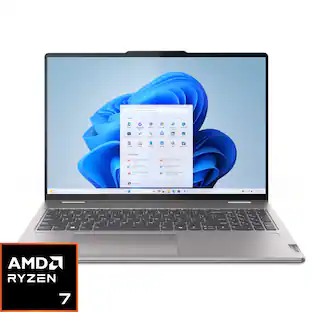
Lenovo - Yoga 7 2-in-1 16" 2K Touchscreen Laptop - AMD Ryzen 7 8840HS 2023 - 16GB Memory - 512GB SSD
$798.99The price was $949.99 $649.99The price was $999.99
 $649.99The price was $949.99
 $1,929.00The price was $1,949.99
 $529.99The price was $649.99


Today's top picks
 $479.99The price was $729.99
 $69.99The price was $129.99
 $199.99The price was $249.99
 $49.99The price was $62.99
 $1,199.99The price was $1,399.99
 $799.99The price was $1,199.99